Project
cortex
Description
In the Editor Settings panel, the "Insert Spaces" toggle has two visual/interaction bugs:
-
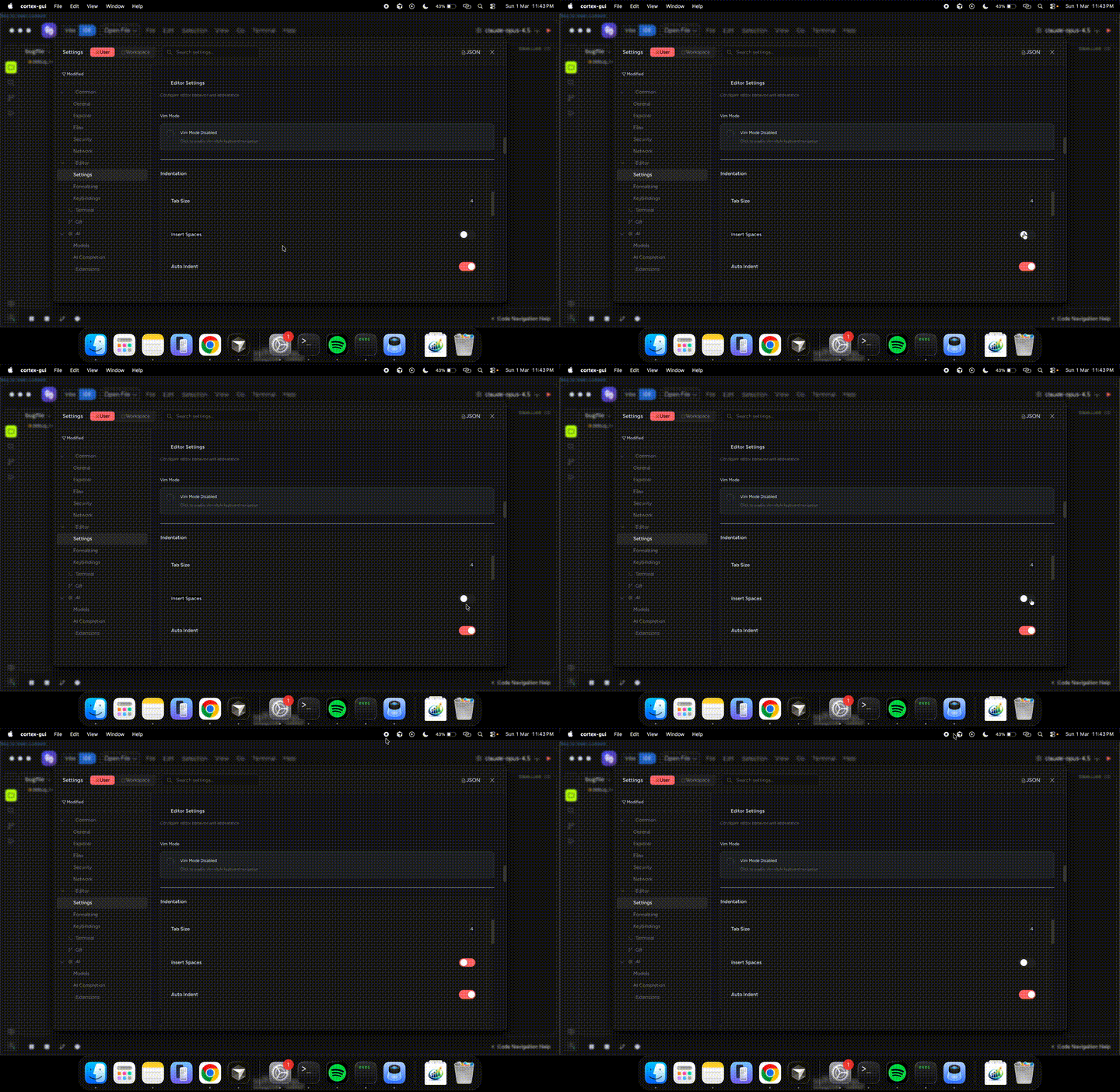
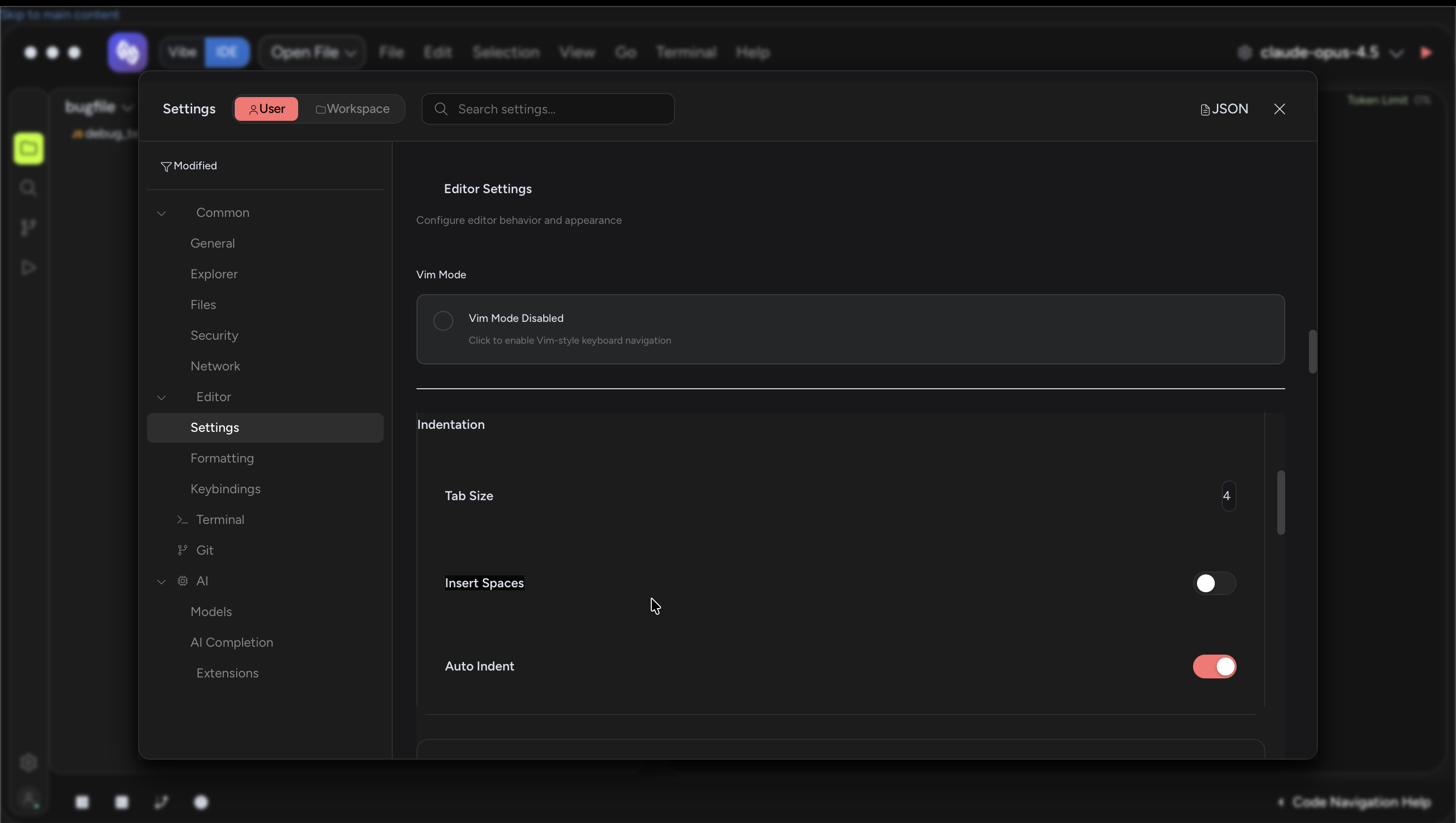
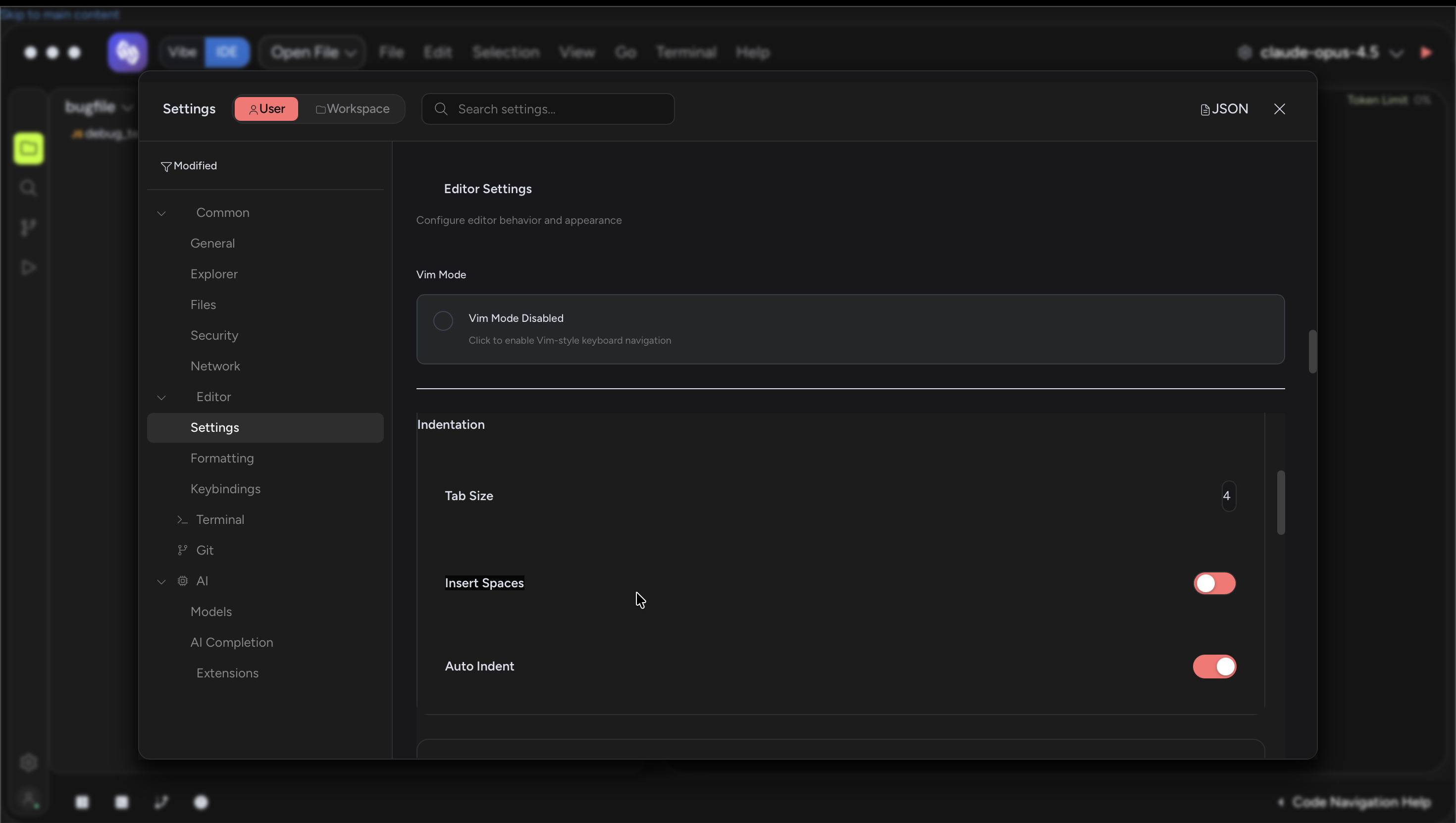
Toggle thumb doesn't move: When toggling Insert Spaces between ON and OFF, the toggle track background color changes (red for ON, grey for OFF), but the white thumb/knob stays in the same position — it does not slide left/right as expected. Compare with the "Auto Indent" toggle directly below, which appears to work correctly.
-
Clicking the toggle thumb doesn't work: Clicking directly on the white circle (thumb) of the toggle does not trigger the state change. The user must click the empty track area around the thumb for the toggle to respond.
The root cause appears to be in CortexToggle.tsx. The handleMouseEnter and handleMouseLeave handlers (lines 103-116) directly manipulate target.style.background on the DOM element, which can conflict with SolidJS's reactive style updates from trackStyle(). Additionally, the thumb <div> at line 132 relies on SolidJS reactively updating its inline transform style via thumbStyle(), but the reactive update may not be propagating correctly to the DOM — the track background updates (confirming local.checked IS reactive) while the thumb transform does not.
Steps to Reproduce
- Open Cortex IDE
- Go to Settings > Editor > Settings
- Scroll to the "Indentation" section
- Observe the "Insert Spaces" toggle (default: ON/red)
- Click directly on the white circle/thumb of the toggle — nothing happens
- Click the empty track area next to the thumb — toggle state changes
- Observe that the track background color changes (red → grey) but the thumb stays in the same position
Expected Behavior
- Clicking anywhere on the toggle (including the thumb) should toggle the state
- The toggle thumb should slide from right (ON) to left (OFF) with a smooth transition animation, matching the behavior of other toggles like "Auto Indent"
Actual Behavior
- Clicking the thumb/knob does not trigger the toggle — only clicking the surrounding track area works
- The toggle thumb stays in the same visual position regardless of ON/OFF state — only the track background color changes
Evidence
GIF showing the bug in action:
Screenshot — Toggle OFF (grey track, thumb still on right):
Screenshot — Toggle ON (red track, thumb still on right — same position):
Debug Logs
// CortexToggle.tsx:76-88 — thumbStyle should update transform reactively
const thumbStyle = (): JSX.CSSProperties => ({
  position: "absolute",
  width: `${specs().thumb.size}px`,
  height: `${specs().thumb.size}px`,
  background: "var(--cortex-switch-thumb, var(--cortex-text-primary))",
  "border-radius": "var(--cortex-radius-full)",
  "box-shadow": "0 1px 3px rgba(0, 0, 0, 0.3)",
  transform: local.checked
    ? `translateX(${specs().travel}px)`   // ON: thumb slides right
    : "translateX(0)",                     // OFF: thumb stays left
  left: `${specs().thumb.offset}px`,
  transition: "transform var(--cortex-transition-slow, 300ms) cubic-bezier(0.4, 0, 0.2, 1)",
});

// CortexToggle.tsx:103-116 — Direct DOM manipulation conflicts with SolidJS reactivity
const handleMouseEnter = (e: MouseEvent) => {
  if (local.disabled) return;
  const target = e.currentTarget as HTMLElement;
  if (!local.checked) {
    target.style.background = "var(--cortex-bg-hover, rgba(255,255,255,0.08))";
  }
};
const handleMouseLeave = (e: MouseEvent) => {
  const target = e.currentTarget as HTMLElement;
  target.style.background = local.checked
    ? "var(--cortex-switch-bg-on, var(--cortex-accent-primary))"
    : "var(--cortex-switch-bg-off, var(--cortex-bg-hover))";
};

// CortexToggle.tsx:131-133 — Thumb inside button, clicks should bubble but don't
<button ... onClick={handleClick} ...>
  <div style={thumbStyle()} />
</button>
Duplicate Check
Keywords searched (25+): "insert spaces", "insertSpaces", "toggle thumb", "toggle knob", "toggle click", "CortexToggle", "editor settings toggle", "toggle position", "toggle move", "toggle frozen", "toggle stuck", "toggle not moving", "switch position", "handleMouseEnter", "handleMouseLeave", "toggle visual", "EditorSettingsPanel", "toggle broken", "toggle does not", "setting toggle", "toggle animation", "toggle slide", "thumb translateX", "toggle unresponsive", "toggle hit area"
Nearest matches reviewed (not duplicates):
Project
cortex
Description
In the Editor Settings panel, the "Insert Spaces" toggle has two visual/interaction bugs:
Toggle thumb doesn't move: When toggling Insert Spaces between ON and OFF, the toggle track background color changes (red for ON, grey for OFF), but the white thumb/knob stays in the same position — it does not slide left/right as expected. Compare with the "Auto Indent" toggle directly below, which appears to work correctly.
Clicking the toggle thumb doesn't work: Clicking directly on the white circle (thumb) of the toggle does not trigger the state change. The user must click the empty track area around the thumb for the toggle to respond.
The root cause appears to be in
CortexToggle.tsx. ThehandleMouseEnterandhandleMouseLeavehandlers (lines 103-116) directly manipulatetarget.style.backgroundon the DOM element, which can conflict with SolidJS's reactive style updates fromtrackStyle(). Additionally, the thumb<div>at line 132 relies on SolidJS reactively updating its inlinetransformstyle viathumbStyle(), but the reactive update may not be propagating correctly to the DOM — the track background updates (confirminglocal.checkedIS reactive) while the thumb transform does not.Steps to Reproduce
Expected Behavior
Actual Behavior
Evidence
GIF showing the bug in action:
Screenshot — Toggle OFF (grey track, thumb still on right):
Screenshot — Toggle ON (red track, thumb still on right — same position):
Debug Logs
Duplicate Check
Keywords searched (25+): "insert spaces", "insertSpaces", "toggle thumb", "toggle knob", "toggle click", "CortexToggle", "editor settings toggle", "toggle position", "toggle move", "toggle frozen", "toggle stuck", "toggle not moving", "switch position", "handleMouseEnter", "handleMouseLeave", "toggle visual", "EditorSettingsPanel", "toggle broken", "toggle does not", "setting toggle", "toggle animation", "toggle slide", "thumb translateX", "toggle unresponsive", "toggle hit area"
Nearest matches reviewed (not duplicates):