This guide provides a complete, beginner-to-advanced resource on quantization for large language models (LLMs). It covers everything from basic concepts and practical quickstarts to advanced methods like QLoRA, with code, visuals, and research directions. Whether you’re new to quantization or an experienced developer, you’ll find actionable insights and reproducible examples here.
- Beginner’s Introduction
- Core Concepts
- Practical Getting Started
- Types of Quantization
- Advanced Quantization: QLoRA and Modern Methods
- Practical Usage & Benchmarks
- Best Practices, Benefits, and Challenges
- Research Directions & Open Questions
- Glossary
- References & Acknowledgements
Beginner’s Quickstart: Quantization makes big AI models smaller and faster so you can run them on your own computer or a single GPU. It works by reducing the number of bits used to store the model, making it more accessible and efficient.
- What is quantization?
- Quantization is the process of reducing the precision of numbers in a model (e.g., from 32 bits to 4 bits).
- This saves memory and speeds up computation, with minimal loss in accuracy if done well.
- Why does it matter?
- LLMs are huge and require a lot of resources. Quantization lets you use them on regular hardware.
- Analogy: Like compressing a high-res image to a smaller file size—some detail is lost, but the main features remain.
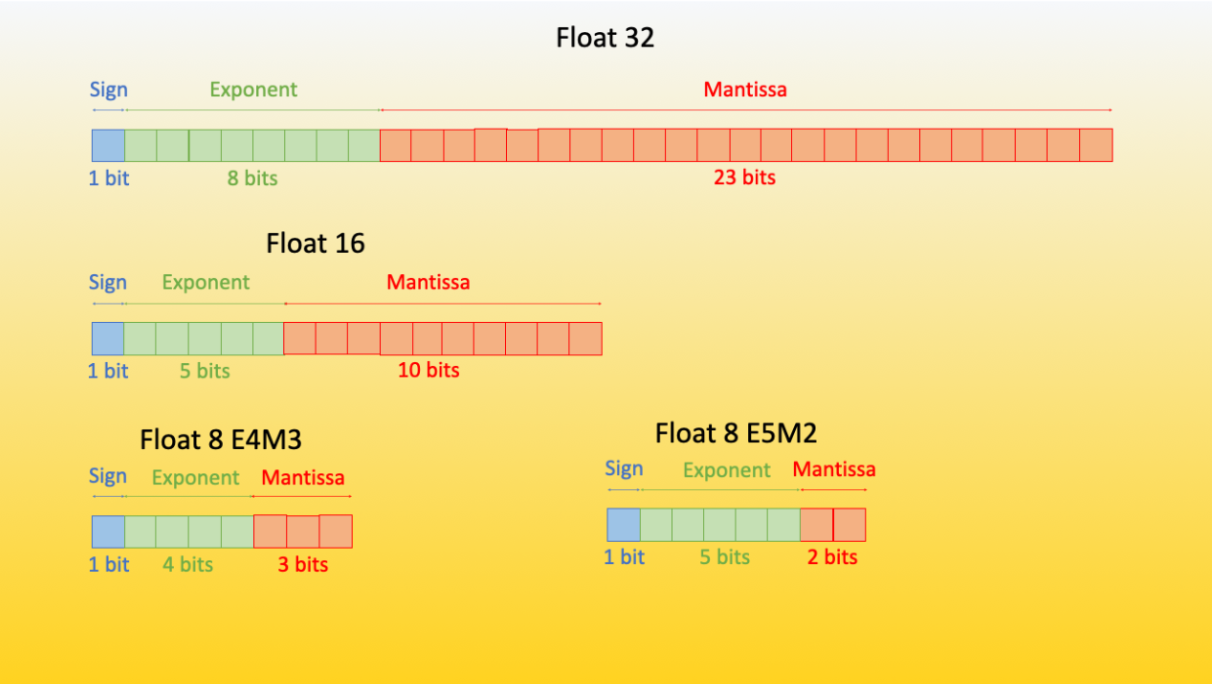
Beginner’s Quickstart: Learn about the different ways numbers are stored in models (like FP32, FP16, INT8, FP4, NF4). More bits means more precision, but also more memory. Less bits means smaller, faster models.
- Data Types:
float32,float16,bfloat16: Standard floating-point types (more bits = more precision).int8,FP8,FP4,NF4: Quantized types (fewer bits = less memory, but special tricks keep accuracy high).
- LoRA (Low-Rank Adaptation):
- A technique for parameter-efficient fine-tuning where only a small set of adapter weights are updated.
- QLoRA:
- An efficient finetuning approach that uses 4-bit quantization and LoRA adapters to reduce memory usage while maintaining performance. QLORA: Efficient Finetuning of Quantized LLMs
Beginner’s Quickstart: Try running a quantized model with just a few lines of code. You’ll need the latest versions of
transformers,bitsandbytes,peft, andaccelerate.
pip install -q -U bitsandbytes
pip install -q -U git+https://github.com/huggingface/transformers.git
pip install -q -U git+https://github.com/huggingface/peft.git
pip install -q -U git+https://github.com/huggingface/accelerate.gitfrom transformers import AutoModelForCausalLM
model = AutoModelForCausalLM.from_pretrained(
"facebook/opt-350m",
load_in_4bit=True,
device_map="auto"
)Beginner’s Quickstart: There are several ways to quantize a model: before or after training, with or without retraining, and with different numbers of bits. Each method has trade-offs in speed, memory, and accuracy.
- Static Quantization: Applied during training; weights and activations are quantized and fixed for all layers.
- Dynamic Quantization: Weights are quantized ahead of time; activations are quantized dynamically during inference.
- Post-Training Quantization (PTQ): Quantization is applied after training, often without retraining.
- Quantization-Aware Training (QAT): Model is trained with quantization in mind, learning to handle quantization errors.
- Binary/Ternary Quantization: Weights are quantized to two (binary: -1, 1) or three (ternary: -1, 0, 1) values.
Pros and Cons Table:
| Method | Pros | Cons |
|---|---|---|
| Static | Predictable, fast | Less adaptable |
| Dynamic | Flexible, efficient | Slightly more overhead |
| PTQ | Fast, no retraining needed | May reduce accuracy |
| QAT | Preserves accuracy | Requires retraining |
| Binary/Ternary | Max compression/speed | Accuracy loss |
Beginner’s Quickstart: QLORA is a new method that lets you fine-tune huge models on a single GPU, using smart tricks to save memory. If you want to try state-of-the-art quantization, check out the QLORA paper and code.
QLORA: Efficient Finetuning of Quantized LLMs [paper]
- 4-bit NormalFloat (NF4):
- An information-theoretically optimal quantization data type for normally distributed weights, outperforming standard 4-bit floats and integers.
- Double Quantization:
- Quantizes the quantization constants themselves, reducing memory usage by ~0.37 bits per parameter (e.g., 3GB for a 65B model) with no performance loss.
- Paged Optimizers:
- Use NVIDIA unified memory to handle memory spikes during training, enabling large-batch training on limited hardware.
Memory Efficiency:
- QLORA reduces the memory required to finetune a 65B model from >780GB to <48GB, making advanced LLM finetuning accessible to researchers and small teams.
Performance:
- QLORA-tuned models (Guanaco family) match or exceed the performance of much larger, more resource-intensive models on benchmarks like Vicuna and MMLU.
- 4-bit QLORA with NF4 matches 16-bit full finetuning and 16-bit LoRA finetuning on academic benchmarks.
- See QLORA: Efficient Finetuning of Quantized LLMs for detailed tables and figures.
Key Results Table:
| Model | Size | Precision | Memory | Vicuna Score (%) | Notes |
|---|---|---|---|---|---|
| Guanaco 65B | 65B | 4-bit | 41GB | 99.3 | QLORA |
| ChatGPT | - | - | - | 100 | Baseline |
| Guanaco 7B | 7B | 4-bit | 5GB | 87.0 | QLORA |
Practical Implications:
- QLORA enables finetuning of LLMs on consumer hardware, democratizing access to advanced NLP.
- The method is open-source and integrated with Hugging Face Transformers and bitsandbytes.
Beginner’s Quickstart: Here you’ll find scripts to compare quantized and full-precision models, and an example of serving a quantized model with FastAPI. Try running the scripts to see the difference in speed and memory.
import torch
import time
from transformers import AutoModelForCausalLM, AutoTokenizer

model_id = "facebook/opt-350m"

# Load full-precision model
model_fp = AutoModelForCausalLM.from_pretrained(model_id, torch_dtype=torch.float32, device_map="auto")
tokenizer = AutoTokenizer.from_pretrained(model_id)

# Load quantized model
model_q = AutoModelForCausalLM.from_pretrained(model_id, load_in_4bit=True, device_map="auto")

prompt = "Quantization enables large language models to run efficiently on consumer hardware."
inputs = tokenizer(prompt, return_tensors="pt").to(model_fp.device)

# Benchmark full-precision
start = time.time()
with torch.no_grad():
    _ = model_fp.generate(**inputs, max_length=50)
end = time.time()
print(f"Full-precision inference time: {end - start:.3f}s")

# Benchmark quantized
inputs = tokenizer(prompt, return_tensors="pt").to(model_q.device)
start = time.time()
with torch.no_grad():
    _ = model_q.generate(**inputs, max_length=50)
end = time.time()
print(f"Quantized inference time: {end - start:.3f}s")

# Memory usage (if using CUDA)
if torch.cuda.is_available():
    print(f"Full-precision VRAM: {torch.cuda.memory_allocated(model_fp.device) / 1e6:.2f} MB")
print(f"Quantized VRAM: {torch.cuda.memory_allocated(model_q.device) / 1e6:.2f} MB")from fastapi import FastAPI
from pydantic import BaseModel
from transformers import AutoModelForCausalLM, AutoTokenizer
import torch
app = FastAPI()
model_id = "facebook/opt-350m"
model = AutoModelForCausalLM.from_pretrained(model_id, load_in_4bit=True, device_map="auto")
tokenizer = AutoTokenizer.from_pretrained(model_id)
class Prompt(BaseModel):
text: str
@app.post("/generate")
def generate(prompt: Prompt):
inputs = tokenizer(prompt.text, return_tensors="pt").to(model.device)
with torch.no_grad():
outputs = model.generate(**inputs, max_length=50)
return {"output": tokenizer.decode(outputs[0], skip_special_tokens=True)}Benchmark Table Template:
| Model | Precision | Inference Time (s) | VRAM Usage (MB) | Notes |
|---|---|---|---|---|
| facebook/opt-350m | FP32 | 0.XXX | XXXX | Baseline |
| facebook/opt-350m | 4-bit | 0.XXX | XXXX | bitsandbytes, QLoRA |
Beginner’s Quickstart: Quantization can save memory and speed up models, but may introduce errors. Follow best practices and check the benefits and challenges before deploying quantized models.
- Quantization saves memory and enables LLMs on edge devices.
- Choose the right quantization method for your use case.
- Test accuracy and performance before deploying.
- Be aware of hardware requirements (e.g., CUDA-enabled GPU for 4-bit quantization).
- More Aggressive Quantization: Can we push below 4-bit quantization (e.g., 3-bit or even 2-bit) while maintaining performance? What new data types or quantization schemes could help?
- Beyond LoRA: How do other parameter-efficient fine-tuning (PEFT) methods compare to LoRA in the context of quantized models? Are there new adapter architectures that work better with low-bit models?
- Evaluation Benchmarks: What new benchmarks or evaluation protocols are needed to better measure real-world performance, bias, and safety in quantized LLMs?
- Bias and Fairness: How can we systematically evaluate and mitigate bias in quantized and finetuned models, especially as they are deployed in more settings?
- Responsible Deployment: What best practices and safeguards are needed to ensure quantized LLMs are used ethically and safely, especially as they become more accessible?
- Reproducibility: How can the community make it easier to reproduce and compare quantization results across hardware, datasets, and tasks?
Advanced users: If you are interested in contributing to the field, consider exploring these open questions or submitting new benchmarks, scripts, or research findings to the community.
- Quantization: The process of reducing the number of bits used to represent model weights and activations, making models smaller and faster.
- LoRA (Low-Rank Adaptation): A technique for parameter-efficient fine-tuning where only a small set of adapter weights are updated.
- QLoRA: An efficient fine-tuning approach that uses 4-bit quantization and LoRA adapters to reduce memory usage while maintaining performance.
- GPTQ: A post-training quantization method that uses layer-wise, asymmetric quantization and inverse-Hessian weighting to minimize error in 4-bit models.
- GGUF: A quantization format that allows block-wise quantization and offloading of model layers to CPU for flexible deployment.
- BitNet: An advanced quantization method using 1-bit or 1.58-bit weights for extreme compression, with efficient matrix multiplication.
- Symmetric Quantization: Maps the range of original values to a symmetric range around zero in the quantized space.
- Asymmetric Quantization: Maps the minimum and maximum of the float range to the min/max of the quantized range, using a zero-point offset.
- Calibration: The process of selecting the optimal range for quantization to minimize error, often using percentiles, MSE, or entropy.
- Clipping: Setting a dynamic range for quantization so that outliers are mapped to the same quantized value, reducing error for most values.
- Quantization Error: The difference between the original and dequantized values, which increases as bit-width decreases.
- FP32: 32-bit floating-point precision, the standard for high-precision model weights.
- FP16: 16-bit floating-point precision, used to reduce memory and speed up computation with minimal loss in accuracy.
- bfloat16: A 16-bit floating-point format with a wider dynamic range than FP16, often used in deep learning.
- INT8: 8-bit integer precision, commonly used for quantized models.
- FP8/FP4/NF4: 8-bit, 4-bit, and NormalFloat 4-bit quantization formats for further reducing model size.
- Calibration Dataset: A dataset used to determine the optimal quantization range for activations during static quantization.
- Parameter-Efficient Fine-Tuning (PEFT): Techniques that update only a small subset of model parameters during fine-tuning, such as LoRA.
- Outlier: A value that is much larger or smaller than most others in a dataset, which can distort quantization.
- Zero-Point: An offset used in asymmetric quantization to map zero in the float range to a quantized value.
- DataCamp Quantization for Large Language Models Tutorial
- Hugging Face Quantization Blog
- QLoRA Paper
- GPTQ: Accurate Post-Training Quantization for Generative Pre-trained Transformers
- A Visual Guide to Quantization
- Original repository for replicating QLoRA results
- Guanaco 33b playground
Thanks to the Hugging Face team, DataCamp, the QLoRA authors, and the open-source community for making these tools and research available to everyone!