🌐 中文版: see issue #52
Since v2.0, MioIsland is a fully open plugin platform. Anyone can write plugins — swap the pixel cat, build a new stats module, add an ambient sound pack, integrate your own dev tool, or build a completely standalone feature panel. This guide walks you through how to do it.
What the plugin system looks like today
Open MioIsland → System Settings → Plugins to see this page:
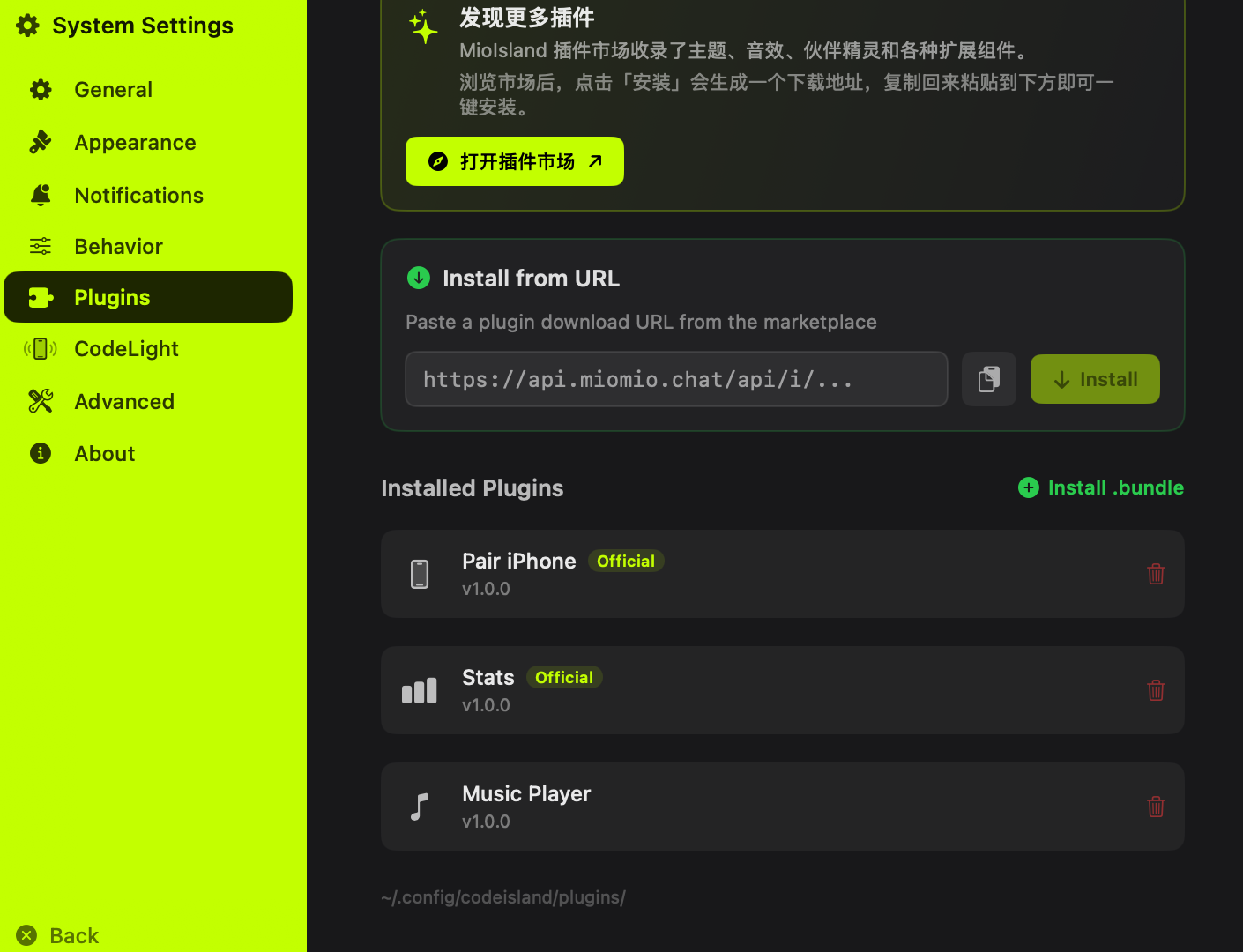
- The "Discover more plugins" banner at the top opens the marketplace
- The "Install from URL" field — grab a download URL from the marketplace, paste it, one-click install
- Below: the installed plugins list. Pair iPhone and Stats are official built-ins — if you remove them, the slot stays as a "Reinstall" button so you never lose them
- Third-party plugins (like Music Player) load from the marketplace or a local
.bundle
Loaded plugins appear as icons in the notch header bar. Click one to expand its panel:
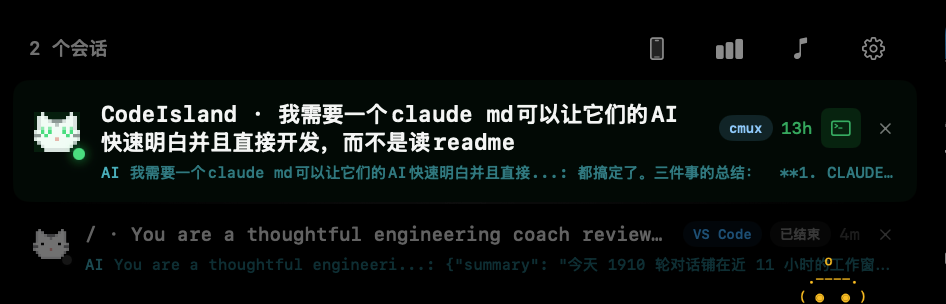
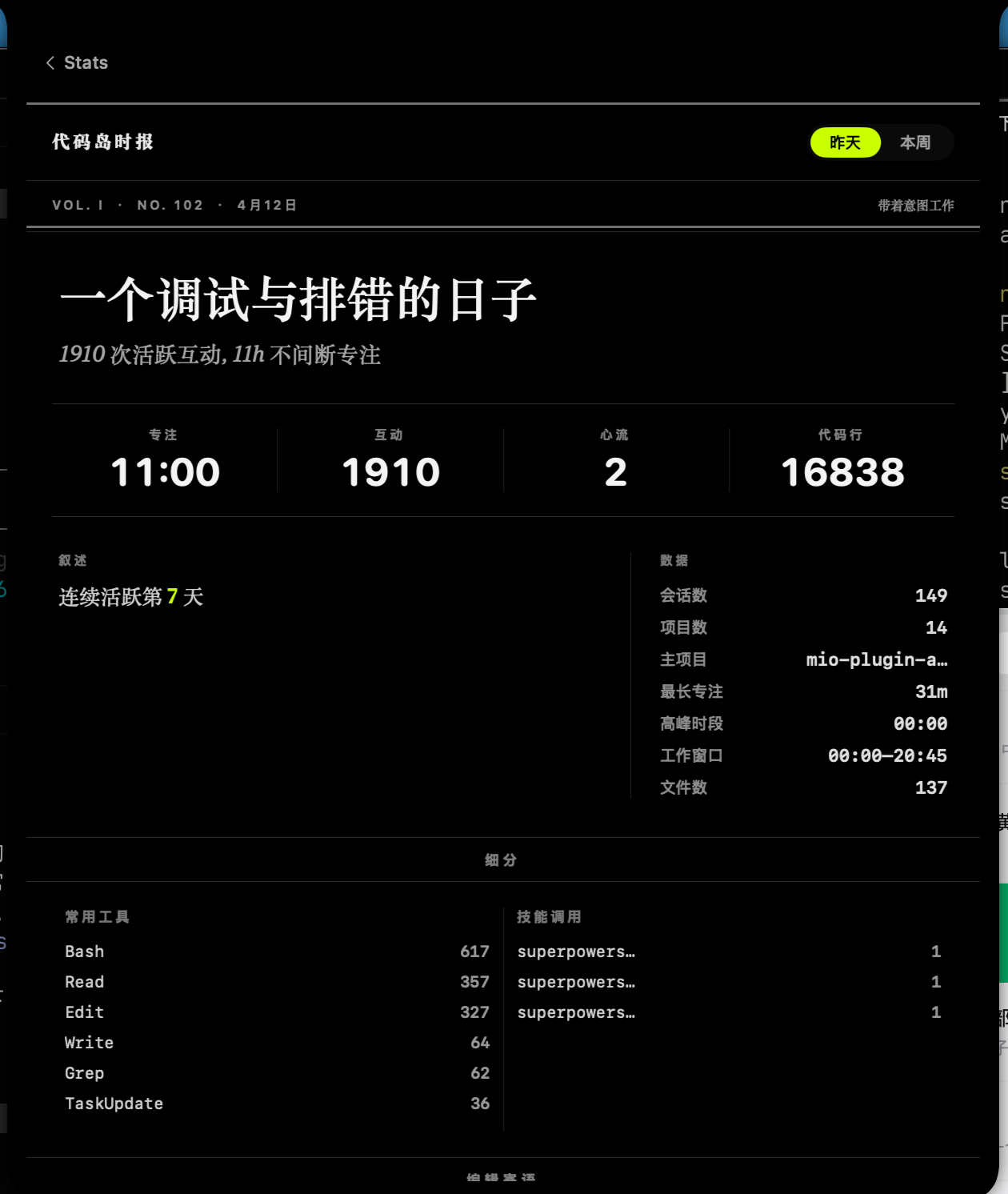
Each plugin owns its full panel. The official Stats plugin, for example, renders the entire panel itself — the host doesn't compose it:
What kinds of plugins can you build?
Pretty much anything that runs on macOS. Some ideas:
- 🐱 New pixel cats / companions — replace the default cat with a pixel dog, dragon, ASCII character
- 🎵 Sound packs — custom alert sounds, white noise, focus-mode background audio
- 🎨 Themes — change notch colors, fonts, animation styles
- 📊 Personal data panels — Stats is a data panel; you could build: today's GitHub commit count, current Linear sprint progress, now playing, weather, crypto prices, server health
- 🛠 Developer tools — one-click open frequent cmux sessions, recent git branch jump, CI status, test results aggregator
- 📅 Lifestyle — pomodoro timer, todos, calendar reminders, focus-mode toggle
- 🔌 Third-party integrations — Slack unread, mail unread, next calendar event, time tracking
- ⚡ Whatever feels right — anything you'd love to have living in your hardware notch
Plugins are isolated .bundle files. They can be free, eventually paid (paid is coming soon), distributed however you want.
How to develop one — let an AI write it
I've already written everything a developer needs into CLAUDE.md. You don't have to read it. You don't have to write code. Here's the flow:
Step 1: clone the plugin template
git clone https://github.com/MioMioOS/mio-plugin-template.git my-cool-plugin
cd my-cool-plugin
Template repo: https://github.com/MioMioOS/mio-plugin-template
The template ships with:
Sources/MioPlugin.swift — the protocol contract (don't touch)Sources/MyPlugin.swift — your principal class, the AI edits thisInfo.plist — bundle metadatabuild.sh — one-shot compile + sign + zipCLAUDE.md — the AI reads this and that's all it needs
Step 2: tell Claude / Codex what you want
Open Claude Code (or Codex / Cursor / any agent that can read the project), describe what you want in plain English:
"Build a plugin that polls my GitHub notifications API every 30 seconds and shows the unread count on a notch icon. Tapping the icon opens a list — each row jumps to the matching PR or issue."
Or:
"Replace the default pixel cat with a pixel penguin, 6 states (idle / working / approval / done / error / compacting), drawn on a 12x10 grid."
Or:
"Pomodoro timer plugin. 25-minute work + 5-minute break cycles. Plays a soft chime at the boundary. The notch icon shows current progress."
The AI will read CLAUDE.md and automatically know:
- How the protocol is implemented
- Which fields in
Info.plist need to change
- How
PLUGIN_NAME and MODULE_NAME in build.sh line up
- How to wrap a SwiftUI view in
NSHostingView
- What it cannot
import
- How to add a header icon via
viewForSlot
You describe the idea. The AI writes the code.
Step 3: build and install
Restart MioIsland and your plugin icon shows up in the notch.
Step 4 (optional): publish to the marketplace
If you want to share it:
- Push your plugin source to a GitHub repo (any account is fine)
- Sign in to the Developer Portal with GitHub OAuth
- Install our GitHub App on your repo so the review team can mirror the source to a private Gitea instance
- Submit your plugin: name (en + zh), description (en + zh, Markdown supported), screenshots, upload
build/<id>.zip
- We review the source — primarily looking for security and data-safety issues
- Approved plugins are listed at miomio.chat/plugins for everyone
Updates: bump version to a strictly higher semver and submit a new build.
A real success story: the Stats plugin
The Stats plugin I built myself uses exactly this flow. The source is fully public — feel free to study it:
https://github.com/MioMioOS/mio-plugin-stats
Inside:
- A complete
AnalyticsCollector that scans ~/.claude/projects/*.jsonl
- A newspaper-style SwiftUI view (serif italic headlines, stat strip, two-column body, unicode-block weekly rhythm, breakdown sections)
- Full i18n (auto zh / en switching)
- Local
claude CLI invocation for an "Editor's Note" with summary + improvement suggestions (runs entirely on the user's machine, never touches any server)
- UserDefaults persistence for cache and personal records
About 1500 lines of Swift. Every line written by Claude Code. I just described the idea and adjusted details.
Things to keep in mind
- macOS 15+ — the plugin system uses new SwiftUI APIs
- arm64 by default — the template builds Apple Silicon only. For Intel compatibility, change two lines in
build.sh (README explains)
- Ad-hoc signing — no Apple Developer account required; the template uses
codesign --sign -
- Don't
import ClaudeIsland — the host module isn't exported. You only have Foundation / AppKit / SwiftUI / Combine and the system frameworks
- Don't change the protocol —
Sources/MioPlugin.swift must stay byte-identical to the host's protocol; the AI knows this rule
Resources
Looking forward to seeing what everyone builds! Reply to this issue if you have questions — I'll keep this guide updated.

What the plugin system looks like today
Open MioIsland → System Settings → Plugins to see this page:
.bundleLoaded plugins appear as icons in the notch header bar. Click one to expand its panel:
Each plugin owns its full panel. The official Stats plugin, for example, renders the entire panel itself — the host doesn't compose it:
What kinds of plugins can you build?
Pretty much anything that runs on macOS. Some ideas:
Plugins are isolated
.bundlefiles. They can be free, eventually paid (paid is coming soon), distributed however you want.How to develop one — let an AI write it
I've already written everything a developer needs into
CLAUDE.md. You don't have to read it. You don't have to write code. Here's the flow:Step 1: clone the plugin template
git clone https://github.com/MioMioOS/mio-plugin-template.git my-cool-plugin cd my-cool-pluginTemplate repo: https://github.com/MioMioOS/mio-plugin-template
The template ships with:
Sources/MioPlugin.swift— the protocol contract (don't touch)Sources/MyPlugin.swift— your principal class, the AI edits thisInfo.plist— bundle metadatabuild.sh— one-shot compile + sign + zipCLAUDE.md— the AI reads this and that's all it needsStep 2: tell Claude / Codex what you want
Open Claude Code (or Codex / Cursor / any agent that can read the project), describe what you want in plain English:
Or:
Or:
The AI will read
CLAUDE.mdand automatically know:Info.plistneed to changePLUGIN_NAMEandMODULE_NAMEinbuild.shline upNSHostingViewimportviewForSlotYou describe the idea. The AI writes the code.
Step 3: build and install
Restart MioIsland and your plugin icon shows up in the notch.
Step 4 (optional): publish to the marketplace
If you want to share it:
build/<id>.zipUpdates: bump
versionto a strictly higher semver and submit a new build.A real success story: the Stats plugin
The Stats plugin I built myself uses exactly this flow. The source is fully public — feel free to study it:
https://github.com/MioMioOS/mio-plugin-stats
Inside:
AnalyticsCollectorthat scans~/.claude/projects/*.jsonlclaudeCLI invocation for an "Editor's Note" with summary + improvement suggestions (runs entirely on the user's machine, never touches any server)About 1500 lines of Swift. Every line written by Claude Code. I just described the idea and adjusted details.
Things to keep in mind
build.sh(README explains)codesign --sign -import ClaudeIsland— the host module isn't exported. You only haveFoundation/AppKit/SwiftUI/Combineand the system frameworksSources/MioPlugin.swiftmust stay byte-identical to the host's protocol; the AI knows this ruleResources
Looking forward to seeing what everyone builds! Reply to this issue if you have questions — I'll keep this guide updated.