Project
ide
Description
When the session lock file (~/.cortex/session_locks.json) is corrupt or manually edited with a typo, all lock subcommands (list, add, check, remove) fail with a raw serde JSON parse error that exposes internal implementation details and provides no actionable information to the user.
The error message is: "Error: key must be a string at line 1 column 16". This gives the user no indication that the problem is with the lock configuration file, no file path to investigate, and no suggestion on how to fix it (e.g., deleting the file to reset).
This can happen in practice when a write is interrupted (power loss, disk full) or when the user tries to manually edit the lock file to add notes or adjust entries.
Error Message
Error: key must be a string at line 1 column 16
Debug Logs
N/A
System Information
- Cortex TUI v0.0.7
- OS: Linux x86_64
Screenshots
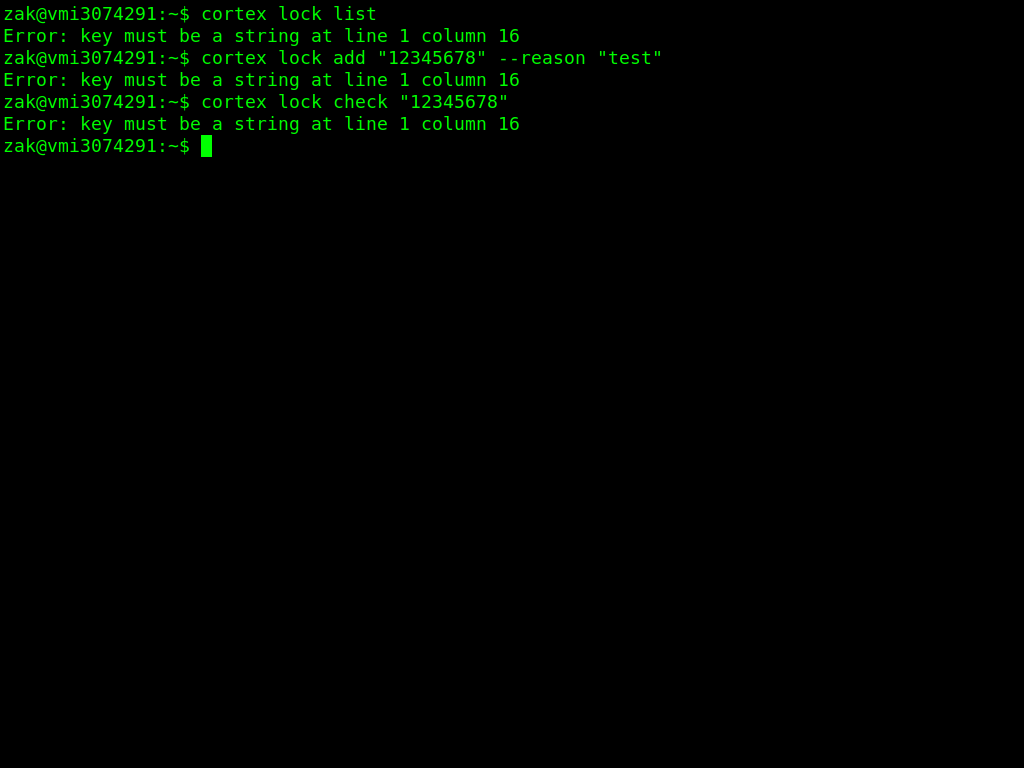
Steps to Reproduce
- Introduce a syntax error in the session lock file by manually editing it (e.g., remove quotes around a key)
- Run
cortex lock list
- Observe the raw JSON parse error with no file path or recovery suggestion
- Run
cortex lock add "12345678" --reason "test" — same raw error
- Run
cortex lock check "12345678" — same raw error
Expected Behavior
When the lock file is corrupt, cortex should display a user-friendly error message that includes the file path and a recovery suggestion, such as: "Error: Failed to read session lock file (~/.cortex/session_locks.json): invalid JSON. Delete the file to reset your session locks."
Actual Behavior
All lock commands propagate the raw serde_json parse error ("key must be a string at line 1 column 16") without context about which file is affected or how to fix the problem. The user has no way to know which file is corrupt or how to recover.

Project
ide
Description
When the session lock file (~/.cortex/session_locks.json) is corrupt or manually edited with a typo, all lock subcommands (list, add, check, remove) fail with a raw serde JSON parse error that exposes internal implementation details and provides no actionable information to the user.
The error message is: "Error: key must be a string at line 1 column 16". This gives the user no indication that the problem is with the lock configuration file, no file path to investigate, and no suggestion on how to fix it (e.g., deleting the file to reset).
This can happen in practice when a write is interrupted (power loss, disk full) or when the user tries to manually edit the lock file to add notes or adjust entries.
Error Message
Debug Logs
N/A
System Information
Screenshots
Steps to Reproduce
cortex lock listcortex lock add "12345678" --reason "test"— same raw errorcortex lock check "12345678"— same raw errorExpected Behavior
When the lock file is corrupt, cortex should display a user-friendly error message that includes the file path and a recovery suggestion, such as: "Error: Failed to read session lock file (~/.cortex/session_locks.json): invalid JSON. Delete the file to reset your session locks."
Actual Behavior
All lock commands propagate the raw serde_json parse error ("key must be a string at line 1 column 16") without context about which file is affected or how to fix the problem. The user has no way to know which file is corrupt or how to recover.