Summary
Auto run document preview flattens YAML front matter
Environment
- Maestro version: 0.16.11-RC
- Operating system: macOS (Darwin Kernel Version 25.3.0: Wed Jan 28 20:54:46 PST 2026; root:xnu-12377.91.3~2/RELEASE_ARM64_T6000, 25.3.0)
- Install source: Packaged build (release build or locally packaged)
- Agent/provider involved: Not provided
- SSH remote execution: Not provided
Steps to Reproduce
- Open an auto run document preview in Maestro.
- Paste Markdown content containing YAML front matter with multiple fields on separate lines.
- View the rendered preview.
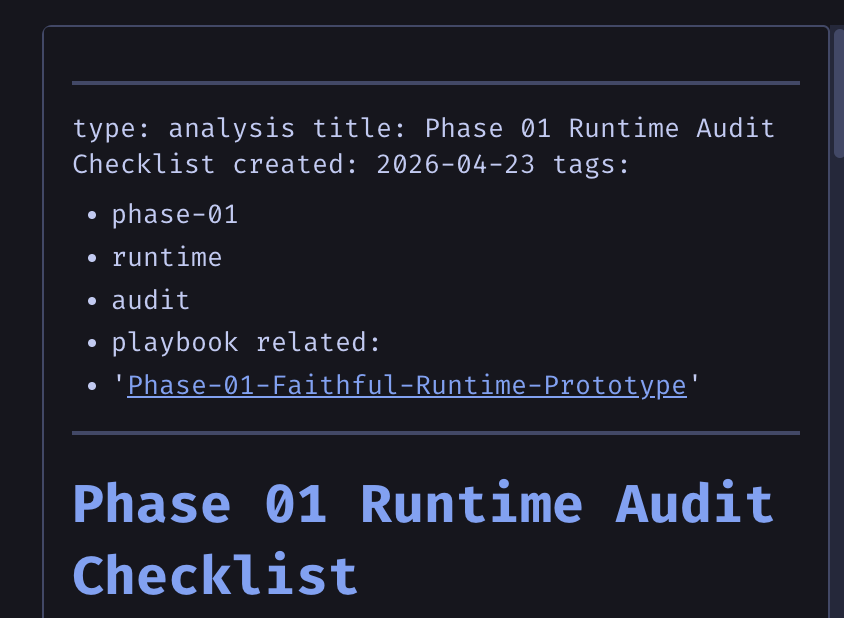
- Observe that the front matter formatting is flattened and line breaks between attributes are lost, with some fields appearing incomplete or missing.
Expected Behavior
The auto run document preview should render pasted Markdown with YAML front matter correctly, preserving each front matter attribute on its own line and showing all fields/values intact.
Actual Behavior
In the auto run document preview, the YAML front matter appears flattened into a single line or otherwise loses formatting. Line breaks between attributes are not respected, and some data appears missing or not filled out correctly in the rendered result.
Additional Context
Reported on Maestro 0.16.11-RC on macOS packaged build. The user’s original pasted example was itself the broken output.
Screenshots / Recordings

Summary
Auto run document preview flattens YAML front matter
Environment
Steps to Reproduce
Expected Behavior
The auto run document preview should render pasted Markdown with YAML front matter correctly, preserving each front matter attribute on its own line and showing all fields/values intact.
Actual Behavior
In the auto run document preview, the YAML front matter appears flattened into a single line or otherwise loses formatting. Line breaks between attributes are not respected, and some data appears missing or not filled out correctly in the rendered result.
Additional Context
Reported on Maestro 0.16.11-RC on macOS packaged build. The user’s original pasted example was itself the broken output.
Screenshots / Recordings