Hi!
This is a feature request that colored brushes be added to the map painting. I understand that changing the theme changes the color that the map brush uses, but if multiple colors need to be used, this unfortunately does not suffice.
I noticed that in the example they overlay images over the squares, but this is also a bit of a hassle if you just need a single color.
Example

My suggestion is as follows:
- In the top left, beside the box select, add a color select.
- Whatever color is selected will be the color that is painted to the square.
- A small color pallet of 5 or so simple colors would appear, and the user could select any.
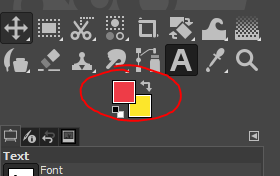
- If possible, have two boxes that can be set to any color, and a system to switch between them. Similar to "foreground and background color" systems in GIMP or Photoshop.
Example:

Hi!
This is a feature request that colored brushes be added to the map painting. I understand that changing the theme changes the color that the map brush uses, but if multiple colors need to be used, this unfortunately does not suffice.
I noticed that in the example they overlay images over the squares, but this is also a bit of a hassle if you just need a single color.
Example
My suggestion is as follows:
Example:
