Summary
office2pdf collapses each XLSX worksheet onto one PDF page instead of preserving the worksheet's native print pagination. For the contributor acceptance fixture, Excel exports the first worksheet as three Statement landscape pages, while office2pdf puts the entire worksheet on one page.
Reproduction
Convert tests/fixtures/xlsx/pr_186_contributor_acceptance.xlsx and compare the first worksheet with a native Microsoft Excel PDF export.
Expected
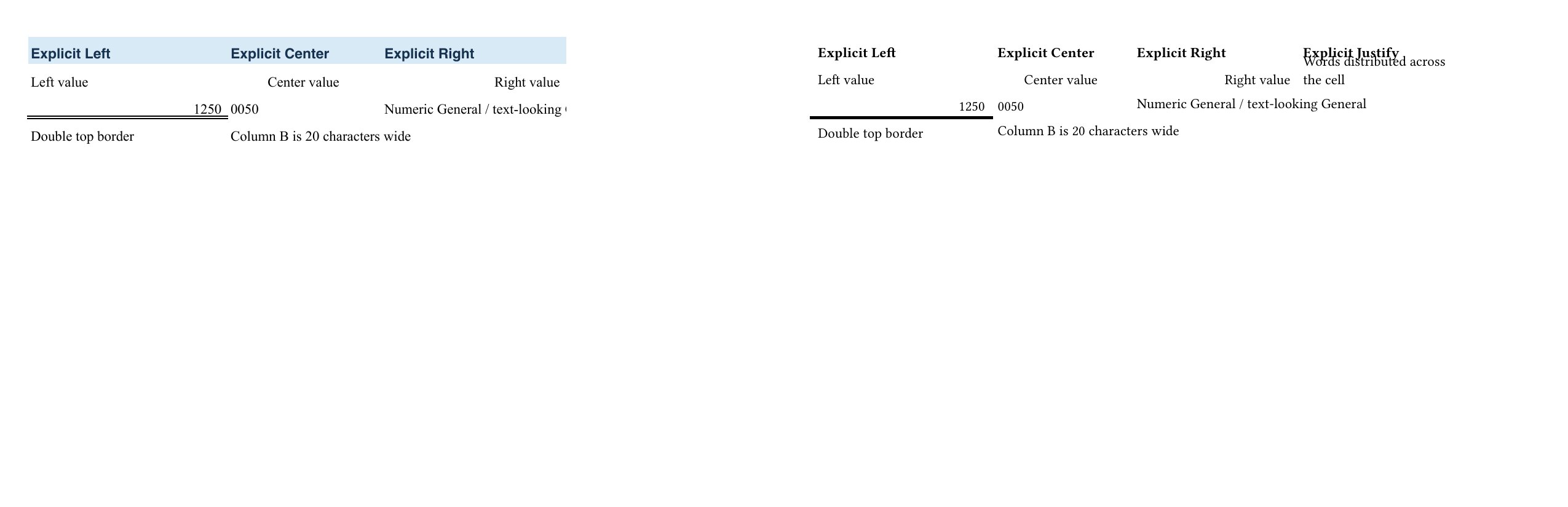
Column overflow follows the workbook's print layout. On page 1, the first three columns are visible and the Explicit Justify column continues on the next native print page.
Actual
All four columns are compressed onto page 1, and the first worksheet produces one page rather than three.
Visual comparison
Ground truth is on the left; office2pdf output at filing time is on the right. Both pages were rendered with pdftoppm at 150 DPI. The extra fourth column on the right-side page is the visible result of the pagination defect.
Related to #186 and #327.
Summary
office2pdf collapses each XLSX worksheet onto one PDF page instead of preserving the worksheet's native print pagination. For the contributor acceptance fixture, Excel exports the first worksheet as three Statement landscape pages, while office2pdf puts the entire worksheet on one page.
Reproduction
Convert
tests/fixtures/xlsx/pr_186_contributor_acceptance.xlsxand compare the first worksheet with a native Microsoft Excel PDF export.Expected
Column overflow follows the workbook's print layout. On page 1, the first three columns are visible and the
Explicit Justifycolumn continues on the next native print page.Actual
All four columns are compressed onto page 1, and the first worksheet produces one page rather than three.
Visual comparison
Ground truth is on the left; office2pdf output at filing time is on the right. Both pages were rendered with
pdftoppmat 150 DPI. The extra fourth column on the right-side page is the visible result of the pagination defect.Related to #186 and #327.