
Replies: 20 comments 15 replies

|
I hear ya. Seems quiet here so far though. Have you looked at some of our Pi projects yet? We've been extending Pi in a few directions:
We're also using Pi as the foundation for our agency's internal AI platform (wgnr.ai), where it orchestrates client work, proposals, and creative production alongside our A0 multi-agent framework. |

|
I have just tried wgnr-pi but could not get slash commands to work. Any pointers or should I just raise an issue? |

|
This may not be a good answer. But the reason that I decided to quit claude code and stick with pi is I don't need a lot of features and bugs that I would never use. And I can build my own extensions within a minute or two. For example, there is no |

|
What does /loop do? |

|
I guess you didn't use claude code? It's a slash command in claude code that works like a cron job.
|
|
such an aberration, who wants a heartbeat in a coding agent? |
|
that's the point. most people don't. but maybe you can find your niche requirement. so you can create an extension for yourself:( btw, the cron job is useful. pi is a coding agent. but don't take it as just a coding agent. be imaginative, my friend. |

|
True. I feel more productive when I'm using Pi than when using Claude, even when I'm using free models. |

|
Here are the things I use (with the package config to import them). Most all of Caveman for short responses
"git:github.com/v2nic/pi-caveman",Filter output and security from @michalvavra
This is the packages config: {
"source": "git:github.com/michalvavra/agents",
"extensions": [
"agents/pi/extensions/filter-output.ts",
"agents/pi/extensions/security.ts"
],
"skills": [],
"themes": [],
"prompts": []
}Review and whimsical extensions by @mitsuhiko
This is the packages config: {
"source": "git:github.com/mitsuhiko/agent-stuff",
"extensions": [
"extensions/review.ts",
"extensions/whimsical.ts"
],
"skills": [
"skills/frontend-design"
],
"themes": [],
"prompts": []
}Refactor and Story time by @github
This is the packages config: {
"source": "git:github.com/github/awesome-copilot",
"skills": [
"skills/refactor",
"skills/repo-story-time"
],
"extensions": [],
"themes": [],
"prompts": []
}Superpowers from @obra (not tested yet)I haven't tried these in pi yet, so I'm not sure if they will work or not, but This is the packages config: {
"source": "git:github.com/obra/superpowers",
"skills": [
"skills/test-driven-development",
"skills/writing-plans",
"skills/writing-skills"
],
"extensions": [],
"themes": [],
"prompts": []
}Permission by @prateekmediaThis is another great security tweak. By default your sessions will be read only This is the packages config: {
"source": "git:github.com/prateekmedia/pi-hooks",
"extensions": [
"permission/permission.ts"
],
"skills": [],
"themes": [],
"prompts": []
}YouTube transcript by @badlogicLittle skill that lets the AI pull down YouTube transcripts. Helpful when This is the packages config: {
"source": "git:github.com/badlogic/pi-skills",
"skills": [
"skills/youtube-transcript"
],
"extensions": [],
"themes": [],
"prompts": []
}Save last, answer, cursor rules from me!
I symlink these to the extensions folder but this config would probably work: {
"source": "git:github.com/NonlinearFruit/dotfiles",
"extensions": [
"pi/save-last-extension.ts",
"pi/answer-extension.ts",
"pi/cursor-rules-extension.ts"
],
"skills": [],
"themes": [],
"prompts": []
} |

|
https://github.com/forjd/pi-todo-md/ was the only TODO I could work with that wasn't built for subagents and seemed to idle endlessly if used in a single-agent mode, but I'm brand new at this so maybe I was holding it wrong. The |

|
For fans of Matt Pocock's Tweaked grill-me skill---
name: grill-me
description: Interview the user relentlessly about a plan or design until reaching shared understanding, resolving each branch of the decision tree. Use when user wants to stress-test a plan, get grilled on their design, or mentions "grill me".
---
Interview me relentlessly about every aspect of this plan until we reach a shared understanding. Walk down each branch of the design tree, resolving dependencies between decisions one-by-one. For each question, provide your recommended answer.
Ask the questions one at a time.
If a question can be answered by exploring the codebase, explore the codebase instead.
## Question delivery
Prefer the `AskUserQuestion` tool over plain text when the question has a discrete set of plausible answers. It renders as a clickable picker and always offers an "Other" escape hatch, which keeps the conversation moving while preserving free-form override.
- Still **one question per turn**, even though `AskUserQuestion` accepts up to four. Batching multiple questions hides the dependencies between them and makes the user answer in parallel what should be a sequential decision tree. Walk the tree one branch at a time.
- Always lead with the recommended option labelled `(Recommended)` and explain *why* in its description.
- Use the `preview` field for ASCII mockups, code snippets, or layout sketches when the choice is visual or structural — side-by-side preview makes trade-offs concrete.
- Fall back to plain text only when the question is genuinely open-ended (e.g., "what are the use cases?") and a 2–4 option list would feel forced.If you are unfamiliar with the |

|
Actually, the only external extension I consistently use right now is pi-mcp-adapter.
Most of my other little extensions are just personal workflow hacks. That’s one of the things I like about Pi.. it’s easy to build tiny tools for very specific use cases. I did publish one recently though: Downshift. It basically starts a session on a premium model, then switches to a cheaper model once the context gets large. The idea is to avoid paying premium prices for the boring continuation phase. Thanks for the grill-me tweak idea, looks reasonable. |

|
The concept clicks. Do you have additional advise after you used it for 2+ months? |

|
by switching to other model mid-session you lose all the cache |

|
I discovered pi-landstrip today, and it is brilliant! 🙂 It lets you restrict what your agent can read and write, and which domain names it's allowed to access. It has nice UI that provides a clear overview of your active permissions - it is able to prompt for approval and things you haven't locked down, and it lets you optionally save approvals to your current project or your global config file. It works on Linux, Mac and Windows. It's the only extension I use - I don't feel safe without it, I mean you hear stories about agents that decide to force push over your git repo or delete your home folder, so this puts me at ease. 😅 Does anyone else feel like we're missing a place to rate and review Pi extensions? Install numbers just don't really mean much, do they. I've been wondering if AT Protocol might be right for this? Like, maybe reviews and ratings for any NPM package could be posted on AT, where it could be sourced by pi.dev/packages and npmx or whoever wants the data? 🙂 |

|
Use pi in a docker container. Map the working folder (i.e., on the host) to some "dev" folder on the container. Start pi in that "dev" folder. Artifacts are written in "dev", which is actually the host working folder. Then the agents can push all they want: containers are ephemeral, but the artifacts produced are eternal! |

|
Containers solve a different problem entirely. I want interactive approvals if the agent starts doing something I didn't ask for - I want to be in the loop, I don't want to just find out later that it went into |

|
I recently added Pi support to NeatContext. It solves a slightly different problem from session resume or compaction—it extracts the durable system knowledge and verified findings from completed work so they can be reused in fresh sessions. And since those knowledge are independent from AI agents, those existing ones from Claude Code and Codex can directly be used in Pi. That gives me motivations to gradually switch to use Pi in my daily work. <- Pi is lightweight and fast! |
|
interesting! and it's all flat files you can check into source control, or? does it use a lot of tokens? 😅 |

|
@mindplay-dk yes it's all flat files. The design is domain knowledge should human readable and editable. They need to be reviewed and eventually check into git repo to share within a team. Only in this way, domain knowledge can be truly useful to help AI agent producing right answers and being trusted by a team. From token side, since only the single domain profile will be fully read at the beginning, I would not say it uses a lot. Files in the knowledge folder will sometimes be indexed by the AI client, depends on the model and client you use. The files in the knowledge folder will be searched per need by LLM. It might spend more tokens than those memorize services which store the conversations into DB. I didn't measure at this time. Reducing token usage is always the long term goal though. The project already applied several performance improvements and algorithms to use token more efficient compare to the first version. But still it's a long term effort. The major thing I'd like to keep: the saved domain knowledge always and must be human readable and editable. That's the key to make them accurate and useful across teams. And that's the key to make AI agent producing right answers. |
💯 this 👍 |

|
For DeepSeek V4 Pro specifically: pi-dsh-minimal remaps Pi onto the official DeepSeek Harness minimal surface (one-line persona + persistent pi install npm:pi-dsh-minimalDefault trigger is V4 Pro only. |

|
I'd like to share my own little project here, not a plugin, phi — a minimal coding-agent harness in Go. ~12 MB release binary, https://github.com/pulseaiclub/phi It's Pi's "lightweight and fast" instinct taken to a single Go binary. A few things I enjoy most: • MCP without context death — schemas never enter the model prompt; the agent only sees server names and discovers tools on demand via mcp_list / mcp_inspect / mcp_call. |

|
I built pi-grill: a design-interview extension for work that is too ambiguous to code safely but too interactive for a static plan. It keeps Pi researching while a persistent TUI panel asks dependency-ready decisions. You can skip a question, add notes, revise answers, then confirm an implementation plan with the full transcript. Install: pi install git:github.com/luw2007/pi-grill@v0.2.0I am looking for early users doing cross-file features or refactors. The feedback I need: which question prevented rework, and which was unnecessary friction? Release demo. |

|
One Pi package I have been enjoying recently is It also turned into a useful portability test. We ran the published package unchanged inside DeepSeek Harness through pi2dsh: OAuth login, a real Codex tool call, DSH-side install: dsh plugin --profile web add pi2dsh
dsh plugin --profile web add @crazygit/pi-codex-image-genReproduction: https://github.com/weijiafu14/pi2dsh/tree/main/examples/codex-image-gen |

|
I have a custom extension that picks up custom prompts from the parent folder's .pi/prompts. That way, I can put all my projects that use the same language into one parent folder (e.g. all native c++ projects in one, all node/npm based projects in another) and those can share prompts that are optimized for projects in the respective language. The extension also contains a "run" tool to run these prompts (with a parameter) directly in subagents, using a model and thinking level configured in the prompt template's front matter. |

|
pi-verdict — a permission gate for pi in the style of Claude Code's auto mode. pi ships without permission prompts by design, which is fine until you let it run unsupervised. This checks every tool call before it runs and returns one of allow / deny / ask — ambiguous calls get routed to you, not silently approved. One ~900-line file with zero runtime dependencies, everything fails closed (classifier timeout/bad output → deny). No built-in allowlist: bypass testing found 8 ways around the original one, so it was removed entirely in 0.2.0 — the built-in layer only makes { "source": "npm:pi-verdict", "extensions": ["./extensions"] }https://github.com/jesset/pi-verdict · https://pi.dev/packages/pi-verdict (Converged on a similar architecture to pi-automode; comparison table in the README.) |
|
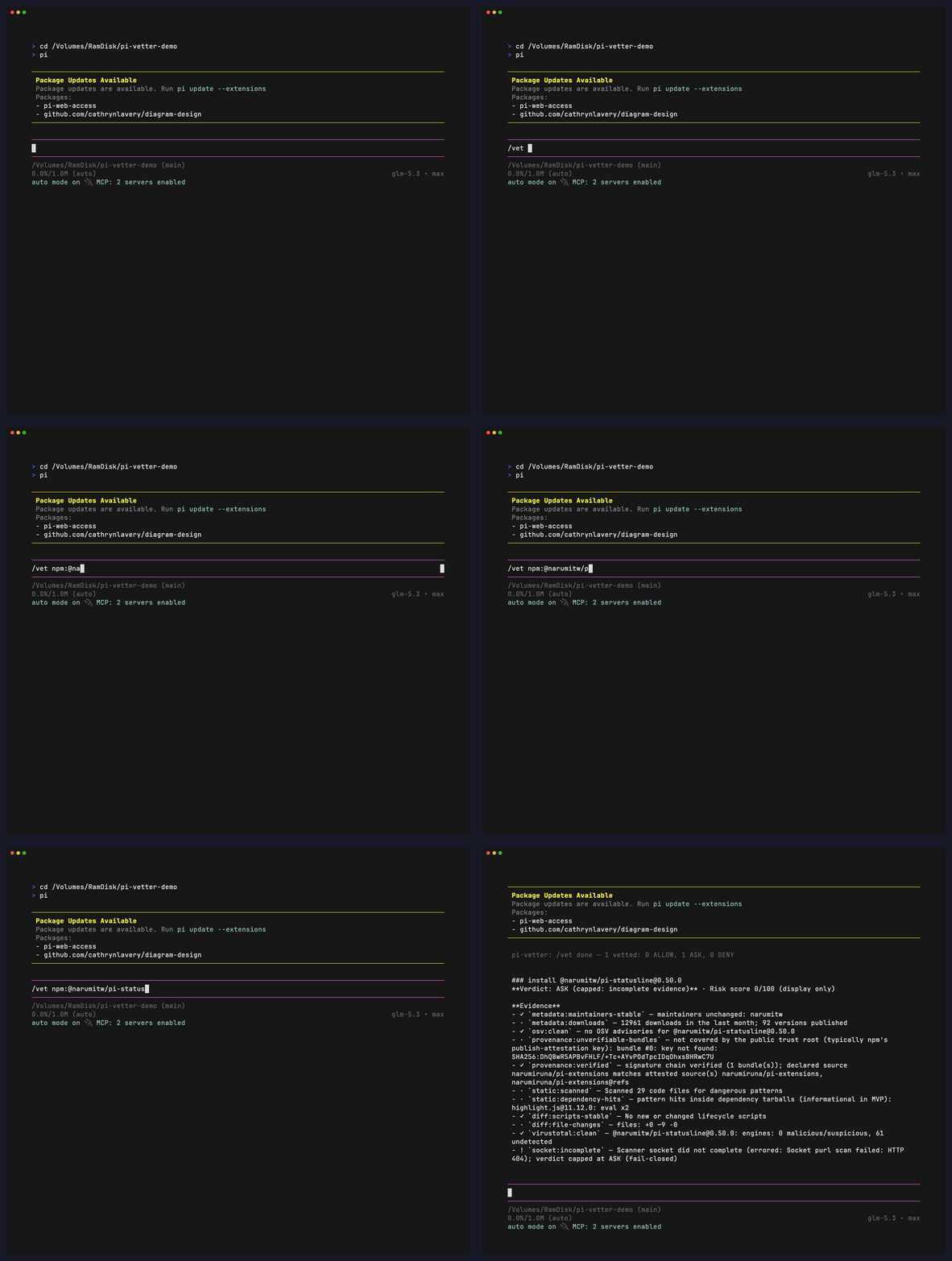
pi-vetter — Supply-chain vetting before install/update
Pi says "updates exist" — pi-vetter shows you what's actually in them. Pi installs extensions with full user permissions and runs their
https://github.com/jesset/pi-vetter · also in the pi.dev directory: https://pi.dev/packages/pi-vetter |

|
Mine is a surface rather than an extension: Phosphor, a desktop app for pi. Extremely flexible, since everything pi exposes over RPC ends up in the UI, and it bundles a few extensions of its own (artifacts, context breakdown, MCP status). https://phosphor.saccolabs.com · https://github.com/agustinsacco/Phosphor |

|
Very cool. I've built something pretty similar. I'll be looking at your work for reference, and probably give phosphor a try on my own too. |

|
The context breakdown and MCP status caught my attention. Does the view distinguish how much context a tool returned from how current that result is? I’m building Kin, which records code connections in the repository. For a caller result, I’d want the source revision and any coverage gaps beside the answer. Is there a place for tool-specific details like that in Phosphor? I haven’t verified a Kin/Pi workflow yet, so I’m interested in how the interface handles this. |

Check out pi-claude-cli. probably the best way to use cc under pi management. Lets you also round robin multiple claude accounts. |
|
Figured I should add the Pi project I've been spending most of my time on lately: Pi Herdsman. Pi Herdsman is built on top of Herdr and requires it for running and managing the underlying Pi sessions. I wanted subagents without giving up the main Pi conversation while they work. Herdsman lets a Pi lead delegate tasks to agents running asynchronously in independent Pi sessions, so they can investigate or implement things in parallel while the lead stays interactive. The part I care about most is context: the lead stays small, clean, and focused on the bigger picture, while detailed work happens elsewhere. Questions, progress, and results still flow back, so the lead knows what's happening without carrying all of the working context. It also supports nested delegation, steering/interruption, Chief supervision across multiple leads, and direct Lead-to-Lead coordination. Herdr handles the physical sessions, Pi owns each conversation, and Herdsman handles the orchestration between them. The latest release also added an SSH-ready container, so Herdsman can now run on a workstation, NAS, server, VPS, or cloud machine and still plug into the same Herdr setup. Install Herdr first, then: pi install npm:pi-herdsman
herdr integration install pi
Feedback is much appreciated! |


|
For long tasks or refactors where you step away from your desk, omp-ntfy sends free phone push notifications (via ntfy.sh) when the agent finishes or stops to ask for input. What makes it convenient:
Install: pi install npm:omp-ntfy |


 and others
Uh oh!
There was an error while loading. Please reload this page.
Since I prefer not to use Discord, I decided to ask my question here instead.
Which plugins, add-ons, or extensions do you most enjoy using with the Pi agent?
All reactions