
Replies: 3 comments 1 reply

-
|
This is great! Could you submit a pull request? Thanks. |
Beta Was this translation helpful? Give feedback.
-
|
A different version by gena https://code.earthengine.google.com/dd95c1b5f7f463dbdfebe5bede970586 |
Beta Was this translation helpful? Give feedback.

-
|
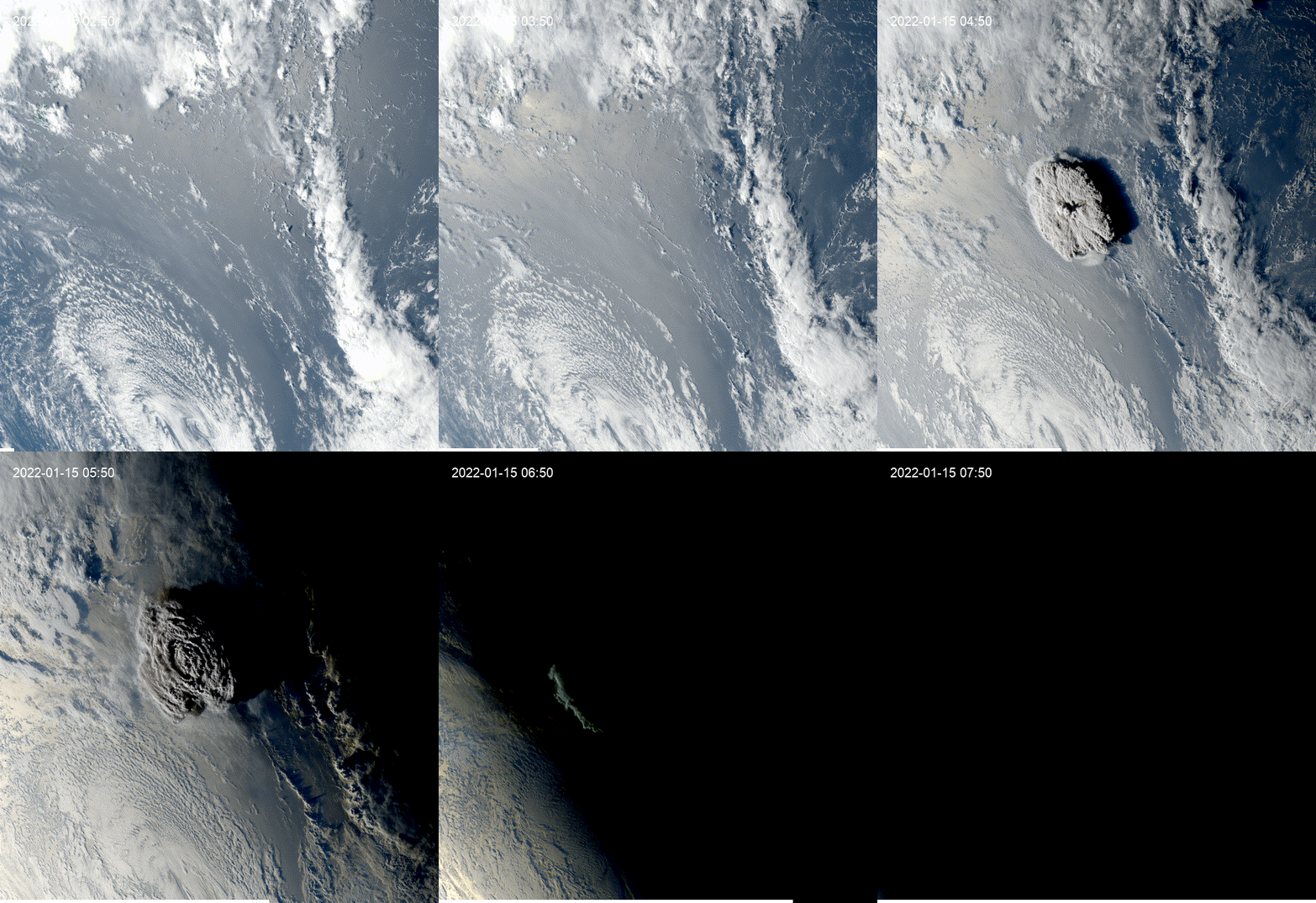
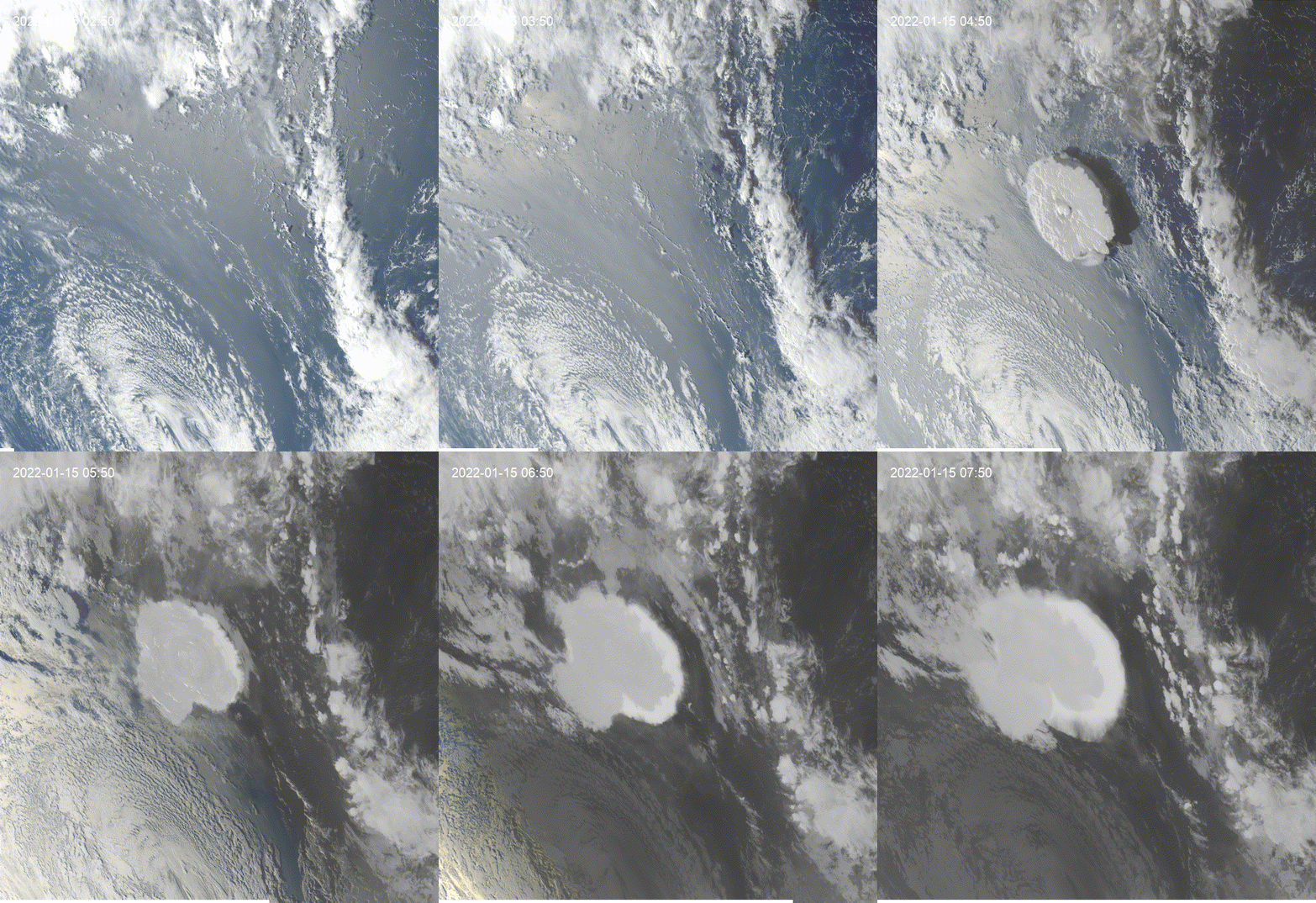
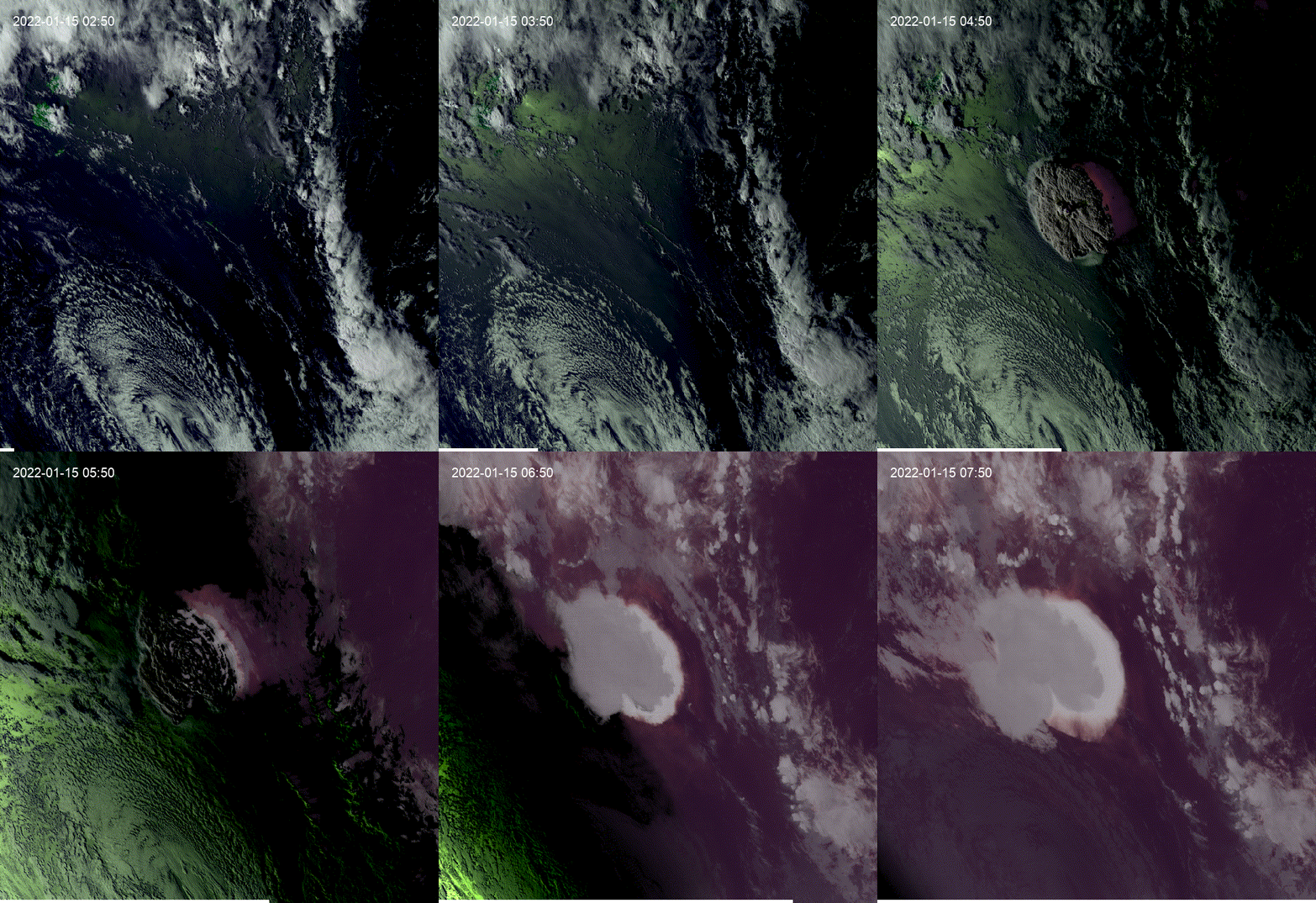
Hi, I liked that example, this would be a modification of the going_timeseries function that can replicate the example. def goes_timeseries(
start_date="2021-10-24T14:00:00",
end_date="2021-10-25T01:00:00",
data="GOES-17",
scan="full_disk",
region=None,
show_night=[False, "a_mode"],
):
"""Create a time series of GOES data. The code is adapted from Justin Braaten's code: https://code.earthengine.google.com/57245f2d3d04233765c42fb5ef19c1f4.
Credits to Justin Braaten. See also https://jstnbraaten.medium.com/goes-in-earth-engine-53fbc8783c16
Args:
start_date (str, optional): The start date of the time series. Defaults to "2021-10-24T14:00:00".
end_date (str, optional): The end date of the time series. Defaults to "2021-10-25T01:00:00".
data (str, optional): The GOES satellite data to use. Defaults to "GOES-17".
scan (str, optional): The GOES scan to use. Defaults to "full_disk".
region (ee.Geometry, optional): The region of interest. Defaults to None.
show_night (list, optional): Show the clouds at night through [True, "a_mode"] o [True, "b_mode"]. Defaults to [False, "a_mode"]
Raises:
ValueError: The data must be either GOES-16 or GOES-17.
ValueError: The scan must be either full_disk, conus, or mesoscale.
Returns:
ee.ImageCollection: GOES timeseries.
"""
if data not in ["GOES-16", "GOES-17"]:
raise ValueError("The data must be either GOES-16 or GOES-17.")
if scan.lower() not in ["full_disk", "conus", "mesoscale"]:
raise ValueError("The scan must be either full_disk, conus, or mesoscale.")
scan_types = {
"full_disk": "MCMIPF",
"conus": "MCMIPC",
"mesoscale": "MCMIPM",
}
col = ee.ImageCollection(f"NOAA/GOES/{data[-2:]}/{scan_types[scan.lower()]}")
if region is None:
region = ee.Geometry.Polygon(
[
[
[-159.5954379282731, 60.40883060191719],
[-159.5954379282731, 24.517881970830725],
[-114.2438754282731, 24.517881970830725],
[-114.2438754282731, 60.40883060191719],
]
],
None,
False,
)
# Applies scaling factors.
def applyScaleAndOffset(img):
def getFactorImg(factorNames):
factorList = img.toDictionary().select(factorNames).values()
return ee.Image.constant(factorList)
scaleImg = getFactorImg(["CMI_C.._scale"])
offsetImg = getFactorImg(["CMI_C.._offset"])
scaled = img.select("CMI_C..").multiply(scaleImg).add(offsetImg)
return img.addBands(**{"srcImg": scaled, "overwrite": True})
# Adds a synthetic green band.
def addGreenBand(img):
green = img.expression(
"CMI_GREEN = 0.45 * red + 0.10 * nir + 0.45 * blue",
{
"blue": img.select("CMI_C01"),
"red": img.select("CMI_C02"),
"nir": img.select("CMI_C03"),
},
)
return img.addBands(green)
# Show at clouds at night (a-mode)
def showNighta(img):
# Make normalized infrared
IR_n = img.select('CMI_C13').unitScale(ee.Number(90), ee.Number(313))
IR_n = IR_n.expression(
"ir_p = (1 -IR_n)/1.4",
{
"IR_n": IR_n.select('CMI_C13'),
},
)
# Add infrared to rgb bands
R_ir = img.select('CMI_C02').max(IR_n)
G_ir = img.select('CMI_GREEN').max(IR_n)
B_ir = img.select('CMI_C01').max(IR_n)
return img.addBands([R_ir, G_ir, B_ir], overwrite=True)
# Show at clouds at night (b-mode)
def showNightb(img):
night = img.select('CMI_C03').unitScale(0, 0.016).subtract(1).multiply(-1)
cmi11 = img.select('CMI_C11').unitScale(100, 310)
cmi13 = img.select('CMI_C13').unitScale(100, 300)
cmi15 = img.select('CMI_C15').unitScale(100, 310)
iNight = cmi15.addBands([cmi13, cmi11]).clamp(0, 1).subtract(1).multiply(-1)
iRGBNight = iNight.visualize(**{"min": 0, "max": 1, "gamma": 1.4 }).updateMask(night)
iRGB = img.visualize(**{"bands": ['CMI_C02', 'CMI_C03', 'CMI_C01'], "min": 0.15, "max": 1, "gamma": 1.4 })
return iRGB.blend(iRGBNight).set("system:time_start", img.get("system:time_start"))
# Scales select bands for visualization.
def scaleForVis(img):
return (
img.select(["CMI_C01", "CMI_GREEN", "CMI_C02", "CMI_C03", "CMI_C05"])
.resample("bicubic")
.log10()
.interpolate([-1.6, 0.176], [0, 1], "clamp")
.unmask(0)
.set("system:time_start", img.get("system:time_start"))
)
# Wraps previous functions.
def processForVis(img):
if show_night[0]:
if show_night[1] == "a_mode":
return scaleForVis(showNighta(addGreenBand(applyScaleAndOffset(img))))
else:
return showNightb(applyScaleAndOffset(img))
else:
return scaleForVis(addGreenBand(applyScaleAndOffset(img)))
return col.filterDate(start_date, end_date).map(processForVis)The possible results of the function are:
# Ouput bands: ['CMI_C01', 'CMI_GREEN', 'CMI_C02', 'CMI_C03', 'CMI_C05']
col = goes_timeseries(start_date, end_date, data, scan, region, show_night=[False, "a_mode"])
# Ouput bands: ['CMI_C01', 'CMI_GREEN', 'CMI_C02', 'CMI_C03', 'CMI_C05']
col = goes_timeseries(start_date, end_date, data, scan, region, show_night=[True, "a_mode"])
# Ouput bands: ['vis-red', 'vis-green', 'vis-blue']
col = goes_timeseries(start_date, end_date, data, scan, region, show_night=[True, "b_mode"])
|
Beta Was this translation helpful? Give feedback.

-
|
Looks good. Please submit a pull request. |
Beta Was this translation helpful? Give feedback.


Uh oh!
There was an error while loading. Please reload this page.
-
Hi, I was exploring this example and I got the question of how to see clouds at night using GOES.
This is a modification of the
geemap.goes_timeseries()function to solve the question.These results are from the unmodified function.
These results are from the modified function.
Beta Was this translation helpful? Give feedback.
All reactions