
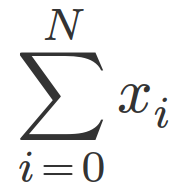
math-core allows you to convert LaTeX math to MathML Core, the MathML specification that is being implemented by web browsers. For example, this LaTeX code:
\sum_{i=0}^N x_iis converted to
<math display="block">
    <munderover>
        <mo lspace="0">∑</mo>
        <mrow>
            <mi>i</mi>
            <mo lspace="0" rspace="0">=</mo>
            <mn>0</mn>
        </mrow>
        <mi>N</mi>
    </munderover>
    <msub>
        <mi>x</mi>
        <mi>i</mi>
    </msub>
</math>
which looks like this:
The goal of this project is to translate modern LaTeX math faithfully to the browser. More specifically, the goal is to…
- Support all common LaTeX math commands, at least those that KaTeX supports
- Produce concise, readable, and semantically correct MathML
- Try to avoid CSS hacks as much as possible (and definitely don’t use JavaScript in any way)
- Support many different math fonts
- Try to keep the compiled WebAssembly code small
This project is still in development, so not all LaTeX math commands that KaTeX supports are supported yet. See Development status below.
There are 4 ways to use the code in this project:
- As a CLI binary
- As a Python package
- As a Rust library
- As a Node.js package
You can download precompiled binaries from the GitHub Release page. Alternatively, you can build the CLI binary from source:
cargo install math-core-cliYou can see an explanation of the CLI interface with
mathcore --helpA config file can be used to define custom LaTeX macros. An example of such a file is contained in this repository: mathcore.toml.
In the future, there may be more comprehensive documentation on a dedicated website.
Install the package with
pip install math-coreBasic documentation for the Python package can be found on pypi page.
Add to your project with
cargo add math-core
The documentation for the library can be found on docs.rs: https://docs.rs/math-core/latest/math_core/
Install the package with
npm i math-core
The MathML markup generated by this project is intended to be very portable and work almost without a CSS style sheet. However, in order to really get LaTeX-like rendering, one unfortunately needs custom math fonts.
To specify the font, include something like this in your CSS:
@font-face {
    font-family: Libertinus Math Regular;
    src: url('./LibertinusMath-Regular.woff2') format('woff2');
}

math {
    font-family: "Libertinus Math Regular", math;
}
Some day, perhaps, any font with a MATH table will be supported, but right now fonts require some tweaks due to browser shortcomings.
One problem is that Chromium does not look at ssty variants when deciding on a glyph for super- and subscript (resulting in incorrectly rendered primes). Another problem is that Safari displays accents with incorrect vertical space. Additionally, both Chromium and Safari do not horizontally center certain accents. These problems have been manually fixed for the three fonts selectable on the playground:
- New Computer Modern Math Book (original repo): a maintained continuation of LaTeX’s classic Computer Modern Math
- Libertinus Math (original repo): a maintained continuation of Linux Libertine
- Noto Sans Math (original repo): a sans-serif math font
The fixes applied to the font files do not change the shape of any glyphs; they merely rearrange some glyphs or position them differently within glyph space.
The patching of these fonts is tracked in a separate repository: math-core-fonts. To use them on your website, download them from there.
The math fonts all have quite large font files. Especially New Computer Modern Math Book is enormous with an almost 700kB .woff2 file. Therefore, if possible, you should use font subsetting where the font file only includes those glyphs that are actually used on your website. Existing tools should work fine for this.
In LaTeX, the text within \text commands is typically meant to be displayed with the document font and not with the math font.
In order to achieve this, in math-core, something like the following needs to be added to the CSS:
mtext {
    /* Base font for `\text` */
    font-family: "Libertinus Serif", serif;
    /* Font for `\texttt` */
    code {
        font-family: "Libertinus Mono", monospace;
    }
    /* Font for `\textrm` */
    span.math-core-serif-font {
        font-family: "Libertinus Serif", serif;
    }
    /* Font for `\textsf` */
    span.math-core-sans-serif-font {
        font-family: "Libertinus Sans", sans-serif;
    }
}
Even if you want to let <mtext> inherit the math font, you should still set a font for \textsf:
mtext span.math-core-sans-serif-font {
    font-family: sans-serif;
}
or, if you use a sans-serif math font, you should set a font for \textrm. Otherwise those commands won’t have an effect.
Chromium does not support the <menclose> element, which is used for \sout{...}, \cancel{...}, etc. Therefore, if you want to use these commands, you need to include the following CSS:
/* Styles for Chromium only */
@supports (not (-webkit-backdrop-filter: blur(1px))) and (not (-moz-appearance: none)) {
    menclose {
        position: relative;
        padding: 0.5ex 0;
    }
    mrow.menclose-updiagonalstrike,
    mrow.menclose-downdiagonalstrike,
    mrow.menclose-horizontalstrike {
        display: inline-block;
        position: absolute;
        left: 0.5px;
        bottom: 0;
        width: 100%;
        height: 100%;
        background-color: currentcolor;
    }
    mrow.menclose-updiagonalstrike {
        clip-path: polygon(0.05em 100%, 0 calc(100% - 0.05em), calc(100% - 0.05em) 0, 100% 0.05em);
    }
    mrow.menclose-downdiagonalstrike {
        clip-path: polygon(0em 0.05em, 0.05em 0em, 100% calc(100% - 0.05em), calc(100% - 0.05em) 100%);
    }
    mrow.menclose-horizontalstrike {
        clip-path: polygon(0em calc(55% + 0.0333em), 0em calc(55% - 0.0333em), 100% calc(55% - 0.0333em), 100% calc(55% + 0.0333em));
    }
}We also recommend (though it is not necessary) to add the following CSS:
/* Styles for Chromium and Safari */
@supports (not (-moz-appearance: none)) {
    mover[accent="true" i] > mo:nth-child(2) {
        margin-bottom: 0.15ex;
    }
}
This slightly increases the gap between letter and accent on Chromium and Safari. One risk with such a CSS rule is that if Chromium or Safari ever increases that gap to match Firefox, then this CSS will produce an overlarge gap. However, it's not clear that this will ever happen and we think the present-day benefits of this CSS rule outweigh the future risks.
The above CSS unfortunately does not fix all rendering bugs found in the current versions of browsers. There is a tracking issue for other known rendering bugs: #209
There are two tracking issues for development:
Other things that haven’t been implemented yet:
- Nested math mode (math mode within
\text{...}): #431
There are some things we will (most likely) never support.
Supporting these would make the parser much more complicated. This does not seem worth it, given that these commands are very rarely used and considered somewhat deprecated.
Other commands in this category: \choose, \brace, \brack, \atop
Again, supporting these would make the code much more complicated and anyway, these commands need to be repeated in every document. It seems more convenient to users and to the development of this project if new commands can only be defined in the config file.
There is no Unicode range for this, so the only way to implement this would be with a custom font and a CSS class, which we would prefer to avoid.
- Don’t use infix commands like
\over,\above,\choose,\brace,\brack,\atop. - Don’t try to create your own symbols by overlapping or stacking existing symbols; instead, try to find a Unicode symbol that looks like what you want: https://ftp.tu-chemnitz.de/pub/tex/fonts/newcomputermodern/doc/newcm-unimath-symbols.pdf
- This also applies to things like
:=. Consider using\coloneqqinstead, which will result in the semantically correct Unicode symbol.
- This also applies to things like
- Don’t worry about having unnecessary curly braces, like, say,
x_{2}vsx_2. Both result in the same MathML because unnecessary groups are stripped away by this library. - Try to avoid using absolute length units like
\hspace{1cm}. It’s difficult to render them correctly. Instead, use relative length units like\hspace{2.8em}. - Use
\text{...}only for prose and not for, e.g., subscripted textual labels as inD_\text{test}. In the latter case, use\mathrm{...}instead.
Note: at the time of this writing (June 2025), none of the following libraries render \vec and \hat correctly.
- pulldown-latex: The project most similar to this one. It is a Rust library for converting LaTeX math to MathML Core. The differences are:
- pulldown-latex only provides a Rust library; no Python package, no CLI
- pulldown-latex requires a CSS style sheet
- pulldown-latex can’t do certain simplifications of the MathML AST due to its architecture; for example, it can’t strip away the unnecessary grouping in
x_{2}, resulting in an unnecessary<mrow>in the output - At the time of this writing (June 2025), pulldown-latex doesn’t distinguish between
\mathcaland\mathscr.
- Temml: a fork of KaTeX which removed the HTML output of KaTeX and kept only on the MathML output. Temml produces much higher quality MathML output than KaTeX. The differences to this library are:
- Temml is written in JavaScript, with all the pros and cons that result from that
- Temml requires a CSS style sheet
- Temml is much more willing to work around browser bugs to get consistent rendering, with specific CSS hacks for each browser; math-core doesn’t do that yet and it’s not clear we’ll ever do that
This code was originally forked from https://github.com/osanshouo/latex2mathml. The basic architecture of a lexer and a parser remains, but all the details have drastically changed and the supported portion of LaTeX commands has drastically increased.