

Full IntelliSense, validation, and tooling for Django Cotton components in VS Code — autocomplete, hover docs, 19 diagnostic rules, quick fixes, and a component explorer. Stop guessing prop names and catch template mistakes before they hit the runtime.
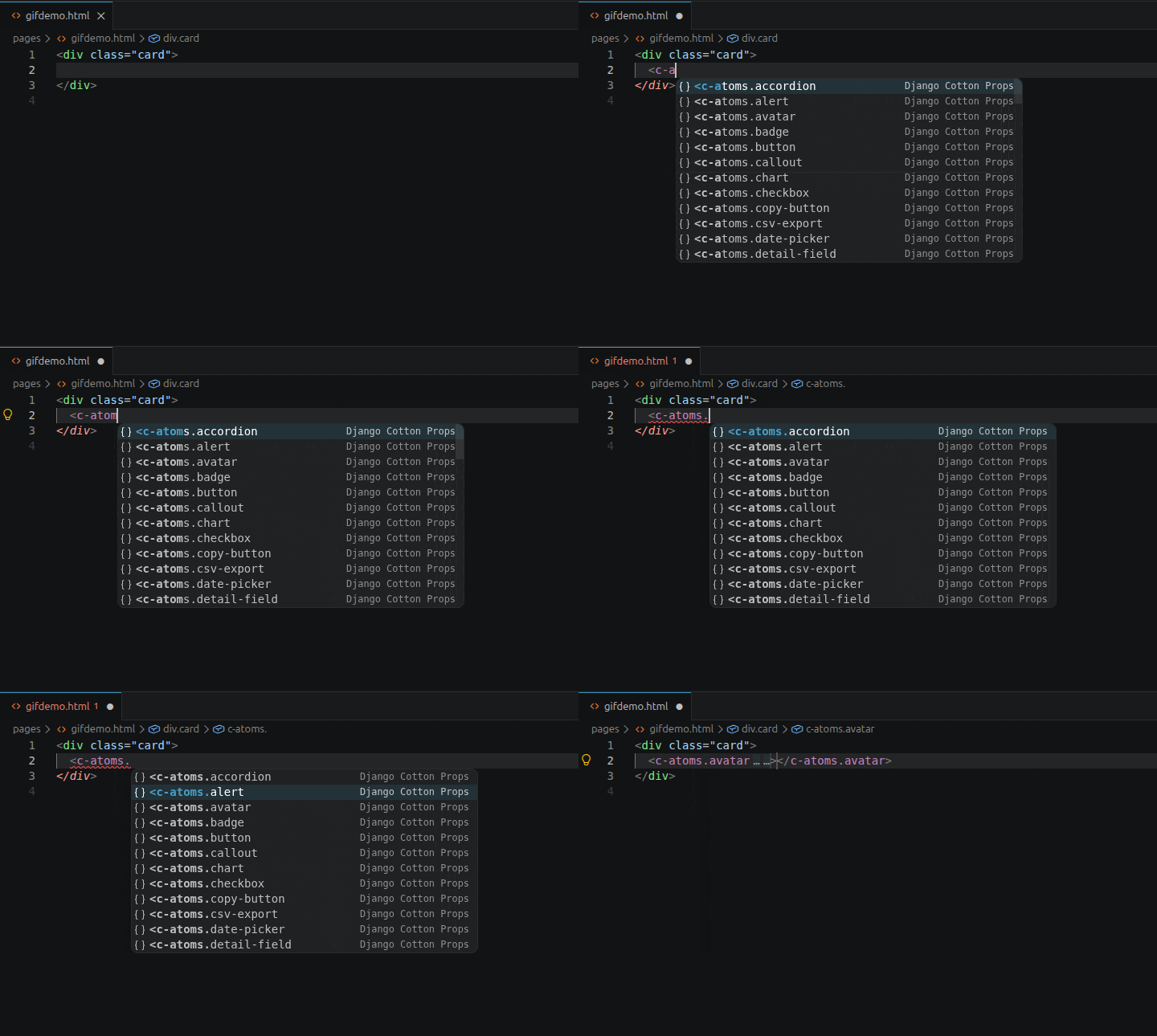
Autocomplete every component, navigate, and accept — without leaving the keyboard
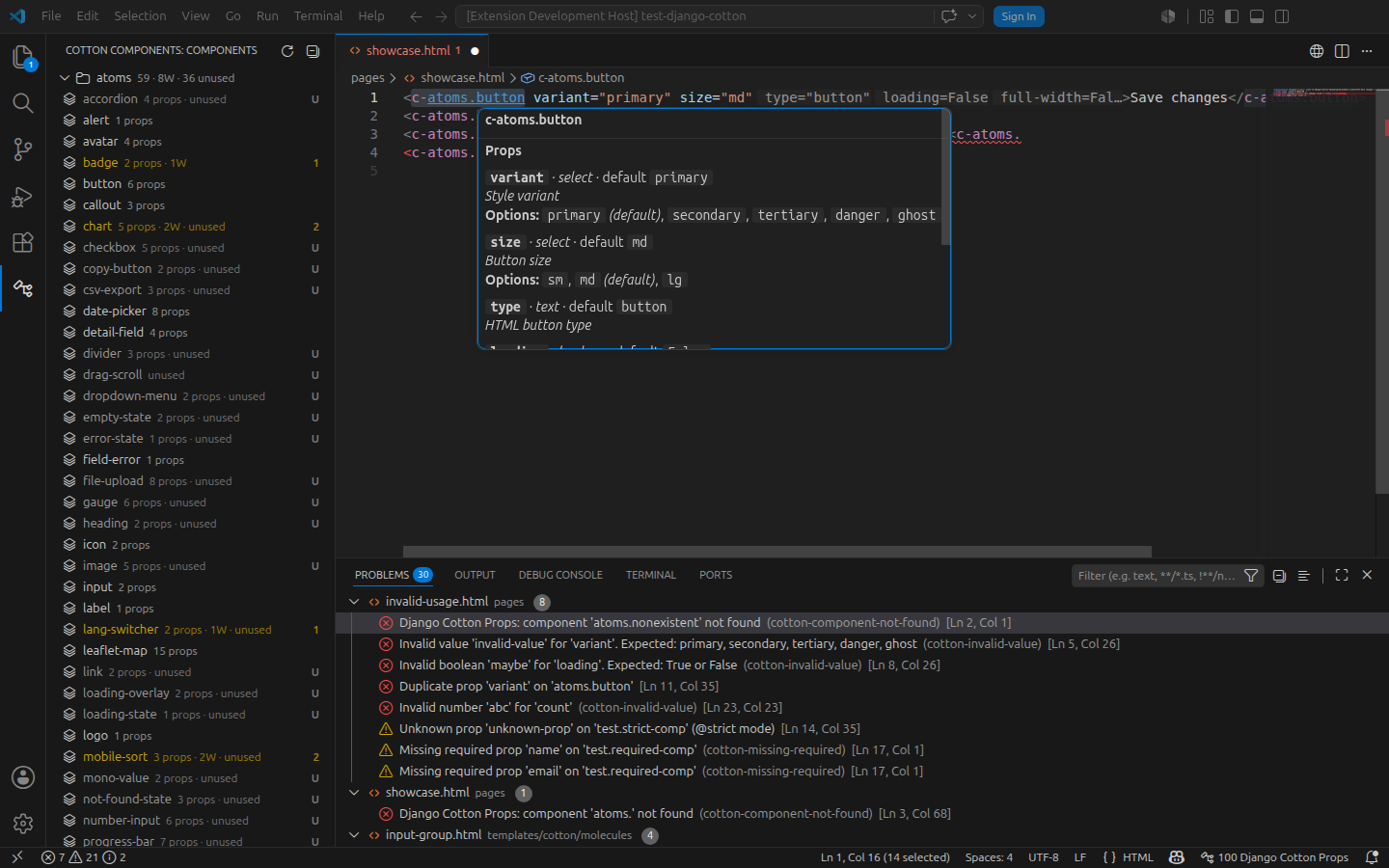
Hover any tag for its full prop documentation
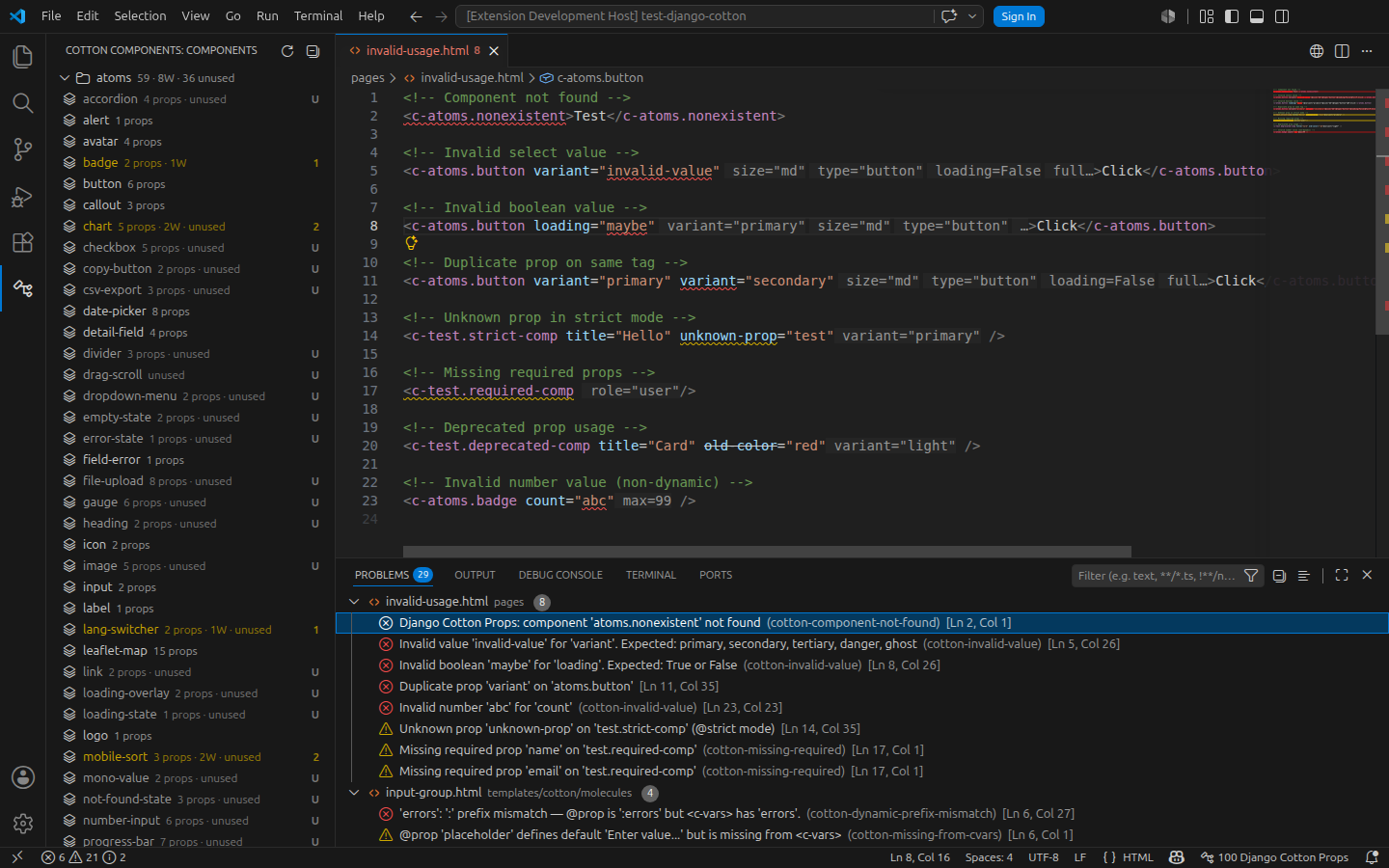
Catch mistakes as you type — 19 diagnostic rules
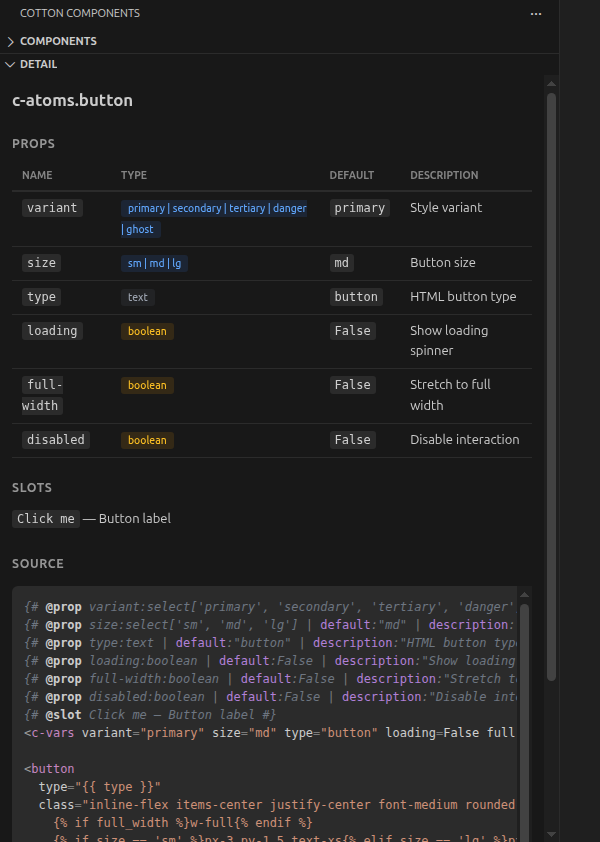
Select any component to inspect its props, slots, and highlighted source — in the sidebar
- Install — search Cotton Props in the Extensions view, or run
ext install velezanthony.cotton-props. - Requirements — a Django Cotton project with component templates, and VS Code 1.97+. The default
templates/cotton/layout needs zero configuration. - Go — open any
.htmlordjango-htmltemplate, type<c-, and autocomplete, hover docs, and diagnostics light up instantly.
Everything works in .html and django-html files, live as you type.
| ⚡ Autocomplete | tags, props, and values — grouped by category, with type / default / required / deprecated badges |
| 💡 Hover docs | description, prop table, slots, and trigger HTML on any tag or prop |
| 🧭 Navigation | Go to Definition (F12), Find All References, Outline symbols, Rename Prop (F2) |
| 🔀 Dynamic dispatch | understands <c-component is="..."> in all three forms |
| 🚦 Diagnostics | 19 edit-time rules across component and usage files |
| 🛠️ Quick fixes | one-click document / sync / insert actions on the 9 auto-repairable diagnostics |
| 🔁 Auto-rename tag | the closing tag follows the opening tag as you edit, through nesting |
| 🗂️ Sidebar explorer | component tree, detail panel, and drag-and-drop usage blocks |
| 🎁 Refactors | Wrap with Component, Extract to Component, convert direct ↔ dispatch |
| 🎨 Editor aids | semantic highlighting, inlay hints, code lens, folding, signature help, status-bar count |
| 📁 Safe renames | renaming a component file updates every <c-tag> reference project-wide |
🚦 All 19 diagnostic rules — what gets flagged at edit time
In component files:
- Duplicate
@propdefinitions @propmissing from<c-vars>(shows default value if defined)- Undocumented props in
<c-vars> - Unused props (defined but never referenced in template body)
- Default mismatch —
@propand<c-vars>have different default values @propdefines default but<c-vars>attr has no value (bare attr)<c-vars>has default value but@propdoesn't document one| requiredco-exists with| default:(parser silently dropsrequired)- Type-default mismatch —
:booleandefault outsideTrue/False/1/0, or:numberdefault that won't parse - Enum default out of range —
:selectdefault (or<c-vars>value) not in the option list - Dynamic-prefix mismatch —
:fooin@propvsfooin<c-vars>(or vice versa) - Missing
<c-vars>—@propdeclared but no<c-vars>tag (Cotton passes nothing to the template) - Missing prop description —
@propwithout| description:filter (hint-level)
In usage files:
- Component not found
- Unknown prop (
@strictmode) - Duplicate prop on same tag
- Deprecated prop usage (strikethrough hint)
- Invalid type value (select, boolean, number)
- Missing required prop
- Invalid component name — a tag like
<c-...>that could never name any component <c-component>with nois(or:is) attribute
[!NOTE] Unused components are flagged in the sidebar (badge
Uon the tree item), not as a file diagnostic — "this component isn't referenced anywhere" is metadata about its place in the system, not a code error. Add{# @ignore-unused #}inside the component file to suppress it for library or dynamic-tag components.
[!TIP] Type validation is smart-skipped for dynamic props (
:collapsed="variable") and template expressions ({{ var }},{% tag %}) — those are Django values, not literals, so there are no false positives.<c-atoms.badge variant="oops" /> <!-- Error: invalid select value --> <c-atoms.badge :variant="user_variant" /> <!-- skipped: Django variable -->
🛠️ Every quick fix — one click on the lightbulb
- Document prop / Document all props — generate
@propannotations with guessed types - Add required prop / Add all required props — insert missing required props with defaults
- Add to
<c-vars>/ Add all missing — insert missing props in the right format (:dynamic,boolean=False,text="value") - Sync
<c-vars>default — update a bare or mismatched value to match the@propdefault - Remove
| required/ Remove| default:— resolve a required-with-default conflict - Replace with
<option>— one action per allowed:selectoption when a value is out of range - Add / Remove
:prefix — toggle the dynamic prefix on a<c-vars>attr to match its@prop - Add
<c-vars />tag — insert the missing declaration when@prophas no<c-vars>sibling - Add
| description:""filter — fill in a missing description
🔀 Dynamic tag dispatch — the three forms of <c-component is="...">
Cotton's built-in dispatcher renders a component whose name is decided at runtime. The extension understands all three shapes:
| Syntax | Treatment |
|---|---|
<c-component is="icons.spinner" /> |
Direct reference to c-icons.spinner — full Go-to-Definition, hover, completion, references. Emits component-not-found if it doesn't resolve. |
<c-component is="icons.{{ name }}" /> |
The static head is a prefix match: every component under c-icons.* counts as referenced (no false unused badge). |
<c-component :is="my_var" /> |
Pure Django expression — unresolvable. Use {# @ignore-unused #} on the target if needed. |
Multi-line declarations work the same way. Renaming a component file rewrites every is="literal-target" pointing at it, and a refactor action converts between the direct and dispatch forms.
🗂️ Sidebar explorer — tree, badges, detail panel, drag & drop
The activity-bar icon opens the Cotton Components panel:
- Components tree — collapsible categories with aggregated diagnostic counts:
atoms 59 · 4E 2W 8H · 12 unused - Per-component badges — a single count for the highest severity present (capped at
9+), coloured by that severity; aUbadge when a component has no diagnostics and is referenced nowhere. The row text spells the full breakdown out:3 props · 2E 1W 8H · unused - Detail panel — click a component for its props table, slots, and syntax-highlighted source
- Drag & drop — drag a component into the editor to insert a full usage block with every prop as a tabstop and defaults pre-filled;
Tabsteps through them - Tag filter — the title-bar button opens a filter box and the tree narrows as you type, matching a case-insensitive substring against the full dotted tag (so both
atomsandbuttonreachatoms.button). The active filter shows asFilter: …in the view header and survives closing the box; clear it with the title-bar button, by emptying the box, or withEscapewhile the tree has focus - Copy tag and in-tree search (
Ctrl+F)
🎨 Semantic highlighting — @prop annotation colors (theme-aware)
| Token | Example | Color |
|---|---|---|
| Delimiters | {# #} | |
comment (green/gray) |
| Keywords | @prop |
keyword (purple) |
| Prop name | variant |
variable (blue) |
| Filter names | default description |
variable (blue) |
| Values | "primary" 13 False |
string (orange) |
| Component tags | c-atoms.button |
keyword (purple) |
Colors adapt to your active VS Code theme.
The full catalogue lives in docs/REFERENCE.md:
- Prop annotation syntax — every
@propfilter, the<c-vars>contract, and how the two stay in sync - Diagnostic rules — one section per code, with the smallest input that triggers it
- Settings — every
djangoCottonProps.*option
Components not showing up?
- No completions, or the sidebar is empty? The extension scans
templates/cotton/by default. If your components live elsewhere, add the folder todjangoCottonProps.templatePaths— path suffixes matched at any depth, so one entry covers the project root and every Django app. Changes apply live, no reload. - A component is flagged
unusedbut it isn't? It's reached only through a dynamic<c-component is="...">the indexer can't resolve. Add{# @ignore-unused #}inside the component file to clear the badge. - A usage isn't validated? Type checks are skipped on purpose for dynamic props (
:prop="var") and template expressions ({{ }},{% %}) — those are Django values, not literals.
Built for Django Cotton · MIT licensed · Requires VS Code 1.97+