


Request Mocking Protocol (RMP) is a specification for HTTP requests mocking in end-to-end tests. It uses declarative JSON schemas to define mocked request and response. These schemas can be serialized and sent over the network, enabling both client-side and server-side mocking.
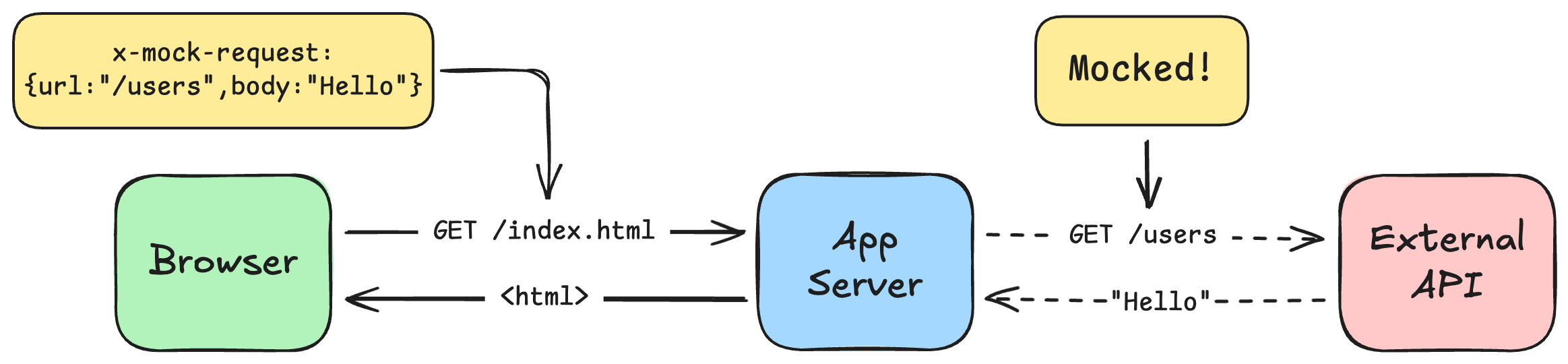
- A test defines mock schemas and sends them to the app server in a custom HTTP header:
x-mock-request. - The server-side interceptor reads that header and applies the mocks to the outgoing API calls.
- The page is rendered with mocked data, and the test can assert the expected UI state.
Check out the Concepts and Limitations for more details.
Click to expand
Install with any package manager:
npm install --save-dev request-mocking-protocolpnpm add --save-dev request-mocking-protocolyarn add --dev request-mocking-protocolThis setup mocks server-side fetch calls made by a Next.js app during Playwright tests.
The Next.js setup includes two parts.
Enable fetch interception in instrumentation.ts for normal server startup.
Create src/patch-fetch.mjs with the following content:
// Patch fetch for testing.
// Keep this file as js to be able to import in the dev command.
import { setupFetchInterceptor } from 'request-mocking-protocol/fetch';

setupFetchInterceptor(async () => {
  const { headers } = await import('next/headers.js');
  return headers();
});
Import the patch in src/instrumentation.ts (adjust the env variable for your project):
export async function register() {
  if (process.env.NEXT_RUNTIME === 'nodejs' && process.env.VERCEL_ENV !== 'production') {
    await import('./patch-fetch.mjs');
  }
}
Note
When deploying on Vercel, don't use process.env.NODE_ENV for detecting non-production environment,
because even preview deployments will have it as production.
Add interceptor to the next dev command, so it remains active across HMR reloads. Update package.json:
{
  "scripts": {
    "dev": "NODE_OPTIONS='--import ./src/patch-fetch.mjs' next dev"
  }
}
Important
This next dev command import should become unnecessary once Next.js preserves the instrumented fetch across HMR automatically (see #92877).
Important
Placing the fetch interceptor in layout.tsx is no longer recommended.
Now your Next.js server is ready for testing.
Each test defines its own mocks using a MockClient class. Mocks are not shared across tests, enabling per-test mock isolation and full parallelization.
import { test as base } from '@playwright/test';
import { MockClient } from 'request-mocking-protocol';

export const test = base.extend<{ mockServerRequest: MockClient }>({
  mockServerRequest: async ({ context }, use) => {
    const mockClient = new MockClient();
    mockClient.onChange = async (headers) => context.setExtraHTTPHeaders(headers);
    await use(mockClient);
  },
});test('my test', async ({ page, mockServerRequest }) => {
// set up server-side mock
await mockServerRequest.GET('https://jsonplaceholder.typicode.com/users', {
body: [{ id: 1, name: 'John Smith' }],
});
// navigate to the page
await page.goto('/');
// assert page content according to mock
await expect(page).toContainText('John Smith');
});Check out MockClient API for other methods.
See the full working example in examples/nextjs-playwright.
RMP offers flexible matching options to ensure your mocks are applied exactly when you need them.
URL strings are matched with URLPattern-style syntax. URLPattern has a few matching rules that can differ from common glob or routing syntax, so review the URLPattern docs carefully when using wildcards or query-string patterns.
Match requests by providing a full URL string.
await mockClient.GET('https://example.com/users', /* response */);Important: this string matches any query parameters. URLPattern treats a missing search component as *, so the mock above matches all of these requests:
https://example.com/users                matches
https://example.com/users?page=1         matches
https://example.com/users?anything=here  matches
Set query: null to match string URL without any query parameters:
await mockClient.GET({
  url: 'https://example.com/users',
  query: null,
}, /* response */);
Examples:
https://example.com/users                matches
https://example.com/users?               matches
https://example.com/users?page=1         does not match
https://example.com/users?anything=here  does not match
The URLPattern equivalent is a trailing ?, which creates an explicit empty search component:
await mockClient.GET('https://example.com/users?', /* response */);Named groups capture a part of the matched URL under a given name using :name syntax. They match any character sequence that doesn't cross a path segment boundary (i.e. stops at /).
await mockClient.GET('https://example.com/users/:id', /* response */);https://example.com/users/123 matches (id = "123")
https://example.com/users/abc matches (id = "abc")
https://example.com/users does not matchNamed groups can be used in the response body via {{ name }} substitution — see Route Parameters.
You can also use named groups in the hostname. In that case the group stops at . instead of /:
await mockClient.GET('https://:env.example.com/users', /* response */);https://api.example.com/users matches (env = "api")
https://staging.example.com/users matches (env = "staging")
https://example.com/users does not matchURLPattern strings can include regex matchers inside parentheses. It can be named :name(regex) or unnamed (regex). Use them to define alternative URL parts or constraints.
Example 1: match two hostnames example.com and example.io:
await mockClient.GET('https://example.(com|io)/users', /* response */);https://example.com/users matches
https://example.io/users matches
https://example.org/users does not matchExample 2: match only URLs with digits in user id:
await mockClient.GET('https://example.com/users/:id(\\d+)', /* response */);https://example.com/users/123 matches
https://example.com/users/abc does not matchIn JavaScript and TypeScript strings, escape regex backslashes as
\\. For example, write\\d+instead of\d+.
In URLPattern syntax, * matches any character sequence, not a single path segment:
await mockClient.GET('https://example.com/users/*', /* response */);https://example.com/users/ matches
https://example.com/users/1 matches
https://example.com/users/1/posts matches
https://example.com/users does not match
https://example.com/users?page=1 does not match
https://example.com/products/1 does not matchWildcards can also be used inside the hostname. The hostname wildcard matches any character sequence inside the hostname component, including dots:
await mockClient.GET('https://*.example.com/users', /* response */);https://api.example.com/users matches
https://cdn.example.com/users matches
https://foo.bar.example.com/users matches
https://example.com/users does not match
https://api.example.com/users/1 does not match
https://api.example.org/users does not matchFor any subdomain plus the root domain, use:
await mockClient.GET('https://{*.}?example.com', /* response */);URLPattern does not ignore trailing slashes by default. To match both /users and /users/, use an optional group as described in the URLPattern pattern syntax docs:
await mockClient.GET('https://example.com/users{/}?', /* response */);https://example.com/users matches
https://example.com/users/ matchesRMP accepts RegExp object instead of string, that is more predictable in some cases. This exmaple matches any URL with /users/xxx pathname:
await mockClient.GET(/\/users\/\d+$/, /* response */);Explicitly define the HTTP method to match:
// GET
await mockClient.GET('https://api.example.com/users', /* response */);
// POST
await mockClient.POST('https://api.example.com/users', /* response */);
// Any HTTP method
await mockClient.ALL('https://api.example.com/users', /* response */);Match requests by specific URL query parameters:
await mockClient.GET({
  url: 'https://api.example.com/users',
  query: {
    page: '1'
  },
}, /* response */);
This matches query page=1 in any position:
https://api.example.com/users?page=1             matches
https://api.example.com/users?page=1&size=10     matches
https://api.example.com/users?size=10&page=1     matches
https://api.example.com/users                    does not match
https://api.example.com/users?size=10            does not match
To require a URL with no query params, set query to null:
await mockClient.GET({
  url: 'https://api.example.com/users',
  query: null,
}, /* response */);Match requests by HTTP headers:
await mockClient.GET({
  url: 'https://api.example.com/users',
  headers: {
    Authorization: 'Bearer test-token'
  },
}, /* response */);Match requests by string or JSON request body.
await mockClient.POST({
  url: 'https://api.example.com/users',
  body: {
    role: 'admin'
  },
}, /* response */);Combine all matchers together:
await mockClient.POST({
  url: 'https://api.example.com/users',
  query: {
    page: '1'
  },
  headers: {
    Authorization: 'Bearer test-token'
  },
  body: {
    role: 'admin'
  },
}, /* response */);
If multiple mocks match the same request, the most recently added matching mock is used. Mock precedence is based on registration order, not URL specificity.
RMP lets you mock any part of the response.
Set response body as string or JSON object:
// string
await mockClient.GET(/* req */, {
  body: 'Hello world'
});

// JSON
await mockClient.GET(/* req */, {
  body: {
    id: 1,
    name: 'John Smith'
  },
});Set response headers:
await mockClient.GET(/* req */, {
  headers: {
    'content-type': 'application/json'
  },
});Set arbitrary HTTP status code to emulate errors:
// Emulate 500 Internal Server Error
await mockClient.GET(/* req */, 500);

// or with full syntax
await mockClient.GET(/* req */, {
  status: 500
});Set arbitrary response delay in miliseconds:
await mockClient.GET(/* req */, {
  delay: 1000
});You can combine all options together to build the response mock:
await mockClient.GET('https://example.com/*', {
  headers: {
    'content-type': 'application/json'
  },
  body: {
    id: 1,
    name: 'John Smith'
  },
  delay: 1000,
});
Response patching allows to make a real request, and modify only parts of the response for the testing purposes.
RMP supports response patching by providing the bodyPatch key in the response schema:
await mockClient.GET('https://jsonplaceholder.typicode.com/users', {
  bodyPatch: {
    '[0].address.city': 'New York',
  },
});
The final response will contain actual and modified data:
[
  {
    "id": 1,
    "name": "Leanne Graham",
    "address": {
-      "city": "Gwenborough",
+      "city": "New York",
      ...
    }
  }
  ...
]
This technique is particularly useful to keep your tests in sync with actual API responses, while maintaining test stability and logic.
The bodyPatch defines fields in a dot-notation form, evaluated with lodash.set:
{
  [path.to.property]: new value
}
You can define route parameters in the URL pattern and use them in the response via {{ }} syntax:
await mockClient.GET('https://jsonplaceholder.typicode.com/users/:id', {
  body: {
    id: '{{ id:number }}',
    name: 'User {{ id }}',
  }
});
The request:
GET https://jsonplaceholder.typicode.com/users/1
will be mocked with the response:
{
  id: 1,
  name: 'User 1',
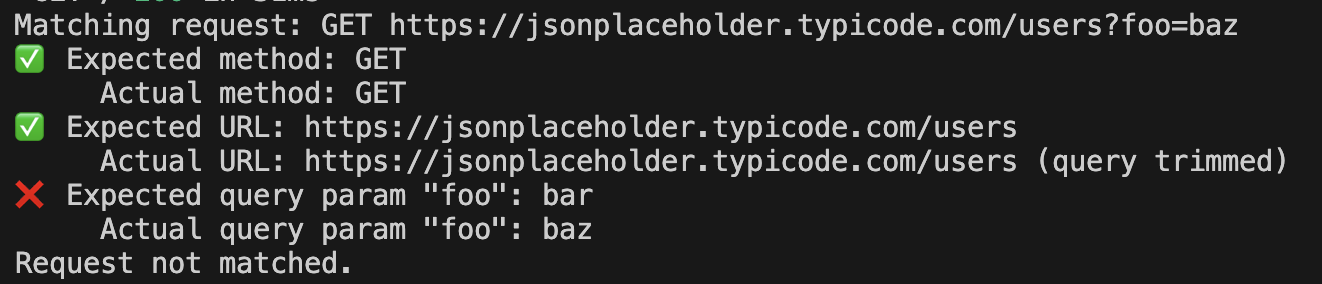
}You can enable debugging in two ways:
- set
REQUEST_MOCKING_DEBUG=1env variable to debug all mocks - set
debug: trueon any request/response schema to debug the specific mock
await mockClient.GET(
  {
    url: 'https://example.com/*',
    query: { foo: 'bar' },
    debug: true, // <-- enable debugging via request schema
  },
  {
    body: { id: 1, name: 'John Smith' },
    debug: true, // <-- or enable debugging via response schema
  },
);
When debug enabled, the server will output mocking logs to console:
RMP is designed to work seamlessly with popular test runners like Playwright and Cypress, and can also be integrated with custom runners.
On the server side, you should set up an interceptor to catch the requests and apply your mocks.
Use the Quick Start: Next.js + Playwright setup for Next.js App Router applications. For Next.js, use the instrumentation.ts setup instead of layout.tsx.
Use the Setup Playwright fixture to send mocks to your application server through Playwright's browser context headers.
-
Add a custom command
mockServerRequestin support files, see example mock-server-request.js. -
Use the custom command to define mocks:
it('shows list of users', () => {
  // set up server-side mock
  cy.mockServerRequest('https://jsonplaceholder.typicode.com/users', {
    body: [{ id: 1, name: 'John Smith' }],
  });

  // navigate to the page
  cy.visit('/');

  // assert page content according to mock
  cy.get('li').first().should('have.text', 'John Smith');
});
See astro.config.ts in the astro-cypress example.
You can integrate RMP with any test runner. It requires two steps:
-
Use the
MockClientclass to define mocks.const mockClient = new MockClient();
-
Attach
mockClient.headersto the navigation request.const headers = { ...mockClient.headers }; // ...navigate to the page with provided headers
You can write an interceptor for any framework. It requires two steps:
- Read the HTTP headers of the incoming request.
- Capture outgoing HTTP requests.
Check out the reference implementations in the src/interceptors directory.
You can mock client-side requests with the same syntax as server-side mocks.
To achieve it in Playwright, create a mockBrowserRequest fixture:
import { test as base } from '@playwright/test';
import { MockClient } from 'request-mocking-protocol';
import { setupPlaywrightInterceptor } from 'request-mocking-protocol/playwright';

export const test = base.extend<{ mockBrowserRequest: MockClient }>({
  mockBrowserRequest: async ({ context }, use) => {
    const mockClient = new MockClient();
    await setupPlaywrightInterceptor(context, mockClient);
    await use(mockClient);
  },
});
Then use it in tests:
test('my test', async ({ page, mockBrowserRequest }) => {
  // set up browser-side mock
  await mockBrowserRequest.GET('https://jsonplaceholder.typicode.com/users', {
    body: [{ id: 1, name: 'John Smith' }],
  });

  // navigate to the page
  await page.goto('/');

  // assert page content according to mock
  await expect(page).toContainText('John Smith');
});A mock schema is a serializable object that describes one HTTP mock. It consists of a reqSchema, which defines the request to match, and a resSchema, which defines the mocked response to return.
Example:
{
  reqSchema: {
    method: 'GET',
    url: 'https://example.com',
  },
  resSchema: {
    status: 200,
    body: 'Hello world',
  }
}
This schema will match the request:
GET https://example.com
and make it return the response:
HTTP 200 OK
Hello world
The request schema is a serializable object that defines parameters for matching a request.
Full request schema definition.
Example:
{
  method: 'GET',
  url: 'https://jsonplaceholder.typicode.com/users',
  query: {
    foo: 'bar'
  }
}
This schema will match the request:
GET https://jsonplaceholder.typicode.com/users?foo=bar
The response schema is a serializable object that defines how to build the mocked response.
Full response schema definition.
Example:
{
  status: 200,
  body: 'Hello world'
}Request-mocking-protocol uses a custom HTTP header x-mock-request for transferring JSON-stringified schemas from the test runner to the application server.
Example:
x-mock-request: [{"reqSchema":{"method":"GET","patternType":"urlpattern","url":"https://example.com"},"resSchema":{"body":"hello","status":200}}]
On the server side, the interceptor will read the incoming headers and apply the mocks.
The MockClient class is used on the test-runner side to define HTTP request mocks.
Creates a new instance of MockClient.
options(optional): An object containing configuration options.debug(optional): A boolean indicating whether to enable debug mode.
Returns HTTP headers that are built from the mock schemas. Should be sent to the server for mocking server-side requests.
A callback function that is called whenever the mocks are changed. Accepts headers parameter that can be attached to the browsing context and send to the server.
Adds a new mock for the corresponding HTTP method.
If multiple mocks match the same request, the most recently added matching mock is used. Mock precedence is based on registration order, not URL specificity.
-
reqSchema: string | RegExp | object– The request matching schema for the mock.- If defined as
string, it is treated as URLPattern for matching the request only by URL. A URL string without an explicit search component matches any query string. - If defined as
RegExp, it is treated as RegExp for matching the request only by URL. - If defined as
object, it is treated as MockRequestSchemaInit type.
- If defined as
-
resSchema: number | object: The response schema for the mock.- If defined as
number, it is treated as an HTTP status code. - If defined as
object, it is treated as MockResponseSchema type.
- If defined as
Examples:
// mock any GET request to https://example.com
await mockClient.GET('https://example.com/*', {
  body: {
    id: 1,
    name: 'John Smith'
  },
});

// mock any POST request to https://example.com having foo=bar in query
await mockClient.POST({
  url: 'https://example.com/*',
  query: {
    foo: 'bar'
  },
}, {
  body: {
    id: 1,
    name: 'John Smith'
  },
});Clears all mocks and rebuilds the headers.
Interceptors are used on the server to capture HTTP requests and apply mocks. Currently, there are two server-side interceptors available.
This interceptor overwrites the globalThis.fetch function.
Basic usage:
const { setupFetchInterceptor } = await import('request-mocking-protocol/fetch');

setupFetchInterceptor(() => {
  // read and return headers of the incoming HTTP request
});
The actual function for retrieving incoming headers depends on the application framework.
If your app doesn’t use fetch, you can try the MSW interceptor, which can capture a broader range of request types:
import { setupServer } from 'msw/node';
import { createHandler } from 'request-mocking-protocol/msw';

const mockHandler = createHandler(() => {
  // read and return headers of the incoming HTTP request
});
const mswServer = setupServer(mockHandler);
mswServer.listen();
Note that MSW is used only to capture the request, while the mocks should be declaratively defined using the MockClient class.
The function for retrieving incoming HTTP headers depends on the application framework.
For Next.js, use the instrumentation.ts setup instead of layout.tsx.
The Playwright interceptor is used in Playwright tests to mock page requests with the same syntax as for server requests.
import { setupPlaywrightInterceptor } from 'request-mocking-protocol/playwright';

await setupPlaywrightInterceptor(page, mockClient);
Use it for in-browser requests. For server-side requests in Next.js, use the Global Fetch interceptor through the quick start setup.
-
Static Data Only: The mock must be serializable to JSON. This means you can't provide arbitrary function-based mocks. To mitigate this restriction, RMP supports Parameter Substitution and Response Patching techniques.
-
Header Size Limits: HTTP headers typically support 4KB to 8KB of data. If you need to mock larger payloads, consider Response patching or alternative techniques.
While both RMP and MSW support request mocking, RMP stands out by enabling per-test isolation and parallelization for server-side mocks. It also allows mocking server-side requests when tests run on CI against a remote target.
| Feature | RMP | MSW |
|---|---|---|
| REST API | ✅ | ✅ |
| GraphQL API | ❌ | ✅ |
| Arbitrary handler function | ❌ | ✅ |
| Server-side mocking | ✅ | ✅ |
| Server-side mocking with per-test isolation | ✅ | ❌¹ |
| Server-side mocking on CI | ✅ | ❌ |
¹ Per-test isolation in MSW can be achieved via spinning a separate app instance for each test. See this example.