# SRP - 平行光实时阴影
# 1. 前言
这一章节主要内容是在SRP中实现平行光源(Directional Light)的实时阴影渲染。
# 2. 理论准备
这里使用Shadow Mapping技术来实现。 相关理论文章可以参考:
[传送门 - Shadow Mapping ](https://learnopengl.com/Advanced-Lighting/Shadows/Shadow-Mapping)
要实现平行光阴影,一般分如下两个步骤:
- Shadow Caster (阴影投射)
- Shadow Receiver (阴影接收)
## 2.1 Shadow Caster
阴影投射从平行光的角度,以正交摄像机绘制场景,得到一张深度图,作为ShadowMapTexture
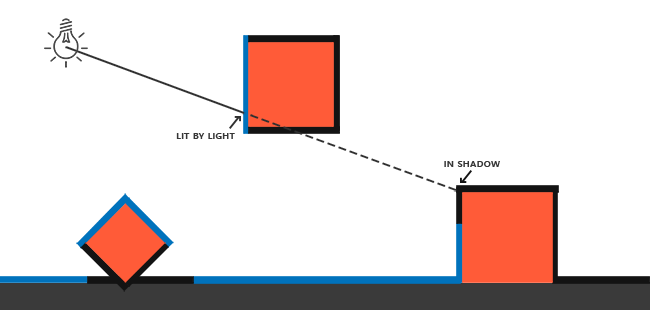 如上图所示,蓝色线条为灯光照亮区域,而黑色部分由于被遮挡形成阴影区域。其中蓝色部分会渲染到ShadowMapTexture中。
## 2.2 Shadow Receiver:
从摄像机角度绘制场景时,在Fragment里,我们重建每个像素的世界坐标,然后重投影到灯光的ShadowMap空间,与ShadowMapTexture中记录的深度值做比较。从而得出像素是否在阴影区域。
如上图所示,蓝色线条为灯光照亮区域,而黑色部分由于被遮挡形成阴影区域。其中蓝色部分会渲染到ShadowMapTexture中。
## 2.2 Shadow Receiver:
从摄像机角度绘制场景时,在Fragment里,我们重建每个像素的世界坐标,然后重投影到灯光的ShadowMap空间,与ShadowMapTexture中记录的深度值做比较。从而得出像素是否在阴影区域。
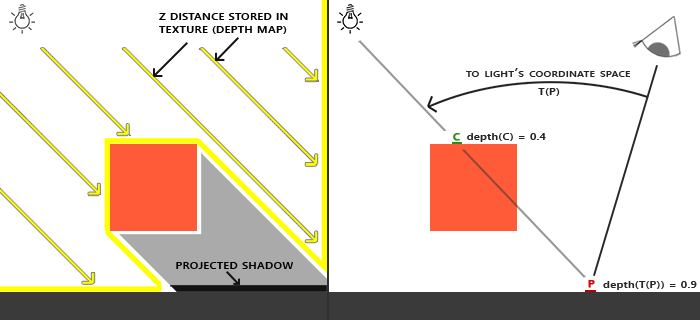 如上图,在ShadowCaster阶段,C点深度`0.4`会被记录到ShadowMapTexture中。 然后当摄像机渲染P点时,算得P点重投影到ShadowMap后的深度为`0.9`, 意味着被C点遮挡,因此判定在阴影区域。
# 3. SRP实现
下面使用SRP来分别实现Shadow Caster和Shadow Receiver。
## 3.1 Shadow Caster
要实现Shadow Caster, 可以细分为如下几个步骤:
- 对场景中的灯光进行裁剪,仅保留对当前摄像机可见区域有影响的灯光.
- 计算灯光的View矩阵和Project矩阵
- 根据计算好的View、Project矩阵,从灯光角度渲染场景,得到ShadowMapTexture
这里我们专门为Shadow Caster定义一个Pass类:
```csharp
public class ShadowCasterPass{
public void Execute(ScriptableRenderContext context,Camera camera,ref CullingResults cullingResults,ref LightData lightData){
}
}
```
### 3.1.1 灯光裁剪
在SRP中,复杂的裁剪工作,引擎已经做好了内部实现,我们只需要通过调用`ScriptableRenderContext.Cull`这个API来进行进行。
在这个系列的前两章中,我们已经完成了裁剪工作,并得到了`CullingResult`对象和`LightData`对象。我们将这两个对象从RenderPipeline中,通过`ShadowCasterPass.Execute`传递过来。其中LightData对象定义如下:
```csharp
public struct LightData{
public int mainLightIndex;
public VisibleLight mainLight;
}
```
在Shadow Caster Pass里我们需要进一步判定,该灯光是否会对可视区域投下阴影。 在SRP中有如下API:
```csharp
public bool CullingResults.GetShadowCasterBounds(int lightIndex, out Bounds outBounds);
```
该接口会根据摄像机视锥裁剪结果,针对指定灯光计算其Shadow Caster影响范围,并返回一个BoundingBox。 假如在范围中没有一个阴影投射对象,那么返回false。
因此我们使用此接口来做前置判断:
```csharp
//false表示该灯光对场景无影响,直接返回
if(!cullingResults.GetShadowCasterBounds(lightData.mainLightIndex,out var lightBounds)){
return;
}
```
### 3.1.2 View&Project矩阵计算
SRP中提供了如下接口来做这件事:
```csharp
public bool CullingResults.ComputeDirectionalShadowMatricesAndCullingPrimitives(int activeLightIndex, int splitIndex, int splitCount, Vector3 splitRatio, int shadowResolution, float shadowNearPlaneOffset, out Matrix4x4 viewMatrix, out Matrix4x4 projMatrix, out Rendering.ShadowSplitData shadowSplitData);
```
可以看到,这个接口的参数非常之多。在这里,我们暂且不去管split相关的参数。因此只需要关注如下三个输入参数:
- activeLightIndex 即我们前面拿到的平行光源索引
- shadowResolution 为ShadowMap贴图的分辨率
- shadowNearPlaneOffset 灯光角度对场景进行深度渲染时的近平面
shadowResolution 可以从Light组件中获取,我们定义如下:
```csharp
private static int GetShadowMapResolution(Light light){
switch(light.shadowResolution){
case LightShadowResolution.VeryHigh:
return 2048;
case LightShadowResolution.High:
return 1024;
case LightShadowResolution.Medium:
return 512;
case LightShadowResolution.Low:
return 256;
}
return 256;
}
```
shadowNearPlaneOffset同样可以从Light组件获取: [API Doc - Light.shadowNearPlane](https://docs.unity3d.com/ScriptReference/Light-shadowNearPlane.html)
最终调用:
```csharp
cullingResults.ComputeDirectionalShadowMatricesAndCullingPrimitives(lightData.mainLightIndex,0,1,
new Vector3(1,0,0),shadowMapResolution,lightComp.shadowNearPlane,out var matrixView,out var matrixProj,out var shadowSplitData);
```
我们可以得到三个输出对象:
- matrixView
- matrixProj
- shadowSpliteData
### 3.1.3 ShadowMapTexture渲染
SRP提供如下API供我们渲染ShadowMapTexture:
```csharp
public void ScriptableRenderContext.DrawShadows(ref Rendering.ShadowDrawingSettings settings);
```
这个API会按照如下条件对Renderers进行过滤:
- 在灯光裁剪区域内
- 开启了Shadow Caster
- 材质包含`"LightMode" = "ShadowCaster"`Pass
在调用这个API进行渲染前,还需要做如下系列准备工作:
- 申请临时的RenderTexture作为ShadowMapTexture
- 配置管线参数,包括View&Proj矩阵和RenderTarget
在代码上大致为:
```csharp
//生成ShadowMapTexture
_shadowMapHandler.AcquireRenderTextureIfNot(shadowMapResolution);
//设置投影相关参数
SetupShadowCasterView(context,shadowMapResolution,ref matrixView,ref matrixProj);
//绘制阴影
context.DrawShadows(ref shadowDrawSetting);
```
为了让物体能正确投射阴影,我们还需要为物体的Shader实现 ShadowCaster Pass
这里我们将改造之前的`BlinnPongSpecular.shader`,加入`ShadowCaster` Pass:
```hlsl
Pass
{
Name "ShadowCaster"
Tags{"LightMode" = "ShadowCaster"}
ZWrite On
ZTest LEqual
ColorMask 0
Cull Back
HLSLPROGRAM
#pragma vertex ShadowCasterVertex
#pragma fragment ShadowCasterFragment
ENDHLSL
}
```
其中`ShadowCasterVertex`和`ShadowCasterFragment`定义在`Shadow.hlsl`中:
```hlsl
struct ShadowCasterAttributes
{
float4 positionOS : POSITION;
};
struct ShadowCasterVaryings
{
float4 positionCS : SV_POSITION;
};
ShadowCasterVaryings ShadowCasterVertex(ShadowCasterAttributes input)
{
ShadowCasterVaryings output;
float4 positionCS = UnityObjectToClipPos(input.positionOS);
output.positionCS = positionCS;
return output;
}
half4 ShadowCasterFragment(ShadowCasterVaryings input) : SV_Target
{
return 0;
}
```
我们使用这个ShadowCasterPass去渲染一遍场景后,可以在FrameDebugger里查看灯光角度生成的深度图:
如上图,在ShadowCaster阶段,C点深度`0.4`会被记录到ShadowMapTexture中。 然后当摄像机渲染P点时,算得P点重投影到ShadowMap后的深度为`0.9`, 意味着被C点遮挡,因此判定在阴影区域。
# 3. SRP实现
下面使用SRP来分别实现Shadow Caster和Shadow Receiver。
## 3.1 Shadow Caster
要实现Shadow Caster, 可以细分为如下几个步骤:
- 对场景中的灯光进行裁剪,仅保留对当前摄像机可见区域有影响的灯光.
- 计算灯光的View矩阵和Project矩阵
- 根据计算好的View、Project矩阵,从灯光角度渲染场景,得到ShadowMapTexture
这里我们专门为Shadow Caster定义一个Pass类:
```csharp
public class ShadowCasterPass{
public void Execute(ScriptableRenderContext context,Camera camera,ref CullingResults cullingResults,ref LightData lightData){
}
}
```
### 3.1.1 灯光裁剪
在SRP中,复杂的裁剪工作,引擎已经做好了内部实现,我们只需要通过调用`ScriptableRenderContext.Cull`这个API来进行进行。
在这个系列的前两章中,我们已经完成了裁剪工作,并得到了`CullingResult`对象和`LightData`对象。我们将这两个对象从RenderPipeline中,通过`ShadowCasterPass.Execute`传递过来。其中LightData对象定义如下:
```csharp
public struct LightData{
public int mainLightIndex;
public VisibleLight mainLight;
}
```
在Shadow Caster Pass里我们需要进一步判定,该灯光是否会对可视区域投下阴影。 在SRP中有如下API:
```csharp
public bool CullingResults.GetShadowCasterBounds(int lightIndex, out Bounds outBounds);
```
该接口会根据摄像机视锥裁剪结果,针对指定灯光计算其Shadow Caster影响范围,并返回一个BoundingBox。 假如在范围中没有一个阴影投射对象,那么返回false。
因此我们使用此接口来做前置判断:
```csharp
//false表示该灯光对场景无影响,直接返回
if(!cullingResults.GetShadowCasterBounds(lightData.mainLightIndex,out var lightBounds)){
return;
}
```
### 3.1.2 View&Project矩阵计算
SRP中提供了如下接口来做这件事:
```csharp
public bool CullingResults.ComputeDirectionalShadowMatricesAndCullingPrimitives(int activeLightIndex, int splitIndex, int splitCount, Vector3 splitRatio, int shadowResolution, float shadowNearPlaneOffset, out Matrix4x4 viewMatrix, out Matrix4x4 projMatrix, out Rendering.ShadowSplitData shadowSplitData);
```
可以看到,这个接口的参数非常之多。在这里,我们暂且不去管split相关的参数。因此只需要关注如下三个输入参数:
- activeLightIndex 即我们前面拿到的平行光源索引
- shadowResolution 为ShadowMap贴图的分辨率
- shadowNearPlaneOffset 灯光角度对场景进行深度渲染时的近平面
shadowResolution 可以从Light组件中获取,我们定义如下:
```csharp
private static int GetShadowMapResolution(Light light){
switch(light.shadowResolution){
case LightShadowResolution.VeryHigh:
return 2048;
case LightShadowResolution.High:
return 1024;
case LightShadowResolution.Medium:
return 512;
case LightShadowResolution.Low:
return 256;
}
return 256;
}
```
shadowNearPlaneOffset同样可以从Light组件获取: [API Doc - Light.shadowNearPlane](https://docs.unity3d.com/ScriptReference/Light-shadowNearPlane.html)
最终调用:
```csharp
cullingResults.ComputeDirectionalShadowMatricesAndCullingPrimitives(lightData.mainLightIndex,0,1,
new Vector3(1,0,0),shadowMapResolution,lightComp.shadowNearPlane,out var matrixView,out var matrixProj,out var shadowSplitData);
```
我们可以得到三个输出对象:
- matrixView
- matrixProj
- shadowSpliteData
### 3.1.3 ShadowMapTexture渲染
SRP提供如下API供我们渲染ShadowMapTexture:
```csharp
public void ScriptableRenderContext.DrawShadows(ref Rendering.ShadowDrawingSettings settings);
```
这个API会按照如下条件对Renderers进行过滤:
- 在灯光裁剪区域内
- 开启了Shadow Caster
- 材质包含`"LightMode" = "ShadowCaster"`Pass
在调用这个API进行渲染前,还需要做如下系列准备工作:
- 申请临时的RenderTexture作为ShadowMapTexture
- 配置管线参数,包括View&Proj矩阵和RenderTarget
在代码上大致为:
```csharp
//生成ShadowMapTexture
_shadowMapHandler.AcquireRenderTextureIfNot(shadowMapResolution);
//设置投影相关参数
SetupShadowCasterView(context,shadowMapResolution,ref matrixView,ref matrixProj);
//绘制阴影
context.DrawShadows(ref shadowDrawSetting);
```
为了让物体能正确投射阴影,我们还需要为物体的Shader实现 ShadowCaster Pass
这里我们将改造之前的`BlinnPongSpecular.shader`,加入`ShadowCaster` Pass:
```hlsl
Pass
{
Name "ShadowCaster"
Tags{"LightMode" = "ShadowCaster"}
ZWrite On
ZTest LEqual
ColorMask 0
Cull Back
HLSLPROGRAM
#pragma vertex ShadowCasterVertex
#pragma fragment ShadowCasterFragment
ENDHLSL
}
```
其中`ShadowCasterVertex`和`ShadowCasterFragment`定义在`Shadow.hlsl`中:
```hlsl
struct ShadowCasterAttributes
{
float4 positionOS : POSITION;
};
struct ShadowCasterVaryings
{
float4 positionCS : SV_POSITION;
};
ShadowCasterVaryings ShadowCasterVertex(ShadowCasterAttributes input)
{
ShadowCasterVaryings output;
float4 positionCS = UnityObjectToClipPos(input.positionOS);
output.positionCS = positionCS;
return output;
}
half4 ShadowCasterFragment(ShadowCasterVaryings input) : SV_Target
{
return 0;
}
```
我们使用这个ShadowCasterPass去渲染一遍场景后,可以在FrameDebugger里查看灯光角度生成的深度图:
 ## 3.2 Shadow Receiver
Shadow Receiver 是在渲染物体的时候,利用ShadowMap贴图来计算每一个像素是否在阴影空间中。
### 3.2.1 WorldToShadowMap矩阵计算
按照`2.2`中所述,我们需要为Shader准备一个变化矩阵以将世界坐标投影到ShadowMap空间. 这个矩阵计算过程如下:
```csharp
///
/// 通过ComputeDirectionalShadowMatricesAndCullingPrimitives得到的投影矩阵,其对应的x,y,z范围分别为均为(-1,1).
/// 因此我们需要构造坐标变换矩阵,可以将世界坐标转换到ShadowMap齐次坐标空间。对应的xy范围为(0,1),z范围为(1,0)
///
static Matrix4x4 GetWorldToShadowMapSpaceMatrix(Matrix4x4 proj, Matrix4x4 view)
{
//检查平台是否zBuffer反转,一般情况下,z轴方向是朝屏幕内,即近小远大。但是在zBuffer反转的情况下,z轴是朝屏幕外,即近大远小。
if (SystemInfo.usesReversedZBuffer)
{
proj.m20 = -proj.m20;
proj.m21 = -proj.m21;
proj.m22 = -proj.m22;
proj.m23 = -proj.m23;
}
// uv_depth = xyz * 0.5 + 0.5.
// 即将xy从(-1,1)映射到(0,1),z从(-1,1)或(1,-1)映射到(0,1)或(1,0)
Matrix4x4 worldToShadow = proj * view;
var textureScaleAndBias = Matrix4x4.identity;
textureScaleAndBias.m00 = 0.5f;
textureScaleAndBias.m11 = 0.5f;
textureScaleAndBias.m22 = 0.5f;
textureScaleAndBias.m03 = 0.5f;
textureScaleAndBias.m23 = 0.5f;
textureScaleAndBias.m13 = 0.5f;
return textureScaleAndBias * worldToShadow;
}
```
ShadowMap空间的坐标分布为xy范围从`0~1`,z范围从`0~1`。但是在反向深度的情况下,z返回从1~0。[传送门 - 什么是反向深度](https://zhuanlan.zhihu.com/p/254625827)
然后我们然后将此矩阵传递给Shader
### 3.2.2 Shader实现
同样改`BlinnPongSpecular.shader`,使其加入阴影接收的支持。
首先使用一个函数,来计算阴影强度:
```hlsl
///检查世界坐标是否位于主灯光的阴影之中(0表示不在阴影中,大于0表示在阴影中,数值代表了阴影强度)
float GetMainLightShadowAtten(float3 positionWS){
//利用3.2.1中的矩阵,将世界坐标投影到ShadowMap空间
float3 shadowMapPos = WorldToShadowMapPos(positionWS);
float depthToLight = shadowMapPos.z;
float2 sampeUV = shadowMapPos.xy;
float depth = UNITY_SAMPLE_TEX2D(_XMainShadowMap,sampeUV);
#if UNITY_REVERSED_Z
// depthToLight < depth 表示在阴影之中
return clamp(step(depthToLight,depth), 0,_ShadowParams.z);
#else
// depthToLight > depth表示在阴影之中
return clamp(step(depth,depthToLight), 0,_ShadowParams.z);
#endif
}
```
其中_ShadowParams.z为阴影强度,直接取自Light组件.
在Frag中,将输出颜色与阴影强度做相乘:
```hlsl
return (1 - GetMainLightShadowAtten(positionWS,normalWS)) * color;
```
效果图:
## 3.2 Shadow Receiver
Shadow Receiver 是在渲染物体的时候,利用ShadowMap贴图来计算每一个像素是否在阴影空间中。
### 3.2.1 WorldToShadowMap矩阵计算
按照`2.2`中所述,我们需要为Shader准备一个变化矩阵以将世界坐标投影到ShadowMap空间. 这个矩阵计算过程如下:
```csharp
///
/// 通过ComputeDirectionalShadowMatricesAndCullingPrimitives得到的投影矩阵,其对应的x,y,z范围分别为均为(-1,1).
/// 因此我们需要构造坐标变换矩阵,可以将世界坐标转换到ShadowMap齐次坐标空间。对应的xy范围为(0,1),z范围为(1,0)
///
static Matrix4x4 GetWorldToShadowMapSpaceMatrix(Matrix4x4 proj, Matrix4x4 view)
{
//检查平台是否zBuffer反转,一般情况下,z轴方向是朝屏幕内,即近小远大。但是在zBuffer反转的情况下,z轴是朝屏幕外,即近大远小。
if (SystemInfo.usesReversedZBuffer)
{
proj.m20 = -proj.m20;
proj.m21 = -proj.m21;
proj.m22 = -proj.m22;
proj.m23 = -proj.m23;
}
// uv_depth = xyz * 0.5 + 0.5.
// 即将xy从(-1,1)映射到(0,1),z从(-1,1)或(1,-1)映射到(0,1)或(1,0)
Matrix4x4 worldToShadow = proj * view;
var textureScaleAndBias = Matrix4x4.identity;
textureScaleAndBias.m00 = 0.5f;
textureScaleAndBias.m11 = 0.5f;
textureScaleAndBias.m22 = 0.5f;
textureScaleAndBias.m03 = 0.5f;
textureScaleAndBias.m23 = 0.5f;
textureScaleAndBias.m13 = 0.5f;
return textureScaleAndBias * worldToShadow;
}
```
ShadowMap空间的坐标分布为xy范围从`0~1`,z范围从`0~1`。但是在反向深度的情况下,z返回从1~0。[传送门 - 什么是反向深度](https://zhuanlan.zhihu.com/p/254625827)
然后我们然后将此矩阵传递给Shader
### 3.2.2 Shader实现
同样改`BlinnPongSpecular.shader`,使其加入阴影接收的支持。
首先使用一个函数,来计算阴影强度:
```hlsl
///检查世界坐标是否位于主灯光的阴影之中(0表示不在阴影中,大于0表示在阴影中,数值代表了阴影强度)
float GetMainLightShadowAtten(float3 positionWS){
//利用3.2.1中的矩阵,将世界坐标投影到ShadowMap空间
float3 shadowMapPos = WorldToShadowMapPos(positionWS);
float depthToLight = shadowMapPos.z;
float2 sampeUV = shadowMapPos.xy;
float depth = UNITY_SAMPLE_TEX2D(_XMainShadowMap,sampeUV);
#if UNITY_REVERSED_Z
// depthToLight < depth 表示在阴影之中
return clamp(step(depthToLight,depth), 0,_ShadowParams.z);
#else
// depthToLight > depth表示在阴影之中
return clamp(step(depth,depthToLight), 0,_ShadowParams.z);
#endif
}
```
其中_ShadowParams.z为阴影强度,直接取自Light组件.
在Frag中,将输出颜色与阴影强度做相乘:
```hlsl
return (1 - GetMainLightShadowAtten(positionWS,normalWS)) * color;
```
效果图:
 可以看到,虽然方块和球体在平面上成功投下了阴影,但是非阴影区域却也出现了许多阴影条纹。这是由于自阴影引起的阴影瑕疵(shadow acne)。
自阴影是由于Shadow Receiver阶段,像素和自身在ShadowCaster产生的ShadowMap深度进行对比,由于是同一像素,理论深度应该是一样的。但因为ShadowMap贴图本身分辨率有限,Camera视角的多个像素投影到ShadowMap上可能是同一个位置,如下图所示:
可以看到,虽然方块和球体在平面上成功投下了阴影,但是非阴影区域却也出现了许多阴影条纹。这是由于自阴影引起的阴影瑕疵(shadow acne)。
自阴影是由于Shadow Receiver阶段,像素和自身在ShadowCaster产生的ShadowMap深度进行对比,由于是同一像素,理论深度应该是一样的。但因为ShadowMap贴图本身分辨率有限,Camera视角的多个像素投影到ShadowMap上可能是同一个位置,如下图所示:
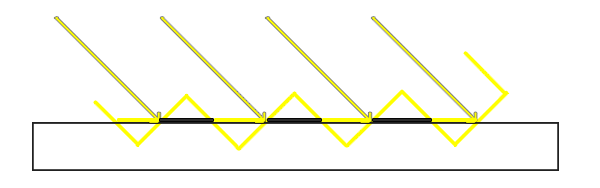 每一条斜黄线断代表ShadowMap贴图中的一个像素,对应到水平地面上可能覆盖多个像素。多个像素里有些深度较大,有些深度较小,因而产生了条状瑕疵。
解决这个问题,通常引入Bias。 而Bias又分为Depth Bias和 Normal Bias.
### a. Normal Bias
Normal Bias是在将像素世界坐标投影到ShadowMap之前,先将其按照法线方向做一定的偏移:
每一条斜黄线断代表ShadowMap贴图中的一个像素,对应到水平地面上可能覆盖多个像素。多个像素里有些深度较大,有些深度较小,因而产生了条状瑕疵。
解决这个问题,通常引入Bias。 而Bias又分为Depth Bias和 Normal Bias.
### a. Normal Bias
Normal Bias是在将像素世界坐标投影到ShadowMap之前,先将其按照法线方向做一定的偏移:
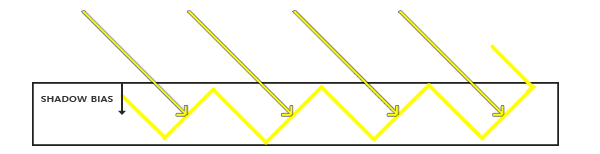 代码如下:
```hlsl
float3 shadowMapPos = WorldToShadowMapPos(positionWS + normalWS * _ShadowParams.y);
```
_ShadowParams.y为normal bias数值,目前直接从Light组件中读取
### b. Depth Bias.
深度偏移则是直接在深度比较时,对深度值加入一定的Bias数值。 代码实现如下:
```hlsl
//使用使用_ShadowParams.x做深度bias
#if UNITY_REVERSED_Z
// depthToLight < depth 表示在阴影之中
return clamp(step(depthToLight + _ShadowParams.x,depth), 0,_ShadowParams.z);
#else
// depthToLight > depth表示在阴影之中
return clamp(step(depth,depthToLight - _ShadowParams.x), 0,_ShadowParams.z);
#endif
```
其中_ShadowParams.x为depth bias的数值,也是直接取自Light组件。
修正后的效果:
代码如下:
```hlsl
float3 shadowMapPos = WorldToShadowMapPos(positionWS + normalWS * _ShadowParams.y);
```
_ShadowParams.y为normal bias数值,目前直接从Light组件中读取
### b. Depth Bias.
深度偏移则是直接在深度比较时,对深度值加入一定的Bias数值。 代码实现如下:
```hlsl
//使用使用_ShadowParams.x做深度bias
#if UNITY_REVERSED_Z
// depthToLight < depth 表示在阴影之中
return clamp(step(depthToLight + _ShadowParams.x,depth), 0,_ShadowParams.z);
#else
// depthToLight > depth表示在阴影之中
return clamp(step(depth,depthToLight - _ShadowParams.x), 0,_ShadowParams.z);
#endif
```
其中_ShadowParams.x为depth bias的数值,也是直接取自Light组件。
修正后的效果:
 # 4.问题
到目前位置,我们已经大致在SRP中实现了平行光阴影的计算渲染。 但还存在如下问题:
- 在编辑器的SceneView中无法看到阴影.
- 如果把摄像机的far clip plane调大,阴影质量也会变得越来愈差.
- Bias的数值计算需要优化
其中1、2两点,都是由于ShadowMap的贴图精度无法满足要求而引起的。 因为摄像机视野越远,ShadowMap贴图需要覆盖的场景范围就越广,导致单位面积精度下降。 而SceneView中的摄像机,其far clip plane通常是好几万级别的,所以直接阴影就消失不见了。
为了解决这个问题,通常要使用`Cascaded Shadow Mapping`技术. 这会在后续实现。
而Bias的问题,目前是直接取了Light组件的设置,更好的方式是要结合ShadowMap分辨率来计算恰当的偏移。这暂且不在此文讨论范围了。
# 4.问题
到目前位置,我们已经大致在SRP中实现了平行光阴影的计算渲染。 但还存在如下问题:
- 在编辑器的SceneView中无法看到阴影.
- 如果把摄像机的far clip plane调大,阴影质量也会变得越来愈差.
- Bias的数值计算需要优化
其中1、2两点,都是由于ShadowMap的贴图精度无法满足要求而引起的。 因为摄像机视野越远,ShadowMap贴图需要覆盖的场景范围就越广,导致单位面积精度下降。 而SceneView中的摄像机,其far clip plane通常是好几万级别的,所以直接阴影就消失不见了。
为了解决这个问题,通常要使用`Cascaded Shadow Mapping`技术. 这会在后续实现。
而Bias的问题,目前是直接取了Light组件的设置,更好的方式是要结合ShadowMap分辨率来计算恰当的偏移。这暂且不在此文讨论范围了。