Conversation


 dhobi
changed the title
dhobi
changed the title

|
Amazing! @LuxuryWasTaken I've made a test release here for you to download, just to make it easier. @dhobi don't forget to submit this PR to https://issuehunt.io/r/1kc/razer-macos/issues/356, don't think we've actually tested that the reward thing actually works so please give it a go. |

|
It would be interesting for me to know if the brightness on 100% is still just around 40% of the real brightness (100/2.55). Edit: I've just updated the blade brightness and tried to link the PR with this issuehunt thingy 😄 |
…zer_chroma_standard_get_led_brightness is 2.55 as well and we could just get rid of conditionally adapting the value.

|
Yes, it's working, but like I said something must be changed related with color picker cause it's not working. But you can use / select colors from menu bar (I really don't know a lot about macOS, in Windows, we're calling it as Taskbar) Also, brightness is still buggy but like I said, Razer Blade is coming with brightness keys in function keys and it works perfectly, so I guess there is no sense of adding it as feature. |
Could you describe this a bit in more detail? The color picker is just there to "set/save" the custom color for a device. This custom color has to be selected in the menu / tray / taskbar afterwards.
I hope this won't be the case anymore with the latest commit here. |
|
This is my first time using this software, I guess color picker is working. Is it supposed to be working like this? If it's working like that normally, it's working yes. I thought color sets immediately when you select from color picker. Also, I guess some of effects are not working, I can go to windows and test all of them if you want. |
Yes, this is how it currently works. A live preview of the selected color would be a nice thing for the future.
Sure, that would be great. We could either set them as "missing" or try to fix it. |
|
|
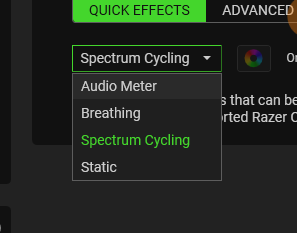
|
Hmm what does the picture show exactly? It would be great to have a list like this:
|
|
only available audio meter, breathing, spectrum cycling, static. I'm switching to mac to confirm which is working. but I don't think all of them necessarry, eg: audio meter is suck because chroma is not per key for base laptops. |
|
WHAT THE FUCK, TRIED WHEEL AND IT'S WORKING |
|
Also, in menu bar, brightness is showing 255%, so yes your thought is true. |
|
Not working: Wave, Reactive, Starlight, Ripple. I also have a lot of devices for Razer Deathadder Elite |
|
So I went to OpenRazer's git and asked, they sent this code. ` TL;DR: |
|
I'm aware of the code in the openrazer project. The changes done on this PR are based on exactly this code fragment you posted (+some in .c files). I can't explain why it works in openrazer but doesn't in Razer macOS... |
|
Unfortunately it's pretty hard to debug without @dhobi actually having a Blade 15 @LuxuryWasTaken. |
|
hey, I just checked razer macOS animations and didn't see Wave effect, maybe that's why it's not working for blade? |
|
Which program do you mean with razer macOS? This software here? I think we show the wave effect (as the openrazer implementation does as well) but as you say it does not work at all... |


There was a problem hiding this comment.
Your changes to razerchromacommon.c are already present in 1kc/librazermacos. You can delete that file from this PR. Furthermore, the last line you added to razerkbd_driver.c is already present in librazermacos.
If you move the remaining changes on razerkbd_driver.c & .h to a PR on librazermacos and delete it from this PR, it'll will be able to be automatically merged.
4 participants


Added support for Blade 15 Base (Early 2020)
This will fix #356
Note: This is untested. Could @LuxuryWasTaken have a look at this?
HowTo:
IssueHunt Summary
Referenced issues
This pull request has been submitted to: