-
EC2 Instances:
-
Create three EC2 instances on Amazon AWS: one as the Ansible master and two as hosts.
-
-
-
SSH to Master Instance:
- Connect to the Ansible master instance using SSH.

ssh -i "your-key.pem" ubuntu@your-master-ip
-
Install Ansible:
- Add the Ansible repository and install Ansible.
sudo apt-add-repository ppa:ansible/ansible
sudo apt update
sudo apt install ansible
-
Verify Installation:
- Confirm that Ansible is installed successfully.
ansible --version

-
Transfer PEM File:
- Copy the PEM file from your local machine to the master instance.
scp -i "your-key.pem" your-key.pem ubuntu@your-master-ip:/home/ubuntu/keys
-
Edit Ansible Hosts File:
- Open the Ansible hosts file for editing.
sudo vim /etc/ansible/hosts
-
Configure Hosts:
- Add the following lines to the hosts file to define the hosts in a group named 'servers.'
[servers]
host_1 ansible_host=your-host-1-ip
host_2 ansible_host=your-host-2-ip

[all:vars]
ansible_user=ubuntu
ansible_ssh_private_key_file=/home/ubuntu/keys/your-key.pem
ansible_python_interpreter=/usr/bin/python3
-
Change PEM File Permissions:
- Restrict permissions on the PEM file.
chmod 400 your-key.pem
-
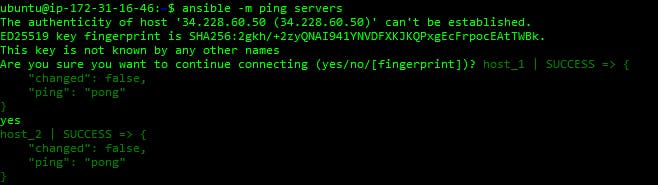
Ping Hosts:
- Verify connectivity by pinging the hosts in the 'servers' group.
ansible -m ping servers
- The ping should be successful.
---
- name: Install Nginx and deploy a custom webpage
  hosts: your_ubuntu_servers  # Replace with your target server(s) or inventory group
  become: true  # Run tasks with elevated privileges

  tasks:
    - name: Update package cache
      apt:
        update_cache: yes

    - name: Install Nginx
      package:
        name: nginx
        state: present

    - name: Start Nginx service
      service:
        name: nginx
        state: started
        enabled: yes

    - name: Copy custom webpage files
      copy:
        src: /path/to/your_webpage_files/
        dest: /var/www/html/
-
Update package cache:
- Ansible task using the
aptmodule to update the package cache on the target servers.
- Ansible task using the
-
Install Nginx:
- Ansible task utilizing the
packagemodule to install Nginx on the target servers.
- Ansible task utilizing the
-
Start Nginx service:
- Ansible task with the
servicemodule to start the Nginx service on the target servers and enable it to start on boot.
- Ansible task with the
-
Copy custom webpage files:
- Ansible task using the
copymodule to copy the custom webpage files from your specified source directory to the destination directory on the target servers.
- Ansible task using the
Running the Playbook: Execute the following command to run the playbook:
ansible-playbook -i /etc/ansible/hosts deploy_webpage.yml
After the playbook execution is complete, visit the public IP of any host server in your web browser to verify if the webpage has been successfully deployed.