Watching Agents Work
Modern agents fan out. A single Claude session can be running six subagents, and the parent terminal shows you almost none of it. Codeman surfaces that hidden work as live windows, panels, and after-the-fact summaries.
Everything on this page is Claude-only. It reads Claude Code's transcripts and team state; the other CLIs expose no equivalent.
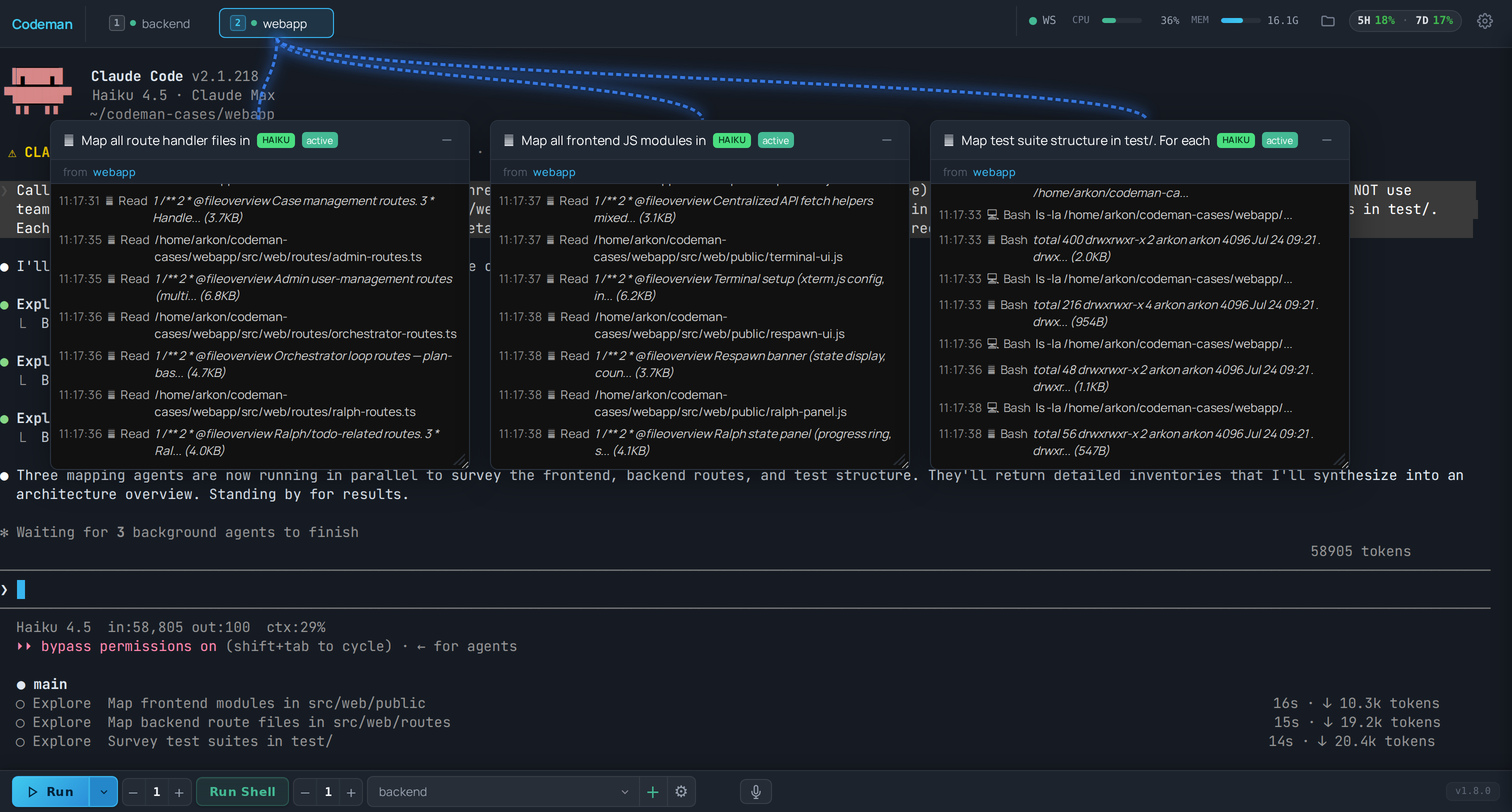
When a Claude session spawns subagents, each one gets its own floating window with a live transcript: what it was asked to do, what it is doing, and what it returned.
- Windows are draggable and resizable, and their positions persist across reloads.
- A connection line links each window to the session tab that spawned it, so with four sessions running you can still tell whose worker is whose.
- Closing a window does not stop the subagent. It only stops you watching it.
This is the feature that makes a fan-out legible. Without it, a lead session that spawned eight workers looks like a stalled terminal for several minutes.
The tab strip draws a coloured arc from a parent tab to any tab it spawned, one colour per child. That covers the other direction of fan-out: not subagents inside one session, but whole sessions started by an agent through the API.
Desktop only, on by default, and toggled in App Settings → Appearance. Arcs are skipped for tabs scrolled out of view.
See Driving Codeman From An Agent for the spawning side.
Claude Code's experimental agent teams appear as teammates alongside subagents. Enable them in the CLI's own environment:
CLAUDE_CODE_EXPERIMENTAL_AGENT_TEAMS=1and turn the per-case Agent Teams toggle on in the case settings gear.
Codeman watches the team directory and matches teammates to the session leading them. Teammates are in-process threads rather than separate CLI processes, so they show up as windows, not tabs.
Notes and the experiment log:
docs/agent-teams/.
When Claude runs a Workflow, dozens of agents can be in flight at once. The completion artifact for a run is only written at the end, so a live run would otherwise be invisible until it finished. Codeman synthesizes the in-flight view from the transcripts and lets the real artifact supersede it when it lands.
Two independent toggles, both off by default:
| Setting | Shows |
|---|---|
| Ultracode panel | A docked panel listing the run's agents. |
| Ultracode windows | Floating windows, like subagents. |
Turning on either starts the watcher.
Last Response (header button, opt-in) renders the agent's last answer as scrollable text rather than terminal output. It exists mostly for phones, where reading a long answer in a terminal viewport is painful. More loads additional context.
| Surface | Answers |
|---|---|
| Away Digest | What happened while I was gone? |
| Run summary | What did this run actually do? |
| Lifecycle log | When did sessions start, exit, or get killed, and why? |
| Token stats | What did it cost? |
The Away Digest aggregates the lifecycle log, run summary events, live sessions, token statistics, and recent subagents into one view. It is the right first thing to open in the morning after an overnight run.
All of these header buttons are opt-in: App Settings → Header & Panels.
The design target is 20 sessions and 50 agent windows at 60fps. If you routinely run more than that, expect the browser rather than the server to be the limit, and close windows you are not reading.
-
A session pointed at a relocated Claude config directory goes blind here. Transcripts
written outside
~/.claude/projectsare invisible to the watchers, so subagent windows, the ultracode panel, the response viewer, and Read My Mind all stop working for that session. Symlinkprojectsback into the shared tree to fix it. See Agent CLIs. - Closing a window does not cancel the agent. Nothing on this page controls agents; it observes them.
- Windows are opt-in for ultracode, automatic for subagents.
- The Dashboard - where these surfaces live.
- Driving Codeman From An Agent - the other kind of fan-out.
- Autonomous Loops - the loops that generate this much activity.