
The Strava Agent is an advanced conversational AI system designed to interact with the complete Strava API. Built on the BeeAI framework with the AgentStack SDK and A2A protocol support, this agent allows you to analyze your athletic performance, explore segments, manage routes, interact with clubs, and much more through natural conversations or programmatic API calls.
- ✅ A2A Protocol Support: Full Agent-to-Agent communication protocol
- ✅ AgentStack Server: RESTful API endpoints for agent interaction
- ✅ 5 Agent Skills: Organized capabilities for different use cases
- ✅ Multi-Agent Ready: Can be integrated with other A2A-compatible agents
- ✅ Improved Documentation: Comprehensive guides for all usage modes
📖 Read the full article: My Personal AI Agent for Strava
- Query recent activities with advanced filters
- Get complete details of any activity
- Analyze laps/splits and training zones
- View kudos and activity comments
- Update activity information
- 🆕 Compare running sessions and track performance improvements
- 🆕 Get personalized training recommendations to improve performance
- Query complete athlete profile
- Update weight and other personal data
- View heart rate and power zones
- Get total and recent statistics
- Total statistics by sport (cycling, running, swimming)
- Temporal progress analysis
- Performance comparison
- Personal records identification
- Explore segments in geographic areas
- View leaderboards with advanced filters
- Query specific segment details
- Manage saved routes
- Get elevation and GPS data
- View clubs you belong to
- Explore club activities
- Query club members
- Detailed club information
- Manage bikes and shoes
- View total mileage per equipment
- Query equipment details
- Point-by-point GPS data
- Detailed heart rate
- Power and cadence
- Speed and elevation
- Temperature and gradient
- Python: Version 3.11 or higher
- Dependency Management:
uvto manage Python packages - Strava Credentials: Client ID, Client Secret, and Refresh Token
Project dependencies are managed with uv and defined in pyproject.toml:
dependencies = [
    "agentstack-sdk==0.4.0rc1",
    "beeai_framework>=0.1.68",
]The agent uses the following BeeAI tools:
- Custom Tools: Direct implementation of Strava API (16 tools)
- Think Tool: Enhanced reasoning for complex analysis
- ReActAgent: Reasoning and action agent
- UnconstrainedMemory: Unrestricted memory for full context
- WatsonxChatModel: IBM Watsonx language model
git clone <repository-url>
cd strava_agentMake sure you have uv installed. Then run:
uv syncCreate a .env file in the project root with your credentials:
# IBM Watsonx (or your LLM provider)
WATSONX_API_KEY=your_api_key
WATSONX_PROJECT_ID=your_project_id
WATSONX_URL=https://us-south.ml.cloud.ibm.com/ml/........

# Strava API
STRAVA_CLIENT_ID=your_client_id
STRAVA_CLIENT_SECRET=your_client_secret
STRAVA_REFRESH_TOKEN=your_refresh_token- Go to Strava API Settings
- Create a new application
- Get your
Client IDandClient Secret - Use the OAuth2 flow to get a
Refresh Token:
# Run the helper script
uv run python get_strava_token.pyRun the agent directly for testing and development:
uv run serverThe agent will start and execute an example query. You can modify the query in src/beeai_agents/agent.py.
Run the agent as an A2A-compatible server:
uv run strava-serverThe server will start on http://127.0.0.1:8000 with the following endpoints:
- A2A Endpoint:
POST http://127.0.0.1:8000/a2a - Health Check:
GET http://127.0.0.1:8000/health - Discovery:
GET http://127.0.0.1:8000/a2a/discover
Quick Test:
curl -X POST http://127.0.0.1:8000/a2a \
  -H "Content-Type: application/json" \
  -d '{"message": {"role": "user", "content": "Show me my last 5 activities"}}'
📖 For complete A2A documentation, see A2A_USAGE.md
The agent includes Think Tool for complex reasoning and analysis. Here are examples organized by complexity level:
Activities:
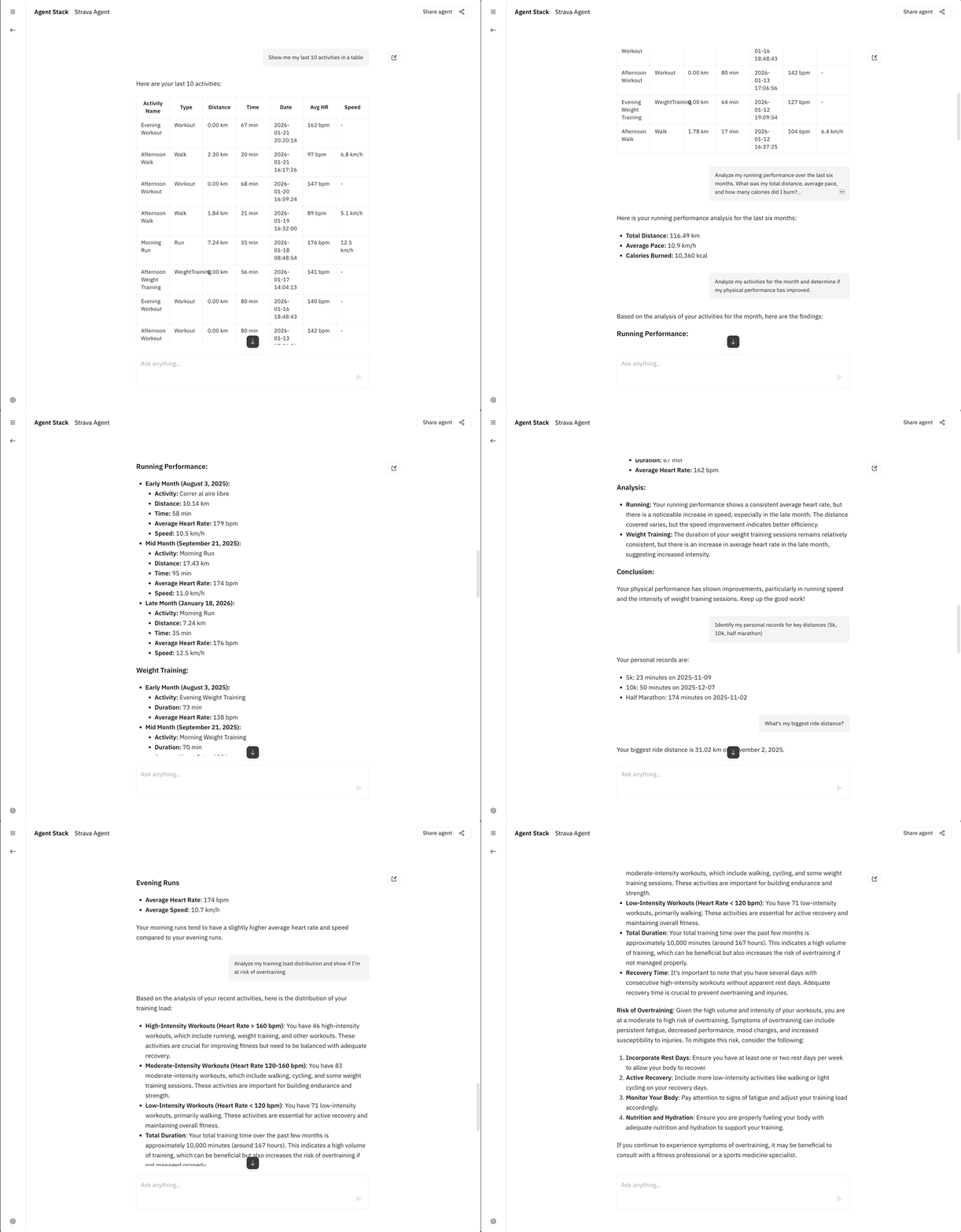
"Show me my last 10 activities in a table"
"Give me complete details of my last run"
"What were my activities from last week?"
Statistics:
"Show my total running statistics"
"What's my biggest ride distance?"
"Display my cycling stats for this year"
🆕 Performance Comparison:
"Compare my last 5 running sessions"
"Has my running performance improved?"
"Analyze my progress in the last 10 runs"
🆕 Training Recommendations:
"Recommend training to improve my pace"
"What workouts should I do to increase distance?"
"Give me a training plan to build endurance"
Comparisons:
"Compare my last 5 runs and tell me if I'm improving my pace"
"Analyze my training consistency over the last 4 weeks"
"What patterns do you see in my workouts? Do I train more on weekdays or weekends?"
Performance Analysis:
"Compare my performance in morning runs vs evening runs"
"Analyze my running performance over the last month"
"How does my heart rate vary across different activity types?"
Progress Tracking:
"Analyze my progress over the last 3 months: show tables with
evolution of distance, pace, and heart rate"

"Calculate my training efficiency: relationship between distance, time, and
heart rate in my last 20 runs"
Zone Analysis:
"Show which HR zones I've trained in most this month"
"Analyze my training load distribution and show if I'm at risk of overtraining"
Predictions:
"Based on my progress over the last 2 months, estimate when I could run 10km
in under 45 minutes"

"Analyze all my data and recommend the best training plan to improve my
half marathon time"
Optimization:
"Analyze the time between my workouts and how it affects my performance"
"Calculate my weekly training load and show if I'm in the optimal range"
✅ Effective Prompt Structure:
[Action] + [Specific Data] + [Time Period] + [Format] + [Analysis]

Example:
"Compare my last 15 runs from the last month in a table
and tell me if I'm improving"
Best Practices:
- Be specific with time: "last 2 weeks" vs "my runs"
- Request tables: "show in a table format"
- Combine metrics: "pace, HR, and cadence"
- Ask for analysis: "and tell me what I should improve"
Preparing for a Race:
"Analyze my last 3 months of training and tell me if I'm ready for a half marathon.
Show progress in tables and give specific recommendations."
Identifying Issues:
"Compare my runs from this month with last month. Identify any performance
decline and suggest possible causes with detailed data."
Goal Tracking:
"My goal is to run 200km this month. Show my current progress in a table,
calculate how much I need to run per week to achieve it."
For 50+ detailed examples with expected outputs, see EXAMPLE_PROMPTS.md
| Endpoint | Operation | Description |
|---|---|---|
GET /athlete |
getAthleteProfile |
Get complete profile |
GET /athlete/zones |
getAthleteZones |
Training zones |
GET /athlete/stats |
getAthleteStats |
Total statistics |
| Endpoint | Operation | Description |
|---|---|---|
GET /athlete/activities |
getActivities |
List activities |
GET /activities/{id} |
getActivityById |
Activity details |
GET /activities/{id}/zones |
getActivityZones |
Zone distribution |
GET /activities/{id}/laps |
getActivityLaps |
Laps/splits |
GET /activities/{id}/streams |
getActivityStreams |
Point-by-point data |
| Endpoint | Operation | Description |
|---|---|---|
GET /segments/{id} |
getSegmentById |
Segment details |
GET /segments/{id}/leaderboard |
getSegmentLeaderboard |
Leaderboard |
GET /segments/explore |
exploreSegments |
Search segments |
| Endpoint | Operation | Description |
|---|---|---|
GET /routes/{id} |
getRouteById |
Route details |
GET /athletes/{id}/routes |
getAthleteRoutes |
Athlete routes |
| Endpoint | Operation | Description |
|---|---|---|
GET /athlete/clubs |
getAthleteClubs |
Athlete clubs |
GET /clubs/{id} |
getClubById |
Club details |
GET /clubs/{id}/members |
getClubMembers |
Club members |
GET /clubs/{id}/activities |
getClubActivities |
Club activities |
┌─────────────────────────────────────────────────────────────┐
│                    User / Client                             │
│              (Natural Language Query)                        │
└────────────────────────┬────────────────────────────────────┘
                         │
                         ▼
┌─────────────────────────────────────────────────────────────┐
│                   StravaAgent (Python)                       │
│  ┌──────────────────────────────────────────────────────┐   │
│  │              ReActAgent (BeeAI)                      │   │
│  │  - Reasoning and planning                            │   │
│  │  - Tool execution                                    │   │
│  │  - Response generation                               │   │
│  └──────────────────────────────────────────────────────┘   │
│                         │                                    │
│  ┌──────────────────────┴──────────────────────────────┐   │
│  │         WatsonxChatModel (IBM Granite)              │   │
│  │  - Natural language processing                       │   │
│  │  - Text generation                                   │   │
│  └──────────────────────────────────────────────────────┘   │
│                         │                                    │
│  ┌──────────────────────┴──────────────────────────────┐   │
│  │         Custom Strava Tools (16 tools)              │   │
│  │  - Direct API implementation                         │   │
│  │  - Automatic OAuth2 authentication                  │   │
│  └──────────────────────────────────────────────────────┘   │
└────────────────────────┬────────────────────────────────────┘
                         │
                         ▼
┌─────────────────────────────────────────────────────────────┐
│                  Strava API (REST)                           │
│  - Activities, Segments, Routes                             │
│  - Statistics, Clubs, Equipment                             │
│  - GPS/HR/Power data streams                                │
└─────────────────────────────────────────────────────────────┘
graph TB
    subgraph UI["🖥️ AgentStack UI"]
        A[User Input<br/>Natural Language]
        Z[Display Response<br/>Text + Images + Maps]
    end

    subgraph A2A["📡 A2A Protocol"]
        B[POST /a2a<br/>JSON Message]
        Y[HTTP Response<br/>Formatted Content]
    end

    subgraph BeeAI["🤖 BeeAI Agent"]
        C[ReAct Agent<br/>Reasoning]
        D[LLM Model<br/>Watsonx]
        E{Tool Selection}
    end

    subgraph Tools["🔧 16 Custom Tools"]
        F1[GetActivities]
        F2[GetActivityById]
        F3[GetAthleteProfile]
        F4[GetActivityStreams]
        F5[GetSegmentById]
        F6[GetClubById]
        F7[... 10 more]
    end

    subgraph Auth["🔐 OAuth2"]
        G[Token Manager]
        H[Auto Refresh]
    end

    subgraph Strava["🏃 Strava API"]
        I1[/athlete/activities]
        I2[/activities/:id]
        I3[/athlete]
        I4[/segments/:id]
        I5[/clubs/:id]
    end

    subgraph Visual["🖼️ Visual Resources"]
        J1[Profile Photos<br/>Strava CDN]
        J2[Route Maps<br/>Strava Polylines]
        J3[Club Photos<br/>Strava CDN]
    end

    subgraph Format["✨ Response Formatter"]
        K[Visual Formatter<br/>Add Images]
        L[Markdown Generator]
        M[Natural Language]
    end

    A -->|1. Query| B
    B -->|2. Parse| C
    C -->|3. Analyze| D
    D -->|4. Select| E

    E -->|5a| F1
    E -->|5b| F2
    E -->|5c| F3
    E -->|5d| F4
    E -->|5e| F5
    E -->|5f| F6
    E -->|5g| F7

    F1 & F2 & F3 & F4 & F5 & F6 & F7 -->|6. Auth| G
    G -->|7. Token| H
    H -->|8. API Call| I1 & I2 & I3 & I4 & I5

    I1 & I2 -->|9. Data| K
    I3 -->|9. Profile + URL| J1
    I4 -->|9. Polyline| J2
    I5 -->|9. Club + URLs| J3

    J1 & J2 & J3 -->|10. Enhance| K
    K -->|11. Format| L
    L -->|12. Generate| M
    M -->|13. Response| D
    D -->|14. Return| Y
    Y -->|15. Display| Z

    style UI fill:#e1f5ff
    style BeeAI fill:#fff4e1
    style Tools fill:#ffe1e1
    style Strava fill:#e1ffe1
    style Visual fill:#f0e1ff
- Query Reception - User sends natural language query
- Intent Analysis - LLM analyzes what the user wants
- Tool Selection - Agent selects appropriate Strava tools
- API Calls - Tools make authenticated requests to Strava
- Data Processing - Raw data is formatted and analyzed
- Visual Enhancement - Maps and photos are added if available
- Response Generation - LLM creates natural language response
- Delivery - Formatted response with visuals returned to user
The agent implements:
- OAuth2 with Refresh Token: Automatic access token renewal
- Secure credential management: Environment variables
- Expiration buffer: Tokens renewed 5 minutes before expiring
- Error handling: Automatic retries on failure
The agent can analyze:
- Pace in min/km
- Average and maximum speed
- Heart rate (average, maximum, zones)
- Cadence
- Elevation gain
- Average and maximum speed
- Power (watts, FTP, zones)
- Heart rate
- Cadence
- Elevation gain
- Kilojoules and calories
- Pace per 100m
- Total distance
- Moving time
The agent uses meta-llama/llama-3-3-70b-instruct by default. You can change the model in the create_strava_agent() function in src/beeai_agents/agent.py:
# Default model (recommended)
agent = create_strava_agent()  # uses llama-3-3-70b-instruct

# Other compatible models
agent = create_strava_agent(model_id="meta-llama/llama-3-1-70b-instruct")
agent = create_strava_agent(model_id="ibm/granite-3-8b-instruct")Make sure the .env file exists and contains all necessary variables.
Verify that your STRAVA_REFRESH_TOKEN is valid. You may need to generate a new one.
Strava has rate limits (200 requests/15min, 2000 requests/day). Wait before making more queries.
- Verify that the LLM model is available
- Check the logs to see which tools are being called
- Simplify your query to be more specific
For a detailed troubleshooting guide, see TROUBLESHOOTING.md.
| Feature | Description |
|---|---|
| Trend Analysis | Charts and progress visualizations |
| Training Recommendations | Personalized plans based on data |
| Athlete Comparison | Benchmarking with similar athletes |
| Performance Prediction | ML to predict future times |
| Wearables Integration | Real-time data from devices |
| Alerts and Notifications | Notices of new records or achievements |
| Recovery Analysis | Fatigue and recovery metrics |
| Multi-language Support | Responses in multiple languages |
- Strava API Documentation
- Strava Getting Started Guide
- API Coverage Analysis - Detailed comparison with official API
- A2A Usage Guide - Complete A2A protocol documentation
- Example Prompts - Powerful prompts to maximize agent capabilities
- Troubleshooting Guide - Common issues and solutions
- 🆕 Performance Comparison Guide - How to compare running sessions and track improvements
- Visual Setup Guide - How to enable maps and photos in UI
- Strava Visual Resources - Available visual resources from API
- Demo Conversation Guide - 10-step demo showcasing all capabilities
This project is under the license specified in the LICENSE file.
Contributions are welcome. Please:
- Fork the repository
- Create a branch for your feature (
git checkout -b feature/AmazingFeature) - Commit your changes (
git commit -m 'Add some AmazingFeature') - Push to the branch (
git push origin feature/AmazingFeature) - Open a Pull Request
This agent is functional for its intended purpose but is under active development. Use of this agent in a production environment is at your own risk. The authors are not responsible for any issues that may arise from its use in production.
For questions, issues, or suggestions, please open an issue in the GitHub repository.
Enjoy training with your Strava AI assistant! 🏃♂️🚴♀️💪
This implementation uses custom BeeAI tools instead of OpenAPI tools because:
- ✅ Better reliability - Direct control over API calls
- ✅ Easier maintenance - Simple Python code
- ✅ Better performance - No OpenAPI parsing overhead
- ✅ Full control - Custom error handling and formatting
- ✅ Easier to extend - Add new tools easily
Profile & Stats (2)
- GetAthleteProfile
- GetAthleteStats
Activities (5)
- GetActivities
- GetActivityById
- GetActivityZones
- GetActivityLaps
- GetActivityStreams
🆕 Performance Analysis (3)
- CompareRunningSessions
- CompareSpecificRuns
- RecommendTraining
Segments (3)
- ExploreSegments
- GetSegmentById
- GetSegmentLeaderboard
Clubs (4)
- GetAthleteClubs
- GetClubById
- GetClubActivities
- GetClubMembers
Routes (2)
- GetRouteById
- GetAthleteRoutes
Implemented: ~90% of most used Strava endpoints
- ✅ Activities (complete - 5 read endpoints)
- ✅ Profile and statistics (complete - 3 endpoints)
- ✅ Segments (complete - 3 endpoints)
- ✅ Clubs (complete - 4 endpoints)
- ✅ Routes (complete - 2 endpoints)
- ✅ Data streams (complete - included in activities)
Not implemented (by design):
- ⚪ Activity uploads/updates (POST/PUT) - Write operations excluded for safety
- ⚪ Kudos and comments (GET/POST) - Social features, not core analytics
- ⚪ Gear management (GET) - Less frequently used
- ⚪ Webhooks - Requires server infrastructure
- ⚪ Segment efforts - Covered by activity streams
📊 For detailed API coverage analysis, see STRAVA_API_COVERAGE.md
This document compares our implementation against the official Strava API documentation at https://developers.strava.com/docs/getting-started/ and explains why certain endpoints are not implemented.
Made with ❤️ using BeeAI Framework