Releases: Foblex/f-flow
Release list
v19.0.0 - Control Schemes, Click-to-Connect, Keyboard Accessibility, and a Unified Connector Model

Until v19 there was exactly one way to drive a Foblex Flow editor - one gesture mapping, one way to create connections, one input device. v19 opens that up: the pointer scheme, the connection gesture, the keyboard, and the AI agents writing code against the library are all first-class now.
Highlights
- Control Schemes -
provideFFlow(withControlScheme(...))maps gestures to actions for the whole editor at once. Miro-like and draw.io-like presets ship out of the box,FControlSchemeControllerswitches them at runtime, and your existing trigger inputs still win. Plain-wheel scroll panning and a separate trackpad pinch step land along the way (#312, #218). - Connection Flows -
withConnectionFlow('click')adds click-to-connect alongside drag (#264). Both gestures drive the new gesture-independentFCreateConnectionSession— preview line, snapping, validation and thefCreateConnectionemission are identical across gestures, and a customType<IFConnectionFlow>gets them for free. - Accessibility - every flow ships ARIA semantics by default (roles, generated connection names, live-region announcements; your attributes are never overridden).
withA11y()enables the keyboard layer: spatial arrow navigation over nodes and connections with selection following directly (aria-activedescendant, no separate focus state),Ctrl+arrow topology walk, hold-or-tapSpacemovement, keyboard connection creation (C→ arrows →Enter),Deleteemitting the newfDeleteSelected, remappable keys and a fully localizable message catalog. - Unified Connector Model - one
[fConnector]directive (source | target | source-target | outlet) replaces thefNodeInput/fNodeOutput/fNodeOutlettrio; connections gain canonicalfSourceId/fTargetId. Legacy APIs keep working, deprecated — migrate at your pace. - AI-Ready Toolchain - dev-mode diagnostics with stable codes (
FF1001–FF1009, documented at flow.foblex.com/docs/errors, stripped from production),ng addinstalls agent rules pointing at the version-matchedAI.mdbundled in the npm package, and the hostedllms.txt/llms-full.txtare CI-validated against the API.
Fixes
- Fast drags no longer lag or jump - the drag anchors to the pointer-down position (#309).
- Safari no longer leaves ghost preview lines after a connection drop (#311).
- A native
<select>inside a node no longer causes a phantom drag after closing. - Connection hover no longer flickers while creating/reassigning connections or dragging nodes.
⚠ Breaking changes
- Flows apply inert ARIA attributes by default; behavior changes only after opting into
withA11y(). Attributes you set yourself always win. FDraggableBasegains two abstract members (fDeleteSelected,fCreateConnectionTrigger) - direct subclasses only.- Unified connector migration notes:
fConnectorMultipledefaults totrue(legacy outputs were single-connection); connector ids are unique across all types;fCanBeConnectedInputs→fCanBeConnectedTo.
Full details: CHANGELOG · Release post
Live demos
18.6.0 - Reflow on Resize and Layer Ordering
Foblex Flow v18.6.0 is the layout-interaction sequel to v18.5.0. The previous release made layout engines a first-class story for the initial render. This one makes layouts stay clean as the graph keeps changing, and gives you control over how the canvas itself is stacked.
Today I'm shipping v18.6.0 with two features: Reflow on Resize and Layer Ordering.
Highlights
- 🧭
withReflowOnResize— one-line install, reacts to any node size change, no manual relayout call. - 🎛️ Five orthogonal reflow knobs — mode, scope, axis, delta source, and collision. Each one controls one decision and stays out of the way of the others.
- 📌
fReflowIgnoredirective — pin annotations, legends, and stats panels so they never receive a primary shift. - ⚙️
FReflowController— change any reflow option at runtime without re-providing the plugin. - 🔁 Standard
(fMoveNodes)pipeline — shifted positions go through your normal application write path. - 🗂️
[fLayers]input — per-canvas control over the order of groups, connections, and nodes. - 🧩
withFCanvas({ layers })provider — set the same canvas layer order once for every canvas in the host component's tree. - 🛡️ Default layer order unchanged — groups → connections → nodes stays the default, so existing apps are unaffected.
Reflow on Resize
Real graphs do not have static node sizes.
A node expands when its details panel opens. It shrinks when async data finishes loading. It grows when the user types a longer label. As soon as one node changes size, every other node nearby is suddenly in the wrong place — overlapping, blocking the path of an edge, breaking the carefully arranged columns.
withReflowOnResize watches every node in the canvas and, the moment a size changes, shifts surrounding nodes so the layout stays clean. No manual relayout, no graph rebuild — the consumer model just receives the new positions through the standard (fMoveNodes) pipeline.
Installation is one line:
import { provideFFlow, withReflowOnResize } from '@foblex/flow';

@Component({
  providers: [provideFFlow(withReflowOnResize())],
})
export class MyFlow {}
That is the whole installation. No directives to attach, no events to subscribe to.
Mode and Scope: Who Moves, How Far
The behaviour is configurable because "shift nearby nodes" is too vague for real layouts. The planner combines a mode, a scope, an axis, a delta source, and a collision resolver. Each knob picks one decision and stays out of the way of the others.
mode decides which nodes are eligible to shift when the source resizes:
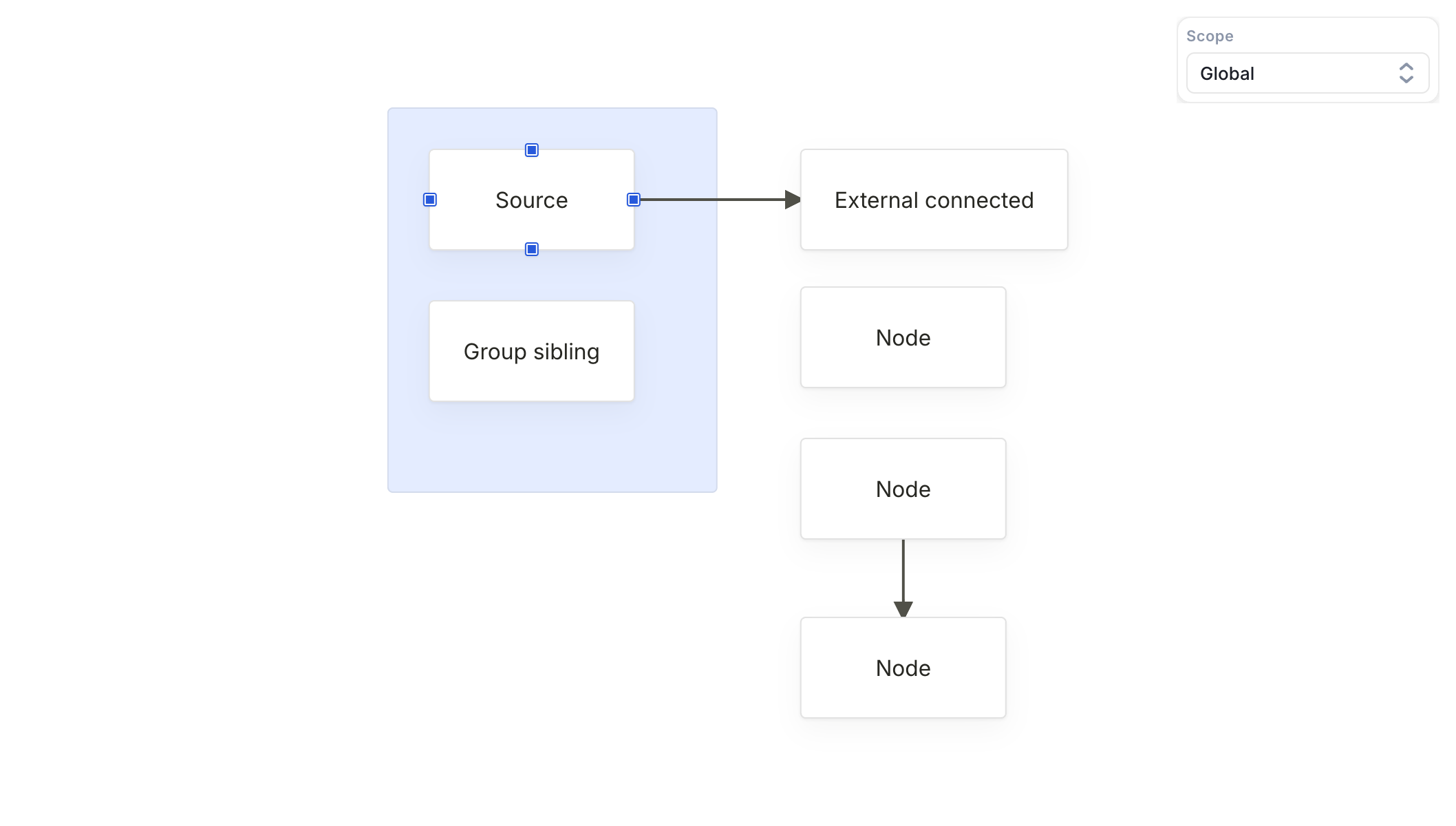
CENTER_OF_MASS(default) — every node whose centre lies past the source's centre on the resize axis. No connection or column alignment required.X_RANGE— same idea, narrowed to nodes that overlap the source on the perpendicular axis. Useful for column-based layouts where a vertical resize should only push the same column.DOWNSTREAM_CONNECTIONS— only nodes reachable from the source via outgoing connections. Pipeline-style editors rely on this so a resize doesn't disturb unrelated branches.
scope decides how far the plan is allowed to look:
GLOBAL(default) — every node and group on the canvas is eligible.GROUP— restricted to the source's siblings. Use it when each group should behave like an isolated workspace.CONNECTED_SUBGRAPH— BFS from the source over connections in both directions. Disconnected islands stay still.
When a shifting candidate would overlap a stationary node, collision decides who gives way: STOP clamps at the spacing line, while CHAIN_PUSH absorbs the anchor into the plan and pushes it too.
For nodes that should always stay pinned regardless of what the rest of the graph does — annotations, legend labels, stats panels — use fReflowIgnore:
<div fNode fReflowIgnore [fNodePosition]="legendPosition">
  Legend
</div>
Every knob can also be changed at runtime through FReflowController.
Layer Ordering
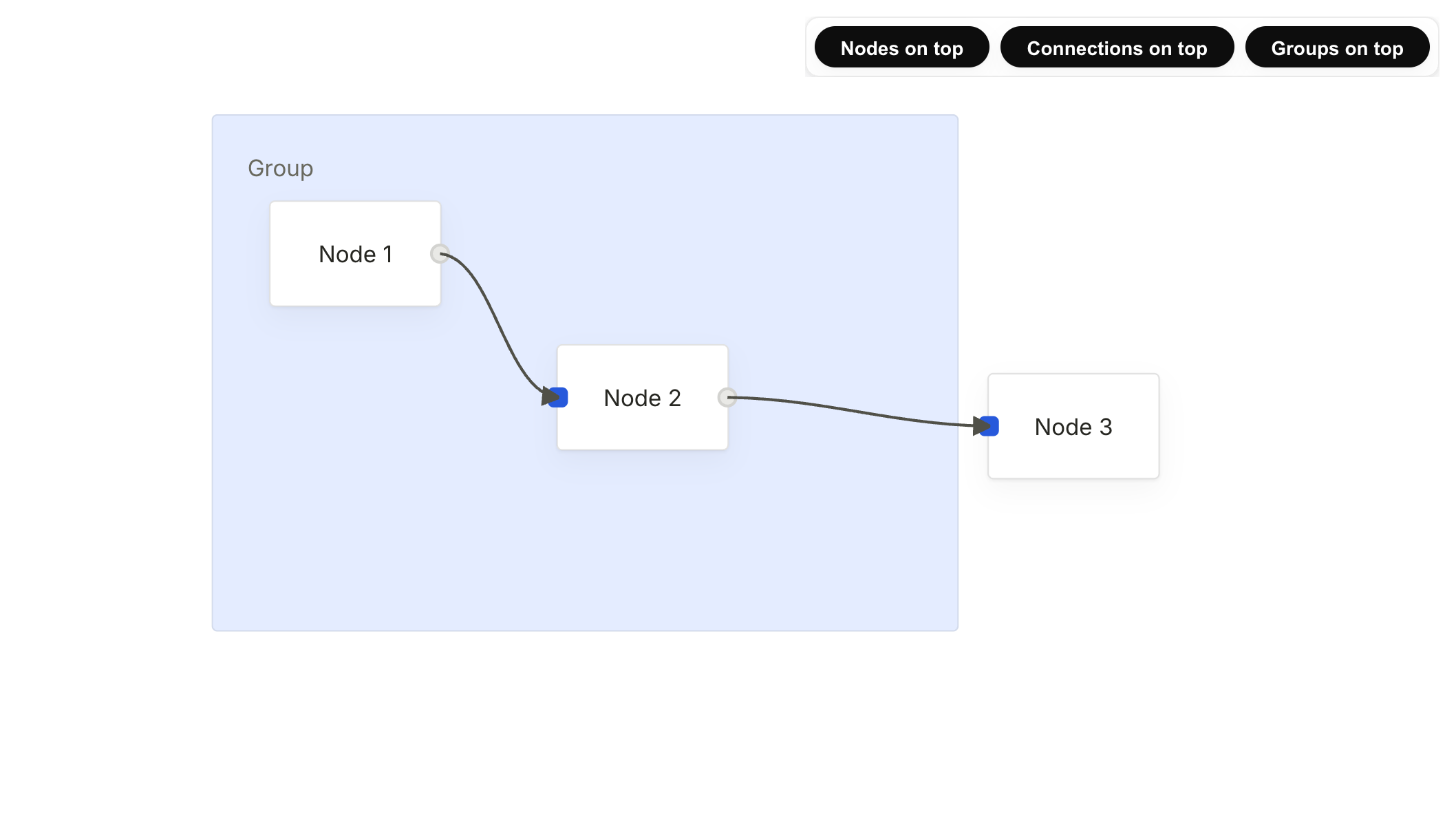
Foblex Flow renders three built-in layers inside <f-canvas> — groups, connections, and nodes — each in its own absolutely-positioned container with its own stacking context. Until v18.6.0 the order was hardcoded: groups underneath, connections in the middle, nodes on top.
That default has been right for the vast majority of editors for years, and it stays the default in v18.6.0. But some editors need a different stack:
- A diagram view with semi-transparent group overlays needs the group layer above the nodes so the tint is visible.
- A pipeline editor with clickable edge labels needs connections above nodes so labels stay reachable when nodes overlap them.
- A custom render layer that draws on top of connections needs the connection container drawn last so its strokes are not occluded.
Two equivalent entry points are available:
<!-- Per-canvas: groups, nodes, connections — connections drawn on top -->
<f-canvas [fLayers]="[EFCanvasLayer.GROUPS, EFCanvasLayer.NODES, EFCanvasLayer.CONNECTIONS]">
  <!-- ... -->
</f-canvas>
import { provideFFlow, withFCanvas, EFCanvasLayer } from '@foblex/flow';
@Component({
providers: [
provideFFlow(
withFCanvas({
layers: [EFCanvasLayer.GROUPS, EFCanvasLayer.NODES, EFCanvasLayer.CONNECTIONS],
}),
),
],
})
export class MyEditor {}Per-canvas [fLayers] always wins over the app-wide value. Missing layers fall back to their default position, and unknown values or duplicates are silently dropped.
Breaking Change
- virtualization: removed the unused
fVirtualForTrackByinput on*fVirtualFor. The input was declared but never wired into the rendering path, so providing atrackByfunction had no effect. Drop the expression from affected templates:*fVirtualFor="let item of items(); trackBy trackFn;"→*fVirtualFor="let item of items();".
Release Links
- Changelog: https://github.com/Foblex/f-flow/blob/main/CHANGELOG.md
- Release article: https://flow.foblex.com/blog/foblex-flow-v18-6-0-smart-auto-layout-on-resize
- Reflow on Resize example: https://flow.foblex.com/examples/reflow-on-resize
- Canvas Layer Ordering example: https://flow.foblex.com/examples/canvas-layers
- Roadmap: https://flow.foblex.com/docs/roadmap
Closing
The two features in v18.6.0 sit at different layers of the library, but they share a theme: making the canvas behave the way real editors actually need it to behave, without forcing application code to fight the library.
Reflow on Resize is about ongoing editing: when nodes change size, when content streams in, when a card toggles open. Layer Ordering is about the canvas's own visual contract: the default stacking stays unchanged, but editors that need a different order now get a configuration call instead of a !important z-index war.
If you're building a visual editor in Angular and want a native Angular solution — not a React wrapper — take a look. And if you like what I'm building, please consider starring the repo ⭐
18.5.0 - Layout Engines, Explicit Render Lifecycle, and Standalone Reference Apps
Foblex Flow v18.5.0 is a platform release focused on layout, render timing, stronger reference apps, and cleaner package boundaries.
Highlights
- Add a first-class layout integration surface in
@foblex/flow - Publish
@foblex/flow-dagre-layoutand@foblex/flow-elk-layout - Add dedicated Dagre and ELK examples in both manual and auto-layout variants
- Add explicit
fNodesRenderedandfFullRenderedlifecycle outputs - Rebuild Schema Designer, UML Diagram, Tournament Bracket, and Call Center Flow as standalone Angular reference apps
- Harden portal prerendering, embedded-page verification, Cypress coverage, and npm package verification
- Keep the connection-worker redraw strategy in place while decomposing it into clearer internal runtime and pipeline pieces
- Stop exporting test-only helpers from the published primary package so runtime bundles no longer pull Angular testing APIs, restoring compatibility with Native Federation style microfrontend setups
Links
- Changelog: https://github.com/Foblex/f-flow/blob/main/CHANGELOG.md
- Release article: https://flow.foblex.com/blog/foblex-flow-v18-5-0-layout-engines-explicit-render-lifecycle-and-standalone-reference-apps
- Dagre auto layout example: https://flow.foblex.com/examples/dagre-layout-auto
- ELK auto layout example: https://flow.foblex.com/examples/elk-layout-auto
- Schema Designer: https://flow.foblex.com/examples/schema-designer
- UML Diagram: https://flow.foblex.com/examples/uml-diagram-example
- Tournament Bracket: https://flow.foblex.com/examples/tournament-bracket
- Call Center Flow: https://flow.foblex.com/examples/call-center
18.4.0 - Auto-Pan, Default Theme, and Smoother Trackpad Zoom
Foblex Flow v18.4.0 is focused on the parts of editor UX that people feel immediately: how the viewport behaves while dragging, how fast a new flow gets styled, and how natural zoom feels on modern laptops.
Today I’m shipping v18.4.0. This release adds the new f-auto-pan plugin, ships a ready-to-use default SCSS theme, smooths trackpad pinch-to-zoom, and cleans up the example portal so examples feel more consistent in both code and presentation.
Highlights
- 🧭
f-auto-panadds edge-based viewport panning during supported drag sessions. - 🎨 A shipped default theme makes it much easier to get a styled editor without rebuilding the whole visual layer from scratch.
- 🎛️ Example controls were refreshed with reusable toolbar, input, select, and overlay primitives.
- 🤏 Trackpad pinch-to-zoom feels smoother by separating gesture-wheel normalization from regular mouse-wheel stepping.
- 📚 Docs and release pages were tightened up around the new theme, auto-pan, and current release history.
Auto-Pan Is Now a Flow Plugin
Screen.Recording.2026-04-02.at.18.56.06.mov
The biggest interaction feature in v18.4.0 is f-auto-pan.
Instead of pushing this behavior into fDraggable inputs, the release makes it an explicit plugin inside f-flow, which fits the rest of the library better and keeps the public API clearer.
<f-flow fDraggable>
  <f-auto-pan
    [fEdgeThreshold]="40"
    [fSpeed]="8"
    [fAcceleration]="true"
  />

  <f-selection-area />

  <f-canvas fZoom>
    <!-- nodes and connections -->
  </f-canvas>
</f-flow>
In this first version, auto-pan supports the drag flows that benefit from it most:
- connection creation
- connection reassignment
- node dragging
- selection area extension
That makes a big difference in real editors where targets are slightly outside the viewport and users should not have to stop, pan manually, and restart the same interaction.
The Default Theme Is Now Shipped
v18.4.0 also formalizes the styling path that many teams want first: a ready-to-use theme that gives you a coherent editor immediately, while still leaving room for more selective mixin-based styling later.
@use '@foblex/flow/styles/default';The shipped theme is built on top of the same public styling surface documented in the new styling guides:
- exported SCSS mixins
- public
--ff-*alias tokens - domain-level theme layers for canvas, nodes, connectors, connections, plugins, and external items
This release also aligns ng add and docs around that path, so the “quick start” styling story is much more consistent than before.
Example Portal Controls Are Cleaner
The examples portal also got a practical cleanup in this release.
Instead of repeating ad-hoc control markup or leaning on heavier Material form-field patterns in small demos, examples now use shared portal UI primitives for toolbar layout and native input/select controls where that makes more sense.
That improves a few things at once:
- examples read more consistently
- example code is easier to copy into real projects
- the demo UI stays visually aligned with the rest of the portal
This is not a headline API feature in the same way as f-auto-pan, but it improves the day-to-day experience of learning the library.
Trackpad Zoom Feels Less “Steppy”
Touch-device pinch-to-zoom was already supported through the pointer/touch flow.
The awkward case in practice was trackpad pinch, because many laptops report it as wheel-like gesture events rather than the same multi-touch pointer sequence used on touch screens. Treating those events like a normal mouse wheel made zoom feel too discrete and jumpy.
In v18.4.0, wheel-based gesture zoom now follows trackpad deltas more closely and avoids forcing them through the same minimum-step floor as a classic wheel mouse.
That makes viewport zoom feel noticeably more natural on MacBooks and other precision-touchpad setups.
Connector Geometry and Docs Polish
This release also keeps the geometry work moving in the right direction.
Rounded connector calculations were hardened again so floating intersections behave more predictably across redraw, create, reassign, drag, and resize flows, especially when connector geometry becomes more complex.
This version also removes a circular build dependency from the connection rotation-context path, so ng build f-flow stays clean while the newer rounded-geometry behavior remains in place.
On the docs side, the release rounds out:
- auto-pan guides and example docs
- default-theme and styling guides
- release history consistency across changelog, roadmap, and blog overview
- refreshed social preview metadata and preview image sizing
Release Links
- Changelog: https://github.com/Foblex/f-flow/blob/main/CHANGELOG.md
- Release article: https://flow.foblex.com/blog/foblex-flow-v18-4-0-auto-pan-default-theme-and-smoother-trackpad-zoom
- Auto Pan example: https://flow.foblex.com/examples/auto-pan
- Zoom example: https://flow.foblex.com/examples/zoom
- Styling docs: https://flow.foblex.com/docs/default-theme-and-styling
- Pull request: #291
Closing
v18.4.0 is an editor-quality release.
It does not revolve around one huge new subsystem. Instead, it improves the things people touch constantly: dragging near viewport edges, getting a good-looking editor running quickly, and zooming naturally on trackpads.
Those are the kinds of changes that make Foblex Flow feel more production-ready in everyday use.
18.3.0 - Projected Connection Gradients, Smarter Redraws, and Production Worker Hardening
Foblex Flow v18.3.0 finishes the connection-model work that started around projected rendering and large-scene performance.
Today I’m shipping v18.3.0. This release makes connection gradients explicitly projected, removes more redundant redraw work for unchanged connections, fixes connection worker startup in production builds, and refreshes the roadmap and docs around the new model.
Highlights
- 🎨 Projected
f-connection-gradientis now the supported way to configure connection gradients. - ⚡ Smarter redraw caching skips repeated marker regeneration and repeated line initialization for unchanged routes.
- 🧵 Production worker hardening starts the connection worker from a blob URL instead of requesting a
.tsworker file. - 📚 Docs and roadmap refresh now explain the new connection model more clearly.
Projected Connection Gradients Are Now the Model
Before this release, gradient colors could live directly on the connection components.
In v18.3.0, gradient configuration is now projected through f-connection-gradient, which makes the connection template more explicit and keeps visual configuration alongside other projected connection content.
Old shape:
<f-connection
  fOutputId="out-1"
  fInputId="in-1"
  fStartColor="#4f46e5"
  fEndColor="#06b6d4"
></f-connection>
New shape:
<f-connection fOutputId="out-1" fInputId="in-1">
  <f-connection-gradient
    fStartColor="#4f46e5"
    fEndColor="#06b6d4"
  ></f-connection-gradient>
</f-connection>
This is the main migration point in the release.
✅ Example: https://flow.foblex.com/examples/connection-gradients
Smarter Redraws for Unchanged Connections
This release also trims more internal redraw work when the effective connection output did not actually change.
That includes:
- skipping marker regeneration when the marker signature is unchanged
- skipping repeated
setLine()andinitialize()work when the route signature is unchanged - keeping gradient DOM ids stable per connection instance
- reducing extra DOM writes when gradient coordinates and colors did not change
This is not a new API headline like fCache, but it matters in editors that already redraw many connections during drag, resize, reassignment, or viewport movement.
Production Worker Hardening
v18.2 introduced the connection worker for heavier redraw scenarios.
In real production deployments, that exposed a packaging problem: some builds could end up requesting worker/f-connection.worker.ts directly, which then failed with a MIME-type error after deployment.
In v18.3.0, the worker runtime is started from a self-contained blob URL instead. That removes the external .ts worker request and makes the production startup path much safer.
This release also keeps the worker opt-in behavior intact. The change is about how the runtime is loaded, not about forcing the worker on by default.
Docs and Roadmap Refresh
I also used this release to tighten the surrounding docs:
- updated
f-connection,f-connection-for-create, andf-snap-connectionguides - refreshed the connection gradients example page
- rebuilt the roadmap docs around release history instead of a vague future-only list
- added a dedicated release article for this version
That should make it easier to answer two common questions:
- what changed in the connection model?
- which releases introduced which major capabilities?
Migration Note
If you use connection gradients today, the main migration is straightforward:
- Remove gradient color inputs from the connection component.
- Add a projected
f-connection-gradientchild. - Keep the rest of the connection structure unchanged.
Release Links
- Release: https://github.com/Foblex/f-flow/releases/tag/v18.3.0
- Changelog: https://github.com/Foblex/f-flow/blob/main/CHANGELOG.md
- Connection Gradients example: https://flow.foblex.com/examples/connection-gradients
- Roadmap: https://flow.foblex.com/docs/roadmap
Closing
v18.3.0 is a smaller release than v18.2.0, but it is an important one.
It locks in the projected gradient model, removes more unnecessary connection work, and makes the production worker path safe enough for real deployments.
If you are already on the v18 line, this is the release that makes the newer connection architecture feel more complete.
18.2.0 - Caching, Virtualization, Connection Worker, and Interaction Refresh
This release focuses on performance and large-scale editor scenarios.
It adds optional caching, progressive virtualization, worker-assisted connection calculation, and a broad interaction refresh across drag-and-drop flows. It also expands examples, tests, and docs around large scenes and product-style editors.
✨ Highlights

- Optional caching for
f-flowto reduce repeated geometry work during redraws. *fVirtualForfor large scenes so projected node lists can be rendered progressively.- Connection Worker for worker-assisted connection calculation in heavier diagrams.
- Zoom during drag so wheel zoom is no longer blocked for the whole drag session.
- Interaction architecture refresh across external item drag, minimap drag, resize, rotate, connection create/reassign, and waypoint drag.
- Examples, tests, and docs refresh with stronger large-scene and production-style reference demos.
🚀 New / Expanded APIs
- Added
fCacheinput onf-flow. - Exposed public
f-cachemodule. - Exposed public
f-virtualmodule. - Exposed public
f-connection-workermodule. - Added
fNodeRenderLimitfor minimap scenarios with very large scenes.
🧩 Interaction Improvements

- Wheel zoom now stays available during supported drag-and-drop flows.
- Connection redraws are more scalable with chunked updates and improved change streams.
- Resize flows keep dependent connections in sync, including soft-parent scenarios.
- External item, minimap, resize, and rotate internals were reworked for a more consistent interaction model.
📚 Examples, Docs, and Reference Apps
- Refreshed example structure and metadata across the portal.
- Added stronger performance-oriented demos for:
- Large Scene Performance
- Connection Redraw Performance
- Elevated the AI Low-Code Platform demo as the flagship reference app:
- JSON import/export
- multiple themes
- right-side config panels
- validation reflected back onto the nodes
- undo/redo, persistence, multi-select, animated connections
- Expanded Cypress regression coverage for examples and interactions.
- Reworked and cleaned up larger reference apps like UML and Tournament Bracket.
⚠️ Breaking Changes
External Item directive class names were renamed:
FExternalItemDirective→FExternalItemFExternalItemPlaceholderDirective→FExternalItemPlaceholderFExternalItemPreviewDirective→FExternalItemPreview
Migration
Update imports from:
import {
  FExternalItemDirective,
  FExternalItemPlaceholderDirective,
  FExternalItemPreviewDirective,
} from '@foblex/flow';
to:
import {
  FExternalItem,
  FExternalItemPlaceholder,
  FExternalItemPreview,
} from '@foblex/flow';
🔧 Install / Update
Angular CLI:
ng add @foblex/flowNX:
nx g @foblex/flow:add🌍 Links
- Docs: https://flow.foblex.com/
- Examples: https://flow.foblex.com/examples
- Repo: https://github.com/Foblex/f-flow
If Foblex Flow has been useful in your work, a GitHub star is always appreciated.
18.1.0 - Magnetic Alignments, Documentation Improvements
This release brings new magnetic alignment plugins, a new AI Low-Code Platform example, and a major documentation update (new pages + improved existing docs).
✨ Highlights
- 🧲 Magnetic alignment plugins: new Magnetic Lines and Magnetic Rects to assist alignment while moving items.
- 🤖 New example: AI Low-Code Platform - a larger, production-like demo showing how to build a full node-based editor experience.
- 📚 Documentation refresh - new docs pages + consistent structure and improved “quick start” sections across core guides.
🧲 New: Magnetic plugins
Magnetic Lines (recommended; replaces the deprecated Line Alignment)
Screen.Recording.2026-02-16.at.13.00.00.mov
Guideline-like alignment assistance while dragging (snap/assist behavior).
Magnetic Rects
Screen.Recording.2026-02-16.at.13.01.38.mov
Rectangle-based alignment / snapping against other elements’ bounds.
Both plugins ship with dedicated examples and updated documentation.
🤖 New example: AI Low-Code Platform

A more complex demo that showcases a production-like editor scenario:
- Undo/redo as the baseline safety net while editing
- Import/Export to JSON (share a flow, version it, move it between machines)
- 4 themes with runtime switching
- localStorage persistence (state/settings)
- animated connections to make data flow readable
- multi-selection for batch operations
- per-node configuration panel with validation
- Angular Material UI
This example is meant as a reference implementation for building production-like editors with Foblex Flow.
📚 Documentation update (major)
New pages:
- https://flow.foblex.com/docs/event-system
- https://flow.foblex.com/docs/selection-system
- https://flow.foblex.com/docs/f-drag-handle-directive
- https://flow.foblex.com/docs/f-group-directive
- https://flow.foblex.com/docs/f-resize-handle-directive
- https://flow.foblex.com/docs/f-rotate-handle-directive
- https://flow.foblex.com/docs/connection-rules
- https://flow.foblex.com/docs/f-connection-marker-directive
- https://flow.foblex.com/docs/f-snap-connection-component
- https://flow.foblex.com/docs/f-connection-waypoints-component
- https://flow.foblex.com/docs/f-external-item-directive
- https://flow.foblex.com/docs/f-selection-area-component
- https://flow.foblex.com/docs/f-magnetic-lines-component
- https://flow.foblex.com/docs/f-magnetic-rects-component
Pages improved:
- https://flow.foblex.com/docs/f-flow-component
- https://flow.foblex.com/docs/f-canvas-component
- https://flow.foblex.com/docs/f-node-directive
- https://flow.foblex.com/docs/f-node-output-directive
- https://flow.foblex.com/docs/f-node-input-directive
- https://flow.foblex.com/docs/f-node-outlet-directive
- https://flow.foblex.com/docs/f-connection-component
- https://flow.foblex.com/docs/f-connection-for-create-component
- https://flow.foblex.com/docs/f-draggable-directive
- https://flow.foblex.com/docs/f-zoom-directive
- https://flow.foblex.com/docs/f-background-component
- https://flow.foblex.com/docs/f-minimap-component
✅ Improvements
- Internal interaction/handler architecture cleanup and unification.
- Better consistency in connection-related flows and selection behavior.
- Public API exports extended where needed (including new plugins).
🙌 Get involved
If you use Foblex Flow, please consider giving the repo a ⭐ - it directly helps discoverability and keeps the project moving forward.
Use Issues for bugs/feature requests and Discussions for roadmap/voting.
18.0.0 - Waypoints, Pinch-to-Zoom, Better Content Projection
This release introduces editable connection waypoints (a new interaction layer for connections), adds pinch-to-zoom for touch/trackpads, improves Angular Control Flow compatibility via richer content projection, and includes a custom background example. A lot of internal refactoring was also done to keep the codebase clean and maintainable.
✨ New: Connection Waypoints (Interactive Editing)
You can now edit a connection path by adding and moving intermediate points (waypoints) directly on the connection.
UX
- Add a waypoint: drag from a candidate point onto the connection.
- Move a waypoint: drag an existing waypoint.
- Remove a waypoint: right-click a waypoint.
📷 Demo
2026-01-26.20.02.49.mov
🤏 New: Pinch-to-Zoom
Zoom interaction now supports pinch gestures on:
- trackpads
- touch devices
This integrates with existing zoom behavior and keeps the UX smooth.
📷 Demo
🧩 Angular Control Flow + Content Projection Improvements
Better support for @if/@for and advanced templates by extending projection slots.
You can now project nodes and connections via grouped slots like:
[fNodes][fConnections]
This enables patterns like conditional rendering of connections or dynamic node grids without breaking projection.
🎨 Custom Backgrounds + New Example
Background handling was enhanced to support custom and complex SVG patterns, plus a dedicated example was added to show advanced background setups.
📷 Demo

🧹 Refactors & Internal Improvements
- Connection building and candidate generation were refactored for clarity.
- New utilities for anchors/candidates were introduced.
- Waypoint/candidate logic became more consistent across all connection types.
- Overall cleanup across interaction modules to improve maintainability.
⚠️ Breaking Changes
1) Custom connection builders: IFConnectionBuilderResponse updated
If you implemented a custom connection type / builder, the response shape has changed:
connectionCenterwas removedpointsis now required (was optional)candidateswas added
✅ You do not have to calculate points or candidates.
If you don’t support them, return empty arrays.
export interface IFConnectionBuilderResponse {
  path: string;
  penultimatePoint: IPoint;
  secondPoint: IPoint;
  points: IPoint[];      // can be []
  candidates: IPoint[];  // can be []
}
2) Connection API cleanup: removed deprecated APIs
Removed deprecated inputs from FConnectionComponent:
fText— removed (useFConnectionContent)fTextStartOffset— removed (useFConnectionContent)
Removed legacy directive:
[fConnectionCenter]— removed (useFConnectionContent)
3) Canvas zoom API cleanup
Removed deprecated zoom aliases from FCanvasComponent:
setZoom(...)→ usesetScale(...)resetZoom()→ useresetScale()
Commits / Links
17.9.5 – Unified Installation Flow and Rendering Performance Improvements
🚀 Highlights
This release improves the installation & setup experience across both Angular CLI and Nx workspaces without requiring Nx dependencies, and includes significant rendering and performance optimizations for connections and zooming inside the canvas.
✨ Features
-
Connectable Side Modes
- Added automatic and manual connection side resolution.
- Updated examples demonstrating connector side behavior.
-
Connection Rendering Improvements
- Introduced
AdaptiveCurveBuilderfor adaptive curve formatting. - Updated connection type examples to reflect improved curve handling.
- Introduced
-
Performance Enhancements
- Reduced redraw and recalculation cost for large node graphs.
- Noticeably smoother dragging and transform interactions.
-
Examples & Pages
- Improved custom 404 page handling and routing consistency.
🐛 Bug Fixes
-
Canvas & Connection Rendering
- Fixed Safari (macOS) issue where paths could be partially clipped.
- Reduced layout thrashing and improved zoom smoothness.
- Optimized path recalculation logic for stability.
-
Dragging
- Restored and stabilized
will-change&transformoptimizations on drag. - Ensured consistent absolute positioning for nodes and groups.
- Restored and stabilized
-
Selection
- Fixed unintended text/element selection when interacting with connections.
📚 Documentation
- Updated supported Angular version info.
- Refined
FNodeInputDirectivedocumentation narrative.
🔧 Install / Update
Angular CLI:
ng add @foblex/flowNX:
nx g @foblex/flow:addNo additional dependencies required — installation is unified.
🌍 Links
• Docs: https://flow.foblex.com
• Examples: https://flow.foblex.com/examples
• Repo: https://github.com/foblex/flow
v17.8.5 Calculated Connectable Sides for Connectors — Manual & Calculated Modes
This release adds fine-grained control over which side of a connector can be used for connections. You can fix sides (LEFT/RIGHT/TOP/BOTTOM), let the system calculate the best side, or restrict calculation to horizontal/vertical axes. There’s also an AUTO mode.
Two modes are showcased in the demo:
- Manual mode — switch input/output sides explicitly to see how links behave when sides are fixed.
- Calculated mode — set side to CALCULATE so it’s picked dynamically based on node positions.
This gives you precise behavior for static layouts and smooth auto-routing for dynamic ones.
API
export enum EFConnectableSide {
  LEFT = 'left',
  TOP = 'top',
  RIGHT = 'right',
  BOTTOM = 'bottom',
  CALCULATE = 'calculate',
  CALCULATE_HORIZONTAL = 'calculate_horizontal',
  CALCULATE_VERTICAL = 'calculate_vertical',
  AUTO = 'auto',
}
Demo
A short video and screenshots are attached to this release showing:
- toggling between Manual / Calculated modes;
- how connections reroute when nodes move;
- differences between CALCULATE, CALCULATE_HORIZONTAL, and CALCULATE_VERTICAL.
💡 If you find this library useful, please consider giving it a ⭐️ on GitHub — it really helps the project grow!
2025-10-05.21.48.32.mov


