

E-nose system capable of differentiating perfume, coffee, and clean air with 98% accuracy
This project uses an array of six MQ-series gas sensors combined with a lightweight machine learning model trained using Edge Impulse.
The model is deployed on the Adafruit Feather M4 Express, which supports TensorFlow Lite Micro for efficient ARM-based inference.
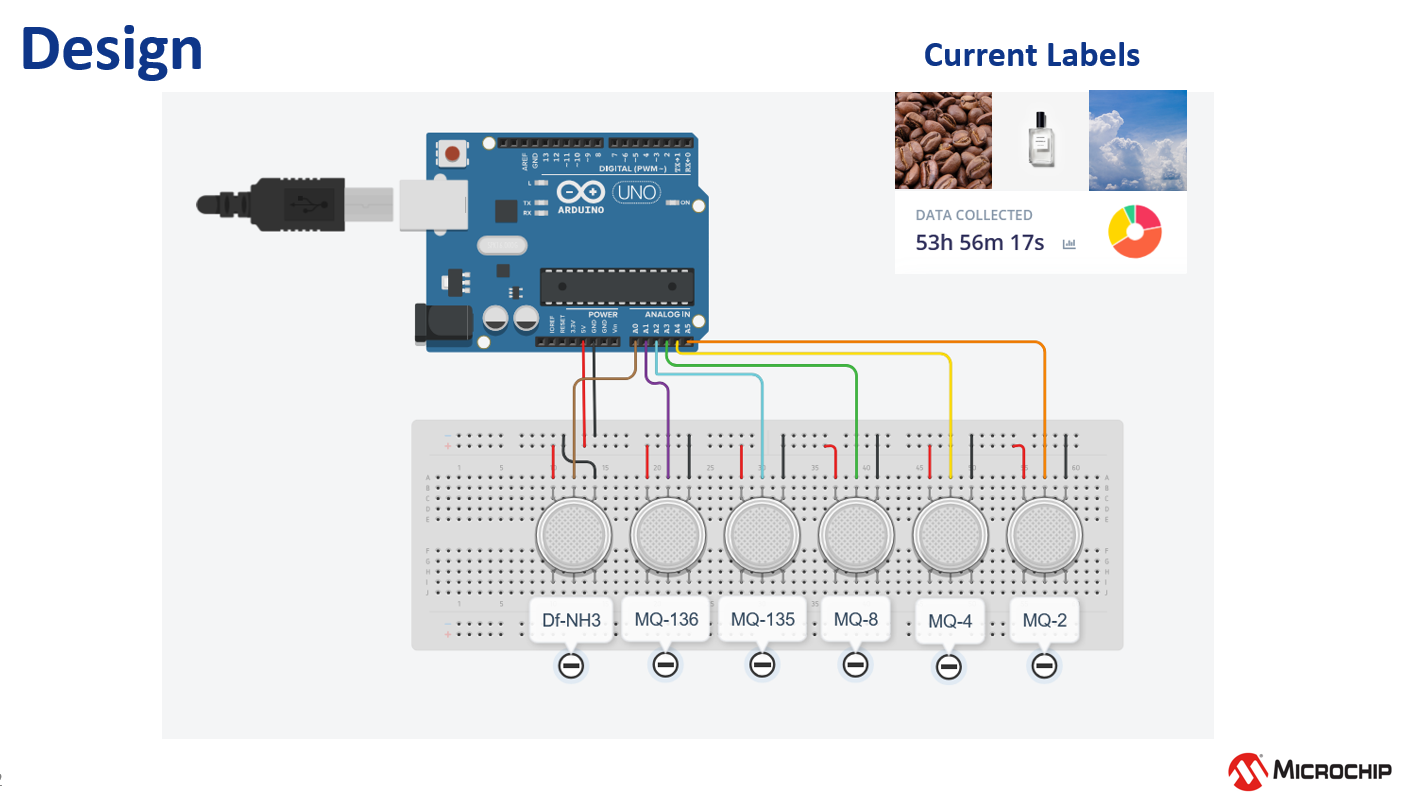
The following sensors make up the current gas-detection array:
| Sensor | Primary Sensitivity |
|---|---|
| DF-NH3 | Ammonia |
| MQ-136 | Hydrogen sulfide |
| MQ-135 | VOCs / CO₂ |
| MQ-8 | Hydrogen |
| MQ-4 | Methane |
| MQ-2 | Smoke / LPG |
These sensors together form a basic but effective VOC fingerprint for classification.
Reasons:
- ARM Cortex-M4F with hardware floating-point accelerators
- Fully supported by TensorFlow Lite Micro
- Supported directly by Edge Impulse Arduino libraries
- Higher performance vs AVR for ML workloads

Project (public link):
https://studio.edgeimpulse.com/public/661994/live
- 6 analog voltage channels
- Sampling frequency ~20 Hz
- 5-second windows (~100 sample frames)
- Labels: Perfume, Coffee, Natural Air
- 99% accuracy on GPU (training)
- ~97% estimated accuracy on Feather M4
- Latency: ~5 seconds
- Low overfitting risk (consistent validation performance)

Source file:
collect-sensor-array.ino
:contentReference[oaicite:0]{index=0}
Script:
record-sensor-array.py
Run:
python record-sensor-array.pyThis script:
- Reads serial output
- Cleans & parses voltage values
- Saves into a CSV dataset
Go to studio.edgeimpulse.com → Clone Project
Data Acquisition → Upload Data
Upload CSV files generated from your Python logger.
Impulse Design → Create impulse
Recommended:
- Window size: 5000 ms
- Frequency: 20 Hz
- DSP Block: Raw Data
- ML Block: Classification (Neural Network)
Impulse Design → Classification
Settings:
- Epochs: 100
- Learning rate: 0.001
- Train/Test Split: 80/20
Go to:
Deployment → Arduino Library → EON Optimizer (uint8)
Download the ZIP and place it under:
Documents/Arduino/libraries/
Restart Arduino IDE. Click on Sketch -> Include Zip Library -> Install the library.
Inside the exported folder:
examples/arduino/feather-m4/feather-ei-inferencing.ino
This code:
- Reads analog data
- Formats a feature vector
- Passes it to the model
- Prints probability scores
Coffee: 0.98
Perfume: 0.01
Natural Air: 0.00
MIT License
[email protected]
December 2025
E-Nose Project