


Convert D2 diagrams to draw.io files: keep authoring diagrams as code in D2, and hand fully editable drawio / diagrams.net files to everyone else. Shapes, containers, edges, styles, and positions all come across as native draw.io elements, not as a pasted image.
npx d2-to-drawio examples/basic.d2 -o basic.drawio
direction: right

user: Visitor { shape: person }
app: "Web App"
db: "Postgres" { shape: cylinder }

user -> app: "browses"
app -> db: "reads / writes"
npx d2-to-drawio examples/basic.d2 -o basic.drawio
The result, opened in draw.io, every element selectable and editable:

A richer example with containers, a queue, crow's foot cardinality, and tooltips (source):
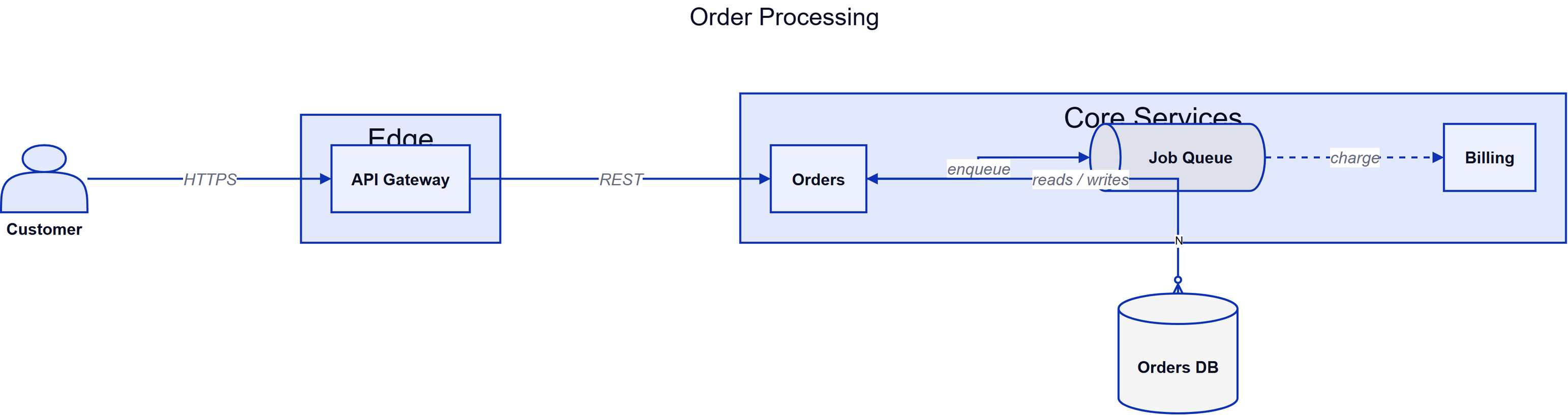
Open the committed outputs directly in your browser:
Plenty of teams standardize on draw.io and Confluence for documentation, while the engineers drawing the systems would rather write diagrams as code, version them, and review them in pull requests. Exporting D2 to SVG or PNG hands the team a static picture nobody can edit; switching the whole team to D2 rarely happens. This tool removes that one-way door: engineers keep the .d2 source of truth, everyone else gets a native .drawio file they can open, edit, and paste into Confluence.
There is a second door this opens: diagrams drafted by an AI. Language models like Claude and ChatGPT write D2 fluently, because D2 is compact text and its layout is automatic: the model writes api -> queue: enqueue and never has to decide where anything goes. What models are consistently bad at is spatial placement, which is exactly what generating draw.io XML directly demands (hundreds of hand-invented x/y coordinates that end up overlapping). The workflow this enables:
- Ask your model: "Describe my architecture as a D2 diagram" and save the answer as
arch.d2. npx d2-to-drawio arch.d2 -o arch.drawio(a real layout engine, not the model, places everything).- Open it in draw.io and fix the 10 percent a human should fix, by dragging.
The AI does the structure, the layout engine does the geometry, you keep an editable file. None of the three steps fights the other.
npm install -g d2-to-drawio
d2-to-drawio diagram.d2 -o diagram.drawio
Or without installing:
npx d2-to-drawio diagram.d2 -o diagram.drawio
Or from stdin to stdout:
cat diagram.d2 | d2-to-drawio > diagram.drawio
Usage: d2-to-drawio [options] [input.d2]

Reads from the input file, or from stdin when no file is given (or "-").
Writes to --output, or to stdout.

Options:
  -o, --output <file>   write the .drawio XML to a file instead of stdout
      --layout <name>   layout engine: dagre (default) or elk
      --theme <id>      D2 theme id (default 0)
      --waypoints       preserve D2 edge routes as fixed waypoints
      --strict          fail when input uses features that would degrade
  -q, --quiet           suppress warnings on stderr
  -h, --help            show this help
  -v, --version         print the version
Behavior notes:
@importsresolve automatically: for file input, every.d2under the input file's directory is available to the compiler; for stdin, imports resolve against the current directory.- Unsupported D2 features never crash a conversion. Each degrades to the closest visual and prints one warning line to stderr.
--strictturns those warnings into a failing exit instead. - By default draw.io re-routes edges orthogonally, which keeps them fully editable.
--waypointspins d2's exact computed routes instead. - Exit codes: 0 success, 1 conversion or input error, 2 usage error.
import { convert, convertFile, dispose } from 'd2-to-drawio';

const xml = await convert('a -> b: hello');
// or, resolving imports relative to the file:
const xml2 = await convertFile('diagram.d2', { layout: 'elk' });

await dispose();
convert(d2Source, options)returns a Promise of the.drawioXML string.convertFile(inputPath, options)reads the file and feeds sibling.d2files to the compiler so relative imports work.options:layout('dagre' | 'elk'),themeID(number),strict(boolean),waypoints(boolean),onWarning(callback receiving{code, message}),fsMap/inputPath(virtual filesystem for imports when usingconvert).dispose()releases the compiler's worker thread. Call it when done, or your process will stay alive. The nextconvertafter adisposetransparently starts a fresh engine.- Errors: malformed D2 rejects with
D2SyntaxError(message carriesfile:line:column); strict-mode degradations reject withUnsupportedFeatureError(carrying the warning list).
Output is deterministic: identical input produces byte-identical output, so generated files diff cleanly in version control.
The full, fixture-backed matrix lives in docs/FEATURE-MATRIX.md. Summary:
| Area | Support |
|---|---|
| Shape catalog (rectangle, square, page, parallelogram, document, cylinder, queue, package, step, callout, stored_data, person, diamond, oval, circle, hexagon, cloud, image, text) | Full |
| Containers, any nesting depth, grid diagrams | Full |
Connections: -> <- <-> --, chains, parallel edges, self-loops |
Full |
| Arrowheads incl. crow's foot ER markers, arrowhead labels | Full |
| Styles: fill, stroke, stroke-width, stroke-dash, opacity, shadow, fonts, bold/italic/underline | Full |
| Themes: all 20 official palettes | Full |
| Compiler-level features: vars, globs, classes, imports, overrides, null | Full |
| Boards (layers, scenarios, steps) | Full, one draw.io page per board |
| Tooltips and links | Full |
| sql_table, class (UML) | Partial: formatted single shapes, not row-by-row cells |
| Sequence diagrams | Partial: exact d2 geometry, but fixed (does not re-route) |
| Markdown / LaTeX / code labels | Partial: plain text / MathJax / monospace box |
| multiple, 3d, double-border, fill-pattern, animated, sketch | Unsupported, warned |
- The compiler dependency (
@terrastruct/d2, the official WASM build of D2) is around 60 MB installed and takes a couple of seconds to start. One-shot CLI runs pay that startup; batch conversions should use the library API, which reuses the engine across calls. - sql_table and class shapes are single shapes with formatted labels. Editing individual rows as draw.io table cells is on the roadmap.
- Sequence diagram messages and lifelines keep d2's exact geometry and will not re-route if you move the actors.
- Links between D2 boards (
link: layers.x) do not become page links in draw.io yet. - The TALA layout engine is not part of the embedded compiler;
dagreandelkare available.
The official D2 compiler (as a WASM build) parses the source and runs the real layout engine, producing fully positioned shapes and routed connections. This tool walks that output, rebuilds the container tree, and translates shapes, styles, and theme colors into draw.io's mxGraph cell model. It then emits deterministic, uncompressed .drawio XML that draw.io opens like any hand-drawn file.
Only things actually planned:
- Native draw.io table cells for sql_table and class shapes.
- draw.io sketch style for D2 sketch mode.
- Page links for D2 board links.
- Icons on regular shapes (currently only
shape: imagecarries an image).
As of July 2026 this is the only dedicated D2 to draw.io converter I am aware of. Related tools:
- D2: the diagram language itself.
- draw.io / diagrams.net: the editor this tool targets.
- @whitebite/diagram-converter: a universal multi-format diagram converter whose published build includes a D2 parser and drawio generator via a shared intermediate representation. A generalist; this tool goes deeper on D2 fidelity (layout preservation, themes, special shapes, degradation warnings).
- mmd2drawio: the same idea for Mermaid.
- The SVG detour: D2 can export SVG that draw.io imports as a static image. Works, but nothing is editable; that gap is the point of this project (see also jgraph/drawio#3764, an open request for D2 input in draw.io itself).
See CONTRIBUTING.md. The short version: fixture first, then the mapping code, then a row in the feature matrix. Bug reports with a minimal .d2 snippet are gold.
MIT. The @terrastruct/d2 dependency is MPL-2.0, used unmodified.