

Turn off the Apple background services you don't use — from the terminal, in one keystroke, fully reversible.
Interactive console util to disable 307 non-essential macOS launchd services — Siri, Apple Intelligence, telemetry, ads, and the Apple apps you don't use — plus the Spotlight file index. macOS Tahoe 26 and Golden Gate 27, Apple Silicon. Needs nothing but python3.
- ~1.5-2 GB of RAM back on a 16 GB M4 (how that was measured).
- Keeps them off across reboots. With SIP on, macOS re-enables disabled services at every boot; a small boot daemon, installed on your first apply, disables them again. With SIP off they stay off on their own.
- Two modes — you choose. With SIP on, 180 labels can be kept off. Turn SIP off from the menu and all 307 can.
- The desktop is never touched. WindowServer, Finder, Dock, audio, networking and security aren't in the catalog at any setting.
- One key undoes everything.
enable all/--enable-all, or--restoreto go back to exactly how it was before your last apply.
Run it with any one of these:
curl -fsSL https://raw.githubusercontent.com/OleksandrKrupko/mac-os-debloat/main/debloat | python3npx -y @oleksandr_krupko/mac-os-debloatbrew install OleksandrKrupko/debloat/debloat && debloatpython3 ships with the Xcode Command Line Tools (xcode-select --install if it's missing).
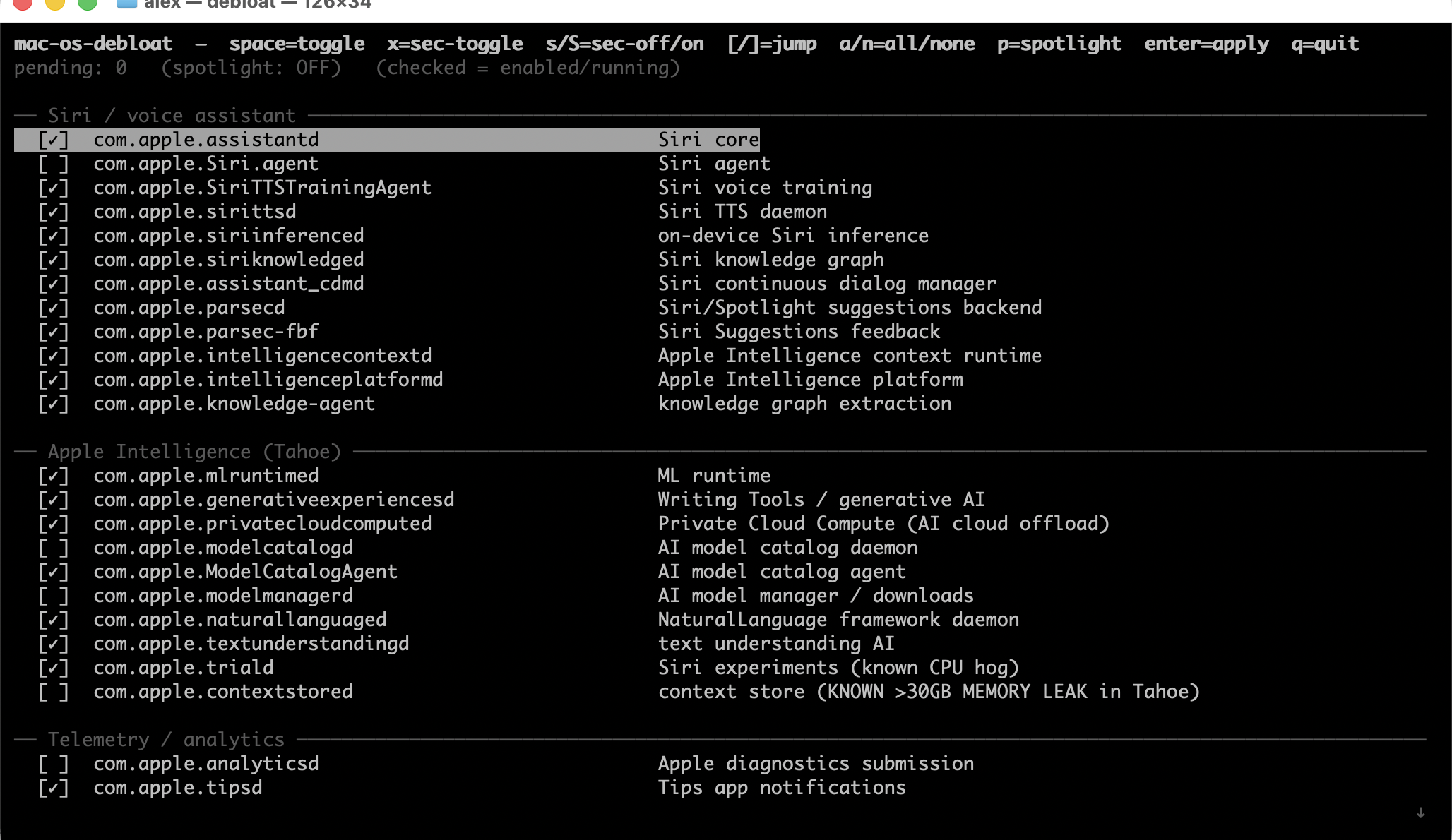
The TUI's top rows are actions — arrow onto one and press enter:
telemetry · balanced · disable all · enable all · disable SIP / enable SIP
Below them is a checkbox per service: space toggles, enter applies. The bottom line explains the row under the cursor: what it does and what you lose with it off.
debloat                    # interactive TUI
debloat --preset telemetry # analytics, crash reports, ads, beta enrollment (48)
debloat --preset balanced  # telemetry + Siri, Apple Intelligence, iMessage, Family (188)
debloat --disable-all      # every label
debloat --enable-all       # everything back on, boot daemon removed
debloat --restore          # back to the state before your last apply
debloat --status           # what's disabled, what's running anyway, SIP, boot daemon
debloat --disable-sip      # turn SIP off (then restart)
debloat --enable-sip       # turn SIP back on (then restart)
debloat --list             # every label, in preset file format
debloat --audit            # labels not present on this macOS build
debloat --dry-run          # with --preset / --disable-all / --enable-all: preview only
Applying asks for your sudo password on the TUI's bottom line. Reading state needs no sudo.
A preset disables its own labels, leaves everything else as it is, and never re-enables anything.
| disables | with SIP on | what you lose | |
|---|---|---|---|
--preset telemetry |
48 | 27 | nothing — analytics, crash reports, Apple ads, Biome, beta enrollment |
--preset balanced |
188 | 104 | Siri, Apple Intelligence, iMessage/FaceTime/Continuity, Family, News/Stocks/Weather |
--disable-all |
307 | 180 | balanced, plus Safari, Photos, Mail/Calendar/Contacts, Music/TV/Books, Maps, Time Machine, Screen Time, HomeKit, printing, iCloud sync — and iCloud login, App Store purchases, macOS Update installs, and on macOS 27 Cmd-Space / the four-finger Apps pinch break |
Counts are for the full catalog; the TUI shows only the labels present on your macOS build, so its numbers are a little lower.
Neither preset touches Apple ID auth, App Store commerce, FairPlay or bridgeOS — 28 labels only --disable-all or your own preset reach. 119 labels sit between balanced and --disable-all; pick those yourself:
mkdir -p ~/.mac-os-debloat/presets
debloat --list > ~/.mac-os-debloat/presets/mine.txt   # delete the lines to keep running
debloat --preset mine
~/.mac-os-debloat/labels.txt adds your own labels to the catalog, in the same format.
System Integrity Protection decides how much macOS lets you keep off.
| SIP on (default) | SIP off | |
|---|---|---|
| Labels you can disable | 180 | all 307 |
| After a reboot | the boot daemon disables them again | they stay off on their own |
| Measured on macOS 26.5 (VM), after reboots | all 149 SIP-on labels stayed off — 55% of the 273 loaded | all 273 stayed off — 100% |
| Cost | none | iPhone/iPad apps stop running on the Mac; root processes can modify system files and load unsigned kernel extensions |
With SIP on, the other 127 labels — marked [sip-off], greyed out in the TUI — are restarted by macOS within seconds of a kill, so the tool leaves them alone.
Turning SIP off: pick disable SIP in the menu (or debloat --disable-sip). It runs csrutil disable, which asks for an admin user and password, then you restart. If macOS only allows it from Recovery, the tool prints the exact steps. enable SIP / --enable-sip turns it back on.
Troubleshooting
iCloud / App Store requests time out, like a firewall block — the local daemon that should answer (identityservicesd, appstoreagent, akd) is off. Only --disable-all or your own preset turn those off. Check debloat --status.
macOS Update downloads but never installs — bridgeOSUpdateProxy / bosreporter / boswatcher are needed on Apple Silicon too. Only --disable-all turns them off (#7).
AKAnisetteError Code=-8025 on iCloud sign-in — re-enable com.apple.Siri.agent; balanced disables it (#7).
Cmd-Space and the four-finger pinch do nothing (macOS 27) — re-enable com.apple.campo.
Charge limit ignored (macOS charge limiter, AlDente) — re-enable com.apple.perfpowermetricd and com.apple.powerlogHelperd. Neither preset disables them; only --disable-all does (#21).
Boot-out failed: 150 — macOS won't stop that running process now; the disable still applies from its next launch. The apply lists any label whose disable did not take effect.
What it disables
307 labels across 70 sections, including:
- Siri / voice assistant (14)
- Apple Intelligence — Tahoe (13), incl.
contextstored(known >30 GB memory leak) andprivatecloudcomputed - More AI / Apple Intelligence (16)
- Diagnostics extras (29) — all telemetry to Apple
- Apple Music Player (AMP) suite (5), Apple Music / iTunes / Media streaming (8)
- Safari + Safari extras (8)
- Game Center + game controllers (7)
- Family / Parental controls (8)
- Beta program enrollment (6)
- iMessage / FaceTime / phone relay (9)
- Apple Mail / Calendar / Contacts / Reminders + AddressBook (9)
- Continuity / AirDrop / Sidecar / AirPlay / Continuity Capture (7)
- Maps, Books, TV+, Stocks/News/Weather, App Store, Apple ID, iCloud, print, Touch Bar, bridgeOS, Xcode / iOS dev stack
Every label, with what it does and what breaks, is in the script (EMBEDDED_LABELS). Labels missing on your macOS build are skipped (--audit lists them).
Never disable these
Not in the catalog; listed because labels.txt could add them:
WindowServer,Finder,Dock,SystemUIServer,controlcenter,notificationcenterui— UI diescoreaudiod— sound diesaccountsd,syspolicyd,securityd,trustd— auth and code signing breaksoftwareupdated,XprotectService— security updates and malware scanning stopCoreLocationAgent,searchpartyd— Find My breaks
Spotlight
The Spotlight checkbox is the file index (mds, mds_stores, mdworker), not the overlay you type into. It serves Cmd-Space file search, Finder search and launchers like Alfred and Raycast. Off runs mdutil -a -d: indexing stops on every volume; find, grep, ripgrep, git and editor search keep working. On runs mdutil -a -i on plus mdutil -a -E, a 10-30 minute rebuild; the row shows a spinner until it settles. Off survives reboots on its own, with no daemon: the indexers (mds_stores, mdworker_shared) stay stopped, while mds and corespotlightd stay resident.
On macOS 27, Cmd-Space and the four-finger Apps pinch are com.apple.campo, a separate row. It is not Siri and not in balanced; turning it off breaks app launching even with the index on. KeepAlive mds / corespotlightd are a separate section gated to macOS 27 — on Tahoe 26, disabling corespotlightd broke typed Cmd-Space.
For an app grid without the index, drag /Applications onto the Dock and view it as a grid (#15).
How it keeps services off
launchctl disable writes an override per launchd domain (system for LaunchDaemons, gui/$UID for LaunchAgents); the tool resolves each label's real domains and writes only there.
With SIP on, launchd drops those overrides at every boot and logs why, once per label: Ignoring enabled state due to rootless restrictions ("rootless" is SIP). Without help, 2 of 273 survive a reboot — the two on Apple's RemovableServices allowlist. So while anything is disabled and SIP is on, the tool keeps a boot daemon installed (/Library/LaunchDaemons/io.github.oleksandrkrupko.debloat.plist, running a root-owned copy of the script). It disables the saved set again at boot and at login, then checks every minute for 5 minutes and every 5 minutes after that. Anything running gets killed once; a service that comes back after its kill is left alone. A service that starts for the first time can run until the next check. Every apply updates the saved set, so re-enabling something is never undone at boot. --enable-all, or any apply with SIP off, removes the daemon and its files.
Some services macOS starts on demand whenever another process asks for them (because ipc (mach) / xpc event in launchd's log), and with SIP on it refuses to unload them. Killed, 60 of 70 were back within 2 seconds. Those 127 are the [sip-off] labels. With SIP off, launchd honours every override and nothing restarts.
Also:
- macOS updates wipe the overrides — run the tool again after one.
gui/$UIDdisables are per user; run once per account.debloat --statusshows what's in effect right now, including services disabled but running anyway.
Reported in #8 and #20; the SIP behaviour has been reported since macOS 10.12.4 (openradar 32281471).
Why, and the RAM figure
macOS Tahoe baselines at ~4-5 GB of RAM and a steady CPU drip from Apple daemons most people don't use. The ~1.5-2 GB figure is the drop in used memory on an idle M4 MacBook Pro 16 GB (macOS 26.3.1) after disabling the full default set and rebooting. Yours depends on what you use. --status's reclaimable RAM is free + inactive + speculative + purgeable pages right now, not a prediction.
Comparison
| Tool | Interface | Curated list | SIP | Install |
|---|---|---|---|---|
| mac-os-debloat | TUI + CLI | ✓ 307 labels + Spotlight | works with SIP on (180 labels); SIP off optional (all) | none — Python stdlib |
| privacy.sexy | web / desktop script generator | privacy settings, a few services | its service-disable scripts say they need SIP off | download |
| b0gdanw Tahoe gist | shell script | ✓ | needs SIP off | copy the gist |
| launchtui | TUI | ✗ generic | bootout only, not kept off |
cargo install |
| Silverback-Debloater | script | ✓ | — | Intel desktops, macOS 12 / 15 |
How it's tested
Unit tests run against a fake launchctl: python3 tests/test_debloat.py.
tests/e2e.py runs the real thing in throwaway tart VMs — real macOS, SIP on or off, real reboots and cold boots — and judges each label from launchd's own state, writing the evidence as JSON and a per-label table.
python3 tests/e2e.py prepare --os 26.5 [--sip off]
python3 tests/e2e.py run persist --os 26.5 --preset disable-all --watch 60,300,600
python3 tests/e2e.py run sip-flow --os 26.5 --preset disable-all
Scenarios: apply, restore, reboot, poweroff, persist (boot daemon), sip-flow (SIP off and back on through debloat), tui-sip (the TUI's SIP rows, typed on a real terminal), spotlight (the TUI's Spotlight row through a reboot). Needs an Apple Silicon Mac; the VM has no battery or Bluetooth, so labels that only load on real hardware are reported as not loaded.
MIT · macOS Tahoe 26 / Golden Gate 27 · Apple Silicon · Python 3.9+ · catalog counts are generated by extras/sync-readme.py
Keywords: macOS debloat, macOS Tahoe debloat, macOS Golden Gate, Apple Silicon debloat, disable Apple Intelligence, disable Siri permanently, launchctl disable, disable SIP, free RAM macOS, macOS privacy, kill Apple telemetry, launchd console util, contextstored memory leak, Tahoe RAM usage.