CV-powered soccer juggling coach — upload, analyze, improve.
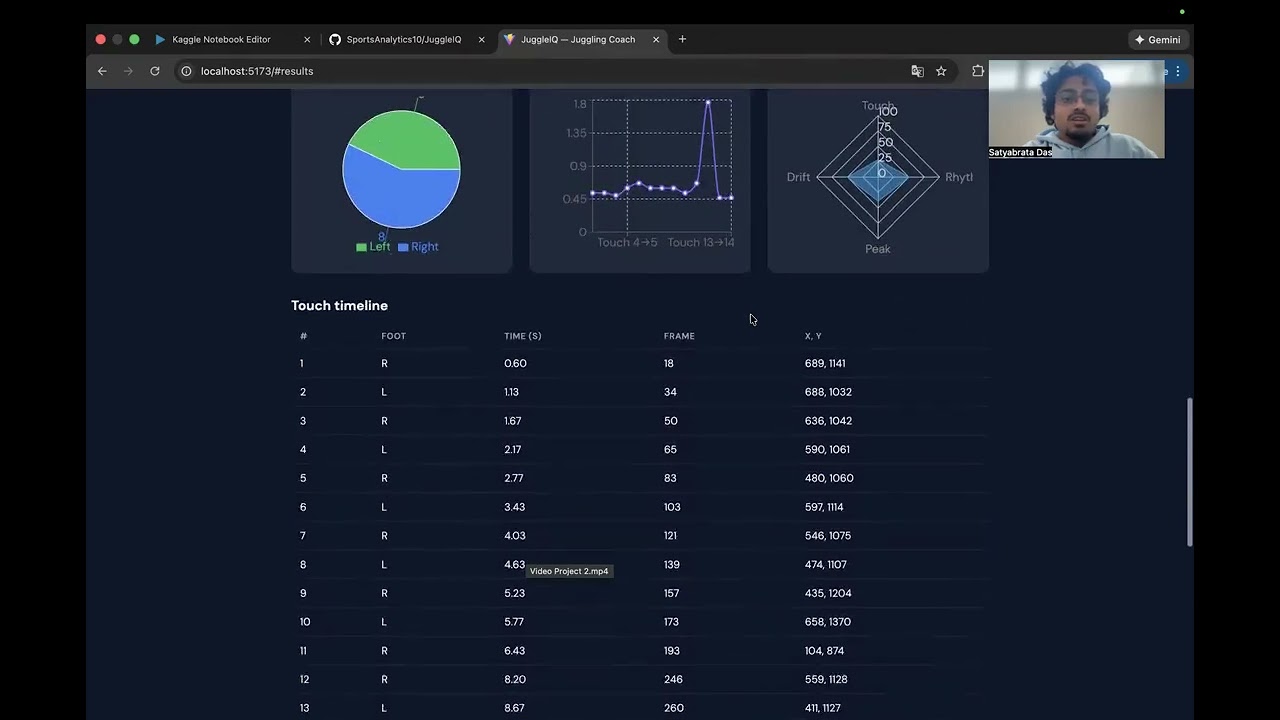
Built for Hacklytics 2026. Users upload a short juggling video; the system detects the ball, tracks pose, identifies touches, and returns metrics plus coaching tips. The frontend shows results with charts and exports session JSON for Figma Make dashboards.
- Upload video (MP4, MOV, AVI, MKV, WebM) and run analysis
- Ball + pose pipeline: YOLO detection, Kalman smoothing, MediaPipe legs/feet
- Touch detection: left/right foot, rhythm intervals, peak height, lateral drift
- Knee stiffness proxy and coaching tips from the API
- Dashboard: skill score, L/R foot donut, rhythm graph, score breakdown, touch timeline
- Download session JSON for Figma Make or other tools
- Anime.js entrance animations and subtle UI graphics
Watch the system in action:
┌─────────────────────────────────────────────────────────┐
│                     USER                                 │
│              (Mobile / Web Browser)                      │
└─────────────────────┬───────────────────────────────────┘
                      │
                      │ 1. Upload Video
                      ▼
┌─────────────────────────────────────────────────────────┐
│                  FRONTEND                                │
│                                                         │
│   React / Flutter / Vue                                 │
│                                                         │
│   Pages:                                                │
│   ├── Upload Page     → send video to API               │
│   ├── Loading Page    → show progress spinner           │
│   ├── Dashboard Page  → show all charts + results       │
│   └── Replay Page     → show annotated video            │
└─────────────────────┬───────────────────────────────────┘
                      │
                      │ 2. POST /analyze (video file)
                      │ 3. GET  /download/{job_id} (video)
                      ▼
┌─────────────────────────────────────────────────────────┐
│                  FASTAPI SERVER                          │
│              (main.py on Kaggle GPU)                     │
│                                                         │
│   Exposed via ngrok                                     │
│   https://xxxx.ngrok-free.app                           │
│                                                         │
│   Endpoints:                                            │
│   ├── GET  /health                                      │
│   ├── POST /analyze      → runs VideoProcessor          │
│   ├── GET  /download/{id}→ returns annotated video      │
│   └── DELETE /cleanup/{id}                              │
└─────────────────────┬───────────────────────────────────┘
                      │
                      │ 4. process_video()
                      ▼
┌─────────────────────────────────────────────────────────┐
│               VIDEO PROCESSOR                            │
│             (video_processor.py)                         │
│                                                         │
│   Frame by Frame Pipeline:                              │
│                                                         │
│   ┌─────────┐    ┌─────────┐    ┌─────────────────┐   │
│   │  YOLO   │───▶│ Kalman  │───▶│  Ball History   │   │
│   │ detect  │    │ filter  │    │  + Trail        │   │
│   └─────────┘    └─────────┘    └────────┬────────┘   │
│                                           │             │
│   ┌─────────────────┐                     │             │
│   │    MediaPipe    │───▶ Pose Landmarks  │             │
│   │  Pose Estimator │                     │             │
│   └─────────────────┘                     │             │
│                                           ▼             │
│                               ┌───────────────────┐    │
│                               │  Touch Detection  │    │
│                               │  F1: Foot Label   │    │
│                               │  F2: Proximity    │    │
│                               │  F3: Peak+Drift   │    │
│                               │  F4: Knee Angle   │    │
│                               └─────────┬─────────┘    │
│                                         │               │
│                                         ▼               │
│                               ┌───────────────────┐    │
│                               │   get_results()   │    │
│                               │   returns JSON    │    │
│                               └───────────────────┘    │
└─────────────────────────────────────────────────────────┘
                      │
                      │ 5. Returns JSON + annotated video
                      ▼
┌─────────────────────────────────────────────────────────┐
│                  FRONTEND DASHBOARD                      │
│                                                         │
│  JSON data mapped to:                                   │
│  ├── Skill Score Ring      ← skill_score                │
│  ├── L vs R Donut Chart    ← left_pct / right_pct       │
│  ├── Rhythm Line Graph     ← intervals[]                │
│  ├── Foot Timeline         ← touches[].foot + t         │
│  ├── Height Heatmap        ← touches[].x/y + peak       │
│  ├── Drift Channel         ← avg_drift_px               │
│  ├── Knee Feedback Card    ← knee_feedback{}            │
│  ├── Coaching Tips List    ← coaching_tips[]            │
│  └── Annotated Video       ← /download/{job_id}         │
└─────────────────────────────────────────────────────────┘
- User picks a video on phone or browser.
- Frontend sends
POST /analyzewith the video file. - FastAPI receives it and saves to
/kaggle/working/videos/. - video_processor.py runs frame by frame:
- YOLO detects the ball every frame
- Kalman filter smooths and fills gaps
- MediaPipe detects leg skeleton
- Touch detection runs on detected frames
- Overlays are drawn on each frame
- get_results() builds the final JSON.
- FastAPI returns the JSON to the frontend.
- Frontend renders the dashboard from the JSON.
- User can click “Watch Replay” (or open annotated video link).
- Frontend calls
GET /download/{job_id}. - Annotated video streams back to the browser.
| Layer | What | Why |
|---|---|---|
| CV Engine | YOLO + MediaPipe + Kalman | Ball + pose detection |
| GPU Server | Kaggle T4 | Free GPU |
| API Layer | FastAPI | Fast, async, auto docs |
| Tunnel | ngrok | Expose Kaggle publicly |
| Frontend | React + Vite | SPA, fast dev experience |
| Charts | Recharts | Rhythm, foot donut, radar |
| Animation | Anime.js | Entrance and UI motion |
| Video | HTML5 <video> |
Replay annotated video |
- [ Choose Video ] button (or “Choose video file” label)
- On select →
POST /analyze - Loading spinner while the API processes
| Block | Data source |
|---|---|
| Skill: 55.4 | skill_score |
| L:80% R:20% | left_pct / right_pct |
| Rhythm Graph | intervals[] |
| Foot Timeline | touches[].foot + t |
| Height / Drift | touches[].x/y, avg_drift_px |
| Knee: 175° Stiff | knee_feedback |
| Coaching Tips | coaching_tips[] |
| Watch Replay | GET /download/{job_id} |
Layout sketch:
┌──────────────┬──────────────┐
│ Skill: 55.4  │  L:80% R:20% │
├──────────────┴──────────────┤
│ Rhythm Graph                │
├─────────────────────────────┤
│ Foot Timeline   L─R─L─L─L   │
├──────────────┬──────────────┤
│ Height Map   │ Drift: 26px  │
├──────────────┴──────────────┤
│ Knee: 175° Very Stiff       │
├─────────────────────────────┤
│ Tips: → Chain more touches  │
├─────────────────────────────┤
│ [ ▶ Watch Replay ]          │
└─────────────────────────────┘
| Layer | Technologies |
|---|---|
| Backend | Python 3.10+, FastAPI, OpenCV, Ultralytics YOLO, MediaPipe, NumPy |
| Frontend | React 19, Vite 7, Recharts, Anime.js |
| Hosting | Kaggle (backend), ngrok (public URL), static frontend (e.g. Vercel/Netlify) |
- Run the FastAPI app (
cv/main.py) in a Kaggle notebook or environment wherevideo_processor.pyand models (YOLO, MediaPipe pose landmarker) are available. - Expose the server with ngrok and set the frontend API base URL to that ngrok URL.
cd frontend
npm install
npm run dev- Set
VITE_API_BASEin.envif your API is not at the default ngrok URL. - Production build:
npm run build→ deploy thedist/folder.
- Configure in
frontend/src/config.jsor viaVITE_API_BASE(e.g.https://your-ngrok-subdomain.ngrok-free.dev).
JuggleIQ/
├── cv/
│   ├── main.py              # FastAPI app: /health, /analyze, /download, /cleanup
│   └── video_processor.py   # YOLO, MediaPipe, Kalman, touch detection, get_results()
├── frontend/
│   ├── src/
│   │   ├── App.jsx          # Upload, results, charts, Figma Make block
│   │   ├── config.js        # API_BASE
│   │   └── App.css
│   └── public/samples/      # Sample drill videos
├── drills/                  # Source drill videos
├── docs/
│   ├── PRD.md
│   ├── tech_stack.md
│   └── DEVPOST_OVERVIEW.md
├── requirements.txt         # Python backend deps
└── README.md                # This file
| Method | Path | Description |
|---|---|---|
| GET | /health |
Health check |
| POST | /analyze |
Upload video → analysis JSON |
| GET | /download/{id} |
Annotated video (inline) |
| DELETE | /cleanup/{id} |
Remove annotated video file |
Session JSON from Download session JSON is under 5MB and can be imported as a Figma Make dataset. Use it to build animated dashboards (skill gauge, foot donut, touch timeline, knee badge, coaching tips). See docs/DEVPOST_OVERVIEW.md for animation ideas and workflow.
- JuggleIQ — Hacklytics 2026
- CV: YOLO (Ultralytics), MediaPipe
- Frontend: React, Vite, Recharts, Anime.js
Gabriel Dos Santos — MediaPipe integration Gavin Calleja — FigmaMake Dashboard Analytics