


A customizable Discord Rich Presence (RPC) plugin for Obsidian, allowing you to showcase your notes, vault, and current activity directly on your Discord profile. Tailored for super users who love personalization and aesthetics.
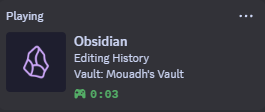
Enhance your Discord experience by displaying rich details about your Obsidian workflow directly on your profile. Whether you're taking notes, organizing ideas, or working on projects, this plugin keeps your presence dynamic and informative.
- 📝 Displays active note title
- 📂 Shows vault name
- ⏳ Elapsed session time
- 🎨 Customizable status messages
- 🎭 Support for themes and icons
- ⚡ Lightweight and optimized (2ms)
- Default (New & Old)
- Catppuccin
- Tokyo Night
- Cyberglow
More in the future!
- Download the main.js and manifest.json files from GitHub Releases.
- Extract and move the folder to
yourvault\.obsidian\plugins\themed-obsidian-discord-rpc. - Enable it in Settings → Community Plugins.
- Open Settings → Community Plugins.
- Search for Themed Discord RPC.
- Click Install and Enable.
well you can just read my CONTRIBUTING.md file
- 🐛 Report an Issue: Open an issue
Built with 💻 and ☕ by Mouadh.