A grouped, customisable left navigation for any WordPress site.


The wp-admin sidebar gets crowded fast. Install half a dozen plugins and the left nav quickly grows from twelve items to twenty-five, with WooCommerce, Yoast, Jetpack, and other plugin-added items competing with core.
WP Admin Sidebar is a small WordPress plugin that improves the wp-admin sidebar, starting with personal rearrangement of items and a curated Plugins group that consolidates plugin-added entries at the bottom. Activating the plugin enables the redesign for every logged-in user on the site — install is the opt-in. Fully reverts on deactivation. Drag, keyboard-reorder, or use a "Move to" menu to reposition any item; positions persist across sessions, per-site for each user.
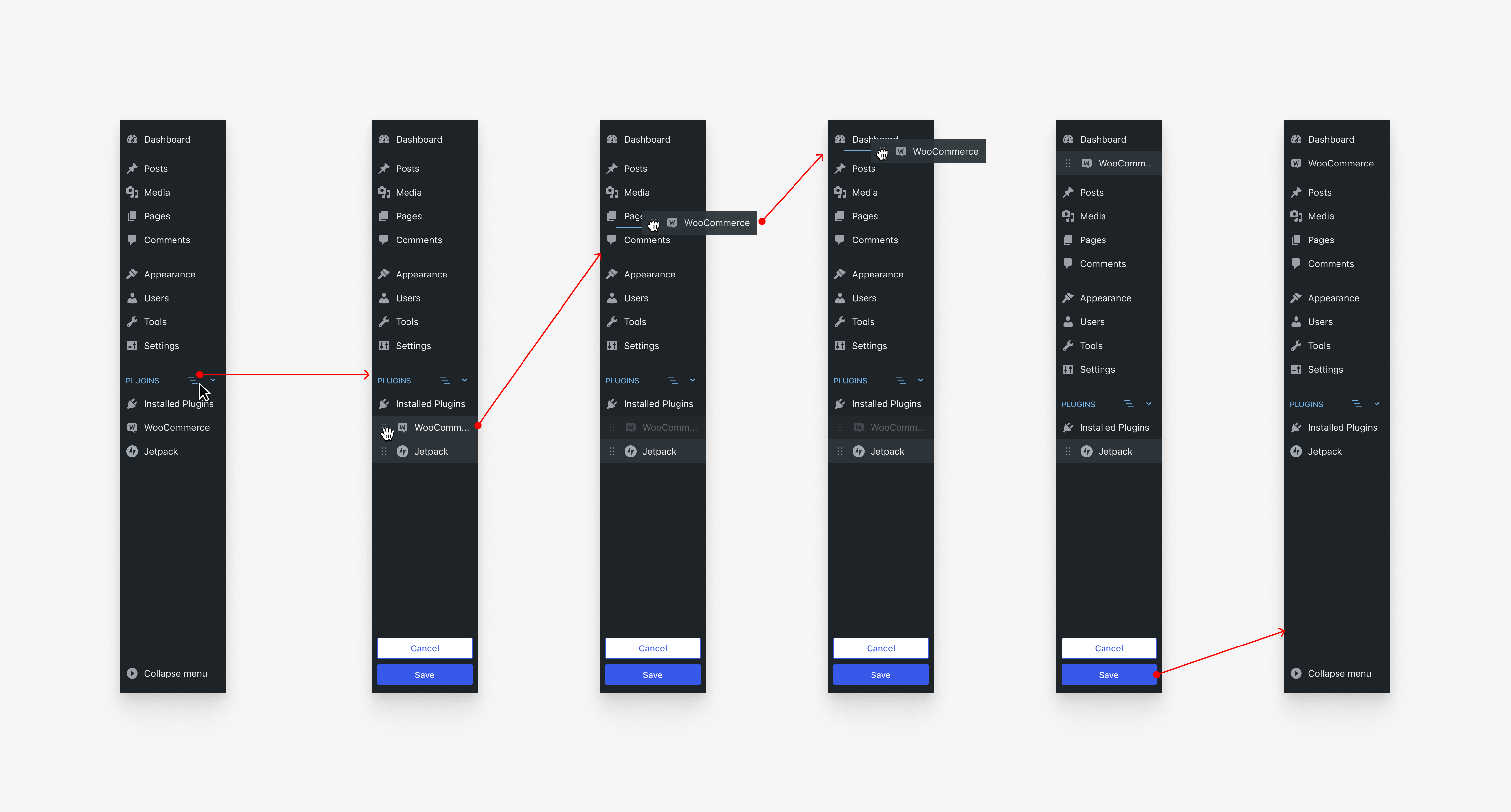
It is built incrementally on top of wp-admin: plain ES modules, no React, no Gutenberg surface — a thin layer of JavaScript over server-rendered HTML, and a small set of PHP filter hooks for hosts and adapter authors to shape the experience for their environments.
This is v0.1.x — early prototype, public from day 1. Inspired by Matt Mullenweg's "Rethinking left navigation" Make/Core post and the WordPress design teams' explorations.
The plugin is functional and shipping behind a sticker on a subset of WordPress.com sites. The public-installable plugin shape is what this repo is for. See docs/roadmap.md for what's locked, what's open, and what's next.
The fastest way is the WordPress Playground demo (no install, no setup):
The blueprint boots WordPress with a representative plugin set (The Events Calendar, Contact Form 7, Classic Editor, Query Monitor), activates this plugin, and drops you in wp-admin/. The redesigned sidebar is active on first load.
To install on your own WordPress site:
-
Clone this repo into
wp-content/plugins/wp-admin-sidebar/, or download the latest release zip and upload via wp-admin Plugins → Add New → Upload Plugin. -
Activate. The redesign is on for every logged-in user. Deactivate to revert.
Hosts that need finer control (per-blog, per-user, percentage rollout) can override by binding the
wp_admin_sidebar_enabledfilter from an adapter. Seedocs/host-extension-api.md. A future deliberate opt-in/opt-out surface is tracked in #16. Saved layouts persist across deactivate / reactivate cycles.
- Grouping. Plugin-added top-level menu items get classified into a curated Plugins group at the bottom of the sidebar. Core items (Dashboard, Posts, Media, Pages, Comments, Appearance, Plugins, Users, Tools, Settings) keep their core positions. The classification is data-driven by a registry of common wp.org plugins (see
src/registry.php) plus a fall-through rule for everything else. - Per-user reorder. Click the customize button next to a group to enter customizer mode. Drag any item, use keyboard reordering (arrows after focusing the grip), or use the Move to menu (3-dot trigger). Save persists the layout in
user_metafor the current site. - Reset to default. Customizer's "Reset to default" returns an item to its baseline group + position from the classifier.
- Per-site, per-user. Each user's saved layouts are scoped per site — a multi-site network or WordPress.com user with several sites gets independent layouts.
- No core changes. The plugin runs entirely as a wp-admin overlay: it reads
$menu/$submenu, classifies, then reorders DOM nodes client-side with the server's pre-classified data block. - Accessibility. Keyboard-navigable end-to-end (tab, focus visible, screen-reader live region for moves). WCAG AA conformance is the README-promised target.
- Performance. Browse-rail bundle ≤ 12 KB gzipped (CI gate). Customizer bundle ≤ 60 KB. Plain ES modules, no build step, no React. The classifier runs once per admin request (
in_admin_headerpriority 1) and is short-circuited when the gate is off — non-opted-in users see no overhead beyond a sub-millisecond filter check.
For the architectural details — /src/ layout, file responsibilities, contracts — see docs/architecture.md.
For host-adapter authors (e.g., a managed-WordPress host wanting to add a "Hosting" group with their own items): docs/host-extension-api.md. The full filter API is documented there with three worked examples.
For prior art and how this plugin relates to other community efforts: docs/related-work.md.
| Phase | What | Status |
|---|---|---|
| v0.1.x | Public scaffold, in-the-open development, early adopters | active (now) |
| v0.2.x | Stable host-adapter API, WordPress.com vendor cutover, Make/Core announcement, Reddit launch | next |
| v0.3.x | Submission to wordpress.org plugin directory, percentage-rollout on WordPress.com | following |
| v1.0 | API stability promise, deprecation policy locked, broader rollout | when public extension API has soaked |
| future | Make/Core proposal for upstream — what core could adopt from the prototype | gated by community signal |
See docs/roadmap.md for milestone-by-milestone detail.
Bug reports, design feedback, and host-adapter questions all welcome.
- Engineering work: GitHub Issues + PRs. Run
composer install,npm install,npm run lint,php tests/test-grep-no-wpcom-tokens.phpbefore opening a PR. SeeCONTRIBUTING.md. - UX / design feedback / "should we…?" questions: GitHub Discussions.
- Security issues: see
SECURITY.md. Don't open a public issue. - Host-adapter authoring: read
docs/host-extension-api.md, then ask in the Host Adapters Discussion category.
GPL-2.0-or-later. Copyright the contributors. By submitting a contribution you license it under GPL-2.0+.
See MAINTAINERS.md. Initial maintainer set: Christos Koumenides (@chriskmnds) and Lucas Mendes (@lucasmdo).