
English | 简体中文 | Español | हिन्दी | Português | 日本語 | Русский | 한국어













Build autonomous, reliable, self-improving AI agents without hardcoding workflows. Define your goal through conversation with hive coding agent(queen), and the framework generates a node graph with dynamically created connection code. When things break, the framework captures failure data, evolves the agent through the coding agent, and redeploys. Built-in human-in-the-loop nodes, credential management, and real-time monitoring give you control without sacrificing adaptability.
Visit adenhq.com for complete documentation, examples, and guides.
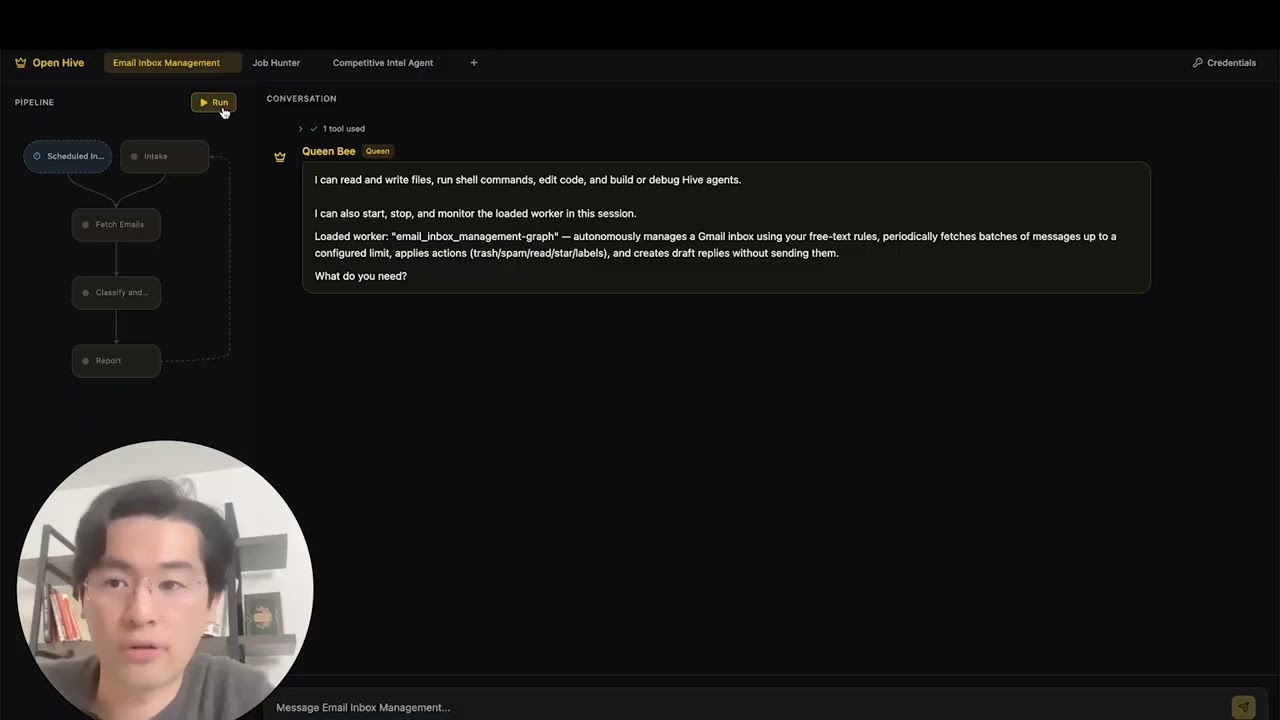
Hive is designed for developers and teams who want to build production-grade AI agents without manually wiring complex workflows.
Hive is a good fit if you:
- Want AI agents that execute real business processes, not demos
- Need fast or high volume agent execution over open workflow
- Need self-healing and adaptive agents that improve over time
- Require human-in-the-loop control, observability, and cost limits
- Plan to run agents in production environments
Hive may not be the best fit if you’re only experimenting with simple agent chains or one-off scripts.
Use Hive when you need:
- Long-running, autonomous agents
- Strong guardrails, process, and controls
- Continuous improvement based on failures
- Multi-agent coordination
- A framework that evolves with your goals
- Documentation - Complete guides and API reference
- Self-Hosting Guide - Deploy Hive on your infrastructure
- Changelog - Latest updates and releases
- Roadmap - Upcoming features and plans
- Report Issues - Bug reports and feature requests
- Contributing - How to contribute and submit PRs
- Python 3.11+ for agent development
- An LLM provider that powers the agents
Note for Windows Users: It is strongly recommended to use WSL (Windows Subsystem for Linux) or Git Bash to run this framework. Some core automation scripts may not execute correctly in standard Command Prompt or PowerShell.
Note Hive uses a
uvworkspace layout and is not installed withpip install. Runningpip install -e .from the repository root will create a placeholder package and Hive will not function correctly. Please use the quickstart script below to set up the environment.
# Clone the repository
git clone https://github.com/aden-hive/hive.git
cd hive


# Run quickstart setup
./quickstart.sh
This sets up:
-
framework - Core agent runtime and graph executor (in
core/.venv) -
aden_tools - MCP tools for agent capabilities (in
tools/.venv) -
credential store - Encrypted API key storage (
~/.hive/credentials) -
LLM provider - Interactive default model configuration
-
All required Python dependencies with
uv -
At last, it will initiate the open hive interface in your browser
Tip: To reopen the dashboard later, run
hive openfrom the project directory.

Type the agent you want to build in the home input box

Click "Try a sample agent" and check the templates. You can run a templates directly or choose to build your version on top of the existing template.
Now you can run an agent by selectiing the agent (either an existing agent or example agent). You can click the Run button on the top left, or talk to the queen agent and it can run the agent for you.

- Browser-Use - Control the browser on your computer to achieve hard tasks
- Parallel Execution - Execute the generated graph in parallel. This way you can have multiple agent compelteing the jobs for you
- Goal-Driven Generation - Define objectives in natural language; the coding agent generates the agent graph and connection code to achieve them
- Adaptiveness - Framework captures failures, calibrates according to the objectives, and evolves the agent graph
- Dynamic Node Connections - No predefined edges; connection code is generated by any capable LLM based on your goals
- SDK-Wrapped Nodes - Every node gets shared memory, local RLM memory, monitoring, tools, and LLM access out of the box
- Human-in-the-Loop - Intervention nodes that pause execution for human input with configurable timeouts and escalation
- Real-time Observability - WebSocket streaming for live monitoring of agent execution, decisions, and node-to-node communication
- Production-Ready - Self-hostable, built for scale and reliability
 Hive is built to be model-agnostic and system-agnostic.
- LLM flexibility - Hive Framework is designed to support various types of LLMs, including hosted and local models through LiteLLM-compatible providers.
- Business system connectivity - Hive Framework is designed to connect to all kinds of business systems as tools, such as CRM, support, messaging, data, file, and internal APIs via MCP.
Hive focuses on generating agents that run real business processes rather than generic agents. Instead of requiring you to manually design workflows, define agent interactions, and handle failures reactively, Hive flips the paradigm: you describe outcomes, and the system builds itself—delivering an outcome-driven, adaptive experience with an easy-to-use set of tools and integrations.
flowchart LR
    GOAL["Define Goal"] --> GEN["Auto-Generate Graph"]
    GEN --> EXEC["Execute Agents"]
    EXEC --> MON["Monitor & Observe"]
    MON --> CHECK{{"Pass?"}}
    CHECK -- "Yes" --> DONE["Deliver Result"]
    CHECK -- "No" --> EVOLVE["Evolve Graph"]
    EVOLVE --> EXEC

    GOAL -.- V1["Natural Language"]
    GEN -.- V2["Instant Architecture"]
    EXEC -.- V3["Easy Integrations"]
    MON -.- V4["Full visibility"]
    EVOLVE -.- V5["Adaptability"]
    DONE -.- V6["Reliable outcomes"]

    style GOAL fill:#ffbe42,stroke:#cc5d00,stroke-width:2px,color:#333
    style GEN fill:#ffb100,stroke:#cc5d00,stroke-width:2px,color:#333
    style EXEC fill:#ff9800,stroke:#cc5d00,stroke-width:2px,color:#fff
    style MON fill:#ff9800,stroke:#cc5d00,stroke-width:2px,color:#fff
    style CHECK fill:#fff59d,stroke:#ed8c00,stroke-width:2px,color:#333
    style DONE fill:#4caf50,stroke:#2e7d32,stroke-width:2px,color:#fff
    style EVOLVE fill:#e8763d,stroke:#cc5d00,stroke-width:2px,color:#fff
    style V1 fill:#fff,stroke:#ed8c00,stroke-width:1px,color:#cc5d00
    style V2 fill:#fff,stroke:#ed8c00,stroke-width:1px,color:#cc5d00
    style V3 fill:#fff,stroke:#ed8c00,stroke-width:1px,color:#cc5d00
    style V4 fill:#fff,stroke:#ed8c00,stroke-width:1px,color:#cc5d00
    style V5 fill:#fff,stroke:#ed8c00,stroke-width:1px,color:#cc5d00
    style V6 fill:#fff,stroke:#ed8c00,stroke-width:1px,color:#cc5d00
| Traditional Frameworks | Hive |
|---|---|
| Hardcode agent workflows | Describe goals in natural language |
| Manual graph definition | Auto-generated agent graphs |
| Reactive error handling | Outcome-evaluation and adaptiveness |
| Static tool configurations | Dynamic SDK-wrapped nodes |
| Separate monitoring setup | Built-in real-time observability |
| DIY budget management | Integrated cost controls & degradation |
- Define Your Goal → Describe what you want to achieve in plain English
- Coding Agent Generates → Creates the agent graph, connection code, and test cases
- Workers Execute → SDK-wrapped nodes run with full observability and tool access
- Control Plane Monitors → Real-time metrics, budget enforcement, policy management
- Adaptiveness → On failure, the system evolves the graph and redeploys automatically
- Developer Guide - Comprehensive guide for developers
- Getting Started - Quick setup instructions
- Configuration Guide - All configuration options
- Architecture Overview - System design and structure
Aden Hive Agent Framework aims to help developers build outcome-oriented, self-adaptive agents. See roadmap.md for details.
flowchart TB
    %% Main Entity
    User([User])

    %% =========================================
    %% EXTERNAL EVENT SOURCES
    %% =========================================
    subgraph ExtEventSource [External Event Source]
        E_Sch["Schedulers"]
        E_WH["Webhook"]
        E_SSE["SSE"]
    end

    %% =========================================
    %% SYSTEM NODES
    %% =========================================
    subgraph WorkerBees [Worker Bees]
        WB_C["Conversation"]
        WB_SP["System prompt"]

        subgraph Graph [Graph]
            direction TB
            N1["Node"] --> N2["Node"] --> N3["Node"]
            N1 -.-> AN["Active Node"]
            N2 -.-> AN
            N3 -.-> AN

            %% Nested Event Loop Node
            subgraph EventLoopNode [Event Loop Node]
                ELN_L["listener"]
                ELN_SP["System Prompt<br/>(Task)"]
                ELN_EL["Event loop"]
                ELN_C["Conversation"]
            end
        end
    end

    subgraph JudgeNode [Judge]
        J_C["Criteria"]
        J_P["Principles"]
        J_EL["Event loop"] <--> J_S["Scheduler"]
    end

    subgraph QueenBee [Queen Bee]
        QB_SP["System prompt"]
        QB_EL["Event loop"]
        QB_C["Conversation"]
    end

    subgraph Infra [Infra]
        SA["Sub Agent"]
        TR["Tool Registry"]
        WTM["Write through Conversation Memory<br/>(Logs/RAM/Harddrive)"]
        SM["Shared Memory<br/>(State/Harddrive)"]
        EB["Event Bus<br/>(RAM)"]
        CS["Credential Store<br/>(Harddrive/Cloud)"]
    end

    subgraph PC [PC]
        B["Browser"]
        CB["Codebase<br/>v 0.0.x ... v n.n.n"]
    end

    %% =========================================
    %% CONNECTIONS & DATA FLOW
    %% =========================================

    %% External Event Routing
    E_Sch --> ELN_L
    E_WH --> ELN_L
    E_SSE --> ELN_L
    ELN_L -->|"triggers"| ELN_EL

    %% User Interactions
    User -->|"Talk"| WB_C
    User -->|"Talk"| QB_C
    User -->|"Read/Write Access"| CS

    %% Inter-System Logic
    ELN_C <-->|"Mirror"| WB_C
    WB_C -->|"Focus"| AN

    WorkerBees -->|"Inquire"| JudgeNode
    JudgeNode -->|"Approve"| WorkerBees

    %% Judge Alignments
    J_C <-.->|"aligns"| WB_SP
    J_P <-.->|"aligns"| QB_SP

    %% Escalate path
    J_EL -->|"Report (Escalate)"| QB_EL

    %% Pub/Sub Logic
    AN -->|"publish"| EB
    EB -->|"subscribe"| QB_C

    %% Infra and Process Spawning
    ELN_EL -->|"Spawn"| SA
    SA -->|"Inform"| ELN_EL
    SA -->|"Starts"| B
    B -->|"Report"| ELN_EL
    TR -->|"Assigned"| ELN_EL
    CB -->|"Modify Worker Bee"| WB_C

    %% =========================================
    %% SHARED MEMORY & LOGS ACCESS
    %% =========================================

    %% Worker Bees Access (link to node inside Graph subgraph)
    AN <-->|"Read/Write"| WTM
    AN <-->|"Read/Write"| SM

    %% Queen Bee Access
    QB_C <-->|"Read/Write"| WTM
    QB_EL <-->|"Read/Write"| SM

    %% Credentials Access
    CS -->|"Read Access"| QB_C
We welcome contributions from the community! We’re especially looking for help building tools, integrations, and example agents for the framework (check #2805). If you’re interested in extending its functionality, this is the perfect place to start. Please see CONTRIBUTING.md for guidelines.
Important: Please get assigned to an issue before submitting a PR. Comment on an issue to claim it, and a maintainer will assign you. Issues with reproducible steps and proposals are prioritized. This helps prevent duplicate work.
- Find or create an issue and get assigned
- Fork the repository
- Create your feature branch (
git checkout -b feature/amazing-feature) - Commit your changes (
git commit -m 'Add amazing feature') - Push to the branch (
git push origin feature/amazing-feature) - Open a Pull Request
We use Discord for support, feature requests, and community discussions.
- Discord - Join our community
- Twitter/X - @adenhq
- LinkedIn - Company Page
We're hiring! Join us in engineering, research, and go-to-market roles.
For security concerns, please see SECURITY.md.
This project is licensed under the Apache License 2.0 - see the LICENSE file for details.
Q: What LLM providers does Hive support?
Hive supports 100+ LLM providers through LiteLLM integration, including OpenAI (GPT-4, GPT-4o), Anthropic (Claude models), Google Gemini, DeepSeek, Mistral, Groq, and many more. Simply set the appropriate API key environment variable and specify the model name. We recommend using Claude, GLM and Gemini as they have the best performance.
Q: Can I use Hive with local AI models like Ollama?
Yes! Hive supports local models through LiteLLM. Simply use the model name format ollama/model-name (e.g., ollama/llama3, ollama/mistral) and ensure Ollama is running locally.
Q: What makes Hive different from other agent frameworks?
Hive generates your entire agent system from natural language goals using a coding agent—you don't hardcode workflows or manually define graphs. When agents fail, the framework automatically captures failure data, evolves the agent graph, and redeploys. This self-improving loop is unique to Aden.
Q: Is Hive open-source?
Yes, Hive is fully open-source under the Apache License 2.0. We actively encourage community contributions and collaboration.
Q: Can Hive handle complex, production-scale use cases?
Yes. Hive is explicitly designed for production environments with features like automatic failure recovery, real-time observability, cost controls, and horizontal scaling support. The framework handles both simple automations and complex multi-agent workflows.
Q: Does Hive support human-in-the-loop workflows?
Yes, Hive fully supports human-in-the-loop workflows through intervention nodes that pause execution for human input. These include configurable timeouts and escalation policies, allowing seamless collaboration between human experts and AI agents.
Q: What programming languages does Hive support?
The Hive framework is built in Python. A JavaScript/TypeScript SDK is on the roadmap.
Q: Can Hive agents interact with external tools and APIs?
Yes. Aden's SDK-wrapped nodes provide built-in tool access, and the framework supports flexible tool ecosystems. Agents can integrate with external APIs, databases, and services through the node architecture.
Q: How does cost control work in Hive?
Hive provides granular budget controls including spending limits, throttles, and automatic model degradation policies. You can set budgets at the team, agent, or workflow level, with real-time cost tracking and alerts.
Q: Where can I find examples and documentation?
Visit docs.adenhq.com for complete guides, API reference, and getting started tutorials. The repository also includes documentation in the docs/ folder and a comprehensive developer guide.
Q: How can I contribute to Aden?
Contributions are welcome! Fork the repository, create your feature branch, implement your changes, and submit a pull request. See CONTRIBUTING.md for detailed guidelines.
Made with 🔥 Passion in San Francisco


