- Overview
- Prequisites
- Notes
- CloudShell Deployment
- Local Deployment (Mac / Linux)
- Deployment Validation
- Running the Guidance
- Evaluation and Testing
- Tracing and Observability
- Next Steps
- Cleanup
- Common issues, and debugging
- Revisions
- Authors
The Guidance for Agentic Data Exploration on AWS (Panoptic) is a Generative AI powered solution that leverages Strands Agents SDK and Amazon Bedrock to unify and analyze diverse data streams without traditional ETL barriers and data integration. This Guidance addresses the challenge of analyzing complex, interconnected data from multiple sources by providing a multi-agent system that can intelligently process, visualize, and extract insights from various data formats.
Why did we build this Guidance?
Traditional data analysis often requires extensive ETL processes and data integration efforts before meaningful insights can be extracted. This Guidance eliminates these barriers by providing specialized AI agents that can work collaboratively to process raw data, create graph representations, generate visualizations, and provide intelligent analysis without requiring upfront data transformation.
The system is comprised of specialized AI agents, each designed for specific use purposes:
The Guidance for Agentic Data Exploration on AWS (Panoptic AI Data Explorer) is a multi-agent Python application with a web UI that provides intelligent data analysis and exploration powered by AWS AI services. The system features a supervisor agent that routes queries to specialized agents and runs as containerized services in AWS Fargate with Amazon CloudFront HTTPS termination and an Application Load Balancer.
| Agent / Tools | Capabilities |
|---|---|
| Supervisor | Classifies requests and routes to specialized agents |
| Product Analyst | Product analysis, catalogs, specifications, and data modeling using products knowledge base |
| Supply Chain Analyst | Manufacturing supply chain operations, weather forecasts, meteorological information, UV index data, and supply chain network analysis |
| Tariff Assistant | US Harmonized Tariff Schedule, HTS codes, duty rates, and trade regulations |
| Schema Translator | Converts database schemas to graph models and relationship analysis |
| Data Analyzer | Analyzes sample data and generates complete database schemas |
| Data Visualizer | Creates charts, graphs, word clouds, tables, and maps from data |
| Graph Assistant | Neptune database queries using Cypher, graph exploration, and database statistics |
| Image Assistant | Image analysis, processing, and generation using AI models |
| Help Assistant | AI Data Explorer application guidance using help knowledge base |
| General Assistant | All other topics outside specialized domains |

You are responsible for the cost of the AWS services used while running this Guidance. Samples costs are outlined below, but actual costs may vary depending on your deployment environment. Prices are subject to change. Consult the AWS Pricing Calculator to create a detailed estimate that fits your needs. Create a Budget through AWS Cost Explorer to help manage costs.
The following table provides a sample cost breakdown for deploying this Guidance with the default parameters in the US East (N. Virginia) Region for one month, assuming 50 chat conversations per business day using ~50,000 total tokens each.
| AWS service | Dimensions | Cost [USD] |
|---|---|---|
| Amazon Bedrock | 48.7M input, 1.8M output tokens (Claude 4 Sonnet) | $172.76 |
| Amazon Bedrock AgentCore Memory | 20,000 short-term memory events | $5.00 |
| AWS Fargate | 2 vCPU, 4GB memory, 24/7 operation | $65.00 |
| Application Load Balancer | Standard ALB with health checks | $22.50 |
| Amazon CloudFront | 1GB data transfer, 10,000 requests | $8.50 |
| Amazon Neptune Serverless | db.t3.medium instance + 1GB storage (optional) | $291.00 |
| Amazon Cognito | 1,000 active users per month | $0.00 |
| Amazon S3 | 5GB storage + data transfer | $1.25 |
| Amazon CloudWatch | Standard monitoring and logging | $15.00 |
| Networking | NAT Gateway, Public IPs | $45.00 |
| Total estimated monthly cost | Without Neptune | $335.01 |
| Total estimated monthly cost | With Neptune | $626.01 |
If used in place of Claude Sonnet 4:
- Amazon Nova Pro $44.64
- Amazon Nova Premier $143.96
Required AWS services and configurations:
- Enable Bedrock model invocation logging
- Set CloudWatch Logs destination to
/aws/bedrock/ModelInvocation
2. IAM Permissions: See IAM Requirements for comprehensive permissions guide.
This Guidance is supported in AWS regions where Amazon Bedrock, Amazon S3 Vectors, and Amazon Neptune are available. Recommended regions include:
- US East (N. Virginia) - us-east-1
- US East (Ohio) - us-east-2
- US West (Oregon) - us-west-2
- EU Central 1 (Frankfurt) - eu-central-1
- Asia Pacific (Sydney) - ap-southeast-2
See Amazon Bedrock Quotas for more details on default limits for Amazon Bedrock Model and Agent usage. Please request service limit increases if you need higher throughput.
This Guidance uses AWS CDK. If you are using AWS CDK for the first time, CDK will automatically be bootstrapped in your target AWS account and region:
-
Login to your AWS account and launch and AWS CloudShell session
-
Clone the repository in your CloudShell home directory
git clone -b v2 https://github.com/aws-solutions-library-samples/guidance-for-agentic-data-exploration-on-aws
-
Setup environment:
cd guidance-for-agentic-data-exploration-on-aws ./scripts/cloudshell-setup.sh -
Deploy the application:
# In new VPC without Neptune database
./scripts/cloudshell-deploy.sh

# In existing VPC without Neptune database
./scripts/cloudshell-deploy.sh --vpc-id vpc-00000000

# In new VPC with new Neptune graph database
./scripts/cloudshell-deploy.sh --with-graph-db

# In existing VPC with existing Neptune database
./scripts/cloudshell-deploy.sh --vpc-id vpc-12345678 --neptune-sg sg-abcdef12 --neptune-host my-cluster.cluster-xyz.us-east-1.neptune.amazonaws.com

# With enforced guardrails (or use --guardrail-mode shadow to warn only)
./scripts/cloudshell-deploy.sh --guardrail-mode enforce
- Node.js 21.x+ and npm:
brew install node - AWS CLI 2.27.51+: Install guide +
aws configure - AWS CDK CLI:
npm install -g aws-cdk - Python 3.13+:
brew install python - Container runtime: Podman or Docker
# 1. Clone and setup
git clone -b v2 https://github.com/aws-solutions-library-samples/guidance-for-agentic-data-exploration-on-aws.git
cd guidance-for-agentic-data-exploration-on-aws
npm install

# 2. Bootstrap AWS (one-time)
npx cdk bootstrap

# 3. Start container runtime (one-time)
podman machine init && podman machine start

# 4. Deploy
./dev-tools/deploy.sh| Configuration | Command |
|---|---|
| New VPC, No Graph DB | ./dev-tools/deploy.sh |
| New VPC with New Graph DB | ./dev-tools/deploy.sh --with-graph-db |
| Existing VPC, No Graph DB | ./dev-tools/deploy.sh --vpc-id vpc-123 |
| Existing VPC with New Graph DB | ./dev-tools/deploy.sh --vpc-id vpc-123 --with-graph-db |
| Existing VPC and Graph DB | ./dev-tools/deploy.sh --vpc-id vpc-123 --neptune-sg sg-456 --neptune-host cluster.neptune.amazonaws.com --guardrail-mode enforce |
| Guardrails Mode enforce blocks shadow (default) logs only |
./dev-tools/deploy.sh --guardrail-mode enforce |
# Copy and customize the deployment template
cp ./dev-tools/deploy-local-template.sh ./dev-tools/deploy-local.sh
# Edit deploy-local.sh with your settings, then run:
./dev-tools/deploy-local.shYour VPC must have:
- Public subnets (2+ AZs) with Internet Gateway routes and
aws-cdk:subnet-type = Publictags - Private subnets (2+ AZs) with NAT Gateway routes and
aws-cdk:subnet-type = Privatetags - Internet Gateway and NAT Gateway(s) properly configured
# Get Neptune details for existing cluster
CLUSTER_NAME="your-cluster-name"
NEPTUNE_SG=$(aws neptune describe-db-clusters --db-cluster-identifier $CLUSTER_NAME --query "DBClusters[0].VpcSecurityGroups[0].VpcSecurityGroupId" --output text)
NEPTUNE_HOST=$(aws neptune describe-db-clusters --db-cluster-identifier $CLUSTER_NAME --query "DBClusters[0].ReaderEndpoint" --output text)

# Deploy with Neptune integration
./dev-tools/deploy.sh --vpc-id vpc-123 --neptune-sg $NEPTUNE_SG --neptune-host $NEPTUNE_HOST# Deploy to different region
export AWS_DEFAULT_REGION=us-west-2
npx cdk bootstrap # if not already done in this region
./dev-tools/deploy.sh# Deploy standalone Neptune cluster
./dev-tools/deploy-graph-db.sh
./dev-tools/deploy-graph-db.sh --vpc-id vpc-123 # with existing VPCAfter deployment, verify the system is working correctly:
-
Get the application URL:
APP_URL=$(aws cloudformation describe-stacks --stack-name DataExplorerAgentsStack --query "Stacks[0].Outputs[?ExportName=='ApplicationUrl'].OutputValue" --output text)
echo "Application URL: $APP_URL"
-
Create admin user:
./scripts/create-admin-user.sh
-
Test the deployment:
# Test agent service health
curl $APP_URL/health

# Test basic query
curl -X POST $APP_URL/query-streaming-with-events \
  -H 'Content-Type: application/json' \
  -d '{"prompt": "Hello, can you help me?"}'
-
Access the web interface:
- Open the application URL in your browser
- Sign in with the admin credentials
- Test a simple query to verify agent routing
-
Access the application
- Open the CloudFront URL provided in the CDK outputs
- Log in with the Cognito user credentials created during deployment
-
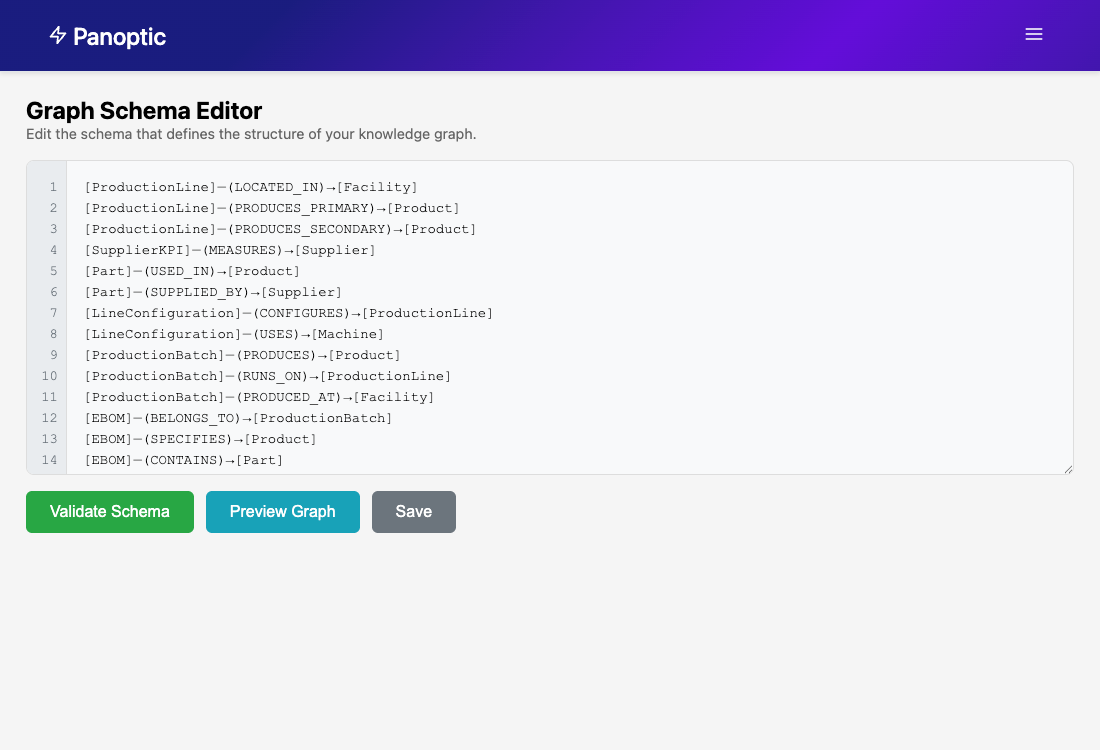
Load demo graph schema
- Navigate to Set Graph Schema from the side navigation
- Open the local file
data/demo_graph.txt - Copy the content into the Graph Schema Editor
- Select "Save"
- Upload demo data files
- Navigate to the Data Explorer
- Select the File Upload icon in the chat window
- Upload all CSV files located in the
data/csvdirectory - Choose "Add to Graph DB" after upload

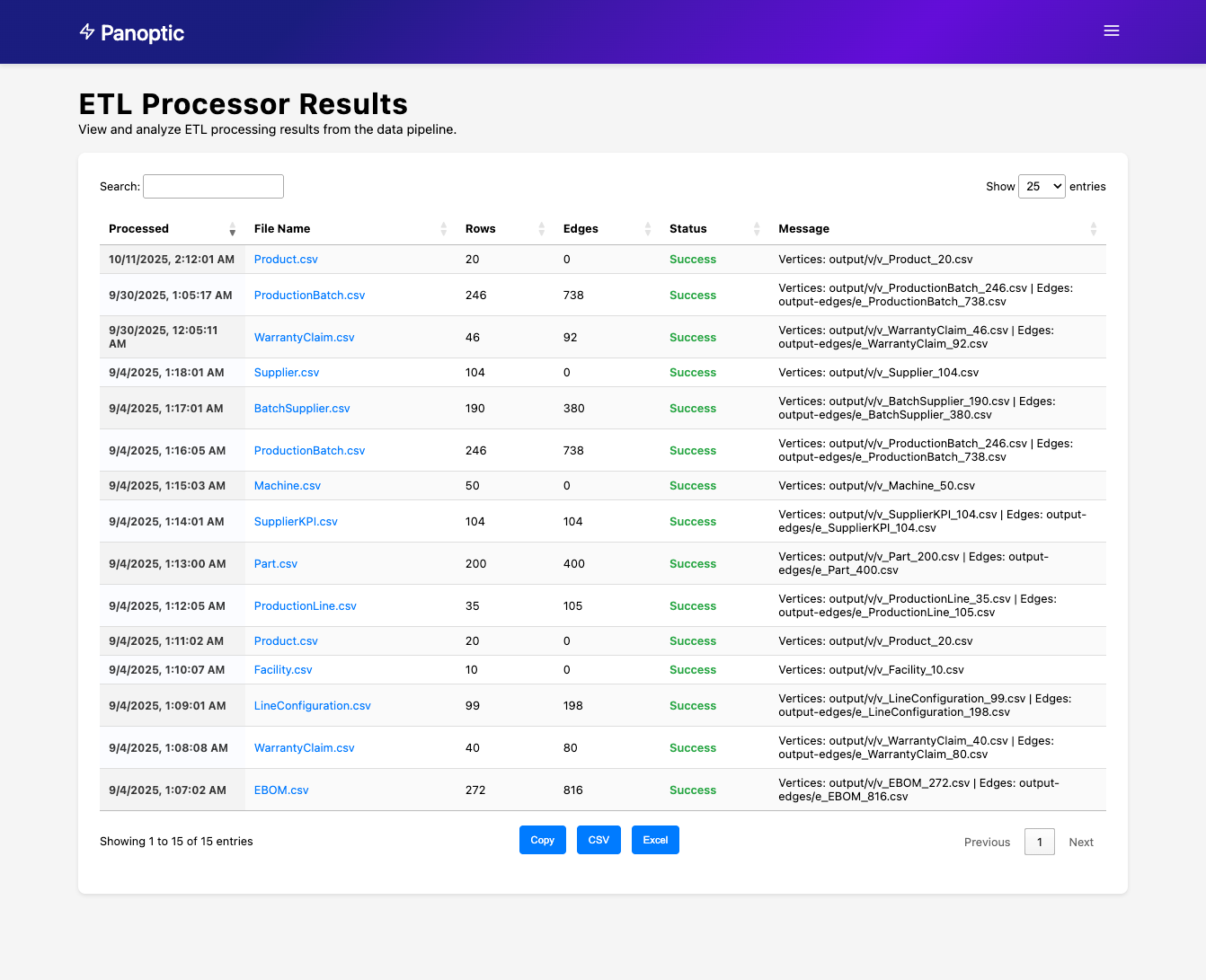
- Monitor data processing
- Navigate to the ETL Processor
- Monitor the status of uploaded files
- Wait for all files to show "processed" status
- Load graph relationships
- Return to the Data Explorer
- Select the Prompt Suggestions icon
- Choose "Bulk load data from output-edges/"
- Submit the command and monitor progress
Once data is loaded, try these sample queries:
Graph Summary:
- Select "Show me the graph summary" from Prompt Suggestions
- Expected output: Statistical overview of nodes, edges, and data distribution

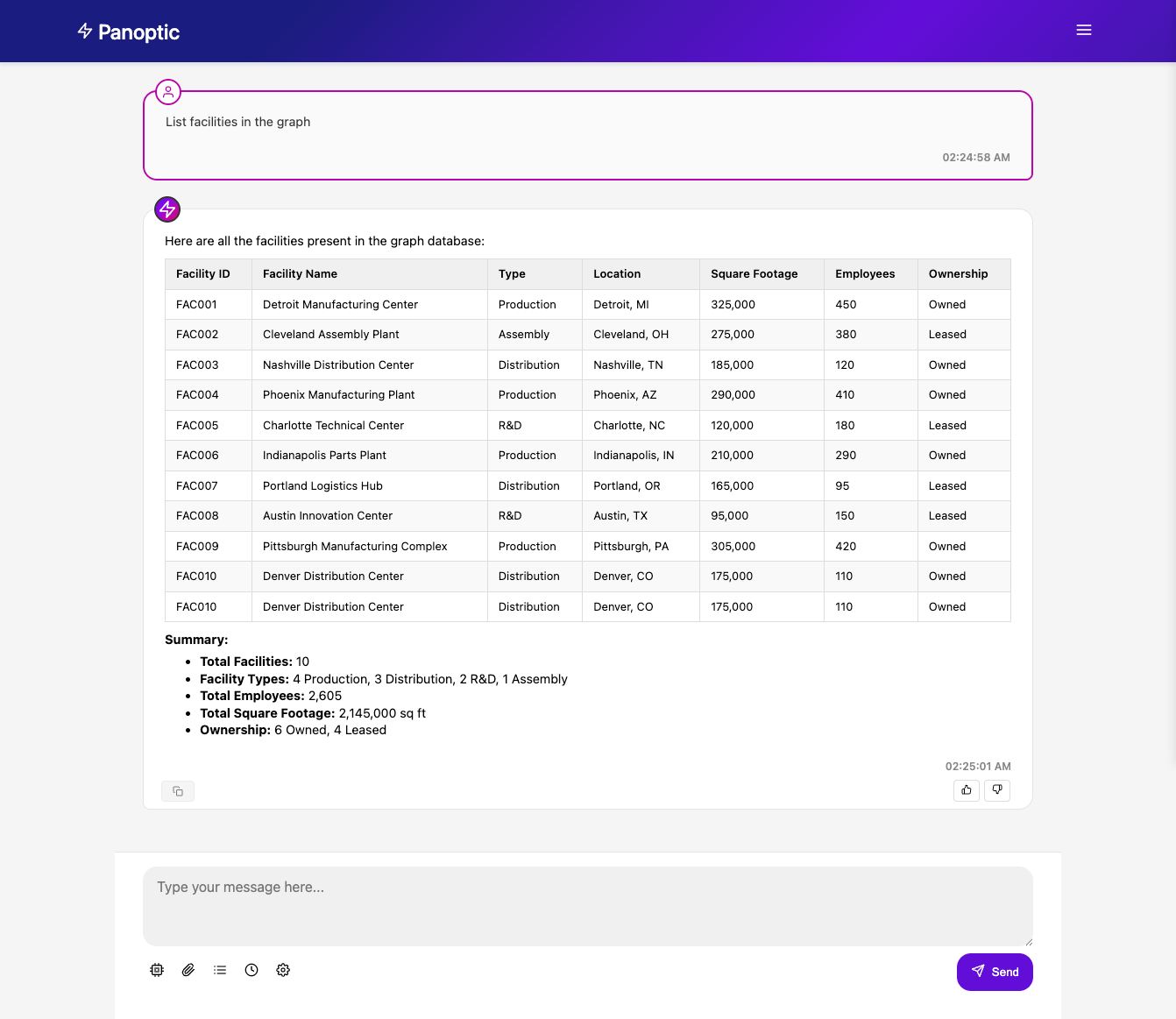
Facility Analysis:
- Select "Provide a comprehensive list of all Facilities"
- Expected output: Detailed list of facilities with properties and relationships
You can also call the agent service directly using the REST API:
# Get the service URL from the CDK output
SERVICE_URL=$(aws cloudformation describe-stacks --stack-name DataExplorerAgentsStack --query "Stacks[0].Outputs[?ExportName=='ALBEndpoint'].OutputValue" --output text)

# Call the main query endpoint (routes to appropriate agent)
curl -X POST \
  $SERVICE_URL/query \
  -H 'Content-Type: application/json' \
  -d '{"prompt": "What is the weather in New York?"}'

# Call the streaming endpoint
curl -X POST \
  $SERVICE_URL/query-streaming-with-events \
  -H 'Content-Type: application/json' \
  -d '{"prompt": "Solve: 2x + 5 = 15"}'

# Call the schema agent for database conversion
curl -X POST \
  $SERVICE_URL/query-streaming-with-events \
  -H 'Content-Type: application/json' \
-d '{"prompt": "Convert this SQL schema to a graph model: CREATE TABLE users (id INT PRIMARY KEY, name VARCHAR(100)); CREATE TABLE orders (id INT PRIMARY KEY, user_id INT, FOREIGN KEY (user_id) REFERENCES users(id));"}'The AI Data Explorer includes an LLM-as-a-judge evaluation framework for measuring agent performance, tracking improvements, and ensuring quality standards.
The evaluation system tests multiple dimensions:
- Agent Routing: Correct supervisor routing to specialized agents
- Response Quality: Accuracy, relevance, and completeness of responses
- Performance: Response times and efficiency
- Tool Usage: Appropriate tool selection and execution
- Edge Cases: Handling of unusual or boundary scenarios
# Run single evaluation with all test cases
./dev-tools/run-evaluation.sh

# Verbose output
./dev-tools/run-evaluation.sh --verbose

# Use different LLM model for evaluation
./dev-tools/run-evaluation.sh --evaluator-model "anthropic.claude-3-5-haiku-20241022-v1:0"# Run multiple rounds to establish statistical baseline
./dev-tools/run-evaluation.sh --baseline --runs 5
# Use specific model for baseline evaluation
./dev-tools/run-evaluation.sh --baseline --runs 5 --evaluator-model "us.anthropic.claude-sonnet-4-20250514-v1:0"# Compare current performance with baseline
./dev-tools/run-evaluation.sh --compare evaluation/continuous_evaluation/baseline_20241217_143022.json
# Compare with specific evaluator model
./dev-tools/run-evaluation.sh --compare baseline.json --evaluator-model "anthropic.claude-3-5-haiku-20241022-v1:0"The evaluation suite includes:
- Agent Routing: Tests supervisor's ability to route queries to correct specialized agents
- Knowledge: Factual questions and explanations
- Calculation: Mathematical and analytical tasks
- Tool Usage: Tasks requiring specific tool selection
- Conversation: Multi-turn interactions
- Edge Cases: Empty queries, malformed input, unusual scenarios
- Success Rate: Overall test completion rate
- Agent Routing Accuracy: Correct agent selection percentage
- Content Accuracy: Response contains expected information
- Response Time: Average, min, max response times
- LLM Judge Scores: AI-evaluated quality metrics (1-5 scale)
- Accuracy: Factual correctness
- Relevance: Addresses the query appropriately
- Completeness: Covers all aspects of the request
- Agent Selection: Appropriate routing decisions
Results are saved with timestamps and include:
- Individual test results with pass/fail status
- Aggregate metrics and statistics
- Performance charts by category
- Comparison with previous baselines
- Detailed analysis and recommendations
The evaluation framework supports CI/CD integration:
- Exit codes indicate pass/fail based on success rate thresholds
- JSON output for automated processing
- Baseline comparison for regression detection
- Statistical significance testing for performance changes
- Regular Evaluation: Run evaluations after significant changes
- Baseline Tracking: Establish baselines with multiple runs for statistical significance
- Category Analysis: Monitor performance across different test categories
- Regression Detection: Compare with baselines to catch performance degradation
- Iterative Improvement: Use results to guide agent refinements
The AI Data Explorer includes comprehensive tracing using OpenTelemetry and Strands SDK integration.
Start the complete tracing stack locally:
# Start Jaeger, OTEL Collector, and Agent Service
./dev-tools/run-with-tracing.sh

# View traces at http://localhost:16686
# Note: Script automatically detects and uses podman-compose or docker-composeTraces are automatically sent to AWS X-Ray in production deployments:
- Enable X-Ray: Traces are enabled by default in production
- View Traces: Access AWS X-Ray console in your deployment region
- Service Map: View complete request flow through agents and tools
- Agent Execution: Complete agent lifecycle and routing decisions
- LLM Interactions: Model calls, token usage, and response times
- Tool Usage: Tool execution, parameters, and results
- Performance Metrics: Request duration and bottlenecks
- Error Tracking: Failed requests and exception details
Environment variables for tracing:
TRACING_ENABLED=true                    # Enable/disable tracing
ENVIRONMENT=local|production            # Deployment environment
OTEL_EXPORTER_OTLP_ENDPOINT=<endpoint>  # OTLP collector endpoint
OTEL_SERVICE_NAME=ai-data-explorer      # Service name in traces
OTEL_CONSOLE_EXPORT=true # Enable console trace output (off by default)Test the complete system locally with Bedrock Guardrails (optional):
# - Start agent service with guardrails (enforce or shadow) on port 8000
# - Start UI on port 5000 connected to the local agent
./dev-tools/run-all-local.sh enforceRun the UI service locally for development:
Local Development (Default):
./dev-tools/run-ui-local.sh- Automatically starts local agent service on port 8000
- Starts UI on port 5000
- UI connects to local agent service
- Limited functionality (no Neptune, no knowledge base)
AWS Backend Development:
./dev-tools/run-ui-local.sh --aws- Uses deployed AWS agent service via CloudFront (HTTPS)
- Starts only UI on port 5000
- Full functionality including Neptune graph database and knowledge base
- Requires prior AWS deployment:
./dev-tools/deploy.sh
Local testing (python):
You can run the python app directly for local testing via:
python ./docker/app/app.pyThen, set the SERVICE_URL to point to your local server
SERVICE_URL=127.0.0.1:8000and you can use the curl commands above to test locally.
Local testing (container):
Build & run the container:
podman build ./docker/ -t agent_container
podman run -p 127.0.0.1:8000:8000 -t agent_container
Then, set the SERVICE_URL to point to your local server
SERVICE_URL=127.0.0.1:8000and you can use the curl commands above to test locally.
File Upload Testing:
Test file upload functionality locally:
# Start complete local system
./dev-tools/run-all-local.sh

# Access web interface at http://localhost:5000
# Upload files from data/csv/ directory
# Test actions: "Analyze" (works fully), "Add to Graph DB" (simulated locally)Note: "Add to Graph DB" requires Neptune deployment. Locally, files are copied to data/upload/ with informational messages.
Guardrails Testing:
Test guardrails integration locally:
# Direct Python testing (fastest)
python ./dev-tools/test-guardrails-local.py your-guardrail-id

# Test with local service
./dev-tools/test-guardrails.sh http://127.0.0.1:8000Run all tests (agent + UI) with a single command:
./dev-tools/test-all.shRun the unit tests locally:
# Install test dependencies (if not already installed)
pip install -r ./docker/requirements.txt

# Use the test script (recommended)
./dev-tools/test-agent.sh                    # Fast tests only (~2 seconds)
./dev-tools/test-agent.sh --all             # All tests including integration (~50 seconds)
./dev-tools/test-agent.sh --integration     # Agent integration tests (~4 minutes)
./dev-tools/test-agent.sh --coverage       # Tests with coverage report

# Or run manually from the tests directory
cd ./docker/app/tests

# Run fast unit tests (no API calls, ~2 seconds)
python -m pytest test_fast.py -v

# Run all tests including integration tests (~50 seconds)
python -m pytest -v

# Run with coverage (optional)
python -m pytest --cov=.. --cov-report=html
The test suite includes:
- Fast Tests (
test_fast.py): API endpoint validation, error handling, mocked responses - Integration Tests (
test_app.py,test_supervisor.py): Full agent routing with real API calls - Agent Integration Tests (
test_agents.py): Multi-agent routing validation with real queries - Health check functionality
- Input validation and error handling
Run the UI integration tests locally:
# Run all UI tests (recommended)
./dev-tools/test-ui.sh

# Or run from the ui directory
cd ui/

# Run all UI tests
./tests/run_tests.sh
The UI test suite includes:
- Request Structure Tests: Validates correct format sent to agent service
- File Upload Tests: Text files (SQL, CSV) and image upload handling
- Agent Communication Tests: Timeout handling, error responses, streaming
- Input Validation: Empty requests, malformed data
- Tests run in ~0.2 seconds using Flask test client with mocked agent service
To remove all resources deployed via CloudShell:
# Remove main application only
./scripts/cloudshell-destroy.sh

# Remove everything including Neptune graph database
./scripts/cloudshell-destroy.sh --with-graph-dbTo remove all resources created by this example:
npx cdk destroy
./scripts/kb-destroy.shLoad Balancer Creation Fails:
- Check that public subnets have Internet Gateway routes
- Check that subnets are properly tagged as
Public - Ensure at least 2 public subnets in different AZs
Fargate Tasks Can't Start:
- Verify private subnets have NAT Gateway routes
- Check that subnets are properly tagged as
Private - Ensure NAT Gateway is in a public subnet
Neptune Connection Timeout:
- Check that both services are in the same VPC
- Check security group rules allow port 8182
- Confirm private subnets can reach Neptune subnets
CDK Bootstrap Required:
npx cdk bootstrapAWS CLI Errors
If you see an error like this, confirm your AWS CLI version by running aws --version. You must have AWS CLI version 2.27.51 or greater to gain s3vectors support required by the app.
usage: aws [options] <command> <subcommand> [<subcommand> ...] [parameters]
To see help text, you can run:

  aws help
  aws <command> help
  aws <command> <subcommand> help

aws: error: argument command: Invalid choice, valid choices are:
Container Runtime Not Running:
# For Podman
podman machine start

# For Docker
docker info
Region Not Supported:
- Ensure your region supports Amazon Bedrock
- Check that all required services are available in your region
| Version | Date | Changes |
|---|---|---|
| 2.0.0 | October 13 2025 | Now built on Strands + AgentCore |
| 1.0.3 | July 23 2025 | Bug fixes |
| 1.0.2 | July 11 2025 | Bug fixes |
| 1.0.1 | May 23 2025 | Bug fixes |
| 1.0.0 | May 15 2025 | Initial release with core agent functionality |
Disclaimer:
Customers are responsible for making their own independent assessment of the information in this Guidance. This Guidance: (a) is for informational purposes only, (b) represents AWS current product offerings and practices, which are subject to change without notice, and (c) does not create any commitments or assurances from AWS and its affiliates, suppliers or licensors. AWS products or services are provided “as is” without warranties, representations, or conditions of any kind, whether express or implied. AWS responsibilities and liabilities to its customers are controlled by AWS agreements, and this Guidance is not part of, nor does it modify, any agreement between AWS and its customers.
- Rob Sable
- Clay Brehm
- John Marciniak
- Sushanth Kothapally
- Rakesh Ghodasara


![@dependabot[bot]](https://avatars.githubusercontent.com/in/29110?s=64&v=4)

