
A Python framework for building agentic AI applications with server-driven UI, native observability, OS-level sandboxing, pluggable model orchestration, and a strict extension boundary — designed for environments where reproducibility, auditability, and operational control matter.
Status: Beta 0.0.1b4 — public preview. The core architecture is implemented and actively tested, but APIs and operational behavior may still change before the first stable release. The software ships without warranty.
- Website: democr.ai
- Documentation: democr.ai/docs/
Democr.ai is a complete runtime framework for AI applications. It provides:
- Server-driven UI for agentic contexts, implementing and extending Google's A2UI protocol
- Multi-client rendering of the same UI definition across web and desktop clients
- Native multi-tenancy enforced at write time
- Cross-platform OS-level sandboxing for engine and extension processes
- Triple-layer audit through SQLAlchemy hooks, with sensitive field redaction
- RBAC with declarative module manifests
- Pluggable AI engine orchestration across local, remote, and distributed runtimes
- Engine quotas for request and token governance by engine and subject scope
- Knowledge subsystem with vector and graph backends
- A strict modular architecture where everything — including authentication — is a module built against the public SDK
The framework is designed around a clear boundary between core runtime and extensions. The SDK is the only supported way to build on top.
Most AI application stacks combine a chat UI, an LLM client, a workflow library, and separate infrastructure for audit, permissions, sandboxing, and observability. Democr.ai puts those concerns in one runtime contract:
- UI is declared server-side and rendered by independent clients.
- Modules, engines, and extractors are installable extensions with a public SDK boundary.
- Model calls flow through an orchestrator that supports local providers, remote providers, process isolation, quotas, and multi-node execution.
- Security and audit are runtime primitives, not application conventions.
- Knowledge ingestion, retrieval, media handling, tools, MCP, and agent skills share the same request and observability context.
That combination is intentionally broad. The project is still beta, but the architecture is already aimed at production-grade constraints rather than demos or single-chatbot prototypes.
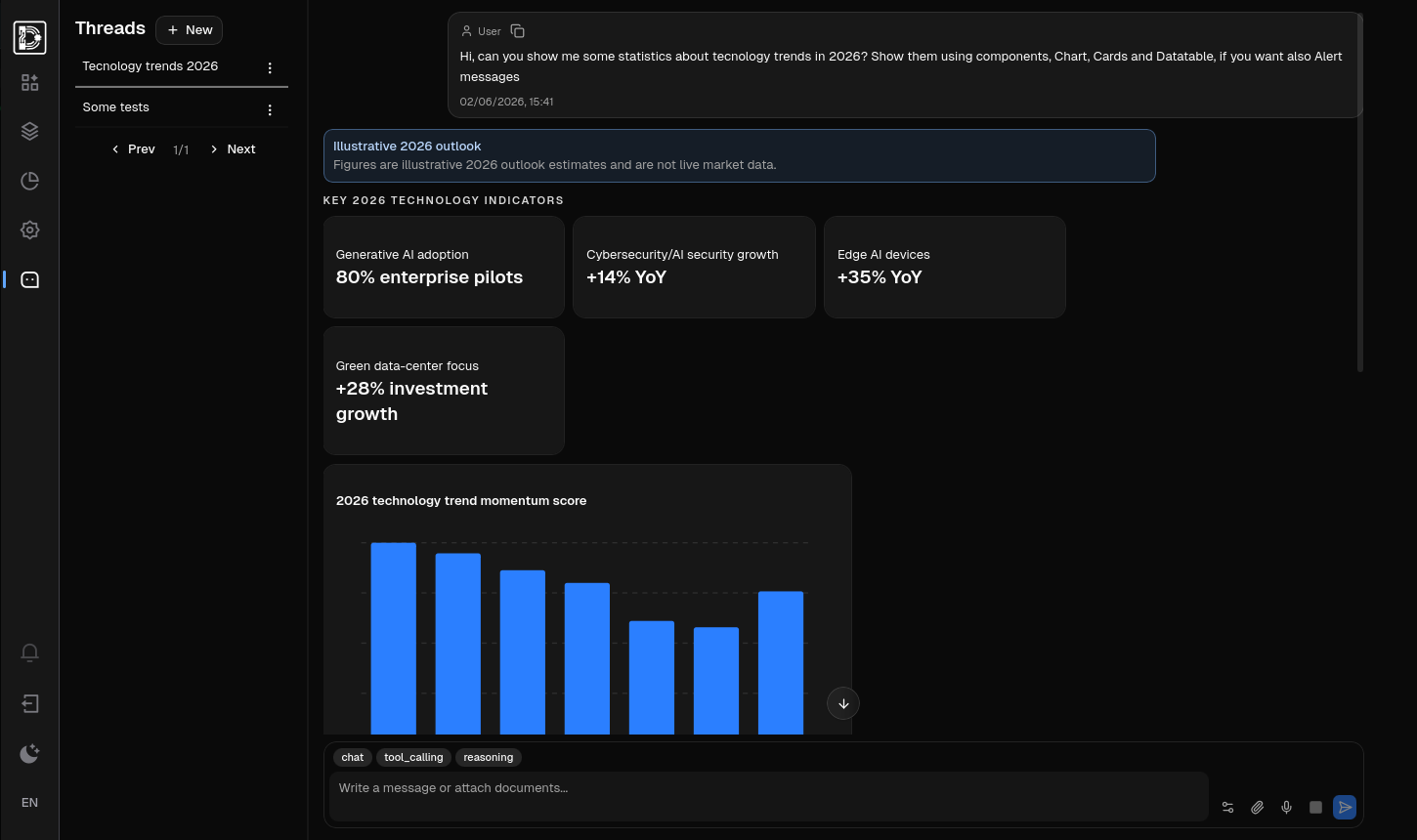
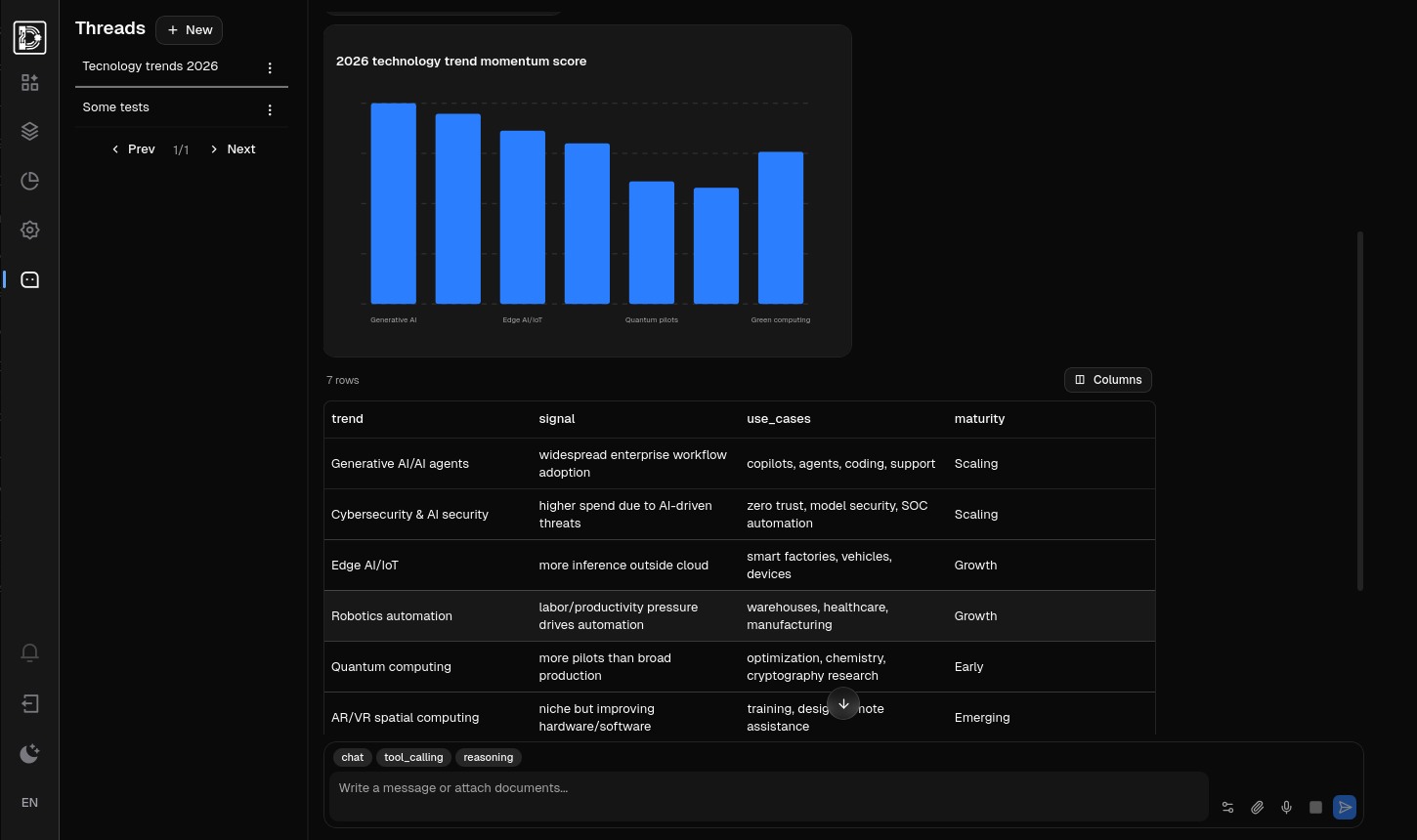
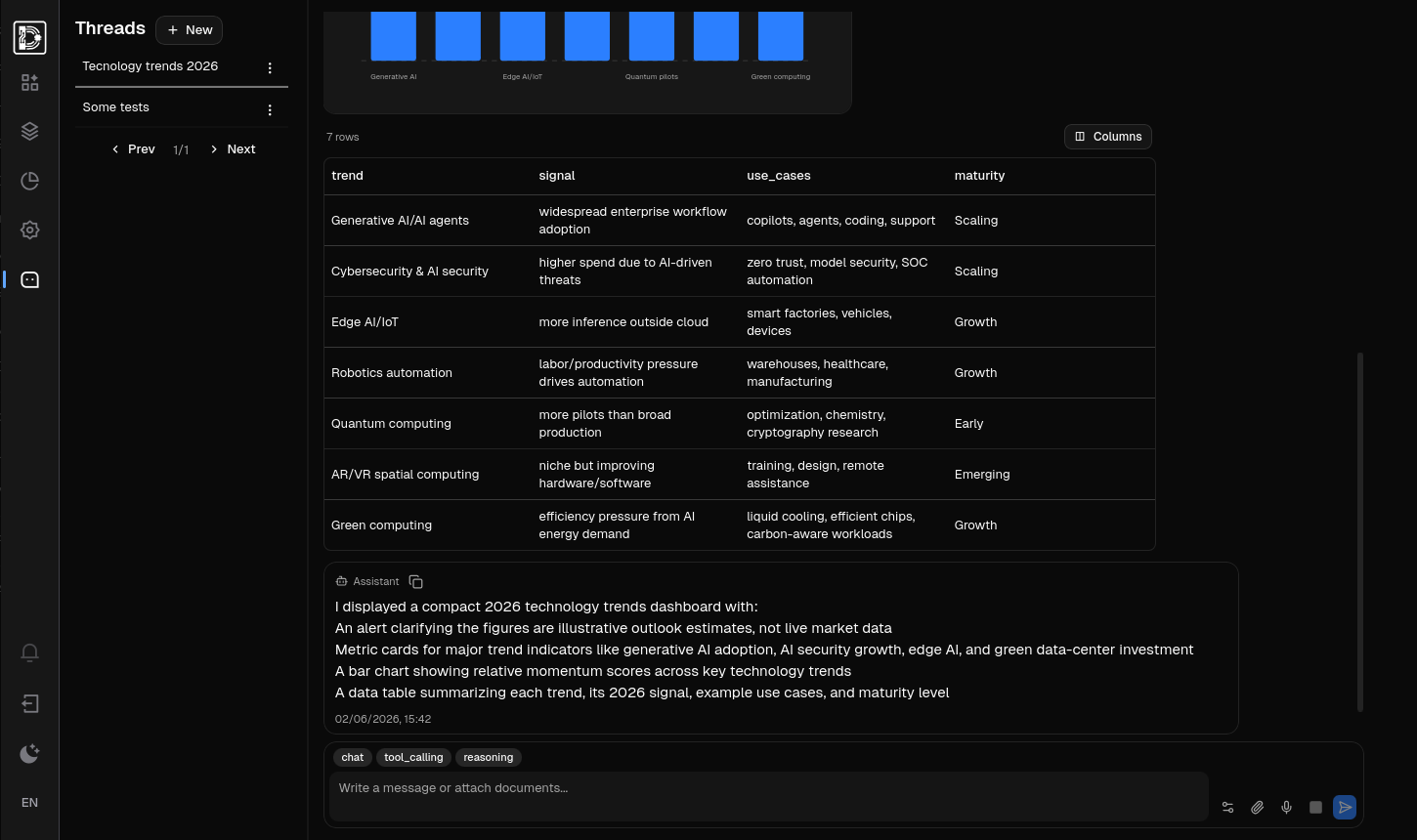
Let agents build UI components that render as native application surfaces, not as screenshots or markup fragments. Democr.ai modules describe UI declaratively on the server, then stream structured updates as the agent works.
The short demo shows the important part: one backend-declared YAML surface reflected through client renderers, while the backend keeps ownership of behavior, actions, and runtime effects.
Democr.ai targets applications where:
- The deployment environment has compliance, regulatory, or operational constraints
- Observability and reproducibility are required from day one, not added later
- Avoiding vendor lock-in is a hard constraint: the framework is fully self-hostable, model-agnostic, and ships no proprietary cloud services
- Auditability across user actions, data mutations, and AI calls is required at the deployment level
- The team prefers an integrated runtime over assembling separate pieces (LLM library + UI framework + observability stack + audit + RBAC + workflow engine)
It is not a thin wrapper, a model router, or a chat UI library. It is a runtime where modules, engines, extractors, and clients compose into a single coherent system.
There are no privileged components. Authentication, system administration, and the demo applications shipped in this repository are all built as modules, using the same SDK that third-party developers use. There are no reserved APIs, no hidden hooks, and no internal-only services.
The modules included in this repository (auth, system, components) are primarily examples of how the framework works and how applications integrate with it. They provide a working baseline, but deployments are not required to use them as-is: teams can replace them, extend them, or build their own domain-specific implementations.
- The runtime is fully self-hostable.
- AI engines are pluggable: local inference (vLLM, llama.cpp) and cloud providers (OpenAI, Anthropic, Google, and others), or custom integrations.
- Storage backends are pluggable for vector (sqlite-vec, pgvector, and others), knowledge graph, and core persistence (SQLite, PostgreSQL).
- No proprietary serialization formats. State is portable across deployments.
Observability is not added as later instrumentation — it is part of how the framework expects developers to build. Every action, AI call, and module operation flows through a correlation chain that allows step-by-step reconstruction of any request. Pipelines are observable. The audit subsystem captures mutations at three layers (request, ORM, AI invocation) automatically, with sensitive field redaction.
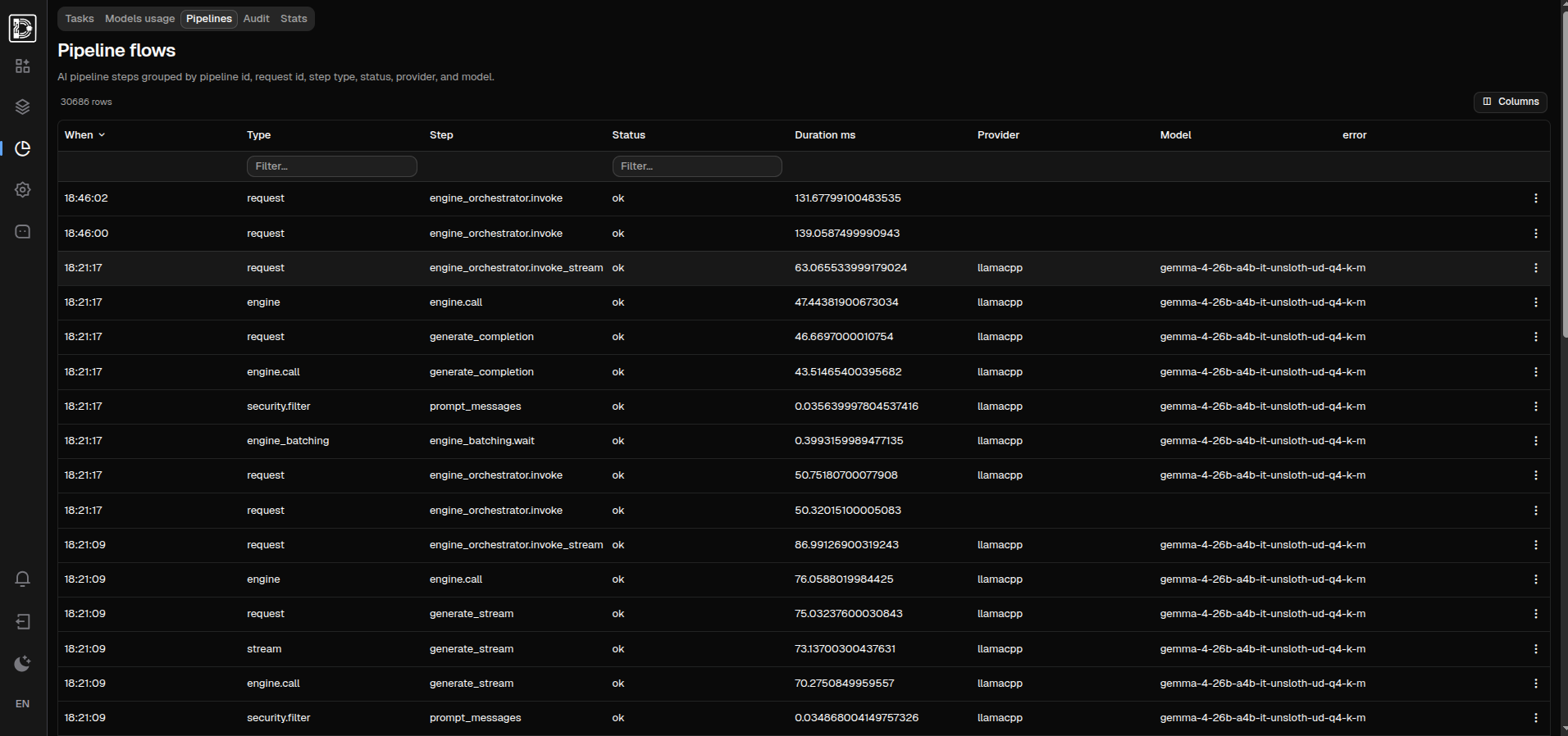
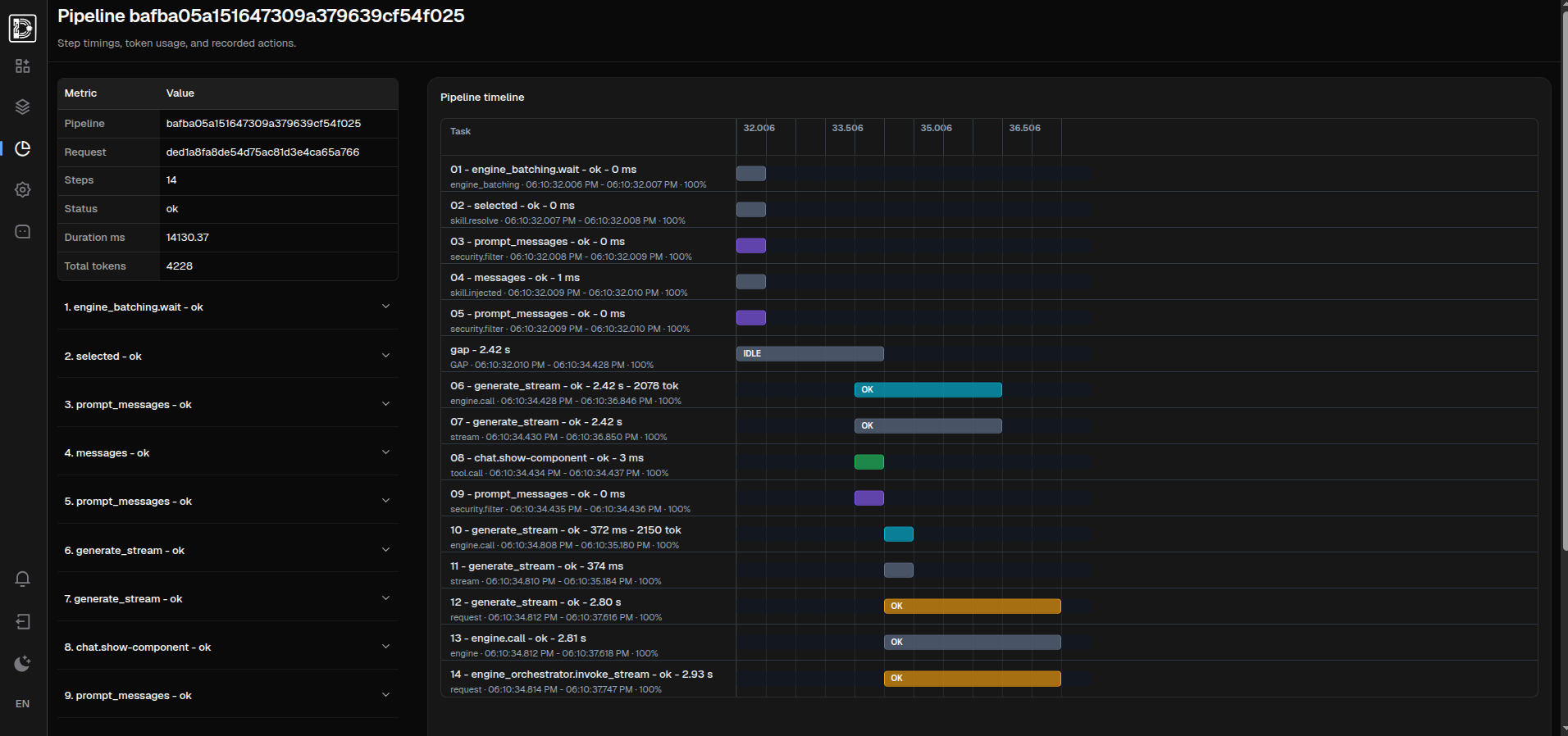
Reproducibility is achieved through deterministic configuration, structured event logs with stable IDs, and an immutable audit trail.
The framework provides security as foundational primitives, not as opt-in features. See Threat model for the precise boundary between framework guarantees and deployer responsibilities.
The UI layer is an extended implementation of Google's A2UI protocol for server-driven UI in agentic contexts. The same UI definition renders consistently across multiple clients with no client-side framework code required from module authors. New clients can be added without changes to existing modules.
Democr.ai is composed of distinct subsystems:
- Core runtime — bootstrap, lifecycle, request handling, dependency graph
- Network — WebSocket, IPC, HTTP under a unified protocol layer
- AI engine orchestrator — job-based scheduling, batching, gRPC process isolation, HITL support
- Knowledge — ingestion queue, projection workers, vector + graph retrieval
- Sandbox — OS-level isolation (Landlock + seccomp + iptables + helper process | seatbelt | Windows Low Integrity + WFP)
- Multi-tenancy — write-time enforcement with materialized scope filters
- RBAC — declarative access policies in module manifests
- Modules — framework extension surface, via SDK
- Engines — pluggable AI inference providers
- Extractors — pluggable knowledge extraction providers
- Clients — independent rendering surfaces for web, desktop, and mobile-oriented clients
- Platform — agents, skills, tools, MCP, UI builder
Detailed subsystem documentation is available at democr.ai/docs/.
| Capability | Status | Notes |
|---|---|---|
| Server-driven UI (extended A2UI) | Implemented | websocket and ipc transport |
| Multi-client rendering | Implemented | Web, Qt desktop, Tauri, React variants |
| Multi-tenancy | Implemented | Write-time enforcement |
| RBAC | Implemented | Declarative manifests |
| AI engine orchestration | Implemented | Job-based, gRPC isolated |
| Knowledge subsystem (vector + KG) | Implemented | Hybrid retrieval |
| Audit (triple layer) | Implemented | Sensitive field redaction |
| OS sandbox (Landlock + seccomp + iptables) | Implemented | |
| OS sandbox on macOS | Implemented | Seatbelt |
| OS sandbox on Windows | Implemented | Low Integrity + WFP; egress enforcement uses an elevated helper |
| Local AI inference | Implemented | vLLM, llama.cpp, ONNX, Ollama, and others |
| Cloud AI providers | Implemented | OpenAI, Anthropic, Google, and others |
| Multi-node engine orchestration | Implemented | Shared queue, node registry, Redis response streams |
| mTLS for internal gRPC services | Roadmap | Server-side TLS + service JWT first |
| Context budget guard | Implemented | Heuristic guard for oversized prompt messages and tool outputs, scaled by model context settings |
| Multi-node tuning | Roadmap | Distributed fine-tuning workflows |
| Mobile clients | Experimental | React Native client exists but is not certified |
| Engine quotas | Implemented | Request and token limits by engine and subject scope |
| Request observability | Implemented | Correlation chain across layers |
The following numbers are local stress-test snapshots for the authenticated
request path: login, session handling, and server-side rendering of the
server-driven UI route /components/_effects/yaml. They document observed
behavior under concurrent load on one machine; they are not universal
performance claims or comparisons with other frameworks.
Environment:
- CPU: Intel Core i9-14900K
- RAM: 64 GB
- GPU: NVIDIA RTX 3090 Suprim, not used by this benchmark path
- OS: Ubuntu 24
- Python: 3.12.3
- Providers: remote providers
| Instances | Workers / instance | Clients / worker | Duration | Requests | Errors | Throughput | Avg latency | p95 latency |
|---|---|---|---|---|---|---|---|---|
| 4 | 4 | 4 | 303.69s | 468,840 | 0 | 1,543.83 req/s | 33.28ms | 47.05ms |
| 8 | 4 | 4 | 302.39s | 718,050 | 0 | 2,374.55 req/s | 43.30ms | 47.94ms |
Command shape:
PYTHONPATH=. .venv/bin/python scripts/multi_core_benchmark.py \
  --instances 4 \
  --workers 4 \
  --clients 4 \
  --duration-seconds 300 \
  --profile custom \
  --profile-log-summary
For the 4-instance run, aggregate resource usage was:
| Metric | Value |
|---|---|
| Avg total CPU | 1326.9% |
| Peak RSS | 7092.1 MB |
| Peak USS | 5936.8 MB |
| Peak PSS | 5986.8 MB |
RSS can overstate standalone memory use because shared pages are counted more than once.
The framework offers security as foundational primitives: OS-level sandboxing, immutable audit, RBAC, scoped data access, and at-rest encryption of secrets stored in the database. Modules operate within these primitives according to the policies they declare (sandbox allow-lists, RBAC permissions, access scope).
The threat model covered by the framework is accidental supply-chain compromise — a third-party module with a bug or compromised dependency must not be able to harm the system beyond its declared scope.
The threat model not covered is a deliberately malicious module installed consciously by the deployer. The selection of modules to install and the configuration of security policies are deployer responsibilities.
The framework's config.yaml is plaintext and is generated locally by the setup wizard. It is not designed to be deployed. Secrets are encrypted at rest only when stored in the database.
- Python >=3.12,<3.14
- Linux is the most tested environment for full security features
- Optional: NVIDIA GPU with CUDA for local inference
From the repository root:
./setup_venv.sh

# alternatively, install and run desktop mode with ./run.sh
For the React web clients and the Tauri desktop client, install frontend dependencies before running them. Tauri also requires Cargo.
yarn --cwd clients/webclient install
yarn --cwd clients/reactbootstrap install
yarn --cwd clients/reactfluent install
yarn --cwd clients/tauri installDefault startup is desktop mode with the Qt client:
python main.pyEquivalent explicit form:
python main.py --mode desktop --client qtdesktoppython main.py --mode server --host 127.0.0.1 --port 8000Desktop mode uses IPC by default. Add --http to also expose HTTP/WebSocket:
python main.py --mode desktop --http --client qtdesktopWeb clients are independent React applications. The runner launches them with yarn dev:
python main.py --mode server --client webclient
python main.py --mode server --client reactbootstrap
Web clients are independent React applications. The runner launches them with yarn dev:
python main.py --client tauriOn first run, the framework starts a setup wizard via the connected client. The wizard configures the database, AI providers, and the initial administrator user. The resulting configuration is generated locally and not designed to be deployed.
Initial setup can also run from the core CLI:
python main.py setup path/to/setup.yamlThe setup YAML contains admin credentials and the runtime config payload. If admin.password is omitted, the command prompts for it interactively; in non-interactive runs use an environment variable such as ${DEMOCRAI_ADMIN_PASSWORD}. The command only runs before an application config exists and will not overwrite an existing installation.
| Command | Purpose |
|---|---|
python main.py |
Default desktop mode |
python main.py --mode server |
Server mode (HTTP + WebSocket) |
python main.py --mode desktop |
Desktop mode (IPC transport) |
python main.py --http |
Also expose HTTP in desktop mode |
python main.py migrate all |
Run all pending database migrations |
python main.py migration-status all |
Show migration status |
python main.py create-migration db -m "desc" --autogenerate |
Create a new core DB migration |
python main.py create-migration data --module <name> -m "desc" --autogenerate |
Create a new module data migration |
python main.py rollback data --steps 1 |
Roll back one data migration step |
python main.py validate-config |
Validate current configuration |
python main.py setup examples/setup.example.yaml |
Run initial setup from YAML |
python main.py install-engines examples/engine-install.example.yaml |
Install and activate engines/models from YAML |
python main.py install-extractors examples/extractor-install.example.yaml |
Install and activate extractors from YAML |
python main.py reset-install |
Reset the installation state |
python main.py module-status |
Show module discovery and load status |
python main.py knowledge-rebuild --all --dry-run |
Rebuild knowledge projections (dry run) |
The core CLI can install and activate engine instances from a YAML file:
python main.py install-engines path/to/engines.yamlThe command starts the application runtime, uses the core SDK context, and follows the same engine lifecycle used by the runtime: registry upsert, runtime config check, install, activation, model download when requested, and model binding activation. It does not require the system module to be installed.
Supported options:
python main.py install-engines path/to/engines.yaml --reset-mode keep
python main.py install-engines path/to/engines.yaml --reset-mode selected
python main.py install-engines path/to/engines.yaml --reset-mode full --yes
python main.py install-engines path/to/engines.yaml --json
Reset modes:
| Mode | Behavior |
|---|---|
keep |
Keep existing engines and models; update declared items and skip already available downloads |
selected |
Reset only engines/models declared in the YAML |
full |
Reset all engine registry rows, model bindings, and downloaded model artifacts; requires --yes outside interactive confirmation |
YAML shape:
engines:
  - provider: openai
    name: openai-main
    config:
      api_key: "${OPENAI_API_KEY}"
    models:
      - id: gpt-5.5
        activate: true

  - provider: gemini
    instances:
      - name: gemini-main
        config:
          api_key: "${GEMINI_API_KEY}"
        models:
          - id: gemini-2.5-pro
            activate: true
      - name: gemini-fast
        config:
          api_key: "${GEMINI_API_KEY}"
        models:
          - id: gemini-2.5-flash
            activate: true

  - provider: ollama
    instances:
      - name: ollama-local
        config:
          base_url: http://localhost:11434
        models:
          - id: llama3.2
            activate: true

  - provider: llamacpp
    name: llamacpp-local
    models:
      - id: tiny-llama3-test-q2-k
        download: true
        activate: true
Sensitive config values can reference environment variables with ${NAME}. When multiple instances use the same provider, provider installation runs once and each instance is activated separately. A complete provider-oriented example is available at examples/engine-install.example.yaml.
The core CLI can install and activate knowledge extractors, then configure MIME routing:
python main.py install-extractors path/to/extractors.yamlSupported options mirror install-engines:
python main.py install-extractors path/to/extractors.yaml --reset-mode keep
python main.py install-extractors path/to/extractors.yaml --reset-mode selected
python main.py install-extractors path/to/extractors.yaml --reset-mode full --yes
python main.py install-extractors path/to/extractors.yaml --json
YAML shape:
extractors:
  - id: docling
    install_config:
      ocr_engine: rapidocr
    runtime_config:
      ocr_enabled: true
      chunk_size: 1200
    mime_bindings:
      - application/pdf
      - text/plain

  - id: ai_audio
    runtime_config:
      model_registry_id: 12
    mime_bindings:
      - audio/mpeg
ai_audio and ai_image require a real model_registry_id for an already configured model with the required capability. If model_registry_id is omitted, the command can still install and activate the extractor, but the runtime configuration is incomplete and extraction will not be usable until that field is saved. A complete example is available at examples/extractor-install.example.yaml.
The runner sets default extension path variables if they are not already configured:
DEMOCRAI_MODULES_PATH=/path/to/modules
DEMOCRAI_ENGINES_PATH=/path/to/engines
DEMOCRAI_EXTRACTORS_PATH=/path/to/extractors
Each variable can contain one or more existing directories. Multiple directories
use the platform path separator (: on Linux/macOS, ; on Windows).
At startup, the core runtime discovers and registers extension packages from these paths. Modules, engines, and extractors are all extension types: modules add application behavior, engines add AI provider/runtime integrations, and extractors add document or media ingestion capabilities.
The components listed below have working implementations covered by development or integration tests. The list will be refined as engines, extractors, and specific model combinations are certified for stable releases.
Note: a complete and versioned list of tested models, engines, and extractors will accompany the first stable release. Provider implementations may exist in the repository before they are certified. Components not listed here should be treated as available implementation work, not as a stable support promise.
| Engine | CPU/GPU | Status |
|---|---|---|
onnx |
CPU | Implemented |
llamacpp |
CPU/GPU | Implemented |
vllm |
GPU | Implemented |
parler |
GPU | Implemented |
qwen_tts |
GPU | Implemented |
whisper |
GPU | Implemented |
espeak |
CPU | Implemented |
rebel |
GPU | Implemented |
gliner+glirel |
GPU | Implemented |
ollama |
GPU (local) | Implemented |
openai compatible |
- | Implemented |
openai |
- | Implemented |
gemini |
- | Implemented |
anthropic |
- | Implemented |
openai whisper |
- | Implemented |
openai tts |
- | Implemented |
edge tts |
- | Implemented |
nvidia_nim |
- | Implemented |
| Extractor | Tested with | Status |
|---|---|---|
docling |
Tesseract/RapidOCR | Implemented |
ai_audio |
Whisper (faster whisper) | Implemented |
ai_image |
Gemma 4 26B A3B | Implemented |
- SQLite (default, recommended for development)
- PostgreSQL (recommended for production multi-tenant deployments)
- sqlite-vec (vector, default)
- pgvector (vector, when PostgreSQL is in use)
- Pinecone
- ClickHouse
qtdesktop— PySide6-based desktop clientwebclient— React web clientreactbootstrap— React web client with Bootstrap/AGID themetauri— Tauri-based desktop client
Additional client implementations exist in the repository, including reactfluent, electron, and reactnativeclient, but are not part of the certified client set yet.
main.py— runner for local development and packaged launcher flowspyproject.toml— build metadata for thedemocraiPython packagedemocrai/core/— internal runtime: bootstrap, storage, network, sandbox, orchestration, registriesdemocrai/sdk/— public SDK boundary for extensions (the only supported import surface for modules)democrai/third_party/— bundled runtime assets (e.g.,libmagic)modules/— bundled demo modules (auth,system,components)engines/— AI engine implementations and manifestsextractors/— knowledge and media extractor implementationsclients/qtdesktop/— Qt desktop clientclients/webclient/— React web clientclients/reactbootstrap/— React web client with Bootstrap/AGID themeclients/reactfluent/— React web client variantclients/tauri/— Tauri-based desktop clientclients/electron/— Electron wrapper for web clientsclients/reactnativeclient/— React Native clientdocs_site/— MkDocs documentation pipelinetests/— Python test suites
Modules may import only from democrai.sdk. Imports from democrai.core are not part of the supported boundary and locked by module runtime.
Full documentation is built with MkDocs:
source .venv/bin/activate
.venv/bin/mkdocs build -f docs_site/mkdocs.yml --strict
Generated output is in docs_site/docs_html/.
Node tooling for documentation post-processing is managed inside docs_site/:
cd docs_site
npm installThe items below are planned for upcoming releases, in approximate order:
- Multi-node tuning — distributed fine-tuning workflows
- Client certification — broaden the certified set beyond
webclient,reactbootstrap,qtdesktop, and Tauri-based desktop - Mobile clients — complete and certify the React Native client
- Knowledge subsystem improvements — additional projection backends, refined retrieval, expanded extractor coverage
- And many more — see the issue tracker for the full backlog and active proposals
Run the full framework test suite:
.venv/bin/python -m pytest -c tests/pytest.iniRun the runtime subset:
.venv/bin/python -m pytest -c tests/pytest.ini tests/runtimeWith coverage:
.venv/bin/python -m pytest -c tests/pytest.ini --cov-config=tests/.coveragerc --cov=democrai tests/runtime
.venv/bin/coverage html --rcfile=tests/.coveragerc
Some tests depend on external engines or services. Verify the local environment before running broader suites.
Democr.ai uses a split licensing model:
democrai/core/is licensed under the GNU Affero General Public License v3.0 (AGPL-3.0). Modifications to the core that are made available over a network must be released under the same license.democrai/sdk/,engines/,extractors/,modules/, andclients/are licensed under the Apache License 2.0. You can build, ship, integrate, and commercialize extensions, engines, extractors, modules, and clients freely, subject to attribution.
If your use case requires a commercial license for the core (for example, proprietary modifications without source disclosure), contact license@democr.ai.
The repository root LICENSE file describes the split and lists the directory-specific licenses. Full license texts are in the corresponding directories (democrai/core/LICENSE for AGPL-3.0, democrai/sdk/LICENSE for Apache-2.0).
The A2UI protocol is a Google open specification for agentic UI. Democr.ai extends it to make the whole application server-driven and potentially controllable by agents.
This project builds on the work of the open-source Python ecosystem, including SQLAlchemy, FastAPI, Alembic, Pydantic, gRPC, Qt, and many others.