



Website · Docs · Quickstart · Apps · Hugging Face · FidOpt · Paper
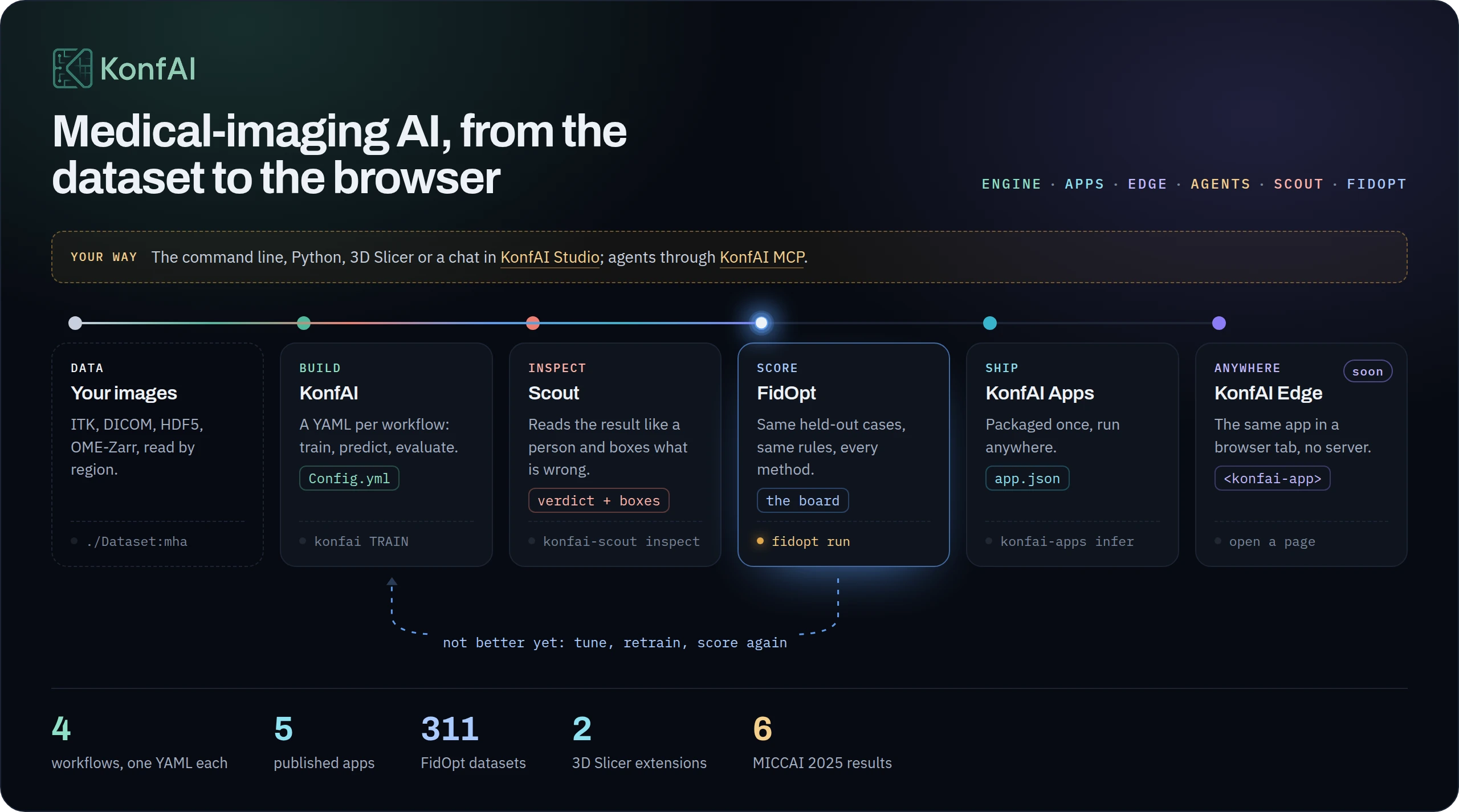
KonfAI is a declarative engine for medical-imaging AI, and the pieces around it: build a method in YAML, inspect it, score it and ship it. The whole family on one page: fideus-labs.github.io/KonfAI.
| Piece | What it does | Get it |
|---|---|---|
| KonfAI | Trains, predicts and evaluates, one YAML per workflow, on images of any size | pip install "konfai[imaging]" |
| KonfAI Scout | Inspects a result like a person at a viewer and shows where it is wrong | konfai-scout/ |
| FidOpt | The open benchmark: 311 datasets, the same rules for every method | fidopt.io |
| KonfAI Apps | Five published models behind one contract: local, on Hugging Face or over HTTP | pip install konfai-apps |
| 3D Slicer | The apps and the registration presets inside Slicer | SlicerKonfAI · SlicerImpactReg |
| KonfAI Edge | The same apps in a browser tab, with no server (coming) | what it is |
| KonfAI Studio | A chat over your dataset, with your own model endpoint | pip install konfai-studio |
| KonfAI MCP | Fifty tools for Claude Code, Codex or any MCP client | pip install konfai-mcp |
An agent that develops a method should be able to ask a trusted service how good it is, and iterate, the way a person submits to a challenge, but in a loop. (FidOpt)
Every piece above runs today. Next, FidLab closes that loop: an agent tunes or writes a method, FidOpt scores each version, and KonfAI Edge puts what wins in a browser tab.
One YAML describes a workflow, from storage to output geometry, and the resolved file records the run.
Trainer:
  Model:
    classpath: UNet.yml          # a model, referenced by name
  Dataset:
    groups_src: { CT: {...}, SEG: {...} }   # channel-first, lazy, patch-based
  epochs: 100                             # the shipped example ships 5, sized for a first run
konfai TRAIN -c Config.yml --gpu 0 # then PREDICTION, then EVALUATION- Scale. Patches are read by region from ITK, HDF5, DICOM and OME-Zarr when the preprocessing streams, and through a bounded buffer when it does not; prediction handles batching, test-time augmentation, ensembles, overlap and geometry.
- Reproduce. Defaults are written into the YAML, and configs travel with their runs.
- Keep your stack. Regular PyTorch and MONAI components plug in, and selected MONAI, nnU-Net, torchvision and segmentation-models-pytorch models have documented paths: when to use KonfAI, or another tool.
Six top-ranking MICCAI 2025 challenge results were built with it: SynthRAD2025 T1 · SynthRAD2025 T2 · CURVAS PDACVI · TrackRAD2025 · Panther · CURVAS. Paper: KonfAI: A Modular and Fully Configurable Framework for Deep Learning in Medical Imaging (Boussot & Dillenseger, 2025).
The five published apps are full systems, not demonstration networks:
| App | Workload | Medium case (249 × 246 × 246), RTX PRO 5000 |
|---|---|---|
| TotalSegmentator-KonfAI | CT: 117 labels / 5 models · MRI: 50 labels / 2 models | CT total: 17.7 s / 5.2 GB RAM / 15.4 GB VRAM: 1.8–3.9× faster, 2.7–4.8× less host RAM than the original |
| MRSegmentator-KonfAI | MRI: 40 labels, 5-fold ensemble | 21 s / 5.3 GB RAM / 16.3 GB VRAM: 1.1–1.7× faster, 1.4–5.4× less host RAM than the original |
| ImpactSynth | three MR/CBCT→sCT variants, 2.5D UNet++, 5 models each | MR: 24.6 s / 2.7 GB RAM / 12.8 GB VRAM |
| ImpactSeg | one model segments 11 structures from CT, MRI, or CBCT | 3.3 s / 1.7 GB RAM / 3.9 GB VRAM |
| IMPACT-Reg | 12 multimodal presets of three engines: elastix+IMPACT, ConvexAdam and FireANTs | FireANTs#syn: 108 s / 6.3 GB RAM / 16.0 GB VRAM |
Each figure is the medium case of the app's own table (see apps/),
measured with benchmarks/perf/bench_apps.py on 2026-09-09; the ratios span its three cases. Running an app needs no
YAML:
pip install impact_synth_konfai
impact-synth-konfai synthesize MR -i input_mr.nii.gz -o output/

# the same app through the generic runtime
konfai-apps infer VBoussot/ImpactSynth:MR -i input_mr.nii.gz -o output/pip install "konfai[imaging]" # core + all imaging backends (recommended)
pip install konfai # core only (bring your own data reader)[imaging] pulls SimpleITK / h5py / pydicom / zarr, needed to read .mha,
.nii.gz, DICOM, and OME-Zarr. For the full extras matrix (smp, lpips,
export, cluster, …) and a reproducible Pixi setup, see the
installation guide.
KonfAI is command-driven; each CLI state maps to one YAML file:
| Command | Config | Does |
|---|---|---|
konfai TRAIN / RESUME |
Config.yml (Trainer:) |
fit a model |
konfai PREDICTION |
Prediction.yml (Predictor:) |
patch/TTA/ensemble inference → datasets |
konfai EVALUATION |
Evaluation.yml (Evaluator:) |
metrics on saved predictions |
konfai TRANSFORM |
Transform.yml (Transformer:) |
dataset preparation: a transform chain → datasets (1→1, N→1, 1→N) |
Full CLI reference (flags, konfai-cluster, konfai-apps):
docs/reference/cli. The words with
two meanings (group, fold, worker, workspace, bundle):
docs/reference/glossary.
The same four workflows are Python callables, with structured results and the config tree as a dict, which is the idiom for a sweep or a notebook:
import konfai
from konfai.data.transform import Reduce, Resample, Write

result = konfai.transform("template", "./Cohorte:mha",
    {"CT": {"CT": [Resample(reference="atlas_000", reference_group="CT"),
                   Reduce(operator="Median", output="template", grid="strict"),
                   Write(dataset="./Template:mha")]}})
result.outputs   # where each deliverable landed
konfai.plan_transform returns the plan without running it; konfai.train,
konfai.predict and konfai.evaluate take a config path or the same tree as a
dict. → Python workflows.
Train, predict and evaluate a two-class segmentation on four tiny synthetic CT volumes: one CPU, no dataset to download, and a final check of the files the run writes.
git clone https://github.com/fideus-labs/KonfAI.git
python -m venv .venv && . .venv/bin/activate
python -m pip install "./KonfAI[itk]"
cp -r KonfAI/examples/Segmentation/TwoClasses konfai-first-run && cd konfai-first-run

export OMP_NUM_THREADS=1
python quickstart.py prepare
konfai TRAIN -y --cpu 1 --config Config.yml
python quickstart.py checkpoint
konfai PREDICTION -y --cpu 1 --config Prediction.yml --models "$(python quickstart.py checkpoint)"
konfai EVALUATION -y --cpu 1 --config Evaluation.yml
python quickstart.py verify
After a run,
Config.ymlwill contain the resolved defaults KonfAI materialised. That's expected, and it's what makes runs reproducible.
verify fails unless the four predictions carry the geometry of their CT and
the Dice values in Metric_TRAIN.json match the written files. The
Quickstart says
what each file is and how to adapt the three configs to your own CT.
The next step trains 41 classes on real pelvis CT, a GPU recommended: run every
cell of
examples/Segmentation/Segmentation_demo.ipynb,
which downloads the demo data, trains, predicts, evaluates and plots the result.
Its epochs: 5 walks the whole path without producing a useful model; raise it
to 100+ for a real run.
A model you already have goes through the same engine in two calls, the patching, the overlap blending, the streamed writes and the run record included:
pip install "konfai[itk,monai]" # .mha through SimpleITK, and the MONAI UNet belowimport konfai
from monai.networks.nets import UNet
from konfai.data.transform import Argmax, TensorCast
from konfai.metric.measure import CrossEntropyLoss
if __name__ == "__main__":
model = UNet(spatial_dims=2, in_channels=1, out_channels=41, channels=(32, 64, 128, 256), strides=(2, 2, 2))
checkpoints = konfai.train_model(model, "./Dataset:mha", inputs="CT", targets="SEG", loss=CrossEntropyLoss(),
patch=[1, 256, 256], epochs=20, batch_size=8,
transforms={"SEG": [TensorCast(dtype="int64")]})
konfai.predict_model(model, "./Dataset:mha", inputs="CT", patch=[1, 256, 256], output="./Pred:mha",
checkpoints=sorted(checkpoints.glob("[0-9]*.pt"))[-1],
final_transforms=[Argmax(), TensorCast(dtype="uint8")])examples/BringYourModel/BringYourModel_demo.ipynb
runs it on the demo data; a MONAI Bundle imports the same way
(konfai.import_bundle), see Adopt from PyTorch/MONAI.
Volumes are read as patches. Whether the volume is also held in RAM depends on
the workflow's loading regime (training caches, and memory_budget makes that
adaptive; prediction, evaluation and transform read each case once and never
cache) and on whether your preprocessing chain can be streamed. KonfAI derives
streamability from the transforms you declared:
| Regime | When | Memory held |
|---|---|---|
| Cache | training default | every case, resident for the whole run |
| Stream | predict/eval default or budget exceeded; transform default; chain streamable | one patch, or a budget-sized slab under TRANSFORM |
| Buffer | predict/eval, or training over its budget; chain not streamable | predict/eval: two cases, the one being finished and the next; training: a FIFO of max(batch_size + 1, shuffle_window) cases |
| Whole-volume | transform, chain not streamable | one case plus one in-flight copy |
A chain streams when every step declares the region it needs: the exact patch
(OneHot), a halo (Dilate), a remap (Flip), a resample (Resample),
or a whole-volume statistic read once from disk (Normalize). Under
TRANSFORM, peak host memory follows the declared memory_budget, not the
volume: python benchmarks/bench_streaming.py --gib 16 --budget 1 runs a
TRANSFORM chain over a 16 GiB volume under a 1 GiB budget and reports the peak
resident set of the whole process tree (protocol:
Reproducing the numbers).
konfai TRANSFORM decides that per case before it writes a byte: STREAM or
LOAD, WHOLE-VOLUME naming the stage that refused to stream, REDUCE or REFUSED
for a reduction, SKIP when the output already exists. The console gets a
one-line summary; the run's log opens with the plan in full.
--plan prints that full report and stops without transforming.
→ Patch streaming: what streams, what does not, and why.
Everything below is referenceable by name in YAML. See the built-in component catalogue for classpaths and constructor arguments.
| Kind | Examples | Catalogue |
|---|---|---|
| Models | UNet, NestedUNet, ResNet, VAE, VoxelMorph, GAN/diffusion families |
models |
| Losses & metrics | Dice, MAE, PSNR, SSIM, LPIPS, FID, CrossEntropyLoss, TRE, IMPACTReg, IMPACTSynth |
losses-metrics |
| Transforms | Standardize, Normalize, Clip, Resample*, OneHot, Crop (~40) |
transforms |
| Augmentations | Flip, Rotate, Elastix, Noise, CutOUT (~15) |
augmentations |
| Schedulers | weight (Constant, CosineAnnealing) + LR (PolyLRScheduler, Warmup, any torch) |
schedulers |
| Storage backends | ITK, HDF5, DICOM series, OME-Zarr | storage-backends |
Not limited to these: any importable class (monai.losses:DiceLoss,
torch:nn:L1Loss, or a local Model:MyNet) works via the module:Class form.
Full docs: https://konfai.readthedocs.io/en/latest/
- Quickstart: first end-to-end run
- Core concepts: how YAML becomes Python objects
- Large images: regional reads, fallback, and tuning
- Adopt from PyTorch/MONAI: reuse and tool choice
- Component catalogue: everything you can configure
- Examples: runnable Segmentation, Synthesis & Registration workflows, a model of your own in ten lines, a public 2.4 GB OME-Zarr read where it lives, plus five published-app demos
Docker: vboussot/konfai,
guide.
git clone https://github.com/fideus-labs/KonfAI.git && cd KonfAI
pixi install
pixi run test      # run the test suite
pixi run check     # lint + format-check + test (run before pushing)
Contributions are welcome: improve examples, clarify docs, add tests, or extend models / transforms / apps. See the developer guide.
Contributors: start with AGENTS.md, the canonical
reference for conventions, commands, and repository rules. The docs site also
publishes llms.txt and
llms-full.txt: the
quickstart, config guides and component catalog in one plain-text file.
@article{boussot2025konfai,
  title   = {KonfAI: A Modular and Fully Configurable Framework for Deep Learning in Medical Imaging},
  author  = {Boussot, Valentin and Dillenseger, Jean-Louis},
  journal = {arXiv preprint arXiv:2508.09823},
  year    = {2025}
}
Licensed under Apache-2.0.