Hi there!
Here is my solution for the final project of the foundations path of the odin project.
The design of the calculator is inspired by the macOS calculator.
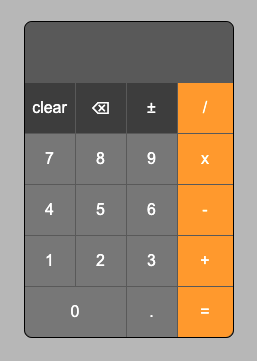
Brief explanation of the functionality: Input is buffered in variable 'displayValue' and set as 'firstValue' or 'secondValue' when an operator is pressed, then the selected operation is executed depending on the set values.
You can:
- chain operations
- after a performed calculation, press the 'equal' button again to repeat the same calculation with the new result
- change the operator if the wrong one was chosen
- undo if you clicked the wrong number with the 'backspace' button (also the 'backspace' button on the keyboard)
- input floating point numbers
- negate the input value with the '±' button (Keyboard shortcut 'Option' or 'Alt' + '-' )
- input values and set operators via keyboard ('=' button = enter, 'clear' button = escape)
What I learned from this project:
- CSS grid
- handle keyboard input
- handle user input
The biggest challenge was to figure out how to handle the values and call the correct functions to the right time. The breakthrough came with the idea of querying the status of the values via a variable (firstValueSet), followed by intensive use of the debugger.
firstValueSet = false -> firstValue can be set
firstValueSet = true -> secondValue can be set and operations can be executed
Let me know if you find something to improve or bugs.
Many thanks for reading and have a nice time 🙂