Monitor and control all your Claude Code sessions from one place.
c9watch (short for claude code watch, like k8s for Kubernetes) is a macOS desktop app that gives you a real-time dashboard of every Claude Code session running on your machine. No more switching between terminals to check which agent needs permission, which one is working, and which one is idle.
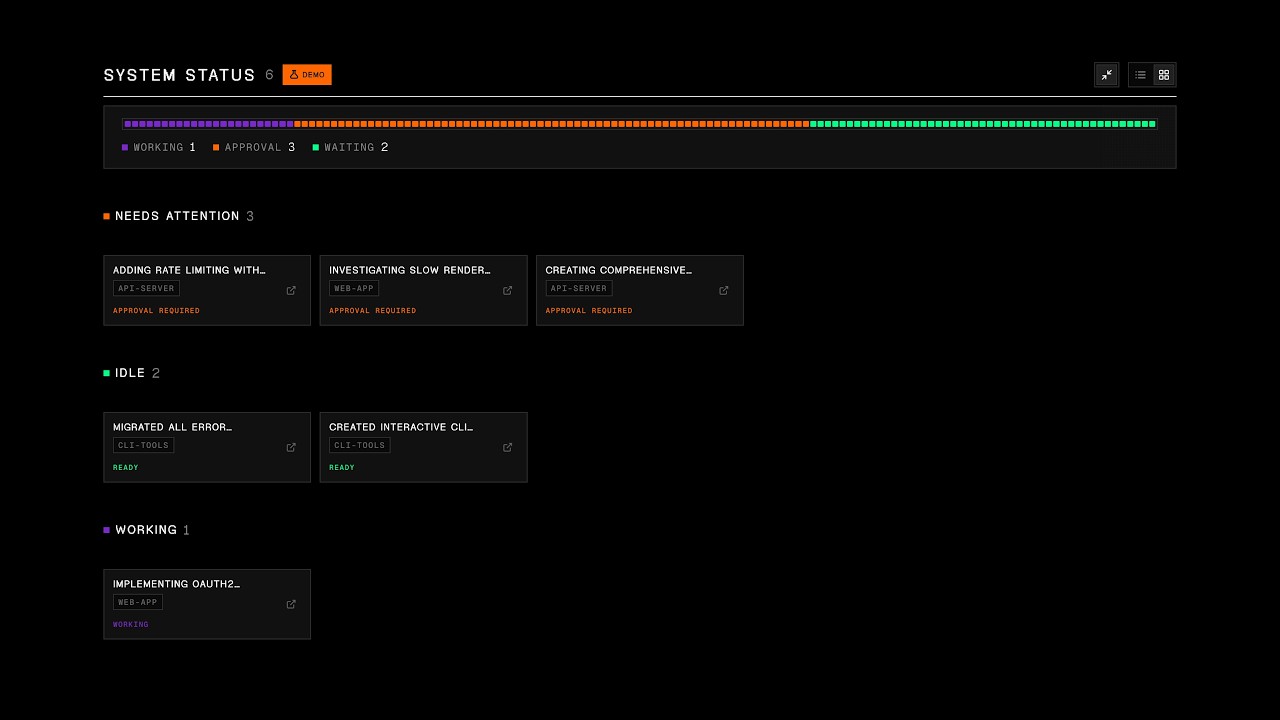
Unlike other Claude Code management tools that require you to launch sessions from within their app, c9watch doesn't care where you start your sessions. It discovers them automatically by scanning running processes at the OS level.
Start Claude Code from any terminal or IDE you already use -- VS Code, Zed, iTerm2, Antigravity, you name it -- and c9watch picks them all up. No plugins to install. No workflows to change. No vendor lock-in.
Just open c9watch and see everything.
Built with Tauri, Rust, and Svelte -- not Electron. The app binary is small, memory usage is minimal, and the UI stays snappy. Rust handles process scanning and file parsing at native speed. Svelte compiles away the framework overhead. You're already running multiple Claude Code agents eating up resources -- your monitoring tool shouldn't add to the pile.
curl -fsSL https://raw.githubusercontent.com/minchenlee/c9watch/main/install.sh | bashGrab the latest .dmg from the Releases page.
Prerequisites: Rust, Node.js (v18+), and the Tauri CLI.
git clone https://github.com/minchenlee/c9watch.git
cd c9watch
npm install
npm run tauri build
The built .app will be in src-tauri/target/release/bundle/macos/.
Sessions grouped by status. Permission requests surface to the top so you never leave an agent stuck waiting.

Sessions grouped by project, each with its own status columns. See what's happening across all your repos.

Minimal cards for when you just need a quick status check without the details.

Expand any card to see the full conversation history with formatted code, tool usage, and a navigation map.

- Zero-integration setup -- Works with any terminal or IDE, no plugins or extensions required
- Auto-discovery -- Detects all running Claude Code sessions by scanning processes at the OS level
- Real-time status -- See at a glance which sessions are Working, Need Permission, or Idle
- Conversation viewer -- Expand any session to view the full conversation with formatted markdown and code blocks
- Session control -- Stop sessions, open their parent terminal/IDE, or rename them for easier tracking
- Multi-project view -- Sessions grouped by project with git branch info
- Menu bar integration -- Quick access from the macOS tray icon
- A background thread polls every 2 seconds, scanning for running
claudeprocesses usingsysinfo - Each process is matched to its session file in
~/.claude/projects/via path encoding and timestamp correlation - The last N entries of each session's JSONL file are parsed to determine status:
- Working -- Claude is generating a response or executing tools
- Needs Permission -- A tool is pending that requires user approval
- Idle -- Session is waiting for your next prompt
- Status updates are pushed to the Svelte frontend via Tauri events
- The UI reactively updates, sorting sessions by priority (permission requests surface first)
| Layer | Technology |
|---|---|
| Desktop framework | Tauri 2 |
| Frontend | SvelteKit + Svelte 5 |
| Backend | Rust |
| Process discovery | sysinfo |
| Design system | Vercel Noir (true black, Geist fonts) |
npm install
npm run tauri dev
This starts both the Vite dev server (hot-reload for the frontend) and the Tauri Rust backend.
c9watch/
├── src/                    # SvelteKit frontend
│   ├── routes/             # Pages (+page.svelte, +layout.svelte)
│   ├── lib/
│   │   ├── components/     # Svelte components (SessionCard, MessageBubble, etc.)
│   │   ├── stores/         # Reactive state management
│   │   ├── demo/           # Demo mode with mock data
│   │   ├── api.ts          # Tauri command wrappers
│   │   └── types.ts        # TypeScript types
│   └── app.css             # Global styles
├── src-tauri/              # Rust backend (Tauri)
│   └── src/
│       ├── lib.rs          # Tauri commands and app setup
│       ├── polling.rs      # Background session detection loop
│       ├── actions.rs      # Stop/open session actions
│       └── session/
│           ├── detector.rs # Process-to-session matching
│           ├── status.rs   # Status determination logic
│           ├── parser.rs   # JSONL file parsing
│           └── permissions.rs # Auto-approval rule checking
Press Cmd+D to toggle demo mode, which loads simulated sessions with animated status transitions. Useful for testing the UI without running real Claude Code sessions.
MIT