In this project we aim to create a website where people can create listings for anything they may want to sell or display. These listings can be made public so that any other user can see them. Other users have the ability to comment on these listings in a public way, so that both the publisher of the listing, and other users are able to see them.
The listings should be able to have a picture attached to them, to showcase the item that the listing is about. Additionally, there is a title and description field where the user can write about the listed item.
While users are able to post their own listings, and see others' public listings, administrators have access to everyone’s listings at all times. This is to allow admins to function as moderators, removing troublesome content, or censoring text in a post. If a listing is particularly bad, the administrators also have the permission to delete the listing.
Users can create accounts, and add a profile picture for their account if they want, but they can only change their own picture. Administrators have the ability to edit anyone’s profile picture, in the event that the picture that was chosen is deemed inappropriate. With the site described, our goals are to create this solution while paying particular attention to some popular attack vectors. These are:
- SQLinjection
- Command injection
- Cross-Site Scripting (XSS)
- Cross-Site Request Forgery (CSRF)
- XML External Entity (XEE)
- Serialization injection
- Denial of Service (DoS)
- Distributed Denial of Service (DDoS)
- Client side manipulation
In our implementation section we will explain what these attack vectors are and how we will design our solution to be resistant to them.
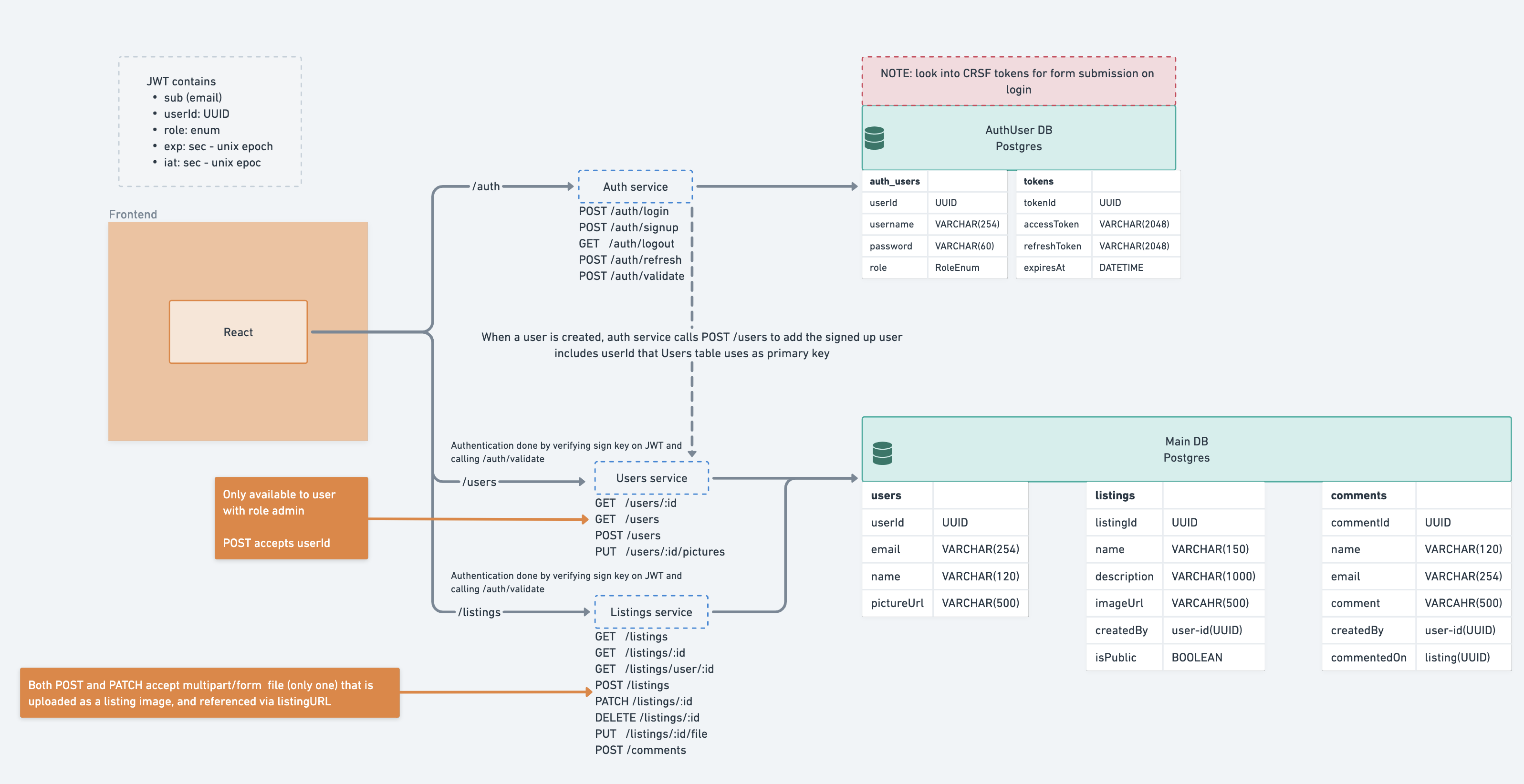
To run this project, the following are required:
- NodeJs version 16 or newer
- Access to a Postgres Database, can be done via Docker
- An account on Linode with object storage set up
The project consists of the following applications:
- Auth Service - a centralized authentication system that handles all authentication. NodeJs Express api
- Listings Service - NodeJs Express API that handles everything regarding the listings and comments.
- Users Service - NodeJs Express API that handles everything regarding the users, but not authentication.
- Frontend - A React app that services as the Visual interface of the application.
The backend applications require a running PostgreSQL database. The connection to it is defined through the .env file
Check out the running application at https://marketplace.hotdeals.dev. Note: will no longer be active after January 18th
The applications utilize environment variables to configure various features and behaviors like database connection, cors rules, and rate limiting.
The .env.example files contains example variables and their values. Most will work out of the box, but the ones with clearly placeholder values like the linode connection details have to be updated for the system to work as a whole.
The .env.example file is optimized towards running through a docker compose. You will need to modify the connection URLs to make it work for running the services locally.
Navigate to each of the application folders and run npm install. This will install the necessary dependencies.
To run the backend applications, use npm run start:dev
To run the frontend application, use npm run start
To run the system through Docker compose, use the following commands:
docker compose up
To start a specific service and rebuild it, use docker compose up service-name --build
Service names:
- Auth Service:
auth-service - Listings service:
listings-service - Users service:
users-service - Frontend:
frontend - NGINX gateway:
gateway
Use the -d flag to run the docker compose in detached mode, making it run in the background.
Endpoints marked with 🔒 require an Authorization header with a Bearer JWT token. Can be obtained from the login and the signup endpoints.
Check out the Postman Collection for a list of endpoints, or read the info below
Auth service features the following endpoints:
- POST
/auth/login- requires request body with email and password. Returns an access token and a refresh token - POST
/auth/signup- requires request body with a name, email, and password. Returns an access token and a refresh token. Creates a user object in the users service - 🔒 POST
/auth/refresh- Deletes the provided token pair and returns a new one. - 🔒 POST
/auth/validate- Returns the decoded token if it is correct. Deletes all tokens of the user if validation fails. - 🔒 POST
/auth/logout- Removes the provided token pair
The Auth Service includes seeding data aka a population script, which is run automatically. This behavior can be disabled with the AUTH_POSTGRES_POPULATE=false env variable.
Populated users:
- Admin: email:
[email protected], password:abcDEF123! - Normal User: email:
[email protected], password:abcDEF123! - And many more generic users. Check out users.constant.ts for the full list
- GET
/listings- returns a list of listings. If the token is provided, the list includes listings of the given user. For an admin, it returns all listings. - GET
/listings/:id- returns a specific listing. Authorize to gain access to private listings - 🔒 POST
/listings- creates a new listing. Content type:multipart/form-data. Body requires a file, name, description, and a isPublic boolean - 🔒 PATCH
/listings/:id- Updates the listing. Content type:application/json. Body requires a name, description, and a isPublic boolean - 🔒 PUT
/listings/:id/file- update the file associated with the listing. Content type:multipart/form-data. Body requires a file - 🔒 DELETE
/listings/:id- Deletes the listing - 🔒 POST
/comment- creates a new comment. Content type:application/json. Body requires name, email, comment, and commentedOn that matches an existing listing the user has access to.
There are 50 populated listings. Their IDs are static between seeding runs. The files are stored on Linode.
There are 500 populated comments. Their IDs are static between seeding runs. They match the populated listings and users.
Set LISTINGS_LINODE_POPULATE=false to prevent re-populating of all listing pictures on every run of the service.
- GET
/users/:id- returns a specific user - 🔒 GET
/users- returns a list of users. Admin only - 🔒 POST
/users- creates a new user. Content type:application/json. Body requires a userId UUID, name, and an email. Only usable by admins. Called by the auth service - 🔒 PUT
/users/:id- update the profile picture. Content type:multipart/form-data. Body requires a file
The populated users match the auth users. Their profile pictures are stored on Linode.
Set USERS_LINODE_POPULATE=false to prevent re-populating of all profile pictures on every run of the service.
The endpoints feature rate limiting. For example, only 3 failed login attempts are allowed in a 5 minute window.
Set GLOBAL_RATE_LIMIT_ENABLED=false to disable it
Set GLOBAL_CORS_ALLOW_ANY_ORIGIN=true to allow cors from anywhere, including localhost. Used only for development