The goal of this project was to design a piece of hardware that you can use to play computer games using the original Nintendo Entertainment System controller. It comes with all the code, PCB schematics and information required to get a printed circuit board printed and assemble and program the hardware.


- KiCad
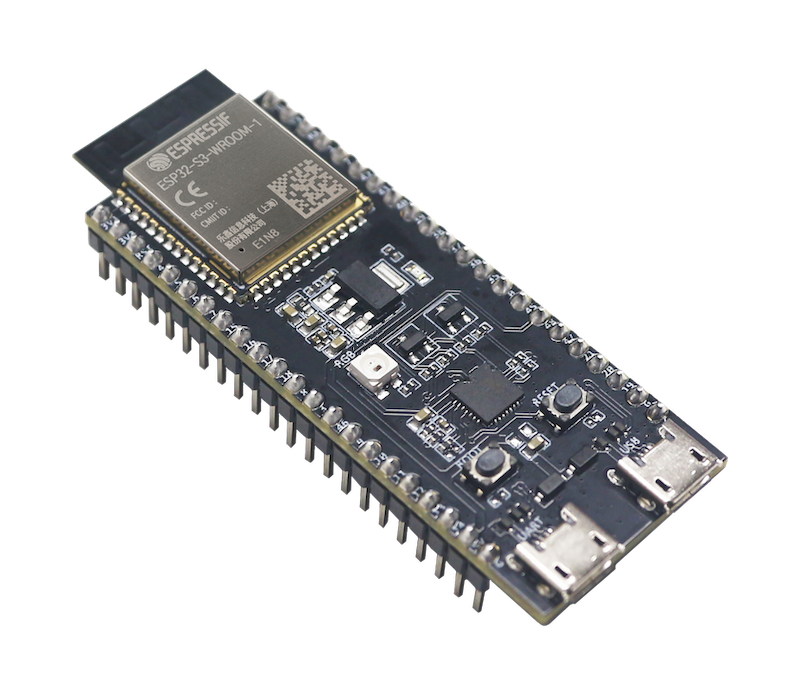
- esp32-s3 devboard (make sure it looks like this)
- NES Controller socket (easily found on AliExpress)
- Arduino IDE setup with
arduino-esp32andESP32-BLE-Gamepadinstalled - A soldering iron and some solder
- Select a PCB printing service of your choice (I went with Aisler).
- If your PCB printing service does not support native KiCad files, open
kicad/wireless-nes-adapterin KiCad and export the schematics so you can get your PCB printed. - Assemble the hardware.
- With your Arduino IDE set up with the aforementioned libraries, select the ESP32-S3 as the target and flash
/arduino/wireless-nes-adapter.inoto the board. - Plug in your controller and power the board via USB.
- Add the controller in your computer's bluetooth devices.
You should now be all set. I recommend using steam as steam input allows you to use the direct input controller you've just built as an xinput one via remapping. I recommend testing the controller on Rain World or Celeste if you have any of those 2 titles due to their low input count requirement.