A Hackathon Project for Perplexity Hackathon
Reclaiming Your Curiosity: Personalized News for Genuine Understanding.
In today's digital world, we're drowning in a constant stream of headlines, designed to capture our attention and turn our fleeting interests into profit for platforms. Our clicks and scrolls, our moments of curiosity, are often leveraged not to deepen our understanding, but simply to keep us engaged for advertising revenue.
Flow & Focus challenges this paradigm. We believe your curiosity is valuable. It's not just data; it's the engine of your intellectual growth. Flow & Focus is designed to harness that intrinsic motivation, turning your news consumption into a powerful, personalized learning experience.
graph LR
    user_input((User Interaction<br/>& Curiosity))

    subgraph "Existing Revenue-Focused Platforms"
        existing_capture[Capture User Data] --> existing_goal{Maximize Engagement<br/>& Ad Views} --> existing_outcome_platform[/Platform Revenue<br/>Growth Metrics/]
        existing_goal -.-> existing_outcome_user[More Content<br/>=> More Scrolling]
    end

    subgraph "Flow & Focus (User-Centric Knowledge)"
        ff_capture[Identify & Track<br/>Curiosity Signals] --> ff_process[Personalization Engine<br/>+ Perplexity Sonar] --> ff_outcome[\Personalized Deep Dives - Focus Mode\]
        ff_outcome --> ff_value[User Understanding<br/>& Knowledge Growth]
    end

    user_input --> existing_capture
    user_input --> ff_capture

    existing_capture -- How data is used --> existing_goal
    ff_capture -- How data is used --> ff_process
We uniquely combine the rapid discovery of a vertical news feed – the Flow Feed – with the in-depth understanding facilitated by a personalized, interactive learning dialogue – Focus. Powered by Perplexity's Sonar Pro for real-time news capture and Sonar Deep Research for tailored, comprehensive analysis based specifically on your demonstrated interests, Flow & Focus transforms passive scrolling into an active journey of knowledge acquisition.
In today's digital landscape, we're constantly swiping through headlines, getting glimpses of stories, but rarely gaining true, nuanced understanding. Existing platforms either offer overwhelming depth or frustrating superficiality.
Flow & Focus solves this by offering:
- Efficient Discovery (Flow): Quickly scan top news in a modern, engaging format without the pressure of deep commitment.
- Effortless Personalization: Your browsing passively signals your interests, without requiring manual setup.
- Meaningful Understanding (Focus): Dive deep into topics you care about, not through dense articles, but via a tailored, interactive conversation that clarifies complex subjects.
- AI-Powered Insight: Leveraging Perplexity's distinct models (
sonar-profor breadth/speed,sonar-deep-researchfor depth/detail) to create truly dynamic and personalized content that adapts to your curiosity.
This dual approach respects the user's time while providing a powerful path to knowledge, making Flow & Focus a fresh and impactful way to stay informed.
-
Dual Mode Interface:
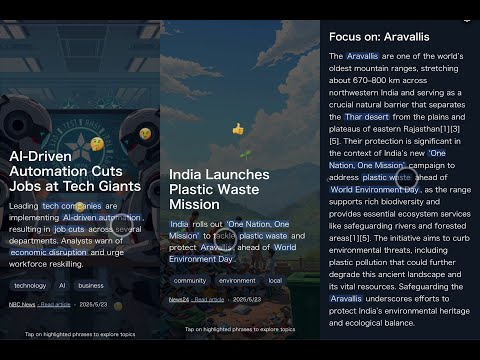
- Flow Feed (Discover & Signal Interest): A vertical, swipeable news feed displaying the latest news snippets with headlines, summaries, tags, and AI-generated background images.
- Focus (Understand & Explore): A personalized deep dive experience offering in-depth content on user interests through an interactive learning dialogue with an AI host, tailored exactly to what you explored, with conversation segments and follow-up question capabilities.
-
Vertical News Feed (Flow Feed):
- On launch, users can choose "Flow Feed" to view the top news stories in a full-screen, vertical format.
- Each news "snippet" includes a concise headline, a brief summary, associated tags, and a visually engaging background.
- Background images are generated by Runware.ai based on keywords derived from the news content by Perplexity.
- News snippets feature emoji reactions reflecting likely emotional responses to the story.
-
Navigation & Interaction (Flow Feed):
- Scroll Down: Loads and displays the next news snippet.
- Scroll Up: Loads and displays the previous news snippet. The app prevents the default browser pull-to-refresh behavior.
- Tap Key Phrase: Tapping a highlighted key phrase within a snippet transitions to a "Deep Dive View" focused on that phrase within the context of the story.
-
Deep Dive View (Flow Feed):
- Accessed by tapping a key phrase in a news snippet.
- Displays detailed information in horizontally scrollable panes.
- Users can swipe left to return to the main vertical news feed.
- Additional key phrases can be tapped to generate further focused content panes.
-
Personalized Deep Dive (Focus):
- Accessed via "Generate Today's Focus" from the launch screen.
- Generates a tailored news digest with multiple conversation segments based on user interests and exploration history.
- Each segment includes a title, summary bullets, an AI-generated image, and an interactive conversation view driven by Perplexity's Sonar Deep Research model.
- Features distinct personas like "Oracle" and "Explorer" to guide the dialogue, making it an engaging Q&A experience.
- Users can ask follow-up questions to explore topics further, with responses generated in real-time.
-
Perplexity-Powered Personalization & Content Generation:
- News summaries and image prompt keywords for Flow Feed are generated using Perplexity's Sonar Pro model for fast, real-time updates.
- In-depth conversational content in Focus mode is powered by Perplexity's Sonar Deep Research model (configurable via
PERPLEXITY_FOCUS_MODELenvironment variable, defaults tosonar-deep-research), ideal for detailed, tailored analysis based on user data (tagPreferences,deepDivePaths). - Background images are generated via Runware.ai using Perplexity-generated keywords.
- Content personalization leverages user behavior tracked in Flow to influence both modes.
-
Personalized News Feed:
- Each news snippet has associated tags.
- The app tracks the amount of time a user spends viewing snippets with particular tags.
- This preference data influences the selection of subsequent news items in Flow Feed and content in Focus mode.
- Users can view and reset their tag preferences to customize their experience.
-
Avoiding Browser Pull-to-Refresh Conflict:
- The application implements measures to prevent the default browser pull-to-refresh action during vertical scrolling.
-
Minimalist Design: Focus on content clarity and intuitive navigation.
-
Online Only: Requires an active internet connection.
| Term | Definition |
|---|---|
| News Snippet | The primary, full-screen vertical card displaying a single news story's headline, brief summary, tags, and background image in Flow Feed. Analogous to a TikTok/Reel. |
| News Feed (Flow Feed) | The sequence of News Snippets the user scrolls through vertically. Potentially personalized. |
| Tag | A category or topic label associated with a News Snippet (e.g., "technology", "politics", "world"). |
| Tag Preference | Data representing user interest, typically {[tag: string]: number_of_seconds_viewed}. |
| Deep Dive View | A secondary view in Flow Feed, accessed by tapping a key phrase. Contains progressively more detailed information about the current news story in horizontally scrollable panes. |
| Deep Dive Pane | A single screen/card of content within the Deep Dive View. |
| Key Phrase | A word or phrase within the News Snippet summary that, when tapped, triggers the generation of a new Deep Dive Pane focused on that specific phrase within the context of the story. |
| Focus Mode | A personalized deep dive experience offering in-depth content on user interests, with interactive conversation segments and follow-up question capabilities. |
| Conversation Segment | A section of content in Focus mode, including a title, summary bullets, image, and interactive conversation view for exploration. |
| Existing Story Content | All content (initial snippet summary + all previously generated deep dive panes) shown to the user for a specific news story. Used as context for generating further details. |
| Image Prompt Keywords | A list of 5-7 English keywords generated by Perplexity from news content, used to prompt Runware.ai for image generation. |
| Emoji Reactions | A set of emojis with counts representing likely audience reactions to a news story in Flow Feed. |
- App Launch: User sees a launch screen with options for "Flow Feed" or "Generate Today's Focus".
- Flow Feed Selection: Client calls
/api/getNewsFeed. API uses Perplexity's Sonar Pro to get top/personalized news, summarize them, extract tags, and generate image prompt keywords.- Background Image Generation: For each snippet, client calls
/api/generateBackgroundImagewith the image prompt keywords. - Display First Snippet: First News Snippet is shown. Client starts tracking view time for its tags.
- Vertical Scrolling:
- Scroll Down: Client requests data for the next snippet via
/api/getNewsFeedincluding current tag preferences. Displays next snippet. Updates tag view time. - Scroll Up: Client displays previous snippet. No browser refresh.
- Scroll Down: Client requests data for the next snippet via
- Deep Dive Interaction (Story A):
- User Taps Key Phrase "X" in Snippet A: Client calls
/api/getDeepDiveOnKeyword {storyId: "A", keyPhrase: "X", existingStoryContent: [SnippetA.summary, Pane1.content, Pane2.content,...]}using Sonar Pro for quick insights. Client adds/transitions to this new focused pane in Deep Dive View for Story A. - User Swipes Left from Deep Dive View: Client returns to displaying Snippet A.
- User Taps Key Phrase "X" in Snippet A: Client calls
- Background Image Generation: For each snippet, client calls
- Focus Selection: Client calls
/api/generatePersonalDigestwith tag preferences and deep dive paths.- Content Generation: API uses Perplexity's Sonar Deep Research to generate personalized conversation segments.
- Display Segments: Segments are shown with titles, summaries, images, and conversation views.
- Interactive Exploration: User can ask follow-up questions via
/api/getDeepDiveOnKeywordwithin Focus, powered by Sonar Deep Research for detailed responses streamed in real-time. - Refresh or Return: User can refresh content or return to Flow Feed.
sequenceDiagram
    participant U as User (Browser)
    participant App as Flow & Focus App (Client)
    participant API as Next.js API Route
    participant LLM as Perplexity (Sonar Pro)
    participant IMG as Runware.ai API

    U->>App: Launch App
    App-->>U: Show Launch Screen (Flow Feed or Focus)

    alt Choose Flow Feed
        U->>App: Select Flow Feed
        App->>API: GET /api/getNewsFeed (optional: { tagPreferences })
        API->>LLM: Fetch & summarize news, get tags, get image_prompt_keywords (context: tagPreferences)
        LLM-->>API: { newsSnippetsData: [{headline, summary, tags, imagePromptKeywords}, ...] }
        API-->>App: Initial News Feed Data

        loop for each initial snippet
            App->>API: POST /api/generateBackgroundImage { imageKeywords: snippet.imagePromptKeywords }
            API->>IMG: Generate image using keywords
            IMG-->>API: { imageUrl: "..." }
            API-->>App: Background Image URL for snippet
            App->>App: Store snippet with image URL
        end
        App-->>U: Display First News Snippet
        App->>App: Start tracking view time for snippet's tags

        loop Main Interaction (Flow Feed)
            alt Scroll Down
                U->>App: Scroll Down
                App->>App: Get current tagPreferences
                App->>API: GET /api/getNewsFeed { offset/cursor, tagPreferences }
                API->>LLM: Fetch & summarize next news, get tags, get image_prompt_keywords (context: tagPreferences)
                LLM-->>API: { nextSnippetData }
                API-->>App: Next Snippet Data
                App->>API: POST /api/generateBackgroundImage { imageKeywords: nextSnippetData.imagePromptKeywords }
                API->>IMG: Generate image
                IMG-->>API: { imageUrl: "..." }
                API-->>App: Background Image URL for next snippet
                App-->>U: Display Next News Snippet
                App->>App: Update tag view times
            else Scroll Up
                U->>App: Scroll Up (Browser default pull-to-refresh prevented)
                App-->>U: Display Previous News Snippet (if available)
                App->>App: Update tag view times for displayed snippet
            else Tap Key Phrase on Snippet (Story X)
                U->>App: Tap Key Phrase "K" on Snippet X
                App->>App: Accumulate existingStoryContent for Story X
                App->>API: POST /api/getDeepDiveOnKeyword { storyId: X.id, keyPhrase: "K", existingStoryContent: accumulatedContent }
                API->>LLM: Generate deep dive for Story X focused on "K", using existingStoryContent
                LLM-->>API: { keyPhraseFocusedPane: {...} }
                API-->>App: Key Phrase Focused Pane
                App-->>U: Add/Show Key Phrase Focused Pane in Deep Dive View (Auto-scroll right)
                App->>App: Update tag view times for Story X's tags
            else Swipe Left from Deep Dive
                U->>App: Swipe Left
                App-->>U: Return to News Snippet View
            end
        end
    else Choose Focus
        U->>App: Select Generate Today's Focus
        App->>API: POST /api/generatePersonalDigest { tagPreferences, deepDivePaths }
        API->>LLM: Generate personalized digest segments based on user interests
        LLM-->>API: { segments: [{title, subtitle, summaryBullets, conversation, imagePromptKeywords}, ...] }
        API-->>App: Personalized Digest Data

        loop for each segment
            App->>API: POST /api/generateBackgroundImage { imageKeywords: segment.imagePromptKeywords }
            API->>IMG: Generate image using keywords
            IMG-->>API: { imageUrl: "..." }
            API-->>App: Background Image URL for segment
            App->>App: Store segment with image URL
        end
        App-->>U: Display Personalized Focus Segments

        loop Interactive Exploration
            alt Ask Follow-up Question on Segment
                U->>App: Ask Question on Segment
                App->>API: POST /api/getDeepDiveOnKeyword { storyId: segment.id, keyPhrase: question, existingStoryContent }
                API->>LLM: Generate response to question in context of segment
                LLM-->>API: { responseContent }
                API-->>App: Response Data
                App-->>U: Update Segment with Question and Response
            else Refresh Focus
                U->>App: Click Refresh Focus
                App->>API: POST /api/generatePersonalDigest { tagPreferences, deepDivePaths }
                API->>LLM: Generate new personalized digest segments
                LLM-->>API: { segments: [...] }
                API-->>App: New Personalized Digest Data
                App-->>U: Display Updated Focus Segments
            else Return to Flow Feed
                U->>App: Click Back to Flow
                App-->>U: Return to Flow Feed Interface
            end
        end
    end
| ID | Requirement | Implementation Notes |
|---|---|---|
| F-1 | Fetch and display an initial feed of News Snippets on launch in Flow Feed, potentially personalized if prior tag preferences exist. | Client calls /api/getNewsFeed. |
| F-2 | Each News Snippet must display a headline, brief summary, associated tags, and a Runware.ai generated background image (using Perplexity-generated keywords). | UI rendering. API integration for text, tags, image keywords, and image. |
| F-3 | Vertical scrolling in Flow Feed: Down for next news, Up for previous news. | Client-side scroll/swipe detection. Manage feed array. |
| F-4 | Prevent Browser Pull-to-Refresh: Implement measures to stop default browser refresh on pull-down at the top of the feed. | CSS (overscroll-behavior: contain;) and JS event listeners. |
| F-5 | Deep Dive View (Tap Key Phrase): Tapping a key phrase transitions to the Deep Dive View for that story, showing detailed information in horizontally scrollable panes. | Client detects tap and handles UI transition. |
| F-6 | Focused Deep Dive (Tappable Key Phrases): Tapping a key phrase fetches a deep dive focused on that phrase within the story's full context via /api/getDeepDiveOnKeyword. Displays as a new pane. |
Key phrases identified with angle brackets. API call for focused content. UI update and programmatic scroll. |
| F-7 | Deep Dive Navigation: Allow horizontal scrolling within Deep Dive View. Swipe Left from Deep Dive View to return to the News Snippet. | Client-side swipe detection and UI state management. |
| F-8 | News Personalization: Track time spent viewing news by tags. Send tag preferences to /api/getNewsFeed and /api/generatePersonalDigest to influence content selection. |
Client-side time tracking per tag. Include in API requests. |
| F-9 | Key phrases in news snippets should be clearly tappable. | CSS styling. Key phrases highlighted with angle brackets in the content. |
| F-10 | Focus Mode: Generate personalized deep dive content with conversation segments based on user interests. | Client calls /api/generatePersonalDigest. |
| F-11 | Interactive Exploration in Focus: Allow users to ask follow-up questions on conversation segments for deeper exploration. | Client calls /api/getDeepDiveOnKeyword with user questions. |
| F-12 | Refresh Focus Content: Provide an option to regenerate personalized content in Focus mode. | UI button to trigger new API call for content generation. |
| Category | Target (Web Context) |
|---|---|
| Design | Clean, immersive, mobile-first vertical video aesthetic. High readability. |
| Performance | Smooth animations. API responses handled with loading states. Background images cached and optimized. |
| Responsiveness | UI adapts to various mobile screen sizes primarily. |
| Accessibility | Basic accessibility: semantic HTML, sufficient contrast. |
| Data Freshness | Leverages Perplexity Sonar Pro for up-to-date news. |
Key Packages:
| Package Type | Used Technologies | Purpose |
|---|---|---|
| Framework | Next.js 15, React 19, TypeScript | Core web framework |
| Styling | Tailwind CSS | Responsive design and UI components |
| Animation | Framer Motion | UI transitions, card animations, swipe gestures |
| State Mgmt | Zustand | Client-side state management with persistence |
| API Client | Native fetch |
Calling Next.js API routes |
| LLM Integration | Perplexity Sonar Pro and Sonar Deep Research | Content generation and personalization; Sonar Pro for real-time updates, Sonar Deep Research for in-depth analysis |
| Image Generation | Runware SDK | Background image creation |
| Validation | Zod | Schema validation for API routes |
- Sonar Pro for Flow Feed: Used for generating concise snippets, tags, and image keywords. Prompts are designed for brevity and relevance, focusing on real-time news updates. The model excels in speed, making it ideal for the rapid discovery phase in Flow Feed.
- Sonar Deep Research for Focus Mode: Employed for generating in-depth conversational digests and interactive follow-ups. Prompts are structured to elicit detailed, dialogue-based content with personas like "Oracle" and "Explorer", leveraging the model's strength in comprehensive analysis.
- Challenge: Handling Perplexity's
<think>Tags within JSON Output: Occasionally, Perplexity inserts<think>tags in responses, even within structured JSON, which can break parsing. Solution: Implemented robust server-side post-processing to clean raw LLM responses before JSON parsing (seeapp/api/utils/perplexity.ts). This was necessary to ensure reliable data handling, as discussed in community forums like Reddit.
API Routes:
| Route | Method | Parameters | Returns | Purpose |
|---|---|---|---|---|
/api/getNewsFeed |
GET | { count?: number, shownHeadlines?: string[], tagPreferences?: { [tag: string]: number } } |
{ snippets: NewsSnippet[] } |
Get personalized news snippets for Flow Feed |
/api/getDeepDiveOnKeyword |
POST | { storyId: string, keyPhrase: string, existingStoryContent: (string | { title: string, content: string })[], stream?: boolean } |
{ newPane: DeepDivePane } or streaming response |
Get content focused on a key phrase for Flow Feed or Focus mode |
/api/generateBackgroundImage |
POST | { imageKeywords: string[] } |
{ imageUrl: string, fromCache: boolean } or fallback gradient |
Generate or retrieve cached background image |
/api/generatePersonalDigest |
POST | { tagPreferences: { [tag: string]: number }, deepDivePaths: string[], numberOfSegments?: number } |
{ segments: ConversationSegment[] } |
Generate personalized digest for Focus mode |
Implementation Notes:
- Perplexity interactions use Sonar Pro model for high-quality content generation.
- Requests include context and preferences for personalization.
- Image caching improves performance and reduces API calls.
- Tag preferences and deep dive paths are persisted in localStorage between sessions.
# Install dependencies
npm install

# Create a .env.local file with your API keys and configuration
echo "PERPLEXITY_API_KEY=your_perplexity_api_key_here" > .env.local
echo "RUNWARE_API_KEY=your_runware_api_key_here" >> .env.local
echo "PERPLEXITY_FOCUS_MODEL=sonar-deep-research" >> .env.local # Optional: specify Perplexity model for Focus mode (defaults to sonar-deep-research)

# Start the development server
npm run dev

# Build for production
npm run build

# Start production server
npm run start- Note: Access the app via
http://localhost:3000in your browser.
- Set up your Perplexity API key:
- Add it to your
.env.localfile:PERPLEXITY_API_KEY=your_key_here
- Add it to your
- Set up your Runware API key for image generation:
- Sign up at Runware.ai
- Create an API key.
- Add it to your
.env.localfile:RUNWARE_API_KEY=your_key_here
- Configure Perplexity Focus model (optional):
- Add to your
.env.localfile:PERPLEXITY_FOCUS_MODEL=sonar-deep-research(orsonar-pro) - This only affects Focus mode; Flow Feed always uses
sonar-profor speed - Defaults to
sonar-deep-researchif not specified
- Add to your
- Start the development server:
npm run dev
- How to use the app:
- The app launches with a choice between "Flow Feed" and "Generate Today's Focus".
- Flow Feed: View the latest news snippets in a vertical feed.
- Scroll Down: View the next news snippet, potentially personalized based on your viewing history.
- Scroll Up: View the previous news snippet.
- Tap a Key Phrase in Snippet: Generates a deep dive focused on that key phrase and shows it as a new pane in the Deep Dive View.
- Swipe Left from Deep Dive View: Return to the main news snippet.
- Generate Today's Focus: Access personalized deep dive content.
- View conversation segments tailored to your interests.
- Ask follow-up questions for interactive exploration.
- Refresh content or return to Flow Feed.
Flow & Focus uses Perplexity to generate relevant keywords from news content, and then uses the Runware API with these keywords to generate abstract or thematic background images for each news snippet and Focus segment.
- Each news snippet and Focus segment features a custom-generated background image.
- Perplexity generates 5-7 English keywords based on the content.
- These keywords are used in the prompt for the Runware API.
- Images are cached to improve performance and reduce API calls.
- Built with Next.js and React.
- Uses Framer Motion for smooth animations and transitions.
- Zustand for client-side state management (news feed, deep dive content, tag view times, Focus segments).
- State persists tag preferences and exploration history to localStorage for personalization between sessions.
- Backend logic encapsulated in Next.js API Routes.
- API routes handle communication with:
- Perplexity Sonar Pro model for fetching/generating news content, keywords, and deep dives.
- Runware API for image generation (using keywords from Perplexity).
- API keys are kept secure on the server-side.
- Zod schemas used for validating requests and API responses.
{
"id": "unique-pane-id",
"title": "Focus on: Key Phrase",
"content": "Detailed explanation about the key phrase in context of the story",
"type": "progressive_detail" | "key_phrase_focus"
}{
"id": "unique-segment-id",
"title": "Segment Title",
"subtitle": "Optional Subtitle",
"summaryBullets": ["Bullet 1", "Bullet 2", "Bullet 3"],
"conversation": [
{ "id": "turn-1", "speaker": "Oracle", "text": "Initial explanation..." },
{ "id": "turn-2", "speaker": "Explorer", "text": "Follow-up question?" },
{ "id": "turn-3", "speaker": "Oracle", "text": "Response to question..." }
],
"imagePromptKeywords": ["keyword1", "keyword2", "keyword3"],
"imageUrl": "url_to_runware_generated_image",
"source": "Optional Source",
"conclusion": "Optional concluding remark"
}{
"technology": 120, // seconds
"world_news": 350,
"finance": 65
}The Flow & Focus application has been fully implemented according to the specifications above. The implementation includes:
- A responsive, mobile-first UI with smooth animations and transitions using Framer Motion.
- Dual mode interface with Flow Feed for news snippets and Focus for personalized deep dives.
- Progressive loading of news content based on user interaction in Flow Feed.
- Interactive exploration in Focus mode with follow-up question capabilities.
- Background image generation with caching for improved performance.
- Key phrase highlighting and focused deep dives in Flow Feed.
- Tag-based personalization with persistent preferences across sessions.
- Touch and swipe gesture handling for intuitive navigation.
- Conversational UI in Focus mode, parsing and handling dialogue structure from LLM responses to display distinct personas ("Oracle" and "Explorer").
- Handling of specific LLM output quirks, such as
<think>tags, through server-side cleaning and regex filtering to ensure reliable JSON parsing.
(Standard Next.js structure using the App Router). This structure was chosen for clarity and maintainability, leveraging Next.js App Router for routing, server-side APIs for secure LLM access, and a component-based architecture for UI organization.
-
.gitignore:
- Purpose: Specifies intentionally untracked files to ignore by Git.
- Features: Lists patterns for files and directories that should not be committed to the repository, such as build artifacts and environment files.
-
eslint.config.mjs:
- Purpose: Configuration file for ESLint.
- Features: Defines linting rules and settings to enforce code quality and consistency across the project.
-
fix-env.sh:
- Purpose: Shell script for environment setup or fixes.
- Features: Likely contains commands to resolve environment-related issues or set up necessary configurations for development.
-
next.config.ts:
- Purpose: Configuration file for Next.js.
- Features: Customizes Next.js build and runtime behavior, such as enabling experimental features or setting up image optimization.
-
package-lock.json:
- Purpose: Automatically generated file for precise dependency versions.
- Features: Locks the exact versions of dependencies installed to ensure consistency across environments.
-
package.json:
- Purpose: Project manifest file.
- Features: Lists project metadata, scripts for development tasks, and dependencies required for the project.
-
postcss.config.mjs:
- Purpose: Configuration file for PostCSS.
- Features: Sets up PostCSS plugins like Tailwind CSS for processing styles during the build process.
-
README.md:
- Purpose: Project documentation file.
- Features: Provides an overview of the project, setup instructions, features, and architecture details for developers and users.
-
tsconfig.json:
- Purpose: Configuration file for TypeScript.
- Features: Defines compiler options and project structure for TypeScript, ensuring type safety and code consistency.
-
app/:
- Purpose: Main application directory for Next.js App Router.
- Features: Contains the core application files, including pages, layouts, API routes, and components for the "Flow & Focus" application.
-
public/:
- Purpose: Directory for static assets.
- Features: Holds publicly accessible files like images, icons, and manifest files that are served directly by the server.
-
app/api/getNewsFeed/route.ts:
- Purpose: Fetches and personalizes news snippets for the vertical feed in Flow Feed.
- Features: Uses the Perplexity API to retrieve current news based on user tag preferences, validates input parameters, ensures unique IDs for snippets, and provides fallback content in case of API failures. Implements caching headers to prevent stale data.
-
app/api/generateBackgroundImage/route.ts:
- Purpose: Generates background images for news snippets and Focus segments using keywords.
- Features: Integrates with Runware.ai API to create thematic images, implements an in-memory cache to optimize performance by reusing previously generated images, and provides fallback gradients if image generation fails.
-
app/api/getDeepDiveOnKeyword/route.ts:
- Purpose: Generates detailed content for specific keywords within a news story or Focus segment.
- Features: Uses Perplexity API to create focused deep dive panes based on existing story context, supports streaming for real-time content delivery and non-streaming responses for complete data, with error handling for robustness.
-
app/api/generatePersonalDigest/route.ts:
- Purpose: Creates personalized news digests for the "Focus" feature.
- Features: Leverages Perplexity's deep research model to generate conversation-style segments based on user interests and exploration history, with detailed JSON schema validation and fallback responses for error cases.
-
app/api/utils/perplexity.ts:
- Purpose: Provides utility functions for interacting with the Perplexity API.
- Features: Handles API calls with customizable parameters, supports both streaming and non-streaming responses, includes error handling, JSON parsing logic, and content cleanup for consistent data processing. This is where LLM interaction logic, including handling of the
<think>tag issue, is implemented.
-
app/components/FlowContainer.tsx:
- Purpose: Manages the main news feed UI and navigation in Flow Feed.
- Features: Handles display and swipe navigation of news snippets, loads images for visible and upcoming snippets, transitions to deep dive views on keyword taps, tracks user interaction for personalization, and includes a preferences panel for resetting tag preferences.
-
app/components/FlowSnippet.tsx:
- Purpose: Renders individual news snippets in the vertical feed.
- Features: Displays news content with animated backgrounds (images or gradients), highlights tappable key phrases for deep dives, shows floating emoji reactions based on content, and tracks view time for user personalization.
-
app/components/DeepDiveView.tsx:
- Purpose: Manages the detailed view of news stories in Flow Feed.
- Features: Uses a swiper interface for navigating multiple deep dive panes, highlights tappable key phrases for further exploration, provides navigation back to the main feed, and tracks interaction time for personalization.
-
app/components/FlowPreloader.tsx:
- Purpose: Preloads news data to minimize user wait time in Flow Feed.
- Features: Fetches initial news snippets early in the app lifecycle, sets fallback gradients for visual consistency while images load, and ensures data is ready for display upon user interaction.
-
app/components/KeywordAnimation.tsx:
- Purpose: Displays animations for keyword interactions in Flow Feed.
- Features: Shows a visual feedback animation with a loading spinner when a user taps a keyword, indicating that deeper insights are being fetched, enhancing user experience during content loading.
-
app/store/useNewsStore.ts:
- Purpose: Manages state for news snippets and user interactions in Flow Feed.
- Features: Handles state for news feed data, current snippet index, deep dive panes, and tag preferences using Zustand. Persists user preferences to localStorage for personalization across sessions, with actions for updating and resetting state.
-
app/store/useFocusStore.ts:
- Purpose: Manages state for personalized deep dive content in Focus mode.
- Features: Stores conversation segments for the "Focus" feature, tracks deep dive paths, and handles image URLs for segments using Zustand with persistence to localStorage, ensuring user exploration history is maintained.
- app/focus/page.tsx:
- Purpose: Displays personalized deep dive content for the "Focus" feature.
- Features: Generates a tailored news digest with conversation segments, allows users to ask follow-up questions for interactive exploration, integrates image generation for visual content, and provides options to refresh content or return to the main feed.
{
  "id": "unique-story-identifier",
  "headline": "Concise News Headline",
  "summary": "Short summary. Key phrases like <key phrase> are marked with angle brackets.",
  "tags": ["technology", "breaking_news"],
  "imagePromptKeywords": ["abstract tech", "global connection", "news pulse"],
  "source": "News Source",
  "sourceUrl": "https://example.com/article",
  "timestamp": "iso_timestamp",
  "imageUrl": "url_to_runware_generated_image",
  "emojiReactions": {"👍": 2345, "❤️": 1870, "😂": 1560},
  "fallbackGradient": "linear-gradient(135deg, hsl(0, 70%, 50%), hsl(40, 70%, 50%))"
}