Repository navigation
Triage: Current State of Talk Notifications #6096
Description

How to use GitHub
- Please use the 👍 reaction to show that you are affected by the same issue.
- Please don't comment if you have no relevant information to add. It's just extra noise for everyone subscribed to this issue.
- Subscribe to receive notifications on status change and new comments.
Summary
Notifications are at the core of any messaging software and there seems to be some significant issues with Talk notifications.
A variety of issues list Talk notification problems. To summarize it seems like the main issue is the lack of consistent notifications of incoming messages. From my testing I've noticed the following:
- Notifications
usuallysometimes work when a user is tagged:@username you'll get this as a toast notification - Notifications usually do not work when a user is not actively on the talk tab and tagged in the message (even if the user has chosen to be notified of all messages and has allowed notifications through the browser:
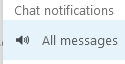
- Some users have reported this to be working (see Sound alarm on receiving new message - option: turn on/off etc. #4651), but I was not able to get it to work in the latest version.
- Notifications are often delayed (this exists on both desktop & mobile, although more severe on mobile)
Related issues:
- Nextcloud Talk notifications not working #6075 : Nextcloud Talk notifications not working
- Notifications for chats are not showing when browser tab/window is inactive #1575 : Notifications for chats are not showing when browser tab/window is inactive
- New message notification is usually not displayed #5321 : New message notification is usually not displayed
- Nextcloud Talk Notifications Delay (15-20-25s) #5992 : Nextcloud Talk Notifications Delay (15-20-25s)
- Error while accessing microphone & camera #595 : Missing chat messages notifications
- Random emptycontent messages #116 : Sound on talk notifications
- Sound alarm on receiving new message - option: turn on/off etc. #4651 : Sound alarm on receiving new message - option: turn on/off etc.
Active Merge Requests:
- Better chat notification handling #1970 : Better chat notification handling
- Add basic sound notification #5335 : Add basic sound notification
Steps to reproduce
- Install latest nextcloud & Talk App
- Create conversation in Talk App
- Navigate away from Talk App tab.
- Receive no notification when message is sent (notification is sent if user is tagged in message)
Expected behaviour
The user receiving a new message should be notified in some way whenever a new message is received.
Actual behaviour
User is not notified other than * on Talk browser tab.
Talk app
Talk app version: 12.0.1
Custom Signaling server configured: no
Custom TURN server configured: no
Custom STUN server configured: no
Browser
Microphone available: yes
Camera available: yes
Operating system: Windows
Browser name: Firefox/Chrome/other chromium browsers
Browser version: Tested on multiple versions
Server configuration
Operating system: Ubuntu
Web server: Apache
Database: MySQL
PHP version: 7.2/7.3/7.4
Nextcloud Version: 22.1.0
List of activated apps:
- Talk
- Notifications
- LDAP user and group backend
Activity
nickvergessen commentedon Aug 20, 2021
This works for me 100% of the time.
Note: notifications are currently not sent, when the user has an active session in the chat. Be it an open tab in the background, foreground or a mobile device that has the chat open. There is some work in progress with #1970 to improve the situation, but there are pitfalls and annoyances all the way.
Same applies here, when you have a session (be it background or foreground) you will not receive any chat notifications for this conversation.
Notifications for mobile clients are done via push and should be instant. There is a known problem with iOS which delays the waking up of the Talk app by a random amount of seconds, but this is nothing we can influence.
The desktop client and browsers pull notifications in a 30 second interval, so it can take between 1 and 30 seconds until you get a notification for a new chat message.
You can improve this by installing the notify_push on your server, which will make each browser and desktop client maintain a permanent open connection to the server: https://github.com/nextcloud/notify_push/
So apart from #1970 to fix #1575 there is nothing Talk can do to improve the situation atm.
MarcS1975 commentedon Aug 20, 2021
Well it doesnt work for everyone else. Many users have reported the same issue.
I myself have tested this on 6 different Android devices and notifications on those devices work for ALL other apps.
Only Nextcloud Talk fails.
I am not even involving any browsers/open sessions etc. Just try to chat between 2 mobile devices and Android does NOT show any notifications.
It is worth noting that the notifications sometimes work initially but after a few days of usage just stop working.
So if you feel like it, then you can close all these tickets but the problem is NOT solved.
nickvergessen commentedon Aug 20, 2021
Okay, when you talk about Android notifications only then the issue might be in Android or our Android app, but at least not in the server part, because there notifications are sent out and handed over to Google/Apple respectively.
Maybe you can debug it together with the Android Devs in the android repository then, but it mostly ends with some energy save settings or custom roms from manufacturers or missing google play services or something along.
MarcS1975 commentedon Aug 20, 2021
meichthys commentedon Aug 20, 2021
@nickvergessen Thanks for the clarification on this. It is very helpful. I will take a look at
notify_push(i think it's calledClient Pushin the app store.There does however still seem to be an issue with the talk notifications from the server to the client. I cannot get consistent notifications via the client - even with all nextcloud browser tabs closed. Steps to reproduce (without notify_push):
Sometimes I will get a bunch of notifications that all come through at once, but they could be 15 minutes late or more. When I am tagged in the conversation, notifications seem to come through more often, but not always.
(This morning it took 10 minutes - almost exactly for the notification to come through for a tagged message)
Some notifications never come through.
nickvergessen commentedon Aug 20, 2021
Desktop client is nothing I can help you with. But it might need a restart after notify_push has been setup before it detects it correctly and utilizes it.
meichthys commentedon Aug 20, 2021
Ok, I'll work on setting up notify_push, but I was expecting things to work (albeit slowly) without notify_push.
nickvergessen commentedon Aug 20, 2021
They do, with a max. 30s delay
meichthys commentedon Aug 20, 2021
I guess that's where I'm seeing the discrepancy. I don't get the notifications within 30 seconds. It takes up to 10 minutes for some, and others never show up. I'm not trying to be ignorant, just trying to report my experience and iron out issues before a potential office-wide deployment.
MarcS1975 commentedon Aug 21, 2021
nickvergessen commentedon Aug 21, 2021
When you have both apps installed, Talk will receive Talk notifications and the Files app all others. If you have only Talk installed, you will only receive Talk notifications. If you have only Files installed, it will receive all notifications.
One thing you can try is going to your personal settings and deleting all devices. Then reauthenticate in the mobile apps and see if it works again.
nickvergessen commentedon Aug 21, 2021
If you have access to the occ command line tool you can also try
And see if it shows an error or something
meichthys commentedon Aug 21, 2021
@MarcS1975 I think your issue is different than mine. Perhaps you should open up a different issue. My issue has nothing to do with the mobile apps it is related strictly to server and desktop client.
MarcS1975 commentedon Aug 21, 2021
nickvergessen commentedon Sep 1, 2021
So I'm closing this meta issue as it doesn't help solving things. If there are still problems with individual apps, please have a look in their repo for related issues:
e-caste commentedon Sep 10, 2021
@nickvergessen Hi, sorry to comment on a closed issue but I have two points that I would like to understand better.
First, does the notify_push app only affect the desktop client and not the mobile clients? I ask because from what you write it seems like that is the case, but from the repo's readme I can't get any further insight on what it's doing, except for the about section, but it doesn't talk about any mobile clients nor message notifications (only file-related ones).
Second, I have tried both the
occcommands you have suggested, after revoking access from many past logins on various apps in my account's security page and keeping only the sessions I am actually using right now (1 browser, 1 desktop, 1 iOS files app, 1 iOS Talk app). The results I got seem weird to me:--talkflag, I get an instant notification in the browser, but no notification at all on iOS--talkflag, I get a notification in the browser and on iOS with a few seconds delayBut on iOS the notification can't be decrypted, and I don't see anything in the Talk app:
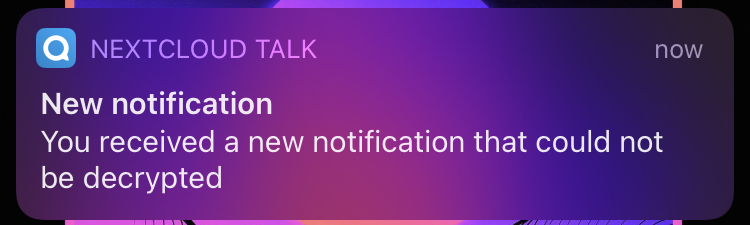
Another abnormality is that in the desktop app I have never received any notifications.
My setup:
meichthys commentedon Sep 10, 2021
@e-caste I'm not certain, but i believe iOS notifications are separate from notify_push.
Desktop notifications are regularly quite delayed and have been hit or miss for a while (I regularly receive desktop notifications that are a few days old).
notify_pushis supposed to help with the situation but unfortunately it isn't too trivial to setup correctly.nickvergessen commentedon Sep 14, 2021
That's expected, but it shows that the pushing works already