

Pick, tune and copy a color theme for the Claude desktop app, in light and dark mode.


Pick a color theme for the Claude desktop app, tune its colors with a live preview, and copy it as a DevTools snippet. Light and dark mode each get their own theme, and the app follows your OS between them. Tested against Claude desktop 3.6556.2 on macOS (the version is shown in the app's title bar).
Open the app: rinn7e.com/claude-desktop-theme-tuner, or let your AI agent design a theme for you.

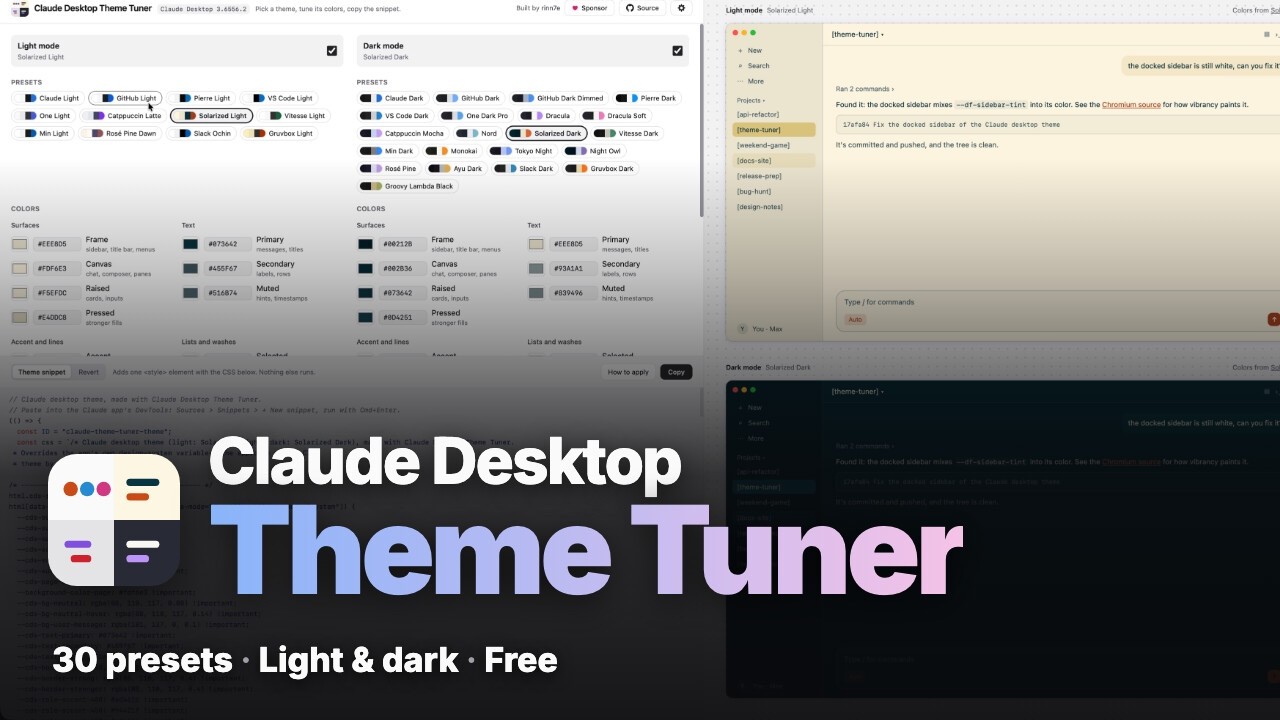
- Presets: one for every code theme in Claude's "Code appearance" setting, in the same order, so the app can match its code blocks: Claude Light and Dark (Claude's own defaults, measured from the app), GitHub (Light, Dark, Dark Dimmed), Pierre, VS Code, One Light and One Dark Pro, Catppuccin Latte and Mocha, Solarized, Vitesse, Min, Rosé Pine and Rosé Pine Dawn, Slack Ochin and Slack Dark, Dracula and Dracula Soft, Nord, Monokai, Tokyo Night, Night Owl and Ayu Dark. Plus Gruvbox Light and Dark, Groovy Lambda Black and Meadow Light.
- Tuning: every color of a theme has a picker, with WCAG contrast checks for the text and accent pairs. Edits are kept in your browser.
- Presets as files: the gear menu saves both modes and the options to a JSON file and loads one back, to keep a theme or share it. Loaded names and links are cleaned, so a shared file can't slip extra CSS into the snippet.
- Share links: the gear menu's Copy Share Link puts the setup in the
link itself (
#theme=..., which never reaches the server); opening it loads the theme. - Made for AI agents: an agent can design themes for you and show you screenshots, without clicking through the page; see Design a theme with an AI agent.
- Preview: mocks of the Claude app in light and dark mode at once, painted with the same variables the snippet sets.
- Less GPU: while Claude works, its looping animations (the shimmer on its working text above all) keep the GPU and macOS's WindowServer busy, see anthropics/claude-code#94003. The Reduce motion option switches on Claude's own reduce-motion guard, which the app never sets; it roughly halved the GPU load in our test.
- Thin arrows: Claude's disclosure arrows (sidebar sections, sessions with
nested sessions, the file tree, panels, the chat's tool rows) are a filled
triangle that reads like the status dot beside it. The Thin arrows
option draws Claude's own thin chevron in their place, in the same
<style>. - Readable output: the snippet is shown in full before you copy it. It adds
one
<style>element and nothing else, and its CSS reads as plain CSS.
The tuner works with AI agents that can browse or run commands, such as Claude Code, Claude Desktop's Code tab or Codex. Give one the link and say what you want:
Use https://rinn7e.com/claude-desktop-theme-tuner/ to design a theme based on
Solarized Light with neon magenta accents, and show me screenshots of 5 styles.
The agent finds the "Agent guide" link in the tuner's title bar and reads llms.txt, which explains how to work without clicking through the page:
- It writes each theme as JSON (a preset plus the colors it changes; every preset's colors are in presets.json) and checks the contrast rules the tuner's own presets follow.
- It puts each theme in a link (
#theme=...). With&view=preview, the link shows only the themed preview of Claude, which the agent screenshots. - It sends you the screenshots, each with its link. Open the one you like: the tuner loads it, and you apply it as below.
Applying stays your step: the snippet runs in your Claude app, so you copy and run it yourself.
The app's How to apply button walks through it, with a screenshot of each
step (in src/asset/how-to-apply/):
- Turn on Developer Mode once: in Claude, Help > Troubleshooting > Enable Developer Mode.
- Copy the theme snippet.
- In Claude, choose Developer > Show Dev Tools (Option+Cmd+I).
- In DevTools open Sources, click >> next to Page and Workspace, and choose Snippets, then + New snippet.
- Paste it, press Cmd+S to keep it, then Cmd+Enter to run it. The Console
says
[theme] applied.
The theme lasts until Claude restarts; after that, run the saved snippet again. The Revert tab has the one-line command that removes it.
Updates rename or add color variables, and the surfaces using them go back to
stock. Maintainers run snippets/diagnose.snippet.js in the Console the same
way, with DevTools undocked (docked DevTools narrows the window, which
collapses the sidebar). It copies a JSON report to the clipboard: what paints
each area, the color variables in use, the rules behind each sidebar, and
every surface still white or gray. Map the new names in src/theme/tokens.ts.
How Claude's UI is put together, and the traps met while debugging it, are in
doc/claude-internals.md.
Claude's UI takes its colors from CSS variables: the design system's --cds-*,
claude.ai's older --bg-* and --text-* (HSL triples), and the Code tab
frame's --df-*. A theme is 13 semantic colors, and everything else is derived
from them.
| File | Role |
|---|---|
src/theme/palette.ts |
the semantic colors, their labels and the contrast pairs |
src/theme/presets.ts |
the hand-tuned presets, their order, and approximate stock colors for an unthemed mode |
src/theme/code-themes.ts |
the other code-theme presets, generated by pnpm run code-themes (scripts/code-themes.mjs) |
src/theme/tokens.ts |
maps a palette onto every Claude variable the snippet sets |
src/theme/css.ts |
writes those variables under the light and dark selectors |
src/theme/snippet.ts |
wraps the CSS into the paste-able script |
src/preview/claude-mock.tsx |
the preview, painted with the same variables |
src/storage/preset-file.ts |
the preset JSON file: saving, and checking a loaded one |
snippets/diagnose.snippet.js |
for maintainers: reports Claude's color variables after an update breaks the theme |
snippets/stock-colors.snippet.js |
reads Claude's own default colors, for the Claude presets |
snippets/arrows.snippet.js |
lists every icon shape in Claude and where it shows, to find the bold arrows to restyle |
Three quirks shape the CSS, each explained where it is handled in the code:
- Every declaration is
!important, because Claude sets the same variables with selectors of up to five parts (its dark mode ones most of all). - The frame re-sets its variables on its own sidebar and cards, so they are set there too.
- With macOS vibrancy the docked sidebar mixes a white tint over a transparent window, so the tint is set to the frame color at 100%.
Node.js 24+ and pnpm:
pnpm install
pnpm run dev
Checks: pnpm run check, pnpm run lint, pnpm run format:check,
pnpm run test. pnpm run build writes a static site to dist/; every push
to main deploys it to GitHub Pages (.github/workflows/pages.yml). Follow the
code convention. Open work is in the
future plan.
Built by rinn7e. If the tuner is useful to you, you can help keep it going by sponsoring me on GitHub.
MIT, see LICENSE. Overriding the app's own variables is the approach
of Clay by Maxime
Bories (MIT, see LICENSE-clay). Each preset credits the color
scheme it follows, in src/theme/presets.ts, src/theme/code-themes.ts and
in the app. The code-theme presets are mapped from the VS Code themes Shiki
ships (all MIT); Pierre's are from @pierre/theme (Apache-2.0, see
LICENSE-pierre).