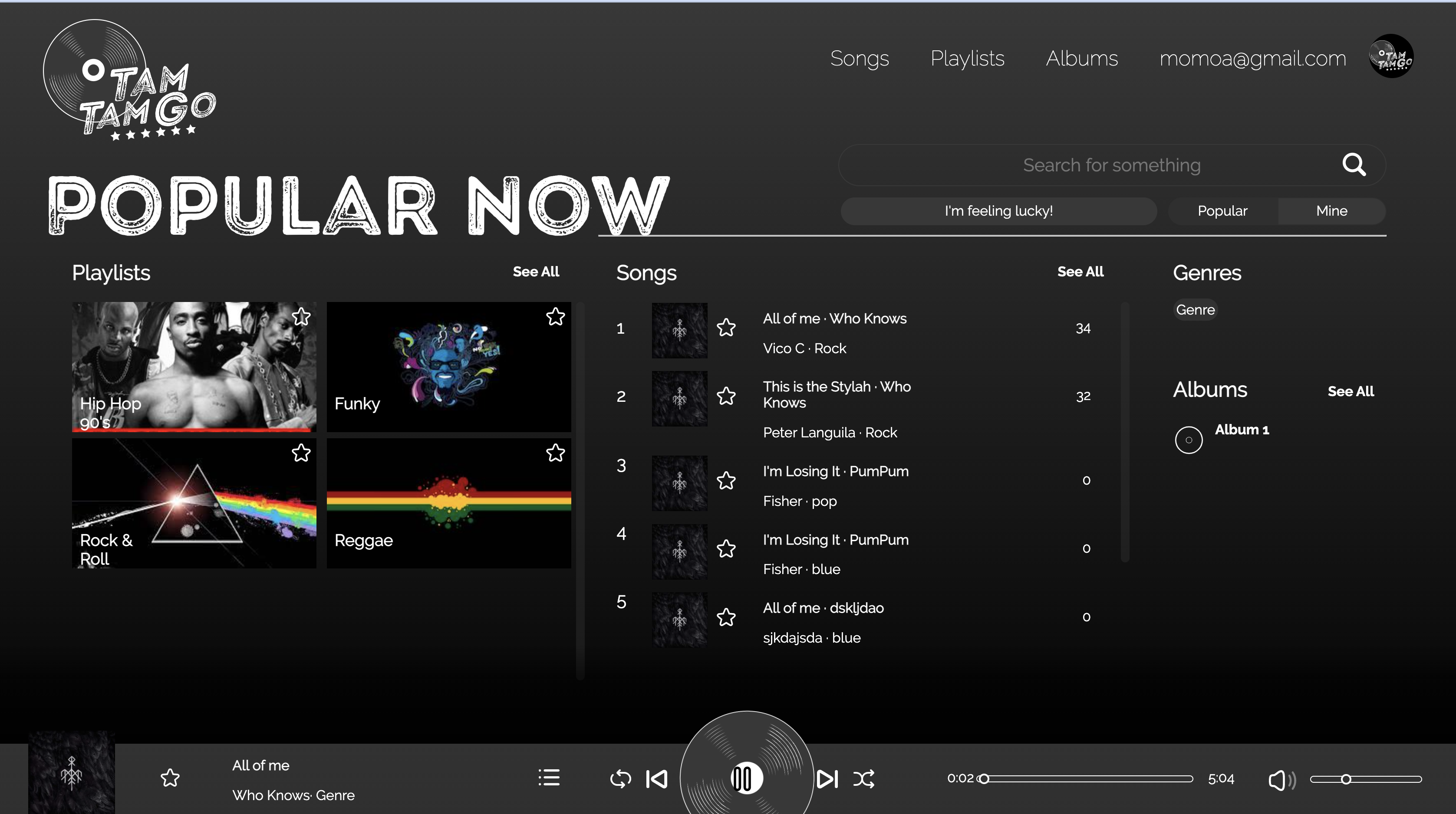
This project is originated from an idea of developing a music streaming platform like Spotify/SoundCloud. The alumni will develop a silent-server application using technologies such as NodeJS, Express, MongoDB, Firebase and Cloudinary for back-end implementation, and ReactJS and Redux for front-end.
FRONTEND : React.js, Redux, SASS, Firebase, Axios
BACKEND : Node.js(express.js), Firebase-admin, MongoDB, Cloudinary, CORS, Mongoose, Morgan, Nodemon, Multer, Path, Babel
React.js ,
Node.js ,
Node.js ,
Node.js ,
Node.js ,
Node.js ,
Firebase-Admin ,
MongoDB .
Cloudinary .
CORS .
Mongoose .
Morgan .
Nodemon .
Multer .
Path .
Babel .
Parameter
Type
Description
firstNamestringRequired . First name of user
lastNamestringLast name of user
birthdaydateBirthday of user
countrystringCountry of user
profilestringURL of user photo in cloudinary
emailstringRequired . Email of user
passwordstringRequired . Password of user
cloudinaryIdstringCloudinary Id of user photo
firebaseUserstringFirebase User ID
Parameter
Type
Description
firstNamestringRequired . First name of user
emailstringRequired . Email of user
passwordstringRequired . Password of user
firebaseUserstringFirebase User ID
CREATE USER WITH GOOGLE ACCOUNT
Parameter
Type
Description
idstringRequired . Id of item of fetch
Parameter
Type
Description
userIdstringRequired . Firebase User ID
Parameter
Type
Description
firstNamestringRequired . First name of user
lastNamestringLast name of user
birthdaydateBirthday of user
countrystringCountry of user
profilestringURL of user photo in cloudinary
cloudinaryIdstringCloudinary Id of photo user
userId stringFirebase User ID
Parameter
Type
Description
userId stringFirebase User ID
FOLLOW USER USING FIREBASE UID PUT /api/user/follow/:userId
Parameter
Type
Description
userId stringFirebase User ID
req.query.fbUserToFollow stringFirebase User ID
UNFOLLOW USER BY FIREBASE USER PUT /api/user/unfollow/:userId
Parameter
Type
Description
userId stringFirebase User ID
req.query.fbUserToUnfollow stringFirebase User ID
Parameter
Type
Description
trackIdstringRequired . Track ID
Parameter
Type
Description
req.query.searchQuerystringRequired . Search String
Parameter
Type
Description
titlestringRequired . Title of track
artiststringArtist of track
albumstringAlbum of track
genrestringGenre of track
durationNumberDuration of track
firebaseUserstringRequired . Track creator (Firebase User ID)
urlTrackstringURL of Claudinary track
cloudinaryIdstringClaudinary id of track
Upload thumnnail to Track PUT /api/tracks/uploadThumbnail/:trackId
Parameter
Type
Description
urlTrackstringURL of Cloudinary track
cloudinaryIdstringCloudinary Id of track
PUT /api/tracks/edit/:trackId
Parameter
Type
Description
trackIdstringRequired . Track Id
titlestringRequired . Track title
artiststringArtist of track
albumstringAlbum of track
genrestringGenre of track
durationNumberTrack duration
DELETE /api/tracks:trackId
Parameter
Type
Description
trackIdstringRequired . Track Id
Get Tracks Created By Each User
Parameter
Type
Description
req.query.firebaseUserstringRequired . Firebase User ID
PUT /api/tracks/like/:trackId
Parameter
Type
Description
trackIdstringRequired . Track Id
PUT /api/tracks/unlike/:trackId
Parameter
Type
Description
req.query.firebaseUserstringRequired . Track Id
Get /api/tracks/addToPlaylist/:trackId
Parameter
Type
Description
trackIdstringRequired . Track Id
req.query.playlistIdstringRequired . Playlist Id
Get /api/tracks/deleteFromPlaylist/:trackId
Parameter
Type
Description
trackIdstringRequired . Track Id
req.query.playlistIdstringRequired . Playlist Id
Update reproduction counter PUT /api/tracks/reproducing/:trackId
Parameter
Type
Description
trackIdstringRequired . Track Id
GET /api/tracks/likedByUser/:userId
Parameter
Type
Description
userId stringRequired . Firebase User Id
PUT /api/tracks/addToAlbum/:trackId
Parameter
Type
Description
trackIdstringRequired . Track id
req.query.albumIdstringRequired . Album Id
PUT /api/tracks/addPhotoToTrack/:trackId
Parameter
Type
Description
trackIdstringRequired . Track id
cloudinaryIdstringRequired . Cloudinary Id of Photo
photoTrackstringRequired . URL of photo to Cloudinary
Parameter
Type
Description
albumIdstringRequired . Album Id
Parameter
Type
Description
titlestringRequired . Title of album
yearDateYear of album
thumbnailstringRequired . URL of photo to Cloudinary
cloudinaryIdstringRequired . Cloudinary Id of photo
totalTracksNumberNumber of tracks in album
firebaseUserstringRequired . Firebase Id of album's creator
Parameter
Type
Description
titlestringTitle of album
yearDateYear of album
thumbnailstringURL of photo to Cloudinary
cloudinaryIdstringRequired . Cloudinary Id of photo
totalTracksNumberRequired . Number of tracks in album
Delete api/albums/:albumId
Parameter
Type
Description
albumIdstringRequired . Album Id
GET api/playlists/:playlistId
Parameter
Type
Description
playlistIdstringRequired . Playlist Id
Parameter
Type
Description
titlestringRequired . Title of playlist
collaborativeBooleanCollaborative of playlist
descriptionstringDescription of playlist
publicAccessibleBooleanAccessibility of playlist
thumbnailstringRequired . URL photo of playlist
cloudinaryIdstringRequired . Cloudinary id of playlist photo
firebaseUserstringRequired . Firebase Id of playlist's creator
PUT api/playlists/:playlistId
Parameter
Type
Description
playlistIdstringRequired . Id of playlist
titlestringRequired . Title of playlist
collaborativeBooleanCollaborative of playlist
descriptionstringDescription of playlist
publicAccessibleBooleanAccessibility of playlist
thumbnailstringRequired . URL photo of playlist
cloudinaryIdstringRequired . Cloudinary Id of playlist photo
DELETE api/playlists/:playlistId
Parameter
Type
Description
playlistIdstringRequired . Playlist Id
PUT api/playlists/follow/:playlistId
Parameter
Type
Description
playlistIdstringRequired . Playlist Id
req.query.firebaseUserstringRequired . Firebase User id
PUT api/playlists/unfollow/:playlistId
Parameter
Type
Description
playlistIdstringRequired . Playlist Id
req.query.firebaseUserstringRequired . Firebase User id
GET api/playlists/details/:playlistId
Parameter
Type
Description
playlistIdstringRequired . Playlist Id
Get info of playlist's creator GET api/playlists/detailsUser/:playlistId
Parameter
Type
Description
playlistIdstringRequired . Playlist Id
Get all playlists created by certain user (using Firenase User Id) GET api/playlists/:playlistId
Parameter
Type
Description
playlistIdstringRequired . Id of playlist
req.query.firebaseUserstringRequired . Firebase User id
Get user's following playlist GET api/playlists/getFollowing/:userId
Parameter
Type
Description
playlistIdstringRequired . Playlist Id
userIdrstringRequired . Firebase User id
To deploy this project run
Insert gif or link to demo
Install of Webpack with npm
1. To start npm and create package.json 2. To install webpack, webpack-cli and webpack-dev-server as dev dependencies npm i -D Webpack Webpack-cli webpack-dev-server 3. Then go to package.json and add in "scripts": "start": "webpack serve" --> to use webpack-dev-server as start command
Now we create webpack.config.js to start configuring the settings.
const webpack = require("webpack); --> // to include webpack

// Settings for module exporting //

module.exports = {
mode: "development" --> // We set the mode to development
};
Here we have to change some settings for webpack-dev-server to show the changes live in browser
devServer: {
  historyApiFallback: true,
  port: 4000,
  open: true,
  compress: true,
  hot: true,
},
"build": "webpack" --> to use webpack as the bundle builder.
4. Now we create our Javascript File @ src/index.js 5. Once created, run these two commands: npm run build --> // to create the [name].bundle.js npm run start --> // to start live webpack dev server 6. The next step is "Webpacking" the HTML, so we install HtmlWebpackPlugin npm i -D html-webpack-plugin And then set some config for this one.
const HtmlWebpackPlugin = require("html-webpack-plugin"); // to the top!

// INSIDE module.exports //
    plugins: [
    new HtmlWebpackPlugin({
      title: "Weeeebpack",
      template: "index.html",
      filename: "index.html",
    }),
Just in case we want to change entry and output points and if we want to use the "path" taken from path module in npm
Add path to our const require and then we can change entry and output points as follows:
const path = require("path");

// INSIDE module.exports //
 entry: {
    main: path.resolve(__dirname, "./src/js/main.js"),
  },

  output: {
    path: path.resolve(__dirname, "./dist"),
    filename: "[name].bundle.js",
  },