tleechan/Position-Sizing-Resources
Folders and files
| Name | Name | Last commit date | ||
|---|---|---|---|---|
Repository files navigation
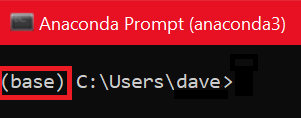
<html> <head> <base target="_blank" /> <title></title> <meta http-equiv="Content-Type" content="text/html; charset=utf-8" http-equiv="content-type"> <style type="text/css">@import url(https://themes.googleusercontent.com/fonts/css?kit=xTOoZr6X-i3kNg7pYrzMss5-x8zqu-667uHWljev_4A);ol{margin:0;padding:0}table td,table th{padding:0}.c1{-webkit-text-decoration-skip:none;color:#1155cc;font-weight:400;text-decoration:underline;vertical-align:baseline;text-decoration-skip-ink:none;font-size:13pt;font-family:"Lato";font-style:normal}.c4{-webkit-text-decoration-skip:none;color:#1c3678;font-weight:700;text-decoration:underline;text-decoration-skip-ink:none;font-size:13pt;font-family:"Lato"}.c11{color:#1c3678;font-weight:700;text-decoration:none;vertical-align:baseline;font-size:24pt;font-family:"Lato";font-style:normal}.c2{color:#000000;font-weight:400;text-decoration:none;vertical-align:baseline;font-size:13pt;font-family:"Lato";font-style:normal}.c5{color:#000000;font-weight:400;text-decoration:none;vertical-align:baseline;font-size:11pt;font-family:"Arial";font-style:normal}.c10{-webkit-text-decoration-skip:none;color:#1155cc;font-weight:400;text-decoration:underline;text-decoration-skip-ink:none;font-size:13pt;font-family:"Lato"}.c0{padding-top:0pt;padding-bottom:0pt;line-height:1.15;text-align:left}.c6{padding-top:0pt;padding-bottom:0pt;line-height:1.0;text-align:left}.c7{background-color:#ffffff;max-width:468pt;padding:72pt 72pt 72pt 72pt}.c3{color:inherit;text-decoration:inherit}.c9{orphans:2;widows:2}.c8{height:11pt}.title{padding-top:0pt;color:#000000;font-size:26pt;padding-bottom:3pt;font-family:"Arial";line-height:1.15;page-break-after:avoid;orphans:2;widows:2;text-align:left}.subtitle{padding-top:0pt;color:#666666;font-size:15pt;padding-bottom:16pt;font-family:"Arial";line-height:1.15;page-break-after:avoid;orphans:2;widows:2;text-align:left}li{color:#000000;font-size:11pt;font-family:"Arial"}p{margin:0;color:#000000;font-size:11pt;font-family:"Arial"}h1{padding-top:20pt;color:#000000;font-size:20pt;padding-bottom:6pt;font-family:"Arial";line-height:1.15;page-break-after:avoid;orphans:2;widows:2;text-align:left}h2{padding-top:18pt;color:#000000;font-size:16pt;padding-bottom:6pt;font-family:"Arial";line-height:1.15;page-break-after:avoid;orphans:2;widows:2;text-align:left}h3{padding-top:16pt;color:#434343;font-size:14pt;padding-bottom:4pt;font-family:"Arial";line-height:1.15;page-break-after:avoid;orphans:2;widows:2;text-align:left}h4{padding-top:14pt;color:#666666;font-size:12pt;padding-bottom:4pt;font-family:"Arial";line-height:1.15;page-break-after:avoid;orphans:2;widows:2;text-align:left}h5{padding-top:12pt;color:#666666;font-size:11pt;padding-bottom:4pt;font-family:"Arial";line-height:1.15;page-break-after:avoid;orphans:2;widows:2;text-align:left}h6{padding-top:12pt;color:#666666;font-size:11pt;padding-bottom:4pt;font-family:"Arial";line-height:1.15;page-break-after:avoid;font-style:italic;orphans:2;widows:2;text-align:left} </style> </head> <body class="c7" data-gr-ext-installed="" data-new-gr-c-s-check-loaded="14.1018.0" data-new-gr-c-s-loaded="14.1018.0"> <p class="c0" style="text-align: justify;"><span style="font-family: Lato, sans-serif; font-size: 17.3333px; white-space: pre-wrap;">The zip file contains the Jupyter notebook and data files used in the course. Before you start running and modifying these code files, you need to set up the recommended python environment. </span></p> <p class="c6"> </p> <p class="c6"> </p> <p class="c6"><span class="c11">Why should we set up a Python environment?</span></p> <p class="c0" style="text-align: justify;"><br /> <span style="font-family: Lato, sans-serif; font-size: 17.3333px; white-space: pre-wrap;">There can be times when you could face incompatibility issues between the packages installed on your system and the packages recommended to run Jupyter notebook codes used in Quantra courses. To remove these incompatibility issues, you simply have to set up the Python environment by following the steps mentioned below. </span></p> <p dir="ltr" style="line-height: 1.38; margin-top: 0pt; margin-bottom: 0pt; text-align: justify;"> </p> <p dir="ltr" style="line-height: 1.38; margin-top: 0pt; margin-bottom: 0pt; text-align: justify;"><span style="font-family: Lato, sans-serif; font-size: 17.3333px; white-space: pre-wrap;">We recommend using the Anaconda and Jupyter notebook for an optimum user experience. </span></p> <p dir="ltr" style="line-height: 1.38; margin-top: 0pt; margin-bottom: 0pt; text-align: justify;"> </p> <p dir="ltr" style="line-height: 1.38; margin-top: 0pt; margin-bottom: 0pt; text-align: justify;"><span style="font-family: Lato, sans-serif; font-size: 17.3333px; white-space: pre-wrap;">Note that each step mentioned below is important to run the codes without any error. If you have already installed the correct version of Anaconda then you can directly go to the second step to set up the Python environment.</span></p> <p dir="ltr" style="line-height: 1.38; margin-top: 0pt; margin-bottom: 0pt; text-align: justify;"> </p> <p dir="ltr" style="line-height: 1.38; margin-top: 0pt; margin-bottom: 0pt; text-align: justify;"><span style="font-family: Lato, sans-serif; font-size: 17.3333px; white-space: pre-wrap;">1. <a href="#step-2" target="_self">Install Anaconda</a></span></p> <p dir="ltr" style="line-height: 1.38; margin-top: 0pt; margin-bottom: 0pt; text-align: justify;"><span style="font-family: Lato, sans-serif; font-size: 17.3333px; white-space: pre-wrap;">2. <a href="#step-3" target="_self">Set up the Python environment</a></span></p> <p dir="ltr" style="line-height: 1.38; margin-top: 0pt; margin-bottom: 0pt; text-align: justify;"> </p> <p dir="ltr" style="margin-top: 0pt; margin-bottom: 0pt; line-height: 1.38; text-align: justify;"> </p> <p dir="ltr" style="margin-top: 0pt; margin-bottom: 0pt; line-height: 1.38; text-align: justify;"><a name="step-2"></a><span style="color: rgb(28, 54, 120); font-weight: bold; font-family: Lato, sans-serif; font-size: 17.3333px; white-space: pre-wrap;">Install Anaconda</span></p> <p><span style="font-family: Lato, sans-serif; font-size: 17.3333px; text-align: justify; white-space: pre-wrap;">Anaconda offers different installations on different architectures such as 32-bit and 64-bit. Therefore it is important to check the system configuration before installing Anaconda.</span></p> <p> </p> <p><span style="font-family: Lato, sans-serif; font-size: 17.3333px; white-space: pre-wrap;">You can follow the links below for a step-by-step guide to download and install the correct version of Anaconda on your system. For any errors you might face, click on the third link for the troubleshooting guide.</span></p> <p> </p> <ol style="margin-left: 40px;"> <li><span style="font-family: Lato, sans-serif; font-size: 17.3333px; white-space: pre-wrap;"><a href="https://blog.quantinsti.com/set-up-python-system/#install-anaconda-on-windows" target="_blank">Install Anaconda on Windows</a></span></li> <li><span style="font-family: Lato, sans-serif; font-size: 17.3333px; white-space: pre-wrap;"><a href="https://blog.quantinsti.com/set-up-python-system/#install-anaconda-on-mac" target="_blank">Install Anaconda on Mac</a></span></li> <li><span style="font-family: Lato, sans-serif; font-size: 17.3333px; white-space: pre-wrap;"><a href="https://blog.quantinsti.com/set-up-python-system/#troubleshooting-anaconda-installation-issues">Troubleshooting Anaconda Installation Issues</a></span></li> </ol> <p dir="ltr" style="margin-top: 0pt; margin-bottom: 0pt; line-height: 1.38; text-align: justify;"> </p> <p dir="ltr" style="margin-top: 0pt; margin-bottom: 0pt; line-height: 1.38; text-align: justify;"><span style="color: #1c3678; font-family: Lato, sans-serif; font-size: 17.3333px; font-weight: bold; white-space: pre-wrap;"><a name="step-3"></a>Set up the Python Environment</span></p> <p><span style="font-family: Lato, sans-serif; font-size: 17.3333px; white-space: pre-wrap;">After installing Anaconda, when you open the Anaconda prompt, you will see "base" written on the left-hand side. That is the default environment.</span></p> <p> </p> <figure><img alt="" src="https://d1rwhvwstyk9gu.cloudfront.net/2021/06/pasted-image-0-1.png" /></figure> <p><span style="font-family: Lato, sans-serif; font-size: 17.3333px; white-space: pre-wrap;">However, we need a custom environment with a compatible python version and packages required for codes covered in the course. A detailed step-by-step guide can be <a href="https://blog.quantinsti.com/set-up-python-system/#set-the-python-version-and-install-packages">found here</a>.</span></p> <p> </p> <p><strong><span style="font-family: Lato, sans-serif; font-size: 17.3333px; white-space: pre-wrap;">What happens if you close everything and come back after two days, wanting to try another strategy from the Quantra course?</span></strong></p> <p> </p> <p><span style="font-family: Lato, sans-serif; font-size: 17.3333px; white-space: pre-wrap;">Remember that you should always open the Anaconda prompt or terminal and type the following command "conda activate <<name of your environment>>" to start the custom python environment suitable for Quantra codes. For example, if the name of your environment is <strong>quantra_py</strong>, then you can type "conda activate quantra_py<strong>"</strong>.</span></p> <p> </p> <p><span style="font-family: Lato, sans-serif; font-size: 17.3333px; white-space: pre-wrap;">Hurray! You have finished setting up your python environment. You can go through the document <a href="Folder Structure and How to Run Code Files.html"><strong>Folder Structure and How to Run Code Files.html</strong></a> for a guide on how to run the Jupyter notebook provided in this zip file. </span></p> <p> </p> <p><u><span style="font-family: Lato, sans-serif; font-size: 17.3333px; white-space: pre-wrap;">If you face any issue while setting up the Python environment on your local computer then raise your query on <a href="https://quantra.quantinsti.com/community" target="_blank">Quantra Community</a>.<!--<span style="font-family: Lato, sans-serif; font-size: 17.3333px; white-space: pre-wrap;"--> </span></u></p> <p class="c0" style="text-align: justify;"><span style="font-family: Lato, sans-serif; font-size: 17.3333px; white-space: pre-wrap;"> </span></p> <p dir="ltr" style="line-height: 1.2; margin-top: 0pt; margin-bottom: 0pt;"><span style="font-family: Lato, sans-serif; font-size: 17.3333px; white-space: pre-wrap;"><span id="docs-internal-guid-f4b02f43-7fff-f496-1b6f-30e25e7de655"><span style="font-size: 8pt; font-family: Lato, sans-serif; background-color: transparent; font-variant-numeric: normal; font-variant-east-asian: normal; vertical-align: baseline; white-space: pre-wrap;">© Copyright QuantInsti Quantitative Learning Private Limited</span></span></span></p> </body> </html>