Welcome to the Kata Club!
This is an extracurricular coding challenge area. Our goal here is to provide some coding challenges to help you practice implementing the concepts we've covered. The challenges are classified as Logic or Interface. Logic challenges are focused on things like loops, functions, and arrays - the stuff that runs behind the scenes. Interface challenges are concepts like images, colors, and other UI elements - things you see on the screen. Several of these challenges are examples of what you might find in some coding interviews. Feel free to work on these individually or with a friend.
Our current plan is to release one logic and one interface challenge each week. We will host optional review sessions for these challenges on Fridays from 12:00 to 1:00. These will be casual reviews where we talk about various ways a challenge can be solved and review some solutions.
- have a github account and connect it with xcode (this is done if you attended the Version Control workshop. you may need to update your PAT. there are slides on Ryver in the Kata Club channel about setting up github)
- clone this repo
- complete the function / follow the instructions
- run the unit tests (if applicable)
- attend the review session on Fridays (optional)
A unit test is a method to test a specific piece of code. The tests help us make sure our code is behaving as expected. Several of these challenges have solutions that can be validated with unit tests which we will provide when possible. Below is a rough outline of the general strategy.
- give a test case
- run your function
- compare your results from step 2 to the hardcoded version of what you expect to happen
- if they match then the test is a success
this is a demo for a function and some tests that would go with it. The function should take in a string and return a greeting with the entered name in all caps.
func greetingAllCapsName(name: String) -> String {
     let allCapsName: String = name.uppercased()
     return "hello, \(allCapsName)!"
}
Below are some examples of unit tests that might be written for the function greetingAllCapsName.
The first test takes in "tyler" (all lowercase) as the given test case. We then run the function with the test case. Then we compare the test case to the hardcoded value ("hello, TYLER").
func testAllLowercaseName() throws {
     // Given
     let inputName = "tyler"

     // When
     actualResult = greeting(name: inputName)

     // Then
     XCTAssert(actualResult == "hello, TYLER", "entering all lowercase name returns an all uppercase name")
}
The second test takes in "TYLER" (already all caps). We want to confirm that when we give someting in all caps it doesn't behave strangely.
func testAllUppercaseName() throws {
     // Given
     let inputName = "TYLER"

     // When
     actualResult = greeting(name: inputName)

     // Then
     XCTAssert(actualResult == "hello, TYLER", "entering all uppercase name returns an all uppercase name")
}
in Xcode use cmd + u to run the existing tests.
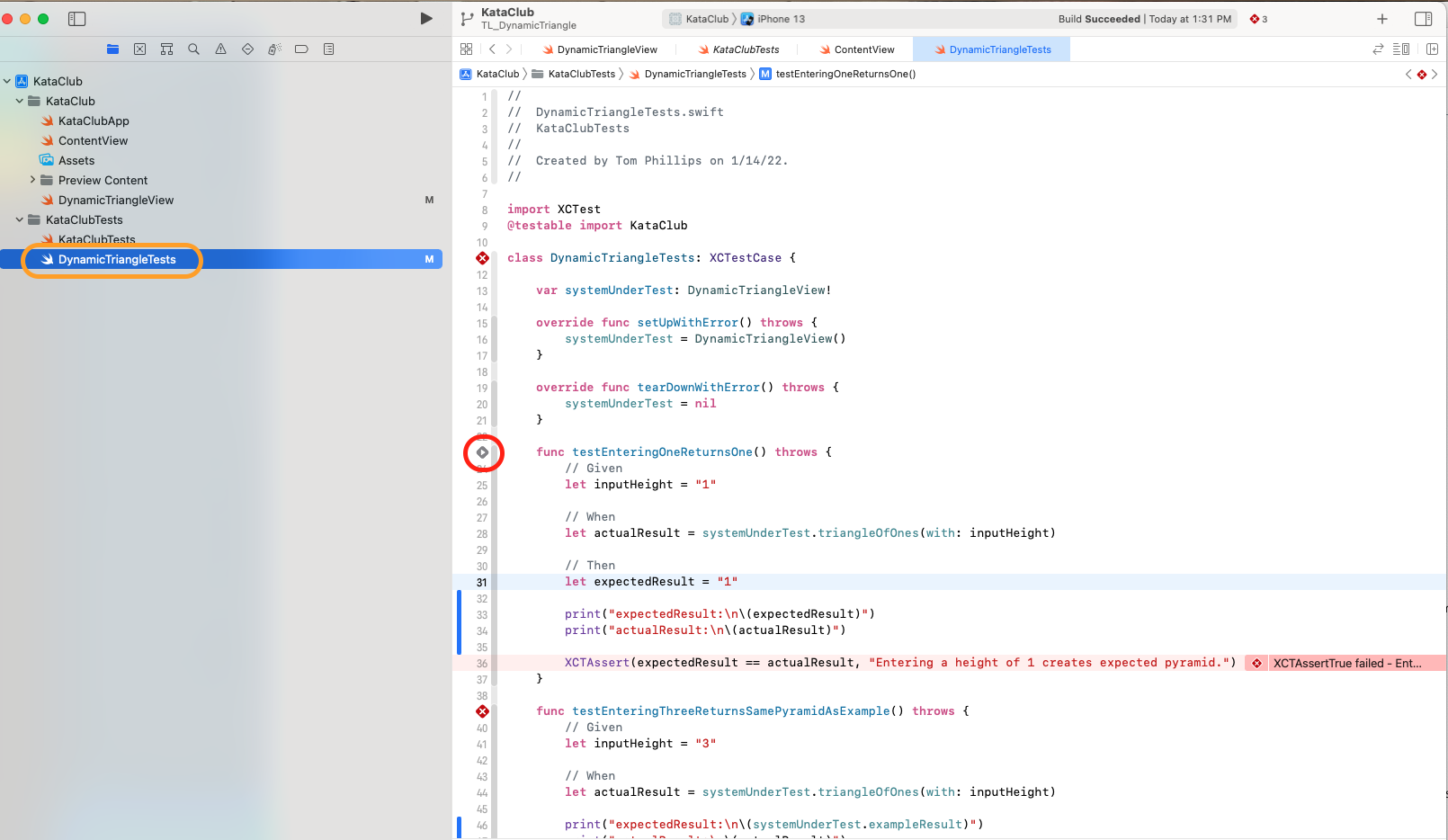
The image below shows us what it looks like after tests have been run. In this example, 3 tests failed. Our code may still run without errors, but the results of the code don't match the expected results.

If you run your code and get all green check marks then your function passed our unit tests and qualifies as a valid solution.
Navigate to the file with tests for the specific challenge. In the image below the file circled in orange (DynamicTriangleTests) has the unit tests for the Dynamic Triangle challenge. Press the play button (circled in red) next to the test function you want to run. If the test passes the play button will change to a green check; if it fails it will turn into a red x.
Featured App View
//This VStack holds the whole interface.
VStack {
  Image("GrandMountain")
      .resizable()
      .scaledToFit()

  //This HStack allows us to push the elements further to the left with a Spacer.
  HStack {

      //This VStack holds all of our text elements.
      VStack(alignment: .leading) {
          Text("FEATURED GAME")
              .font(.headline)
              .foregroundColor(.highContrastGray)
          Text("Grand Mountain Adventure")
              .font(.largeTitle)
              .fontWeight(.bold)
          //This line prevents the text getting cut off with a "..."
              .fixedSize(horizontal: false, vertical: true)
          Text("Carve up some powder in this stunning ski park.")
              .foregroundColor(.highContrastGray)
      }

      Spacer()
  }
  .padding()
}
//This clips the corners to be rounded.
.cornerRadius(15.0)
//The .background modifier lets us add colors and shadows that don't affect the rest of our view.
//I prefer .background over ZStacks/.frame, because it allows us to fit the content freely to itself and the screen.
.background {
  RoundedRectangle(cornerRadius: 15.0)
      .foregroundColor(.background)
      .shadow( radius: 15.0, x: 0.0, y: 8.0)
}
.padding()
Podcast Episode View
VStack(alignment: .leading) {

  //Episode list title
  HStack {
      Text("Episodes")
          .font(.title)
          .fontWeight(.semibold)
      Spacer()
      Text("See All")
          .font(.title3)
          .foregroundColor(.highContrastPurple)
  }

  Divider()
      .padding(.bottom, 10.0)

  //Date grouping
  HStack {
      //Date
      Text("DEC 22, 2021")
          .fontWeight(.medium)

      //Interpunct
      Text("·")
          .fontWeight(.medium)

      //Explicit marking
      Image(systemName: "e.square.fill")
  }
  .foregroundColor(.highContrastGray)
  .font(.caption)
  .padding(.bottom, 0.1)

  //Episode title
  Text("May We Have This Dance?")
      .font(.title3)
      .fontWeight(.semibold)
      .padding(.bottom, 0.1)

  //Episode description
  Text("A jazz dance born in Harlem in the 1920s end up in a tiny Swedish town. What happens when Black dancers try to bring the Lindy Hop home?")
      .foregroundColor(.highContrastGray)

  HStack {
      //Play button
      Image(systemName: "play.fill")
          .font(.caption)
          .foregroundColor(.highContrastPurple)
          .padding(8.0)
          .background {
              Circle()
                  .foregroundColor(.lightGray)
      }

      //Length of time
      Text("44 min")
          .foregroundColor(.highContrastPurple)

      Spacer()

      //Downloaded symbol
      Image(systemName: "arrow.down.circle.fill")
          .font(.caption)
          .foregroundColor(.gray)

      //See more button
      Image(systemName: "ellipsis")
          .foregroundColor(.gray)
  }
}
Dynamic Triangle
 func triangleOfOnes(with height: String) -> String {
      guard let height = Int(height), height > 0 else { return invalidInputText}

      if height == 1 {
          return "1"
      }

      var output = ""
      let numberOfRows = (height * 2) - 1

      for row in 1...numberOfRows {
          let numberOfOnes = row <= height ? row : (numberOfRows - row) + 1
          output.append(String(repeating: "1", count: numberOfOnes))

          if row < numberOfRows {
              output.append("\n")
          }
      }

      return output
  }
func triangleOfOnes(with height: String) -> String {

  guard let height: Int = Int(height) else {
      return invalidInputText
  }

  if height < 1 {
      return invalidInputText
  }

  if height == 1 {
      return "1"
  }

  var result = """
  """

  for i in 1...height{
      result += "\(String(repeating: "1", count: i))\n"
  }

  for i in (1..<height).reversed(){
      result += String(repeating: "1", count: i)
      if i != 1{
          result += "\n"
      }
  }

  return result
}
Arithmetic Progression
   func findMissingElement(in array: [Int]) -> Int? {

      var deltas = [Int]()

      for i in 0...array.count-2{
          deltas.append(array[i+1] - array[i])
      }

      let minDelta = deltas.min()!
      let maxDelta = deltas.max()!

      if minDelta == maxDelta{
          // no missing numbers
          return nil
      } else {
          let maxDeltaIndex = deltas.firstIndex(of: maxDelta)
          let missingNumber = array[maxDeltaIndex!] + minDelta
          return missingNumber
      }
  }
func findMissingElement(in array: [Int]) -> Int? {
      let firstTerm = inputArray[0]
      let lastTerm = inputArray[inputArray.count - 1]
      let range = lastTerm - firstTerm
      let arithmeticProgression = range / inputArray.count

      for index in 0...inputArray.count - 2  {
        let currentTerm = inputArray[index]
        let nextTerm = inputArray[index + 1]

        if currentTerm + arithmeticProgression != nextTerm {
            return currentTerm + arithmeticProgression
        }
      }

      return nil
  }
   func findMissingElement(in array: [Int]) -> Int? {
      var ranges: [Int] = []

      for index in 0..<(array.endIndex - 1) {
          let range = array[index + 1] - array[index]
          ranges.append(range)
      }

      let step: Int = ranges.min() ?? 0
      var missingValue: Int? = nil

      for index in 0..<ranges.count {
          if ranges[index] != step {
              missingValue = array[index] + step
          }
      }

      return missingValue
  }
Substring
  func calculateOccurrences(inputString:String, inputSubstring:String) -> Int {
  //rule out Does Not Contain case
  if !inputString.contains(inputSubstring) {
      return 0
  }

  //store count
  var count = 0

  //check each substring within inputString
  for index in 0...(inputString.count - inputSubstring.count) {
      let lowerBound = String.Index(encodedOffset: index)
      let upperBound = String.Index(encodedOffset: index + inputSubstring.count)
      let substring = inputString[lowerBound..<upperBound]

      if String(substring) == inputSubstring {
          count += 1
      }
  }

  return count
}
func calculateOccurrences(inputString:String, inputSubstring:String) -> Int {
      inputString.components(separatedBy: inputSubstring).count - 1
  }