Django Template Language support that actually reads your project — plus an interactive ER diagram of your models.


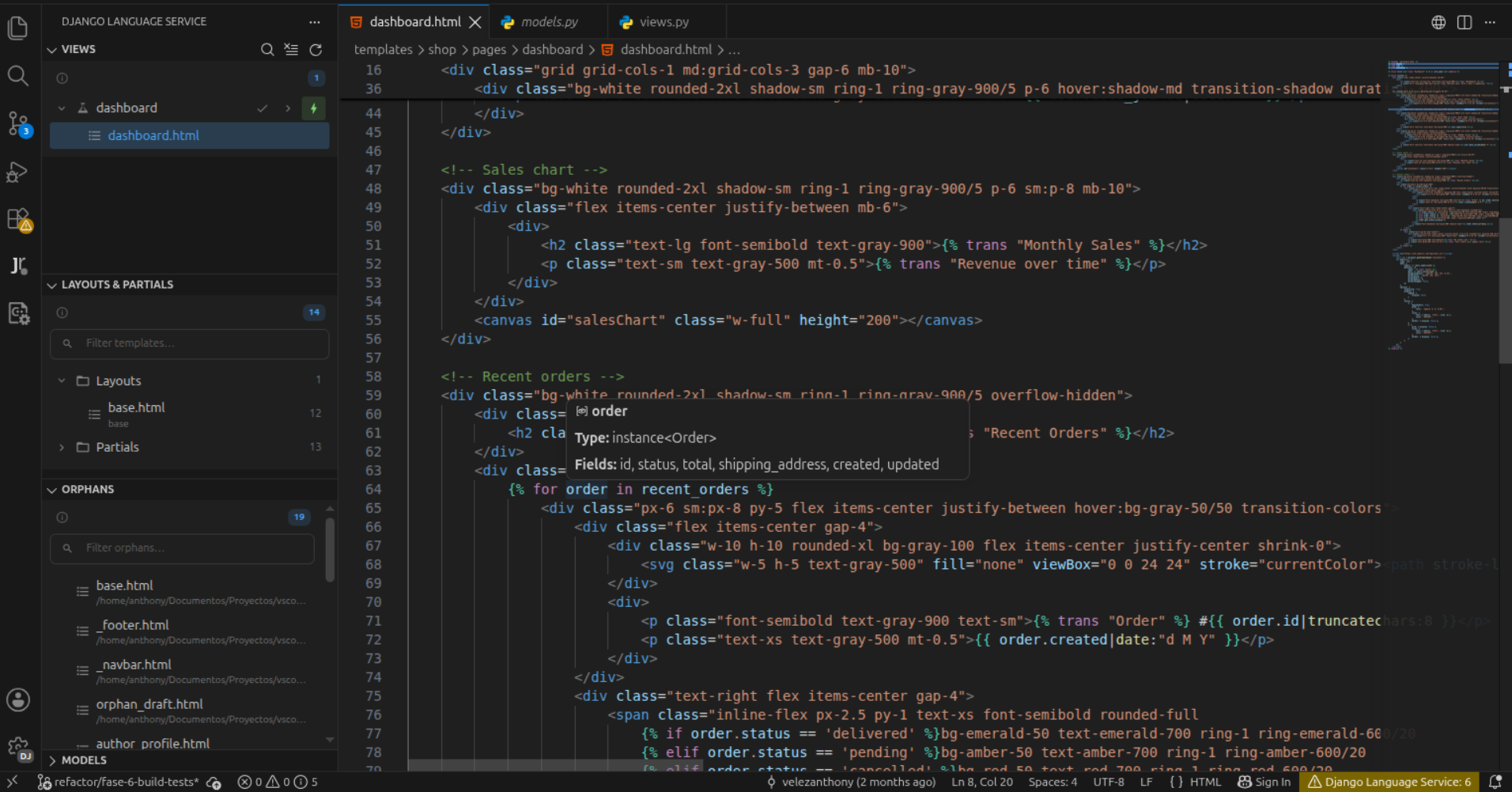
It is not a regex syntax plugin. On startup it parses your models.py, views.py, forms.py, urls.py, templatetags/ and migrations into a project graph, keeps that graph warm with a scoped file watcher, and answers every completion, hover, go-to-definition and diagnostic from it.
That is the difference between "{{ }} is highlighted" and "{{ order.customer.emial }} — did you mean email?".
- Why
- The model diagram
- Template language support
- IntelliSense
- Hover documentation
- Navigation
- Diagnostics
- Live Mode
- Formatting
{% include %}refactoring- Comments
- Sidebar explorer
- How it works
- Reference: commands, settings, what gets indexed
Django spreads one feature across four files. The view builds a context dict, the template consumes it, the model defines what those objects can do, and urls.py names the route. No editor sees the connection, so the mistakes land at runtime:
| You write | Django says, in the browser | This extension says, as you type |
|---|---|---|
{{ product.nme }} |
nothing — renders empty | 'nme' is not a field of Product — did you mean 'name'? |
{{ total }}, never passed |
nothing — renders empty | 'total' is not defined in the view context |
{% url 'produt_detail' %} |
NoReverseMatch at request time |
URL name 'produt_detail' is not defined in any urls.py |
{{ x|money }} without {% load %} |
TemplateSyntaxError |
Filter 'money' requires {% load shop_tags %} + quick fix |
Silent empty output is the worst failure mode a template language has. Most of this extension exists to turn it into a squiggle.
Show Model Diagram (Ctrl+K Ctrl+D / Cmd+K Cmd+D) opens a panel beside the editor that re-renders every time the scanner reports new data.
Selecting a box lifts it and its direct relations and dims everything else. The card is the model as parsed: real field types, max_digits / decimal_places, choices, db_table, forward relations, and every model that points back at this one. Click a relation to walk to it, or Go to source to open models.py at the class line.
Turn on Blast radius (cascade delete) in the Analyze menu and clicking a model shows what a delete would CASCADE into instead — the question you actually want answered before writing on_delete=models.CASCADE.
The migration panel replays your migrations as a chronological DAG. Pick a step and the canvas shows what that migration touched — added models in green, field changes in amber, removed models struck through.
The models a migration touched are rarely the whole story, so their direct relation neighbours come along as muted context, tagged affected. You see what changed and what it lands on.
Click a model while a migration is selected and you get a field-level diff of that model across the step.
Two comparisons are available, and they answer different questions:
| Mode | Compares | Answers |
|---|---|---|
| this migration | snapshot[N-1] → snapshot[N] |
what did this migration change? |
| vs current state | snapshot[N] → your live models |
what has drifted since? |
The diff compares the whole field signature, not just the type — a migration that only moves DecimalField(10,2) to (12,4) shows both columns with the changed kwarg highlighted, because the field type alone never changed.
Also in the panel: filters by relation type and app, a search box with field: and rel: scopes, circular-reference detection, hub-tier shading, live metrics, force-directed re-layout, saveable box positions, and full keyboard navigation.
Copy the diagram as Mermaid, DBML (dbdiagram.io), PlantUML or raw SVG.
The output was checked against each format's own parser rather than eyeballed — @dbml/core parsed the DBML and converted it to PostgreSQL, mermaid.parse accepted the Mermaid, the PlantUML server rendered the PlantUML. That was a one-off validation, recorded in diagram-exports.test.ts. What CI runs on every push is a golden-output check, so it catches a regression against the last known-good export rather than against the upstream parsers. Concretely, the exports mean:
- Foreign keys emit the real column (
author_id, or yourdb_column), typed after the key they point at, so everyRefresolves. A DBML file whose refs point at columns that do not exist is rejected outright by dbdiagram. varchar(200)anddecimal(12,2)carry their length and precision.- The implicit
idappears only when Django would add one. An explicit or composite primary key replaces it, andmodels.CompositePrimaryKeybecomes a table-levelindexes { (a, b) [pk] }. Meta.unique_together,Meta.indexesandUniqueConstraintare rendered, each in the notation its format supports.on_deletebecomes a DBML referential action.- Abstract and proxy models are skipped — neither backs a table.
- Syntax highlighting for DTL inside plain
.htmlfiles through a TextMate grammar injected intotext.html.basic/text.html.derivative, so{{ }},{% %}and{# #}are coloured without switching language mode. Dedicated grammars ship fordjango-htmlanddjango-txt. - Language configuration:
{# #}block comments, bracket pairs, auto-closing pairs that insert the trailing space ({%→%}), and onEnter rules that indent inside DTL blocks. - Folding for any block tag the document closes — every
{% end… %}in the file names its own opener, so{% if %},{% for %},{% block %},{% cache %},{% blocktranslate %}and a tag library's own block tags all fold without a list to maintain. - Tag-pair highlighting with correct depth counting. From a mid tag (
{% else %},{% empty %}) both the opener and closer light up. - Emmet is auto-configured for
django-htmlanddjango-txt.
All completions fire in html, django-html and django-txt unless stated otherwise.
- Template paths in
{% include %}/{% extends %}— and in Python nearrender(,template_name,get_template(. - URL names in
{% url %}and inreverse()/redirect(), followed by the pattern's own path arguments. - Static files, DTL filters (built-ins plus the loadable Django libraries the document's
{% load %}tags name — custom libraries from your owntemplatetags/are checked by the diagnostics, but do not yet appear in filter completion), and block names followed up the{% extends %}chain. - Context variables — the view's context plus template-local bindings, resolving dotted chains hop by hop through the model graph. Requires Live Mode.
- Python snippets that key off the file you are in:
models.py→dm*,views.py→dv*,urls.py→du*, and so on.
- DTL tags and filters — description, syntax, example, and a link to the Django docs. Most built-ins, plus
{% trans %},{% blocktranslate %},{% static %},|intcomma,|naturaltime,|ordinaland Django 6.0's{% partial %}. A name the registry does not carry gets no hover at all, never a guessed one. - Template paths preview the referenced file; URL names show the pattern and the view behind it.
- Model fields — hovering any segment of
{{ order.customer.email }}says what that segment is: field, relation,@property, zero-argument method, annotation or dict key. Requires Live Mode.
Ctrl+Click a template path to open it, a URL name to reach its path(), or a context variable to land on the view that supplies it — {{ product.name }} goes to the model class that declares the field, following relations hop by hop. Template paths are clickable links everywhere they appear. Context-variable navigation requires Live Mode.
{% load %}checking (django-dtl-load) — a warning when a tag or filter needs a library that is not loaded, and a hint when a library is loaded but never used. Custom libraries are discovered from your<app>/templatetags/*.pymodules — the library name is the module name, exactly as Django resolves it — and fromhelpers.pyfiles.- Filters are found wherever Django allows them, including inside tag expressions (
{% if x|money %}), not only inside{{ }}. - A tag inside
{% comment %},{% verbatim %}or{# #}is not a use: it needs no load, and it does not keep an unused load alive. - Quick fix:
Add {% load <lib> %}per library, plus anAdd all missing {% load %} tagssource-fix-all that works with fix-on-save.
- Filters are found wherever Django allows them, including inside tag expressions (
- URL references — warns on names not defined in any
urls.py, and bails out entirely when the index is empty so an incomplete scan never floods you. - Context variables — variables not in the view's context, and dotted chains that do not resolve, with did-you-mean suggestions. Requires Live Mode.
- Multi-line
{% include %}hints, with a left-border decoration and ruler mark. - Script and style filter — VS Code's own HTML validator reports garbage inside
<script>blocks containing{{ }}. This strips DTL length-preservingly and reports only real JS and CSS errors. It writes two workspace settings; see docs/REFERENCE.md.
A false warning is worse than no warning: it teaches you to ignore the squiggles. So the context checker knows that all of these are valid Django and stays quiet:
{{ product.pk }}                     {# every model has it #}
{{ product.get_status_display }}     {# generated for any field with choices #}
{{ product.get_absolute_url }}       {# a zero-argument model method #}
{{ products.0.name }}                {# sequence index #}
{% regroup products by x as rows %}  {# `as` binds a local #}
{% blocktrans with n=p.name %}       {# so does blocktrans #}
{{ _("Hello") }}                     {# a call, not a variable #}
It still flags {{ product.discounted }} when discounted takes arguments — a template cannot call that — and {{ ticket.id }} when the model is keyed by something else.
And when it cannot fully read how a view builds its context — a **spread of something opaque, an update() with a value it cannot follow — it says so and drops to a note instead of accusing you:
'stats' was not found in the view context — the view builds it in a way this extension cannot read, so it may well be fine
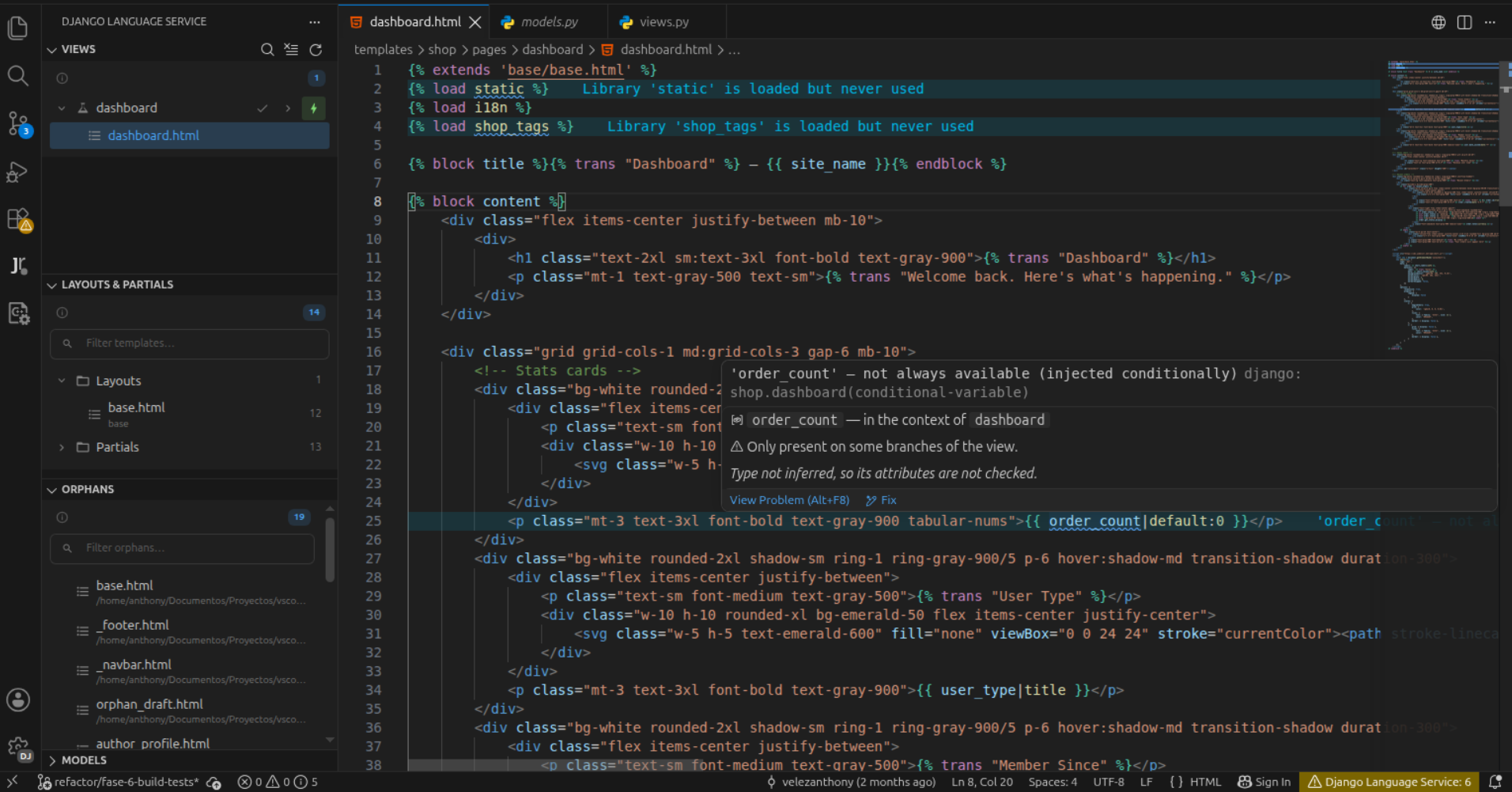
Context-variable completion, model-field hover, context go-to-definition and context diagnostics are off until you pick a view. That is deliberate: a template can be rendered by several views, so the extension refuses to guess.
Run Pick View (Quick Pick) from the Views sidebar, or toggle Live Mode there. Live Mode belongs to the template you enabled it in — open a different template and it switches off silently, because validating a document that view never renders would light up every variable in it. Switching to views.py and back keeps it on.
Validate Context Variables does a one-shot validation against a chosen view without turning Live Mode on.
The context surface is read from the view body, whatever shape it takes:
def dashboard(request):
    base = {"nav": nav_items()}
    ctx = {**base, "page": "dashboard"}      # merges expand
    ctx["title"] = "Dashboard"               # any variable name, not just `context`
    ctx.update(build_stats(request))         # helpers resolve, including imported ones
    return render(request, "dashboard.html", ctx)
Class-based views are followed too — get_context_data, extra_context, model / context_object_name, and mixins defined in another file, transitively.
Registered for html, django-html and django-txt, so Format Document, Format on Save and the extension's own command all go through it.
<pre> and <textarea> are emitted verbatim — their content preserves whitespace, so re-indenting them changes what the page renders. The opening tag is still indented, since that whitespace sits outside the element. <script> and <style> are the opposite case and stay reindented.
| Before | After |
|---|---|
<div>
  <pre>
 +---+
 |   |
 +---+
</pre>
</div> |
<div>
  <pre>
 +---+
 |   |
 +---+
</pre>
</div> |
- Expand / collapse a single include at the cursor —
Toggle HTML Propsswitches between the two shapes,Collapse to Inlinealways collapses. - Expand All / Collapse All across the document, with a count reported.
- CodeLens above every multi-line
{% include %}, and above single-line ones that carry HTML props.
Toggle Template Comment (Ctrl+Shift+/, Cmd+Shift+/) toggles {# #} or {% comment %} over the selection, picking the right form for the selection shape.
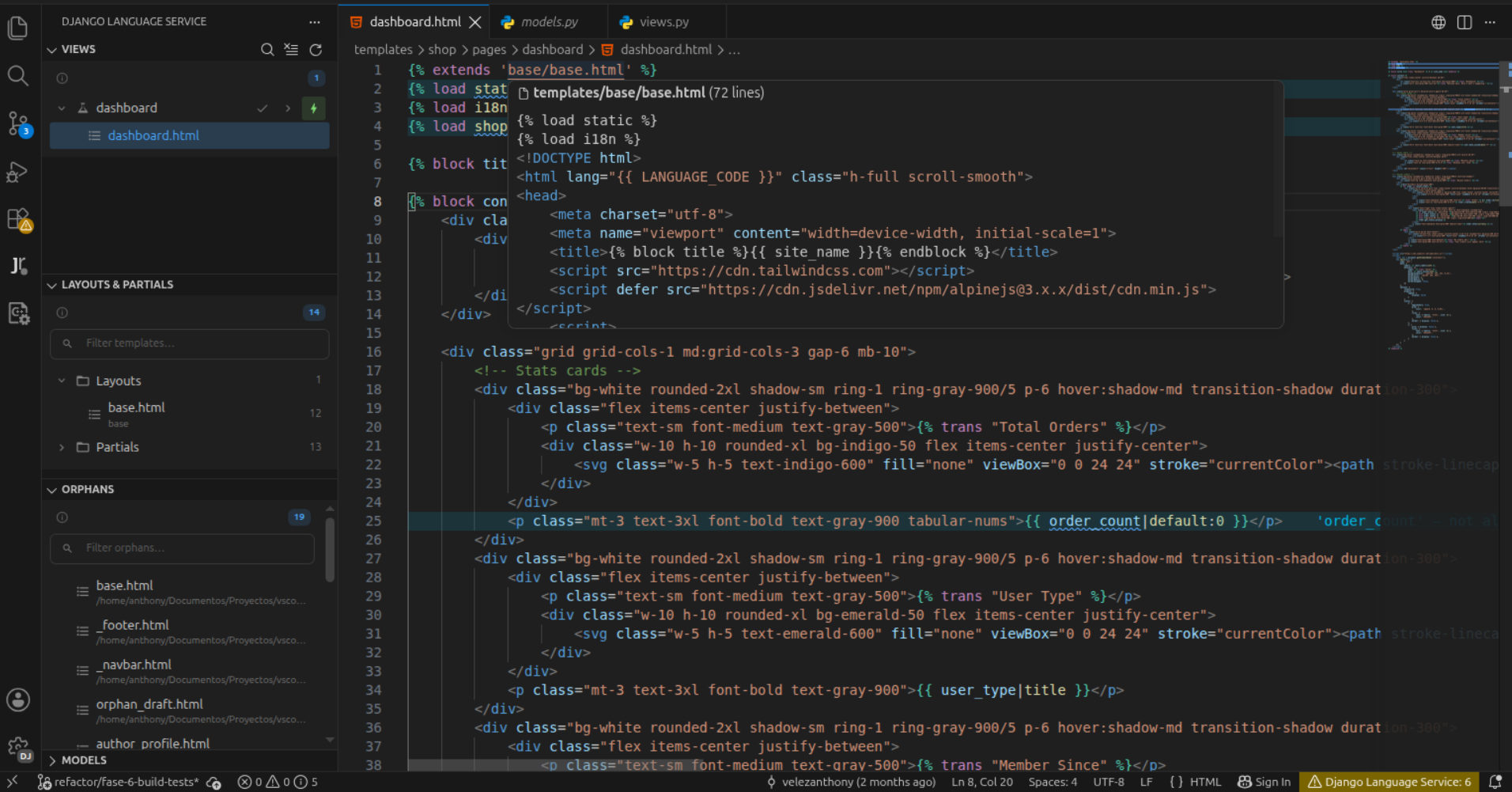
Four sections, all driven by the project index and refreshed on every rescan:
- Views — for the open template, the views that can reach it and each one's template chain, with a ⚡ on the live view.
- Layouts & Partials — templates that others
{% extends %}or{% include %}, with counts. - Orphans — templates no view renders and nothing includes.
- Models — totals, top apps, and models grouped by app; click one to open
models.pyat its class line.
- Explorer badges: a numeric badge for multi-line
{% include %}blocks (capped at9+), a?badge on orphan templates. - Status bar:
Django Language Service: N, broken down in the tooltip, hidden entirely at zero.
Commands, keybindings, settings and exactly which files the indexer reads live in docs/REFERENCE.md.
On activation the extension builds a Scanner over a FileSystem port and an mtime-guarded parse cache, then runs two passes. Pass 1 globs and parses every matched file into domain entities. Pass 2 builds keyed indexes and resolves everything that crosses a file boundary: {% extends %} / {% include %} targets, URL names, template chains, choice symbols imported from enums.py, abstract bases from mixins.py, settings.AUTH_USER_MODEL, and the context helpers and mixins a view pulls in. The result is a frozen Project snapshot; a new object identity per scan is what makes the downstream WeakMap-keyed memoization correct.
Pass 2 re-runs on every scan rather than being cached with the entity, which is what lets a cached view be corrected instead of left stale when the file it depends on changes.
A file watcher — scoped to exactly the patterns above, never **/*.py — funnels events into a 200 ms debounce, evicts only the touched paths and re-runs both passes. Anything inside a virtualenv, site-packages, node_modules or __pycache__ is filtered out before it reaches the debouncer, so pip install does not trigger a rescan.
The codebase is layered: domain is pure logic with zero vscode imports, infra owns I/O and indexing and depends only on domain, and adapters is the only layer that talks to the VS Code API. extension.ts is the single composition root, and each adapter registration is error-isolated so one broken provider cannot abort activation.
All of the documentation below is also published, searchable, at velezanthony.github.io/django-language-service.
docs/ARCHITECTURE.md— layer rules, the scan pipeline, the adapter contract.CONTRIBUTING.md— setup, conventions, pull-request workflow.
npm install
npm run watch              # esbuild watch (extension + webview bundles)
npm run check-types        # tsc --noEmit, both projects
npm run check-svelte       # svelte-check
npm test                   # vitest unit tests
npm run test:integration   # VS Code extension-host suite
npm run package            # type-check + svelte-check + lint + format check + unit tests + production CSS + bundle
Press F5 to launch an Extension Development Host against the bundled test Django project.
Every image in this README is captured, never mocked up:
- The editor shots come from
scripts/vscode-cdp-harness/, which drives a real Extension Development Host over the Chrome DevTools Protocol — real VS Code, real theme tokens, real completion and diagnostic widgets. scripts/diagram-harness/does the same for the model diagram: it runs the shipped webview bundle in a plain browser against a payload parsed from the bundled test project.
Both recipes are committed, so the media can be regenerated after a UI change.