⚡ 本库声明 | Repository Statement:
- 本仓库专注于数字出版领域智能代理与工具开发,基于 AgentScope 框架,兼容上游 agentscope-ai/CoPaw。 This repository focuses on intelligent agents and tools for digital publishing, based on AgentScope framework, compatible with upstream agentscope-ai/CoPaw.
- 行业相关需求、创新、定制化优先本地处理,框架基础特性和 bug 优先本地修复,积累后再同步到上游。 Industry-specific needs, innovation, and customization are handled locally first; framework features and bugs are fixed locally and then synchronized upstream.
- 开发协作请务必查阅 开发模式说明。 For development and collaboration, please refer to Development Mode.
Important
本库构建/分发/下载(Local Edition Build & Distribution)
- 本库本地构建与分发入口:
scripts/pack/README.md(含 macOS.zip/ Windows.exe产物说明)。 Local build/distribution entry:scripts/pack/README.md(including macOS.zipand Windows.exeartifacts). - 本库下载地址(Local Edition Releases):https://github.com/futuremeng/CoPaw/releases Upstream 下载地址(for comparison only):https://github.com/agentscope-ai/CoPaw/releases
- 本库与 upstream 不要在同一 Python 环境中同时安装(包名同为
copaw),后安装会覆盖先安装。 Do not install this local edition and upstream in the same Python environment (copawpackage name is identical); the later install overrides the former. - 桌面端也不要混装:若都命名为
CoPaw.app或同一安装目录,后安装版本会覆盖前安装版本。 Do not co-install desktop builds in the same app/install path either; later installs can overwrite earlier ones. - 建议隔离方式:独立虚拟环境(如
.venv-local/.venv-upstream)或独立容器。 Recommended isolation: separate virtual environments (for example,.venv-local/.venv-upstream) or separate containers.
本库版本专有主要特性(Local-only Highlights)
- Skills Marketplace(Git-backed skills market aggregation + Console market management + 覆盖前确认)。
- 数字出版开发模式与双轨协作文档(本地优先、按需回流 upstream)。
- 发布流程增强:
RELEASE.md/RELEASE_zh.md、Release Checklist Issue 模板、PR 发布检查区块。 - 本地桌面打包修复:macOS 下
.venvPython 优先与conda-unpack兼容处理。














Your Personal AI Assistant; easy to install, deploy on your own machine or on the cloud; supports multiple chat apps with easily extensible capabilities.
Core capabilities:
Every channel — DingTalk, Feishu, QQ, Discord, iMessage, and more. One assistant, connect as you need.
Under your control — Memory and personalization under your control. Deploy locally or in the cloud; scheduled reminders to any channel.
Skills — Built-in cron; custom skills in your workspace, auto-loaded. No lock-in.
What you can do
- Social: daily digest of hot posts (Xiaohongshu, Zhihu, Reddit), Bilibili/YouTube summaries.
- Productivity: newsletter digests to DingTalk/Feishu/QQ, contacts from email/calendar.
- Creative: describe your goal, run overnight, get a draft next day.
- Research: track tech/AI news, personal knowledge base.
- Desktop: organize files, read/summarize docs, request files in chat.
- Explore: combine Skills and cron into your own agentic app.
[2026-03-12] We released v0.0.7! See the v0.0.7 Release Notes for the full changelog.
- [v0.0.7] Added: Tool Guard security layer — blocks risky tool calls until user approval; Mattermost and Matrix channel integrations; @mention-only group filtering for Discord/DingTalk/Feishu/Telegram; Telegram Markdown rendering; Feishu emoji reactions and rich text media; QQ image sending; LLM call auto-retry with exponential backoff; LM Studio provider; token usage tracking with dashboard; provider
generate_kwargseditor; workspace file drag-and-drop; chat model switching; agent language selector; context management UI; chat state preservation across navigation; AI skill optimization with streaming; skill card description display; auto PyPI mirror for China. - [v0.0.7] Improved: Provider connection test messages; async workspace zip and session load; provider ID conflict auto-resolution; on-demand model discovery; token recording centralization; built-in skill docs and shell
PATHhandling; Himalaya email skill; memory docs reorganization; Config & Security page refactor. - [v0.0.7] Fixed: DingTalk auth failure cleanup; Discord 2000-char message splitting; channel config type alignment for Matrix/Mattermost/MQTT; Windows shell encoding and process tree cleanup; desktop SSL certificates, IME input, and external URL navigation; magic command session state protection; Ollama modal re-renders; chat request deduplication.
- [v0.0.7] Contributors: Thanks to new contributors: @2catycm, @2niuhe, @yingdachen, @Atletico1999, @buecker, @Cirilla-zmh, @gnipping, @Nufe-muzi, @FuKunZ, @JasonBuildAI, @StarMoonCity, @walker83, @lllcy.
[2026-03-09] We released v0.0.6! See the v0.0.6 Release Notes for the full changelog.
[2026-03-06] We released v0.0.5! See the v0.0.5 Release Notes for the full changelog.
[2026-03-02] We released v0.0.4! See the v0.0.4 Release Notes for the full changelog.
Recommended reading:
- I want to run CoPaw in 3 commands: Quick Start → open Console in browser.
- I want to chat in DingTalk / Feishu / QQ: Configure channels in the Console.
- I don’t want to install Python: Script install handles Python automatically, or use ModelScope one-click for cloud deployment.
- 🚀 CoPaw(数字出版方向本地特色库 | Digital Publishing Local Edition)
- CoPaw
If you prefer managing Python yourself:
pip install copaw
copaw init --defaults
copaw app
# 🌐 多语言入口
| [English](README.md) | [中文](README_zh.md) | [日本語](README_ja.md) |
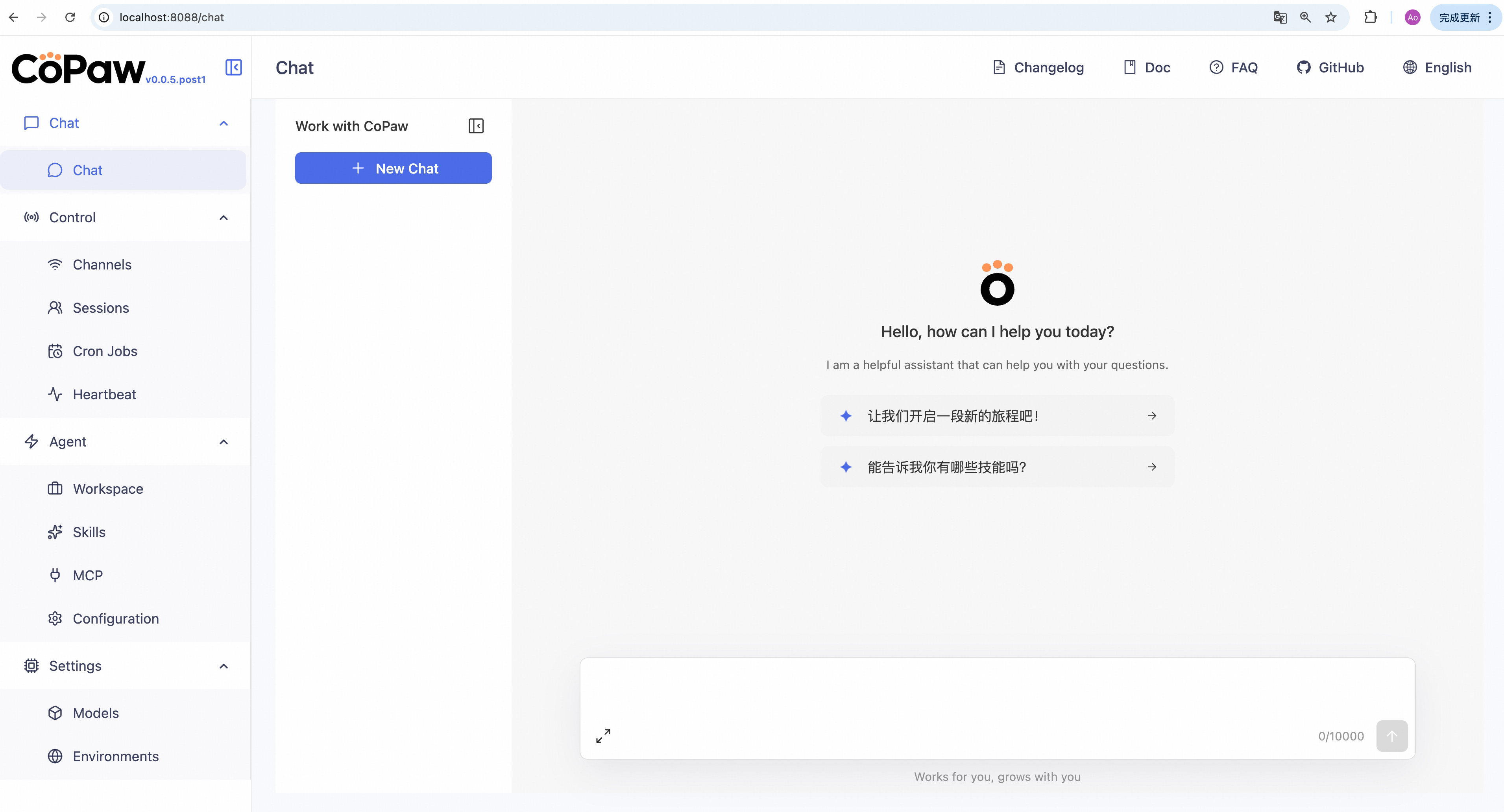
Then open **http://127.0.0.1:8088/** in your browser for the Console (chat with CoPaw, configure the agent). To talk in DingTalk, Feishu, QQ, etc., add a channel in the [docs](https://copaw.agentscope.io/docs/channels).
### Script install
No Python setup required, one command installs everything. The script will automatically download uv (Python package manager), create a virtual environment, and install CoPaw with all dependencies (including Node.js and frontend assets). Note: May not work in restricted network environments or corporate firewalls.
**macOS / Linux:**
```bash
curl -fsSL https://copaw.agentscope.io/install.sh | bashTo install with Ollama support:
curl -fsSL https://copaw.agentscope.io/install.sh | bash -s -- --extras ollamaTo install with multiple extras (e.g., Ollama + llama.cpp):
curl -fsSL https://copaw.agentscope.io/install.sh | bash -s -- --extras ollama,llamacppWindows (CMD):
curl -fsSL https://copaw.agentscope.io/install.bat -o install.bat && install.batWindows (PowerShell):
irm https://copaw.agentscope.io/install.ps1 | iexNote: The installer will automatically check the status of uv. If it is not installed, it will attempt to download and configure it automatically. If the automatic installation fails, please follow the on-screen prompts or execute
python -m pip install -U uv, then rerun the installer.
⚠️ Special Notice for Windows Enterprise LTSC UsersIf you are using Windows LTSC or an enterprise environment governed by strict security policies, PowerShell may run in Constrained Language Mode, potentially causing the following issue:
If using CMD (.bat): Script executes successfully but fails to write to
PathThe script completes file installation. Due to Constrained Language Mode, it cannot automatically update environment variables. Manually configure as follows:
- Locate the installation directory:
- Check if
uvis available: Enteruv --versionin CMD. If a version number appears, only configure the CoPaw path. If you receive the prompt'uv' is not recognized as an internal or external command, operable program or batch file,configure both paths.- uv path (choose one based on installation location; use if
uvfails): Typically%USERPROFILE%\.local\bin,%USERPROFILE%\AppData\Local\uv, or theScriptsfolder within your Python installation directory- CoPaw path: Typically located at
%USERPROFILE%\.copaw\bin.- Manually add to the system's Path environment variable:
- Press
Win + R, typesysdm.cpland press Enter to open System Properties.- Click “Advanced” -> “Environment Variables”.
- Under “System variables”, locate and select
Path, then click “Edit”.- Click “New”, enter both directory paths sequentially, then click OK to save.
If using PowerShell (.ps1): Script execution interrupted
Due to Constrained Language Mode, the script may fail to automatically download
uv.
- Manually install uv: Refer to the GitHub Release to download
uv.exeand place it in%USERPROFILE%\.local\binor%USERPROFILE%\AppData\Local\uv; or ensure Python is installed and runpython -m pip install -U uv.- Configure
uvenvironment variables: Add theuvdirectory and%USERPROFILE%\.copaw\binto your system'sPathvariable.- Re-run the installation: Open a new terminal and execute the installation script again to complete the
CoPawinstallation.- Configure the
CoPawenvironment variable: Add%USERPROFILE%\.copaw\binto your system'sPathvariable.
Once installed, open a new terminal and run:
copaw init --defaults   # or: copaw init (interactive)
copaw app
Install options
macOS / Linux:
# Install a specific version
curl -fsSL ... | bash -s -- --version 0.0.2

# Install from source (dev/testing)
curl -fsSL ... | bash -s -- --from-source

# With local model support
bash install.sh --extras llamacpp    # llama.cpp (cross-platform)
bash install.sh --extras mlx         # MLX (Apple Silicon)
bash install.sh --extras llamacpp,mlx

# Upgrade — just re-run the installer
curl -fsSL ... | bash

# Uninstall
copaw uninstall          # keeps config and data
copaw uninstall --purge  # removes everything
Windows (PowerShell):
# Install a specific version
irm ... | iex; .\install.ps1 -Version 0.0.2

# Install from source (dev/testing)
.\install.ps1 -FromSource

# With local model support
.\install.ps1 -Extras llamacpp      # llama.cpp (cross-platform)
.\install.ps1 -Extras mlx           # MLX
.\install.ps1 -Extras llamacpp,mlx

# Upgrade — just re-run the installer
irm ... | iex

# Uninstall
copaw uninstall          # keeps config and data
copaw uninstall --purge # removes everythingBeta Notice: The desktop application is currently in Beta testing phase with the following known limitations:
- Incomplete compatibility testing: Not fully tested across all system versions and hardware configurations
- Potential performance issues: Startup time, memory usage, and other performance aspects may need further optimization
- Features under development: Some features may be unstable or missing
If you're not comfortable with command-line tools, you can download and use CoPaw's desktop application without manually configuring Python environments or running commands.
Download the desktop app from GitHub Releases:
- Windows:
CoPaw-Setup-<version>.exe - macOS:
CoPaw-<version>-macOS.zip(Apple Silicon recommended)
- ✅ Zero configuration: Download and double-click to run, no need to install Python or configure environment variables
- ✅ Cross-platform: Supports Windows 10+ and macOS 14+
- ✅ Visual interface: Automatically opens browser interface, no need to manually enter addresses
⚠️ Beta stage: Features are continuously being improved, feedback welcome
Important: The first launch may take 10-60 seconds (depending on your system configuration). The application needs to initialize the Python environment and load dependencies. Please wait patiently for the browser window to open automatically.
When you download the CoPaw macOS app from Releases, macOS may show: "Apple cannot verify that 'CoPaw' contains no malicious software". This happens because the app is not notarized. You can still open it as follows:
-
Right-click to open (recommended) Right-click (or Control+click) the CoPaw app → Open → in the dialog click Open again. This tells Gatekeeper you trust the app; after that you can double-click to launch as usual.
-
Allow in System Settings If it is still blocked, go to System Settings → Privacy & Security, scroll to the message like "CoPaw was blocked because it is from an unidentified developer", and click Open Anyway or Allow.
-
Remove quarantine attribute (not recommended for most users) In Terminal run:
xattr -cr /Applications/CoPaw.app(or use the path to the.appafter unzipping). This clears the "downloaded from the internet" quarantine flag so the warning usually does not appear, but is less safe and controllable than using Right-click → Open.
For detailed usage instructions, troubleshooting, and common issues, see the Desktop Application Guide.
Images are on Docker Hub (agentscope/copaw). Image tags: latest (stable); pre (PyPI pre-release).
docker pull agentscope/copaw:latest
docker run -p 127.0.0.1:8088:8088 \
  -v copaw-data:/app/working \
  -v copaw-secrets:/app/working.secret \
  agentscope/copaw:latest
Also available on Alibaba Cloud Container Registry (ACR) for users in China: agentscope-registry.ap-southeast-1.cr.aliyuncs.com/agentscope/copaw (same tags).
Then open http://127.0.0.1:8088/ for the Console. Config, memory, and skills are stored in the copaw-data volume; model provider settings and API keys are in the copaw-secrets volume. To pass API keys (e.g. DASHSCOPE_API_KEY), add -e VAR=value or --env-file .env to docker run.
Connecting to Ollama or other services on the host machine
Inside a Docker container,
localhostrefers to the container itself, not your host machine. If you run Ollama (or other model services) on the host and want CoPaw in Docker to reach them, use one of these approaches:Option A — Explicit host binding (all platforms):
docker run -p 127.0.0.1:8088:8088 \
  --add-host=host.docker.internal:host-gateway \
  -v copaw-data:/app/working \
  -v copaw-secrets:/app/working.secret \
  agentscope/copaw:latest
Then in CoPaw Settings → Models, change the Base URL to
http://host.docker.internal:<port>— for example,http://host.docker.internal:11434for Ollama, orhttp://host.docker.internal:1234/v1for LM Studio.Option B — Host networking (Linux only):
docker run --network=host \
  -v copaw-data:/app/working \
  -v copaw-secrets:/app/working.secret \
  agentscope/copaw:latest
No port mapping (
-p) is needed; the container shares the host network directly. Note that all container ports are exposed on the host, which may cause conflicts if the port is already in use.Note: If you only mount
/app/workingwithout a separate volume for/app/working.secret, the entrypoint will automatically redirect secrets into/app/working/.secretso they persist on the same volume.
The image is built from scratch. To build the image yourself, please refer to the Build Docker image section in scripts/README.md, and then push to your registry.
No local install? ModelScope Studio one-click cloud setup. Set your Studio to non-public so others cannot control your CoPaw.
To run CoPaw on Alibaba Cloud (ECS), use the one-click deployment: open the CoPaw on Alibaba Cloud (ECS) deployment link and follow the prompts. For step-by-step instructions, see Alibaba Cloud Developer: Deploy your AI assistant in 3 minutes.
If you use a cloud LLM (e.g. DashScope, ModelScope), you must configure an API key before chatting. CoPaw will not work until a valid key is set. See the official docs for details.
How to configure:
- Console (recommended) — After running
copaw app, open http://127.0.0.1:8088/ → Settings → Models. Choose a provider, enter the API Key, and enable that provider and model. copaw init— When you runcopaw init, it will guide you through configuring the LLM provider and API key. Follow the prompts to choose a provider and enter your key.- Environment variable — For DashScope you can set
DASHSCOPE_API_KEYin your shell or in a.envfile in the working directory.
Tools that need extra keys (e.g. TAVILY_API_KEY for web search) can be set in Console Settings → Environment variables, or see Config for details.
Using local models only? If you use Local Models (llama.cpp or MLX), you do not need any API key.
CoPaw can run LLMs entirely on your machine — no API keys or cloud services required. See the official docs for details.
| Backend | Best for | Install |
|---|---|---|
| llama.cpp | Cross-platform (macOS / Linux / Windows) | pip install 'copaw[llamacpp]' or bash install.sh --extras llamacpp |
| MLX | Apple Silicon Macs (M1/M2/M3/M4) | pip install 'copaw[mlx]' or bash install.sh --extras mlx |
| Ollama | Cross-platform (requires Ollama service) | pip install 'copaw[ollama]' or bash install.sh --extras ollama |
After installing, you can download and manage local models in the Console UI. You can also use the command line:
copaw models download Qwen/Qwen3-4B-GGUF
copaw models # select the downloaded model
copaw app # start the serverYou can add a community skills market source in Console or in your config.json.
Example source for the editor-skills repository:
{
  "skills_market": {
    "markets": [
      {
        "id": "editor_skills",
        "name": "Editor Skills",
        "type": "git",
        "url": "https://github.com/futuremeng/editor-skills",
        "branch": "main",
        "path": "skills",
        "enabled": true,
        "order": 1,
        "trust": "community"
      }
    ]
  }
}| Topic | Description |
|---|---|
| Introduction | What CoPaw is and how to use it |
| Quick start | Install and run (local or ModelScope Studio) |
| Console | Web UI: chat and agent configuration |
| Models | Configure cloud, local, and custom providers |
| Channels | DingTalk, Feishu, QQ, Discord, iMessage, and more |
| Skills | Extend and customize capabilities |
| MCP | Manage MCP clients |
| Memory | Long-term memory |
| Context | Context management mechanism |
| Magic commands | Control conversation state without waiting for the AI |
| Heartbeat | Scheduled check-in and digest |
| Config & working dir | Working directory and config file |
| CLI | Init, cron jobs, skills, clean |
| FAQ | Common questions and troubleshooting |
Full docs in this repo: website/public/docs/.
For common questions, troubleshooting tips, and known issues, please visit the FAQ page.
| Area | Item | Status |
|---|---|---|
| Horizontal Expansion | More channels, models, skills, MCPs — community contributions welcome | Seeking Contributors |
| Existing Feature Extension | Display optimization, download hints, Windows path compatibility, etc. — community contributions welcome | Seeking Contributors |
| Console Web UI | Expose more info/config in the Console | In Progress |
| Self-healing | Magic commands and daemon capabilities (CLI, status, restart, logs) | In Progress |
| DaemonAgent: autonomous diagnostics, self-healing, and recovery | Planned | |
| Multi-agent | Background task support | In Progress |
| Multi-agent isolation | Planned | |
| Inter-agent contention resolution | Planned | |
| Multi-agent communication | Planned | |
| Multimodal | Voice/video calls and real-time interaction | In Progress |
| Small + Large Model Collaboration | Train/fine-tune local small LLMs for CoPaw workflows and sensitive-data use cases | In Progress |
| Multi-model routing. Local LLMs for sensitive data; cloud LLMs for planning and coding; balance of privacy, performance, and capability | Planned | |
| Memory System | Experience distillation & skill extraction | In Progress |
| Multimodal memory fusion | Planned | |
| Context-aware proactive delivery | Planned | |
| Security | Shell execution confirmation | Planned |
| Tool/skills security | Planned | |
| Configurable security levels (user-configurable) | Planned | |
| Release & Contributing | Contributing guidance for vibe coding agents | Planned |
| Sandbox | Deeper integration with AgentScope Runtime sandboxes | Long-term Planned |
| Cloud-native | Deeper integration with AgentScope Runtime; leverage cloud compute, storage, and tooling | Long-term Planned |
| Skills Hub | Enrich the AgentScope Skills repository and improve discoverability of high-quality skills | Long-term Planned |
Status: In Progress — actively being worked on; Planned — queued or under design, also welcome contributions; Seeking Contributors — we strongly encourage community contributions; Long-term Planned — longer-horizon roadmap.
We are building CoPaw in the open and welcome contributions of all kinds! Check the Roadmap above (especially items marked Seeking Contributors) to find areas that interest you, read CONTRIBUTING to get started, and follow RELEASE.md when preparing an official release. We particularly welcome:
- Horizontal expansion — new channels, model providers, skills, MCPs.
- Existing feature extension — display and UX improvements, download hints, Windows path compatibility, and the like.
Join the conversation on GitHub Discussions to suggest or pick up work.
git clone https://github.com/agentscope-ai/CoPaw.git
cd CoPaw

# Build console frontend first (required for web UI)
cd console && npm ci && npm run build
cd ..

# Copy console build output to package directory
mkdir -p src/copaw/console
cp -R console/dist/. src/copaw/console/

# Install Python package
pip install -e .- Dev (tests, formatting):
pip install -e ".[dev,full]" - Then: Run
copaw init --defaults, thencopaw app.
CoPaw represents both a Co Personal Agent Workstation and a "co-paw"—a partner always by your side. More than just a cold tool, CoPaw is a warm "little paw" always ready to lend a hand (or a paw!). It is the ultimate teammate for your digital life.
AgentScope team · AgentScope · AgentScope Runtime · ReMe
| Discord | X (Twitter) | DingTalk |
|---|---|---|
 |
 |
 |
CoPaw collects anonymous usage data during copaw init to help us understand our user base and prioritize improvements. Data is sent once per version — when you upgrade CoPaw, telemetry is re-collected so we can track version adoption.
What we collect:
- CoPaw version (e.g., 0.0.7)
- Install method (pip, Docker, or desktop app)
- OS and version (e.g., macOS 14.0, Ubuntu 22.04)
- Python version (e.g., 3.13)
- CPU architecture (e.g., x86_64, arm64)
- GPU availability (yes/no)
What we do NOT collect: No personal data, no files, no credentials, no IP addresses, no identifiable information.
When running copaw init interactively, you will be asked whether to opt in. If you choose --defaults, telemetry is accepted automatically. The prompt appears once per version and never affects CoPaw's functionality.
CoPaw is released under the Apache License 2.0.
All thanks to our contributors: