Add icons to certain main menu items#65229
Add icons to certain main menu items#65229the-sink wants to merge 1 commit intogodotengine:masterfrom
Conversation


|
Consider using the icon you're currently using for "Manage Editor Features..." I feel like this is mostly fine, as I find there to be need of icons mainly for the most commonly used settings, although I would personally get rid of the "Toggle Fullscreen" one altogether, and instead try to introduce a photo camera Icon for "Take Screenshot", as that one is certainly more common. |


|
Alright I adjusted the Editor tab's icons a bit: There are still a few things I think could use their own icons, but that's down to preference and considering everything appears to be working I think I'll mark this as ready. |
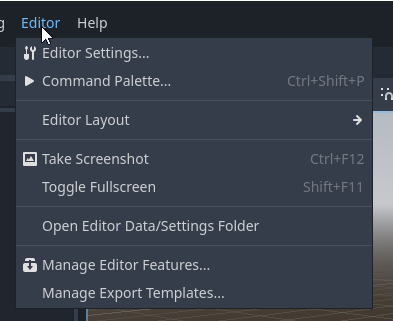


|
Looks good to me, although the Manage Editor Features icon should be used for Manage Export Templates instead (which is the dialog that can download/install things). Also, this PR should be rebased 🙂 |

|
May I poke in? I don't know if OP is available, and I hope it is. We agreed these icons to be overall good. Otherwise we could mark the PR as salvageable. |

|
@the-sink Could you look into rebasing this PR against the latest |

|
Is there interest in rebasing this PR? |
 the-sink
force-pushed
the
menubar-icons
branch
from
the-sink
force-pushed
the
menubar-icons
branch
from
6314d46 to
5f72b75
Compare
the-sink
force-pushed
the
menubar-icons
branch
4 times, most recently
from
6de3824 to
3e123f5
Compare
|
Phew, it's been a while... rebased and squashed! Thanks for the follow up, I had forgotten about this. Not 100% familiar with the changes made since this PR was first opened but I followed the pattern of how icons are already implemented in the help menu and copied it over to the others. Also removed icons from Quick Open Scene and Quick Open Script in the File menu for consistency's sake with the Save section directly above. Same for the Redo shortcut. At this point I think it's best to have these icons as a visual helper to distinguish where groupings of options in these menus but avoid using them too excessively or we'll clutter the menus. If there's any suggestions on other icon changes/additions I'd be happy to edit them. Here's the Scene menu now: |


There was a problem hiding this comment.
It looks fine and has some support, so I guess adding these icons is ok. For consistency the same should be probably done in Script Editor and Shader Editor (in another PR).
Although the changes are in wrong place. The icons should be assigned in _update_theme() (and seems like Help menu is already doing it).

 AdriaandeJongh
left a comment
AdriaandeJongh
left a comment
AdriaandeJongh
left a comment
There was a problem hiding this comment.
I'd love to get this merged asap, as it is a great usability improvement that will "impact" all users of the engine. @KoBeWi's comments should be addressed.
 AdriaandeJongh
moved this from For team assessment
to In Progress
in Usability Team Review Tracker
AdriaandeJongh
moved this from For team assessment
to In Progress
in Usability Team Review Tracker
|
Should be ready & updated the PR description with screenshots of how they currently look. |

AdriaandeJongh
left a comment
AdriaandeJongh
left a comment
There was a problem hiding this comment.
if i’m being nitpicky, i’m not sure whether the reload project and manage editor features should get an icon. those are or should not necessarily be hot paths. all other icons are great and really help scan the menus.
didn’t review the code.
AdriaandeJongh
moved this from In Progress
to Merge Ready
in Usability Team Review Tracker


There was a problem hiding this comment.
Tested locally (rebased on top of master 9273a6a), it works as expected (including light <-> dark theme changes). Code looks good to me.
I think this makes sense from an UX perspective. The only change I'd make is the one @AdriaandeJongh mentioned above:
i'm not sure whether the reload project and manage editor features should get an icon. those are or should not necessarily be hot paths
Reload Saved Scene does not have an icon, so I agree Reload Current Project shouldn't have an icon either.
Scene
| Before | After |
|---|---|
 |
 |
Project
| Before | After |
|---|---|
 |
 |
Editor
| Before | After |
|---|---|
 |
 |
|
For now I have reverted Reload Current Project and Manage Editor Features to be without icons. Perhaps it would make sense to have icons for both reload saved scene and reload current project instead, and remove the icon for Undo? I use reload project and reload scene often enough from the system menu, but just use the keybinds for undo/redo so I am virtually never interacting with them from the system menu. Just my personal experience, however. Not sure if others are using them frequently enough to be considered icon-worthy, and I suppose system menu undo/redo can be common for some. I agree with @AdriaandeJongh that Manage Editor Features probably shouldn't have an icon. |

|
It’s a fair point to differentiate between whether a feature is used often vs. it is often selected in these specific menus. something like undo will much more often be triggered by a shortcut, and rarely chosen through this menu as the shortcut is a standard. then imagine removing it; it would then be very strange to have a bunch of icons putting emphasis on ‘the most important options’ and undo or saving isn’t there… so i think the heuristic should be that the features that are used often get icons, regardless of whether they are uses through these specific menus. but IMO the question isn’t just ‘is it used much’, but also ‘is this how godot is intended to be used’. every option is a trade off between those two questions, i think? i personally do use ‘reload current project’ often, but my doubt from earlier is about the ‘is this how godot is intended?’ question and the answer is a resounding no. there are also periods where i used the ‘open user data folder’ option much, but i think that’s highly specialized. having said that and looking at the PR once more:
|
I agree with this feedback as well. @the-sink Can you look into performing these changes?
Most of the time, OS screenshot tools are preferred, but for HDR screenshots, a built-in option is going to be better as OS tools are notoriously not good at taking HDR screenshots (e.g. broken tonemapping). Now that #117800 is merged, we should look into taking simultaneous PNG + EXR screenshots when Request HDR Output is enabled in the Project Settings. The PNG screenshot is tonemapped to SDR and can be shared easily, while the accompanying EXR screenshot contains "true" HDR data. |
|
Take screenshot item no longer has an icon, and I've added one for Close Scene. I didn't want to use the Close icon since I already used that for "Quit" right below it, so I made a new CloseScene icon for it. Let me know if you think it should be anything different/already existing, or if there is anything wrong with this new icon; it's my first time adding one to the editor! Here's what the menus currently look like in dark and light themes:
|


AdriaandeJongh
left a comment
AdriaandeJongh
left a comment
There was a problem hiding this comment.
New icon looks good to me, and all remarks by myself and @Calinou are addressed 👍🏼

 bruvzg
left a comment
bruvzg
left a comment
bruvzg
left a comment
There was a problem hiding this comment.
macOS has Editor Settings in the app menu instead of Editor, and it probably should have icon set as well:
diff --git a/editor/editor_node.cpp b/editor/editor_node.cpp
index 79a391e7d6..6d60628d0f 100644
--- a/editor/editor_node.cpp
+++ b/editor/editor_node.cpp
@@ -706,6 +706,8 @@ void EditorNode::_update_system_menu_icons(bool dark_mode) {
 #ifdef MACOS_ENABLED
        if (menu_type != MENU_TYPE_GLOBAL) {
                settings_menu->set_item_icon(settings_menu->get_item_index(EDITOR_OPEN_SETTINGS), get_editor_theme_native_menu_icon(SNAME("Tools"), menu_type == MENU_TYPE_GLOBAL, dark_mode));
+       } else {
+               apple_menu->set_item_icon(apple_menu->get_item_index(EDITOR_OPEN_SETTINGS), get_editor_theme_native_menu_icon(SNAME("Tools"), menu_type == MENU_TYPE_GLOBAL, dark_mode));
        }
 #else
        settings_menu->set_item_icon(settings_menu->get_item_index(EDITOR_OPEN_SETTINGS), get_editor_theme_native_menu_icon(SNAME("Tools"), menu_type == MENU_TYPE_GLOBAL, dark_mode));
@@ -8949,7 +8951,7 @@ EditorNode::EditorNode() {
                apple_menu->set_system_menu(NativeMenu::APPLICATION_MENU_ID);
                _add_to_main_menu("Apple", apple_menu);

-               apple_menu->add_shortcut(ED_GET_SHORTCUT("editor/editor_settings"), EDITOR_OPEN_SETTINGS);
+               apple_menu->add_icon_shortcut(get_editor_theme_native_menu_icon(SNAME("Tools"), menu_type == MENU_TYPE_GLOBAL, DisplayServer::get_singleton()->is_dark_mode_supported() && DisplayServer::get_singleton()->is_dark_mode()), ED_GET_SHORTCUT("editor/editor_settings"), EDITOR_OPEN_SETTINGS);
                apple_menu->add_separator();
                apple_menu->connect(SceneStringName(id_pressed), callable_mp(this, &EditorNode::_menu_option));
        }


|
@bruvzg and @KoBeWi's changes have been made. I suppose that considering Editor Settings is moved to the app menu on macOS, there will be no items in the Editor menu with an icon? That might make it a little visually inconsistent - Debug has no icons but at least has checkboxes that fill the leftmost space that would otherwise have icon(s), so it "looks" consistent enough (at least to me). Could also be something that is adjusted in a future PR as usage patterns change, though. |
11 participants


Adds icons to certain items in the Scene, Project, and Editor main menus. Mentioned in godotengine/godot-proposals#5306.